


- Posts: 141
- Thank you received: 2
3 Post Moderation Rule for New Boarders (25 Jan 2021)
New boarders will have their posts moderated - Don't worry if you cannot see your post immediately.
How to edit waveforms or apply a filter to get rid of tiny clicks?
09 Oct 2016 12:08 - 09 Oct 2016 12:08 #80596
by AlexMaxim
Hey there guys,
I hope that you are all doing well.
I would be very grateful for any help with a quick, near-newbie question: within FCPX, is there any way to edit waveforms or perhaps apply a filter to eliminate tiny clicks in voiceover files?
The complicating factor is that these clicks are not isolated on some otherwise silent bit of the file. They are part and parcel of the narration.
The clicks are only perceptible at higher volumes, and the voiceover files are otherwise perfect. All I need is some tool which will enable me to cut away or smooth out a tiny part of the file.
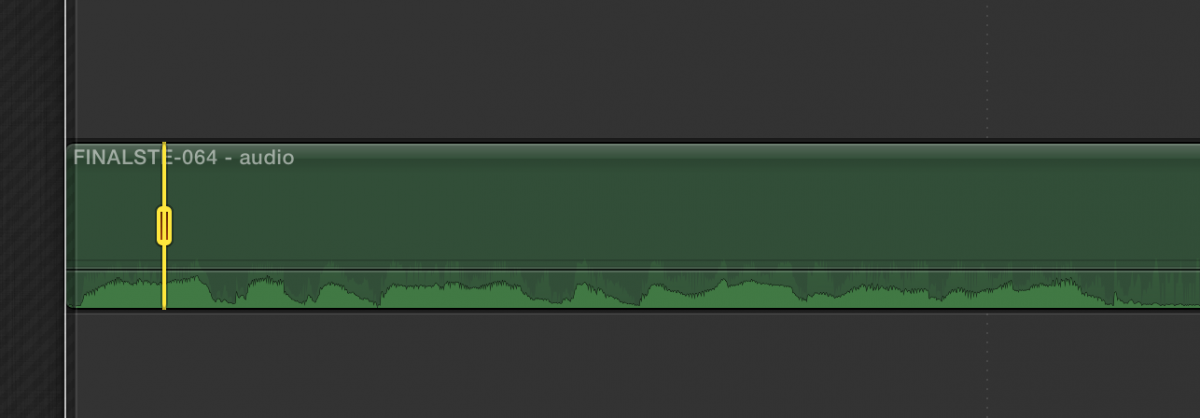
I attach a .png to illustrate the miniscule affected area.
Any ideas?
I hope that you are all doing well.
I would be very grateful for any help with a quick, near-newbie question: within FCPX, is there any way to edit waveforms or perhaps apply a filter to eliminate tiny clicks in voiceover files?
The complicating factor is that these clicks are not isolated on some otherwise silent bit of the file. They are part and parcel of the narration.
The clicks are only perceptible at higher volumes, and the voiceover files are otherwise perfect. All I need is some tool which will enable me to cut away or smooth out a tiny part of the file.
I attach a .png to illustrate the miniscule affected area.
Any ideas?
Last edit: 09 Oct 2016 12:08 by AlexMaxim.
Please Log in to join the conversation.


10 Oct 2016 07:35 #80600
by Emmanuel
Replied by Emmanuel on topic How to edit waveforms or apply a filter to get rid of tiny clicks?
I'm pretty sure you could fix that with Izotope RX, whether the declicker plugin or the spectral repair.
Before you go on with those tools, you could try to simply micro cut those sounds out and join the separate parts together, and use a morphing for the image.
Before you go on with those tools, you could try to simply micro cut those sounds out and join the separate parts together, and use a morphing for the image.
Please Log in to join the conversation.
10 Oct 2016 11:41 #80607
by AlexMaxim
Thank you for your kind response! The information about Izotope should be really useful for the future.
Re: micro-cutting, the only problem is that the clicks occur simultaneously to the voiceover. So even if I cut a small part out, it will create a gap in the narration. Also, the duration of the clicks is very small - literally a fraction of a fraction of a second - so they are actually quite hard to clip out.
I was hoping there would be a plug-in or a tool within FCPX which could address this issue. If not, I'll have to seriously think about outsourcing this operation.
Replied by AlexMaxim on topic How to edit waveforms or apply a filter to get rid of tiny clicks?
manoucho wrote: I'm pretty sure you could fix that with Izotope RX, whether the declicker plugin or the spectral repair.
Before you go on with those tools, you could try to simply micro cut those sounds out and join the separate parts together, and use a morphing for the image.
Thank you for your kind response! The information about Izotope should be really useful for the future.
Re: micro-cutting, the only problem is that the clicks occur simultaneously to the voiceover. So even if I cut a small part out, it will create a gap in the narration. Also, the duration of the clicks is very small - literally a fraction of a fraction of a second - so they are actually quite hard to clip out.
I was hoping there would be a plug-in or a tool within FCPX which could address this issue. If not, I'll have to seriously think about outsourcing this operation.
Please Log in to join the conversation.
- Tom Wolsky
-

- Offline
- Moderator
-

10 Oct 2016 11:45 #80609
by Tom Wolsky
Replied by Tom Wolsky on topic How to edit waveforms or apply a filter to get rid of tiny clicks?
Zoom right into the timeline. You can cut to 1/80tg of a frame.
Please Log in to join the conversation.
10 Oct 2016 12:49 #80613
by AlexMaxim
That's great.
What FCPX tool(s) would I use once I zoomed in? Please forgive my ignorance: my knowledge of this suite is fairly basic.
Replied by AlexMaxim on topic How to edit waveforms or apply a filter to get rid of tiny clicks?
Tom Wolsky wrote: Zoom right into the timeline. You can cut to 1/80tg of a frame.
That's great.
What FCPX tool(s) would I use once I zoomed in? Please forgive my ignorance: my knowledge of this suite is fairly basic.
Please Log in to join the conversation.
- Tom Wolsky
-
- Offline
- Moderator
-
10 Oct 2016 13:13 #80615
by Tom Wolsky
Replied by Tom Wolsky on topic How to edit waveforms or apply a filter to get rid of tiny clicks?
Uses keyframes to bracket the area. If it's really small you won't even hear the gap. If you do, take a snippet of ambient sound from somewhere and lay it underneath the gap.
Please Log in to join the conversation.
10 Oct 2016 13:17 - 10 Oct 2016 13:17 #80616
by AlexMaxim
I understand using keyframes to bracket the area, but then what do I do? Just delete the bracketed area? Or is there any way to 'clip' or smooth the waveform itself?
And would music also work instead of ambient sound?
Many thanks for your kind explanation!
Replied by AlexMaxim on topic How to edit waveforms or apply a filter to get rid of tiny clicks?
Tom Wolsky wrote: Uses keyframes to bracket the area. If it's really small you won't even hear the gap. If you do, take a snippet of ambient sound from somewhere and lay it underneath the gap.
I understand using keyframes to bracket the area, but then what do I do? Just delete the bracketed area? Or is there any way to 'clip' or smooth the waveform itself?
And would music also work instead of ambient sound?
Many thanks for your kind explanation!
Last edit: 10 Oct 2016 13:17 by AlexMaxim.
Please Log in to join the conversation.
- Tom Wolsky
-
- Offline
- Moderator
-
10 Oct 2016 13:21 #80617
by Tom Wolsky
Replied by Tom Wolsky on topic How to edit waveforms or apply a filter to get rid of tiny clicks?
Once you have the click bracketed pull the audio down to zero. If you have music the whole speech then you wouldn't need anything else.
Please Log in to join the conversation.
10 Oct 2016 14:27 - 10 Oct 2016 14:28 #80620
by Overturf
Replied by Overturf on topic How to edit waveforms or apply a filter to get rid of tiny clicks?
You might want to use the range tool (R) after you have zoomed in properly. This will automatically add keyframes.
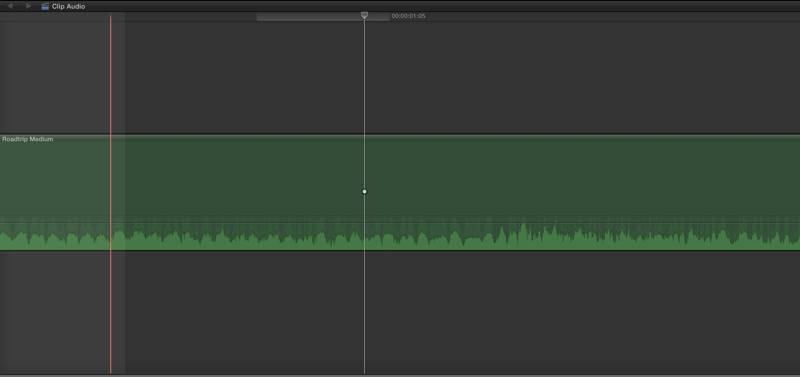
Then pull audio down in that range.
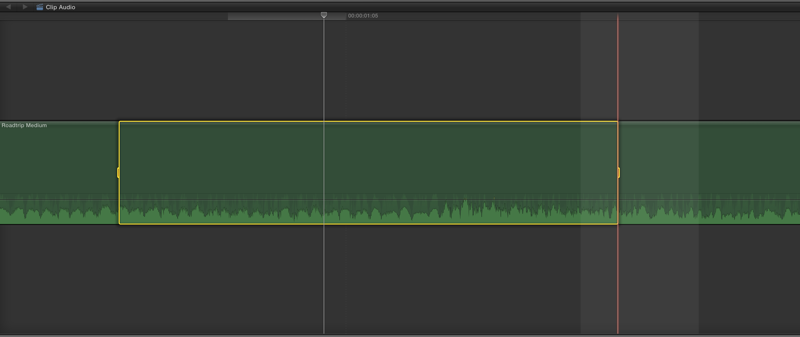
Should look something like this.
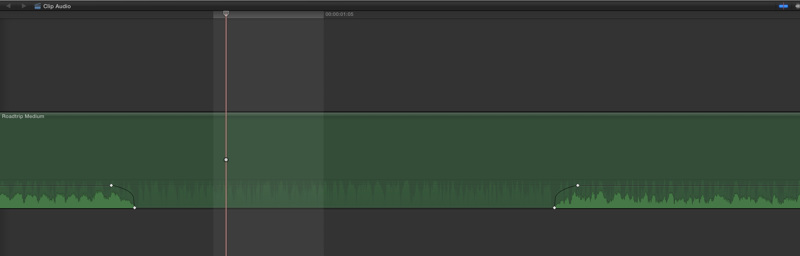
Then pull audio down in that range.
Should look something like this.
Last edit: 10 Oct 2016 14:28 by Overturf.
Please Log in to join the conversation.
11 Oct 2016 12:33 #80641
by AlexMaxim
Brilliant! I will try doing exactly that. Thank you so much once again for your kind explanation!
Replied by AlexMaxim on topic How to edit waveforms or apply a filter to get rid of tiny clicks?
Tom Wolsky wrote: Once you have the click bracketed pull the audio down to zero. If you have music the whole speech then you wouldn't need anything else.
Brilliant! I will try doing exactly that. Thank you so much once again for your kind explanation!
Please Log in to join the conversation.
11 Oct 2016 12:34 #80642
by AlexMaxim
Thank you so much for the visual explanation! I am very grateful indeed for your taking the time and trouble to create the screenshots. It makes the process that much more logical.
Here goes!
Replied by AlexMaxim on topic How to edit waveforms or apply a filter to get rid of tiny clicks?
Overturf wrote: You might want to use the range tool (R) after you have zoomed in properly. This will automatically add keyframes.
Then pull audio down in that range.
Should look something like this.
Thank you so much for the visual explanation! I am very grateful indeed for your taking the time and trouble to create the screenshots. It makes the process that much more logical.
Here goes!
Please Log in to join the conversation.
- simon.a.billington
-

- Offline
- Elite Member
-

Less
More
- Posts: 179
- Thank you received: 10
18 Oct 2016 12:06 #80873
by simon.a.billington
Replied by simon.a.billington on topic How to edit waveforms or apply a filter to get rid of tiny clicks?
Hope it works out. However, the trouble with briefly dropping out audio, even covering it with ambient noise can be just as obtrusive as the click itself. RX is a great tool, but expensive. You can get a set of similar plugins at Waves, but really only worth it if they are on sale.
If you get your hands on a 3rd party audio editor it's possible to export the audio and use the pencil tool to effectively draw over the click points, but it's not as smooth.
If you attempt to do it in FCPX there's two ways I would go about it.
If the click is on a strong percussive sound like certain consonants (K or T for example) then I'd just reduce that small slither or a click until it's around the same loudness as the consonant. With a bit of luck it will be mostly masked at that point.
If the click is during a more drawn out sound, like a vowel, then place two cuts around that vowel sound and crop out the click. What you would then do is time stretch the vowel where you cut the click out and ave them cross fade a tiny bit in the middle. The other cuts are just to make sure you done stretch the rest or the audio as well.
The process is easier than it sounds, but goes take practice to get it right.
The quicker way of doing it, though, is just to get a third party declick plugin and let it do the heavy lifting for you.
Also, if you end up doing any work for the same people again, try to find out the source of the click and eliminate it. It may be the result of s few things including not enough CPU, their Buffer setting isn't set high enough, or it could be a sample rate problem.
If you get your hands on a 3rd party audio editor it's possible to export the audio and use the pencil tool to effectively draw over the click points, but it's not as smooth.
If you attempt to do it in FCPX there's two ways I would go about it.
If the click is on a strong percussive sound like certain consonants (K or T for example) then I'd just reduce that small slither or a click until it's around the same loudness as the consonant. With a bit of luck it will be mostly masked at that point.
If the click is during a more drawn out sound, like a vowel, then place two cuts around that vowel sound and crop out the click. What you would then do is time stretch the vowel where you cut the click out and ave them cross fade a tiny bit in the middle. The other cuts are just to make sure you done stretch the rest or the audio as well.
The process is easier than it sounds, but goes take practice to get it right.
The quicker way of doing it, though, is just to get a third party declick plugin and let it do the heavy lifting for you.
Also, if you end up doing any work for the same people again, try to find out the source of the click and eliminate it. It may be the result of s few things including not enough CPU, their Buffer setting isn't set high enough, or it could be a sample rate problem.
Please Log in to join the conversation.
18 Oct 2016 12:15 #80875
by AlexMaxim
Thank you so much for your kind suggestions! We are presently collaborating with a sound engineer who has a lot of experience of ironing out minor glitches. Hopefully, this can solve the problem.
Replied by AlexMaxim on topic How to edit waveforms or apply a filter to get rid of tiny clicks?
simon.a.billington wrote: Hope it works out. However, the trouble with briefly dropping out audio, even covering it with ambient noise can be just as obtrusive as the click itself. RX is a great tool, but expensive. You can get a set of similar plugins at Waves, but really only worth it if they are on sale.
If you get your hands on a 3rd party audio editor it's possible to export the audio and use the pencil tool to effectively draw over the click points, but it's not as smooth.
If you attempt to do it in FCPX there's two ways I would go about it.
If the click is on a strong percussive sound like certain consonants (K or T for example) then I'd just reduce that small slither or a click until it's around the same loudness as the consonant. With a bit of luck it will be mostly masked at that point.
If the click is during a more drawn out sound, like a vowel, then place two cuts around that vowel sound and crop out the click. What you would then do is time stretch the vowel where you cut the click out and ave them cross fade a tiny bit in the middle. The other cuts are just to make sure you done stretch the rest or the audio as well.
The process is easier than it sounds, but goes take practice to get it right.
The quicker way of doing it, though, is just to get a third party declick plugin and let it do the heavy lifting for you.
Also, if you end up doing any work for the same people again, try to find out the source of the click and eliminate it. It may be the result of s few things including not enough CPU, their Buffer setting isn't set high enough, or it could be a sample rate problem.
Thank you so much for your kind suggestions! We are presently collaborating with a sound engineer who has a lot of experience of ironing out minor glitches. Hopefully, this can solve the problem.
Please Log in to join the conversation.
- simon.a.billington
-
- Offline
- Elite Member
-
Less
More
- Posts: 179
- Thank you received: 10
18 Oct 2016 12:28 #80876
by simon.a.billington
Replied by simon.a.billington on topic How to edit waveforms or apply a filter to get rid of tiny clicks?
If there are a few issues, that's probably the best method, providing the know what they are doing. They're most likely going to be set up and have more experience to tackle the job in question.
Although, if it doesn't work out desirably let me know. I had 20 years of audio under my belt before I got into editing.
Although, if it doesn't work out desirably let me know. I had 20 years of audio under my belt before I got into editing.
Please Log in to join the conversation.
18 Oct 2016 12:39 #80878
by AlexMaxim
That's extremely kind! We will definitely let you know if our present arrangement doesn't work out.
Replied by AlexMaxim on topic How to edit waveforms or apply a filter to get rid of tiny clicks?
simon.a.billington wrote: If there are a few issues, that's probably the best method, providing the know what they are doing. They're most likely going to be set up and have more experience to tackle the job in question.
Although, if it doesn't work out desirably let me know. I had 20 years of audio under my belt before I got into editing.
That's extremely kind! We will definitely let you know if our present arrangement doesn't work out.
Please Log in to join the conversation.
