


- Posts: 3
- Thank you received: 0
3 Post Moderation Rule for New Boarders (25 Jan 2021)
New boarders will have their posts moderated - Don't worry if you cannot see your post immediately.
Importing AVCHD: Stream Error
- ted.banucci
-
 Topic Author
- Offline
- New Member
-

Less
More
27 Sep 2016 22:23 #80335
by ted.banucci
Importing AVCHD: Stream Error was created by ted.banucci
Recorded an hour long clip on my Panny HMC-150 recently and I must have had a glitch in the card I recorded to. When importing the AVCHD clip to FCP X, I get the error, "Import Failed" "Stream Error at: blah blah blah". I've attached a screenshot for more comprehensive details.
I've tried a number of things:
- ClipWrap will not convert the file.
- MPEG Streamclip does not do AVCHD files.
- I was able to import first half of the file (up to the glitch) with FCPX. However, I can't import any other selection of the second half without the same error.
What is frustrating is that I can actually watch the whole second half by scrubbing through it. On FCP 7, whenever we had a glitch in a DV tape, I was able to force record everything playable on the tape. Is there a way to do this same action with an AVCHD file?
Thanks-
Ted
I've tried a number of things:
- ClipWrap will not convert the file.
- MPEG Streamclip does not do AVCHD files.
- I was able to import first half of the file (up to the glitch) with FCPX. However, I can't import any other selection of the second half without the same error.
What is frustrating is that I can actually watch the whole second half by scrubbing through it. On FCP 7, whenever we had a glitch in a DV tape, I was able to force record everything playable on the tape. Is there a way to do this same action with an AVCHD file?
Thanks-
Ted
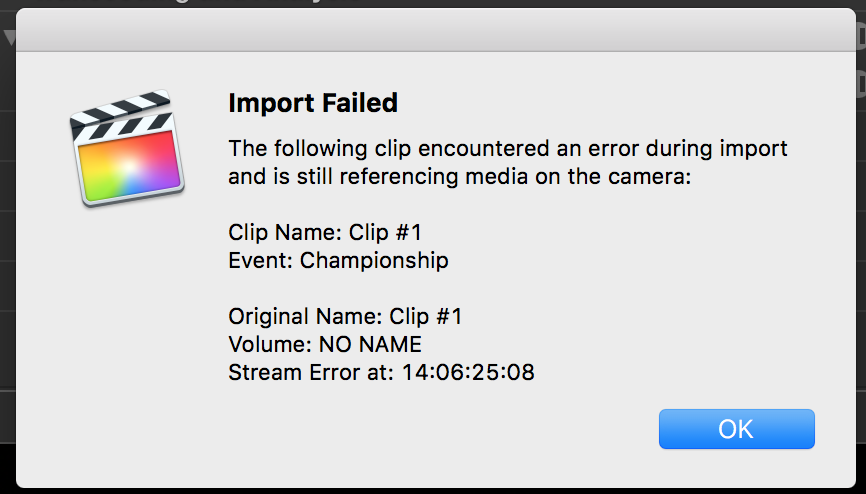
Please Log in to join the conversation.
- Karsten Schlüter
-

- Offline
- Moderator
-

Less
More
- Posts: 3790
- Thank you received: 718
28 Sep 2016 09:29 #80341
by Karsten Schlüter
Replied by Karsten Schlüter on topic Importing AVCHD: Stream Error
Can QuicktimeX handle that file?
And, Welcome Ted to fcp.co
And, Welcome Ted to fcp.co
Please Log in to join the conversation.


28 Sep 2016 13:50 - 28 Sep 2016 13:51 #80350
by dgwvideo
Creating history....one edit at a time !
Replied by dgwvideo on topic Importing AVCHD: Stream Error
If the clip is still on your camera and shown in the event browser, connect your camera, select the clip and choose File/Import/Reimport from Camera/Archive. It might be that you turned off your camera before the original import completed. A better way to do this would be to copy the entire AVCHD file from the camera to a hard drive location and then import to FCPX from the drive.
Creating history....one edit at a time !
Last edit: 28 Sep 2016 13:51 by dgwvideo.
Please Log in to join the conversation.

28 Sep 2016 16:02 #80356
by joema
BTW this 60 Minutes segment broadcast on Aug 14, 2016 used the HMC-150 for most of the field interviews.
joema.smugmug.com/Photography/60-Minutes...asonic-HMC/n-MFg8L9/
This shows how even top news shows do not always use (or need) the latest technology. It also shows how the broadcast standards are sufficiently flexible to accept material like this and they do not always require 10-bit 4:2:2 content at 100 megabits/sec, which is a frequently-mentioned requirement.
Replied by joema on topic Importing AVCHD: Stream Error
ted.banucci wrote: Recorded an hour long clip on my Panny HMC-150...
BTW this 60 Minutes segment broadcast on Aug 14, 2016 used the HMC-150 for most of the field interviews.
joema.smugmug.com/Photography/60-Minutes...asonic-HMC/n-MFg8L9/
This shows how even top news shows do not always use (or need) the latest technology. It also shows how the broadcast standards are sufficiently flexible to accept material like this and they do not always require 10-bit 4:2:2 content at 100 megabits/sec, which is a frequently-mentioned requirement.
Please Log in to join the conversation.
- ted.banucci
-
Topic Author
- Offline
- New Member
-
Less
More
- Posts: 3
- Thank you received: 0
28 Sep 2016 21:34 #80369
by ted.banucci
Replied by ted.banucci on topic Importing AVCHD: Stream Error
Thanks Karsten and dgwvideo-
I've actually browsed this website since you guys started, but have not been on the forums till now.
To answer both questions- One of the first things I did was copy the file from the SDHC card to the hard drive to make sure that my card was not causing the import problem.
I've also opened this in QuickTime and have not been able to save as a ProRes file from there. I can try doing it as a 1080 mp4, but I didn't want to lose quality.
I've actually browsed this website since you guys started, but have not been on the forums till now.
To answer both questions- One of the first things I did was copy the file from the SDHC card to the hard drive to make sure that my card was not causing the import problem.
I've also opened this in QuickTime and have not been able to save as a ProRes file from there. I can try doing it as a 1080 mp4, but I didn't want to lose quality.
Please Log in to join the conversation.
- ted.banucci
-
Topic Author
- Offline
- New Member
-
Less
More
- Posts: 3
- Thank you received: 0
30 Sep 2016 15:11 #80397
by ted.banucci
Replied by ted.banucci on topic SOLVED: Importing AVCHD: Stream Error
I refined my search on the web and eventually came upon a program that converted the file for me. On the App store, it's called "Free AVCHD to MOV". Worked like a charm!
Please Log in to join the conversation.
30 Sep 2016 16:25 #80398
by joema
Did you copy the entire AVCHD folder tree, ie the bundle as it appears in Finder? While in most cases you can get away with drilling down, finding the video file and copying that, you're really not supposed to. Maybe this is one of those situations where it requires the entire AVCHD bundle.
If you copy the entire AVCHD file bundle from the card to your local drive then try the import from there, does it work?
Re "I can actually watch the whole second half by scrubbing through it", is that on the camera or after the failed import to FCPX? If it's on the camera this (again) might imply it works because it has access to the entire AVCHD file bundle.
If that fails after copying the entire AVCHD bundle to your local hard drive, and if ClipWrap fails to convert it, that might imply the file is somehow damaged.
Re "whenever we had a glitch in a DV tape, I was able to force record everything playable on the tape", DV used only intra-frame compression so each frame is independently compressed. Recovering from a glitch in the tape was technically straightforward.
By contrast AVCHD uses H264 inter-frame compression, so many frames are entirely missing on the media, only difference data is recorded for each GOP (Group Of Pictures). If a GOP is damaged, usually you lose the entire GOP. GOP size varies but they can be pretty big. In theory sufficiently clever software might skip over a damaged GOP and resume decoding but in most cases I think they just give up.
If only your camcorder can read it, then next step would be try capturing it from the camcorder to FCPX or transferring via USB 2.0, if that is possible. If not the only option would be use an HDMI recorder to capture it in real time.
Replied by joema on topic Importing AVCHD: Stream Error
ted.banucci wrote: ....One of the first things I did was copy the file from the SDHC card to the hard drive to make sure that my card was not causing the import problem....
Did you copy the entire AVCHD folder tree, ie the bundle as it appears in Finder? While in most cases you can get away with drilling down, finding the video file and copying that, you're really not supposed to. Maybe this is one of those situations where it requires the entire AVCHD bundle.
If you copy the entire AVCHD file bundle from the card to your local drive then try the import from there, does it work?
Re "I can actually watch the whole second half by scrubbing through it", is that on the camera or after the failed import to FCPX? If it's on the camera this (again) might imply it works because it has access to the entire AVCHD file bundle.
If that fails after copying the entire AVCHD bundle to your local hard drive, and if ClipWrap fails to convert it, that might imply the file is somehow damaged.
Re "whenever we had a glitch in a DV tape, I was able to force record everything playable on the tape", DV used only intra-frame compression so each frame is independently compressed. Recovering from a glitch in the tape was technically straightforward.
By contrast AVCHD uses H264 inter-frame compression, so many frames are entirely missing on the media, only difference data is recorded for each GOP (Group Of Pictures). If a GOP is damaged, usually you lose the entire GOP. GOP size varies but they can be pretty big. In theory sufficiently clever software might skip over a damaged GOP and resume decoding but in most cases I think they just give up.
If only your camcorder can read it, then next step would be try capturing it from the camcorder to FCPX or transferring via USB 2.0, if that is possible. If not the only option would be use an HDMI recorder to capture it in real time.
Please Log in to join the conversation.
