


- Posts: 107
- Thank you received: 0
3 Post Moderation Rule for New Boarders (25 Jan 2021)
New boarders will have their posts moderated - Don't worry if you cannot see your post immediately.
don't understand 50p and 25p
26 Sep 2016 13:01 #80278
by mitchino
don't understand 50p and 25p was created by mitchino
I have shot a clip at 50p and put it on a 25p timeline so it slows down. I import the clip into FCPX, add it to the 25p timeline then choose modify>retime>slow>50%. The clip plays back at the slower speed but it is stuttering. I thought because there were twice as many frames recorded, when added to a 25p timeline it would play back smoothly, twice as slowly at 25p. What am I doing wrong?
Please Log in to join the conversation.
26 Sep 2016 13:07 #80279
by mitchino
Replied by mitchino on topic don't understand 50p and 25p
as an adjunct to this - when I add the clip to the timeline and then set it to 50% speed, sometimes the render bar appears as it applies the effect to the clip and sometimes it doesn't do anything, how do I fix that glitch?
Please Log in to join the conversation.
- Tom Wolsky
-

- Offline
- Moderator
-

26 Sep 2016 13:11 #80280
by Tom Wolsky
Replied by Tom Wolsky on topic don't understand 50p and 25p
Set the 50p clip to automatic speed in th retiming menu.
Please Log in to join the conversation.
26 Sep 2016 13:21 #80281
by mitchino
Replied by mitchino on topic don't understand 50p and 25p
Thanks, I've just done that and the clip plays back at 50% speed, but it looks like it's only playing every other frame. If I go through it frame by frame using the arrow key, each frame is up for 2 taps of the arrow key.
What I don't understand is, if I shot 10 secs of 50p I get 500 frames. I then want to have those 500 frames play at 25 fps, so I get a 20 sec clip, but still smooth.
What I don't understand is, if I shot 10 secs of 50p I get 500 frames. I then want to have those 500 frames play at 25 fps, so I get a 20 sec clip, but still smooth.
Please Log in to join the conversation.
- Tom Wolsky
-
- Offline
- Moderator
-
26 Sep 2016 13:27 #80282
by Tom Wolsky
Replied by Tom Wolsky on topic don't understand 50p and 25p
Please post the complete information about your media, both the 25p and the 50p and your project properties. Screenshots would be great.
Please Log in to join the conversation.
26 Sep 2016 13:36 #80283
by mitchino
Replied by mitchino on topic don't understand 50p and 25p
My media is Sony XAVC MPEG 4 from an FS5. I have clips that were shot at 25p and others that are 50p.
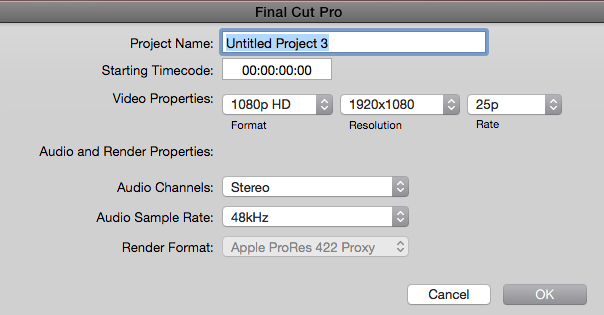
Project Properties are 1080p HD 1980 x 1080 25p
Project Properties are 1080p HD 1980 x 1080 25p

Please Log in to join the conversation.
- Tom Wolsky
-
- Offline
- Moderator
-
26 Sep 2016 13:42 #80285
by Tom Wolsky
Replied by Tom Wolsky on topic don't understand 50p and 25p
If you put the 50p clip in the 25p project, does it immediately play in slow motion?
If not, at it plays at normal speed, when you apply automatic speed, there should be no frame doubling.
Maybe you make post a piece of media somewhere so the can be reproduced. I can't reproduce the problem with 59.94 media in a 29.97 project, but I don't have material from that camera.
If not, at it plays at normal speed, when you apply automatic speed, there should be no frame doubling.
Maybe you make post a piece of media somewhere so the can be reproduced. I can't reproduce the problem with 59.94 media in a 29.97 project, but I don't have material from that camera.
Please Log in to join the conversation.
26 Sep 2016 13:46 #80287
by mitchino
Replied by mitchino on topic don't understand 50p and 25p
When I drop the clip onto the timeline it plays at normal speed. If I then choose Modify>Retime>Automatic Speed it gets an orange bar above it saying Slow (50%) and doubles in length, but then plays back every other frame.
Please Log in to join the conversation.
- Tom Wolsky
-
- Offline
- Moderator
-
26 Sep 2016 13:56 #80290
by Tom Wolsky
Replied by Tom Wolsky on topic don't understand 50p and 25p
Not sure what's going on, sorry.
Please Log in to join the conversation.
26 Sep 2016 15:06 #80296
by mitchino
Replied by mitchino on topic don't understand 50p and 25p
My FCPX isn't up to date - going to sort that and then try again. Don't abandon me yet! 
Please Log in to join the conversation.
- Tom Wolsky
-
- Offline
- Moderator
-
26 Sep 2016 15:13 #80297
by Tom Wolsky
Replied by Tom Wolsky on topic don't understand 50p and 25p
IF you step through the 50p media in the QT player or the browser how does it look?
Please Log in to join the conversation.
26 Sep 2016 18:03 #80310
by mitchino
Replied by mitchino on topic don't understand 50p and 25p
Problem solved, or at least understood. Total error on my part. I shot the footage at 50p but at a shutter speed of 1/30th. An impossible combo. I set the shutter speed above 1/50th and everything now behaves normally.
Very annoying that the Sony FS5 lets you set such a combo with no warning.
Very annoying that the Sony FS5 lets you set such a combo with no warning.
Please Log in to join the conversation.
- Tom Wolsky
-
- Offline
- Moderator
-
26 Sep 2016 18:04 #80311
by Tom Wolsky
Replied by Tom Wolsky on topic don't understand 50p and 25p
So the camera is really shooting the 50fps shooting by frame doubling in the camera. Yes, nasty. You should get a warning on that.
Please Log in to join the conversation.
