



- Posts: 170
- Thank you received: 2
3 Post Moderation Rule for New Boarders (25 Jan 2021)
New boarders will have their posts moderated - Don't worry if you cannot see your post immediately.
How to Update FCP X
22 Sep 2016 05:13 #80165
by PhilCF
How to Update FCP X was created by PhilCF
I've just realised I'm on an old copy of FCPX 10.1.3
I bought a license for FCP 2 years ago.
How do you upgrade it? I can't find a button or tutorial anywhere.
Thanks
I bought a license for FCP 2 years ago.
How do you upgrade it? I can't find a button or tutorial anywhere.
Thanks
Please Log in to join the conversation.
- Karsten Schlüter
-

- Offline
- Moderator
-

Less
More
- Posts: 3790
- Thank you received: 718
22 Sep 2016 05:20 - 22 Sep 2016 05:21 #80167
by Karsten Schlüter
Replied by Karsten Schlüter on topic How to Update FCP X
you missed 5 free updates ... 
launch the AppStore
be sure you're logged in with the AppleID you purchased FCPX with
click on updates
click on install…
oh, and by the way: you missed some dramatic changes in FCPX! Perhaps you should read & watch some tutorials…
launch the AppStore
be sure you're logged in with the AppleID you purchased FCPX with
click on updates
click on install…
oh, and by the way: you missed some dramatic changes in FCPX! Perhaps you should read & watch some tutorials…
Last edit: 22 Sep 2016 05:21 by Karsten Schlüter.
Please Log in to join the conversation.
22 Sep 2016 05:28 #80168
by PhilCF
Replied by PhilCF on topic How to Update FCP X
Amazing... I can't wait to get my hands on it.
I went into App store this morning and tried to buy FCP X (I thought i was using a cracked copy). App store said I couldn't buy it coz I'd already bought it - I just needed to update.
I logged in to my apple ID and there are no FCP updates in there.
Any ideas on how to resolve? x
I went into App store this morning and tried to buy FCP X (I thought i was using a cracked copy). App store said I couldn't buy it coz I'd already bought it - I just needed to update.
I logged in to my apple ID and there are no FCP updates in there.
Any ideas on how to resolve? x
Please Log in to join the conversation.
- Karsten Schlüter
-
- Offline
- Moderator
-
Less
More
- Posts: 3790
- Thank you received: 718
22 Sep 2016 05:33 #80169
by Karsten Schlüter
That's an easy one:
your stolen copy is 'booked' under some other's AppleID.
Log out, log in with yours ...
(… interesting, how nonchalanced you talk about stolen software ) :dry:
Replied by Karsten Schlüter on topic How to Update FCP X
phil@circuitfactory.ae wrote: ...tried to buy FCP X (I thought i was using a cracked copy). App store said I couldn't buy it coz I'd already bought it - I just needed to update.
I logged in to my apple ID and there are no FCP updates in there.
...
That's an easy one:
your stolen copy is 'booked' under some other's AppleID.
Log out, log in with yours ...
(… interesting, how nonchalanced you talk about stolen software ) :dry:
Please Log in to join the conversation.


22 Sep 2016 05:33 #80170
by AppleGuru
Looks like you are using a cracked copy not cool for that price tag. If it was you would see the updates and in your purchase history.
Delete FCPX from your Mac and go back into the App Store and it will be available for purchase.
Replied by AppleGuru on topic How to Update FCP X
phil@circuitfactory.ae wrote: Amazing... I can't wait to get my hands on it.
I went into App store this morning and tried to buy FCP X (I thought i was using a cracked copy). App store said I couldn't buy it coz I'd already bought it - I just needed to update.
I logged in to my apple ID and there are no FCP updates in there.
Any ideas on how to resolve? x
Looks like you are using a cracked copy not cool for that price tag. If it was you would see the updates and in your purchase history.
Delete FCPX from your Mac and go back into the App Store and it will be available for purchase.
Please Log in to join the conversation.
22 Sep 2016 05:39 #80171
by PhilCF
Replied by PhilCF on topic How to Update FCP X
I'm not sure I follow. I only have one App Store log in. When I log in, there's no updates for FCPX
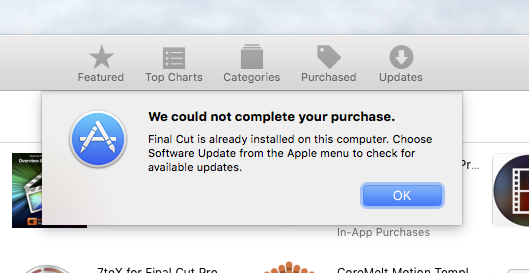
When I clicked to buy FCP X, it gave me this error message. But there is no apple menu containing "Software Update" anywhere to be seen?
Any ideas?
When I clicked to buy FCP X, it gave me this error message. But there is no apple menu containing "Software Update" anywhere to be seen?
Any ideas?
Please Log in to join the conversation.
22 Sep 2016 06:02 #80172
by PhilCF
Replied by PhilCF on topic How to Update FCP X
thanks for your help everyone x
Please Log in to join the conversation.
- Karsten Schlüter
-
- Offline
- Moderator
-
Less
More
- Posts: 3790
- Thank you received: 718
22 Sep 2016 06:03 #80173
by Karsten Schlüter
just follow step by step:
trash your installation of FCPX << it prohibits a 2md install.
then, log in with your AppleID, purchase, install.
All your projects, plugins etc are untouched - except the new file-organisation............
Replied by Karsten Schlüter on topic How to Update FCP X
phil@circuitfactory.ae wrote: I'm not sure I follow. …
just follow step by step:
trash your installation of FCPX << it prohibits a 2md install.
then, log in with your AppleID, purchase, install.
All your projects, plugins etc are untouched - except the new file-organisation............
Please Log in to join the conversation.

Less
More
- Posts: 971
- Thank you received: 46
22 Sep 2016 06:50 #80176
by MsJustine
Replied by MsJustine on topic How to Update FCP X
I would suggest 2 ways here..
Way 1- Send a feddback to Apple, explain the problem, ask them to confirm it is a legit copy, if this is true, they Apple, maybe able to reset and allow you to update.
2-Failing that, create a new Apple ID, and use this new Apple ID to purchase a legit copy of Final Cut Pro X, this way you know you have a clear safe legal copy of FCPX.
I have to use 2 Apple ID, 1 for my ipad and FCPX which I bought and registered in the USA, and a 2nd ID for my macbook pro which was bought outside of the USA, a bit annoying having to change stores, but in your case, you are still local with both accounts.
I tried to get both accounts set to local, to merge both accounts, but so far no dice!!!
Way 1- Send a feddback to Apple, explain the problem, ask them to confirm it is a legit copy, if this is true, they Apple, maybe able to reset and allow you to update.
2-Failing that, create a new Apple ID, and use this new Apple ID to purchase a legit copy of Final Cut Pro X, this way you know you have a clear safe legal copy of FCPX.
I have to use 2 Apple ID, 1 for my ipad and FCPX which I bought and registered in the USA, and a 2nd ID for my macbook pro which was bought outside of the USA, a bit annoying having to change stores, but in your case, you are still local with both accounts.
I tried to get both accounts set to local, to merge both accounts, but so far no dice!!!
Please Log in to join the conversation.

22 Sep 2016 07:36 #80177
by knesaren
Replied by knesaren on topic How to Update FCP X
Which version of OS X are you on?
Please Log in to join the conversation.
Less
More
- Posts: 971
- Thank you received: 46
22 Sep 2016 07:56 - 22 Sep 2016 08:00 #80178
by MsJustine
Replied by MsJustine on topic How to Update FCP X
Sierra, apart from siri, nothing I can see has changed, apart from breaking FCPX, on 2nd thoughts, why do you need to know what OS I use?? It is not like there is one!!
Last edit: 22 Sep 2016 08:00 by MsJustine.
Please Log in to join the conversation.
- Karsten Schlüter
-
- Offline
- Moderator
-
Less
More
- Posts: 3790
- Thank you received: 718
22 Sep 2016 08:00 #80179
by Karsten Schlüter
I strongly assume, Kenneth' Q was for the OP of this thread…
Replied by Karsten Schlüter on topic How to Update FCP X
MsJustine wrote: Sierra, …
I strongly assume, Kenneth' Q was for the OP of this thread…
Please Log in to join the conversation.
Less
More
- Posts: 971
- Thank you received: 46
22 Sep 2016 08:03 #80180
by MsJustine
Replied by MsJustine on topic How to Update FCP X
oh...I thought 10.1.3 only worked on El Cap, it was a forced or mandatory upgrade to get to 10.1..
Please Log in to join the conversation.
22 Sep 2016 18:16 #80193
by VidGreg
Replied by VidGreg on topic How to Update FCP X
Aren't people making assumptions about if this is a legit copy?
Granted the OP comments might suggest it isn't, but then again App Store is not perfect.
Phil go to App Store and sign in. Go to Purchased tab. It should show Final Cut Pro X and the purchase date.
You may be able to hold down the Option Key and click on the icon and that should open up the App Store link for FCPX and you may then see the update button there. Try that, then if that doesn't work, go to the Updates tab In the App Store and try the Option key trick.
If you see it in the "Purchased" tab, but no update, then you could remove it from your Mac and then you should be able to redownload the latest version.
As always, make sure you have back-ups of everything a few times over.
Also everyone should remember that the Apple servers are pretty busy right now, so some wonkiness is to be expected.
Phil before you upgrade or purchase FCPX, you need to read up on upgrading to FCPX 10.2 as there were some real changes and it might mess with your library/project structure. So read and be aware. If memory serves me right there was some issues between 10.1.3 and 10.1.4?? too.
Arctic Whiteness's FCP Library Manager can help here.
Hope this helps, Greg
Granted the OP comments might suggest it isn't, but then again App Store is not perfect.
Phil go to App Store and sign in. Go to Purchased tab. It should show Final Cut Pro X and the purchase date.
You may be able to hold down the Option Key and click on the icon and that should open up the App Store link for FCPX and you may then see the update button there. Try that, then if that doesn't work, go to the Updates tab In the App Store and try the Option key trick.
If you see it in the "Purchased" tab, but no update, then you could remove it from your Mac and then you should be able to redownload the latest version.
As always, make sure you have back-ups of everything a few times over.
Also everyone should remember that the Apple servers are pretty busy right now, so some wonkiness is to be expected.
Phil before you upgrade or purchase FCPX, you need to read up on upgrading to FCPX 10.2 as there were some real changes and it might mess with your library/project structure. So read and be aware. If memory serves me right there was some issues between 10.1.3 and 10.1.4?? too.
Arctic Whiteness's FCP Library Manager can help here.
Hope this helps, Greg
Please Log in to join the conversation.
- nils.dettmann
-

- Offline
- Elite Member
-

Less
More
- Posts: 161
- Thank you received: 13
22 Sep 2016 21:40 #80198
by nils.dettmann
Replied by nils.dettmann on topic How to Update FCP X
I would go with Carstens advice first:
Delete FCPX from the Applicatons Folder.
If it was purchased before, the newest Version can be downloaded, if not it can be purchased.
Generally if there is any version of an AppStore app present on the system which is not tied to an account actually regsitered to the computer, you can´t upgrade it and you can´t buy it.
Delete FCPX from the Applicatons Folder.
If it was purchased before, the newest Version can be downloaded, if not it can be purchased.
Generally if there is any version of an AppStore app present on the system which is not tied to an account actually regsitered to the computer, you can´t upgrade it and you can´t buy it.
Please Log in to join the conversation.
23 Sep 2016 01:15 #80199
by PhilCF
Replied by PhilCF on topic How to Update FCP X
Thanks for all your advice guys... I trashed the old FCP and bought the new one.
It's working fine now.
Thanks everyone x
It's working fine now.
Thanks everyone x
Please Log in to join the conversation.
