


- Posts: 6
- Thank you received: 0
3 Post Moderation Rule for New Boarders (25 Jan 2021)
New boarders will have their posts moderated - Don't worry if you cannot see your post immediately.
Drop frames found in exported video.
21 Sep 2016 16:49 #80150
by beh1994
Drop frames found in exported video. was created by beh1994
Hai guys,
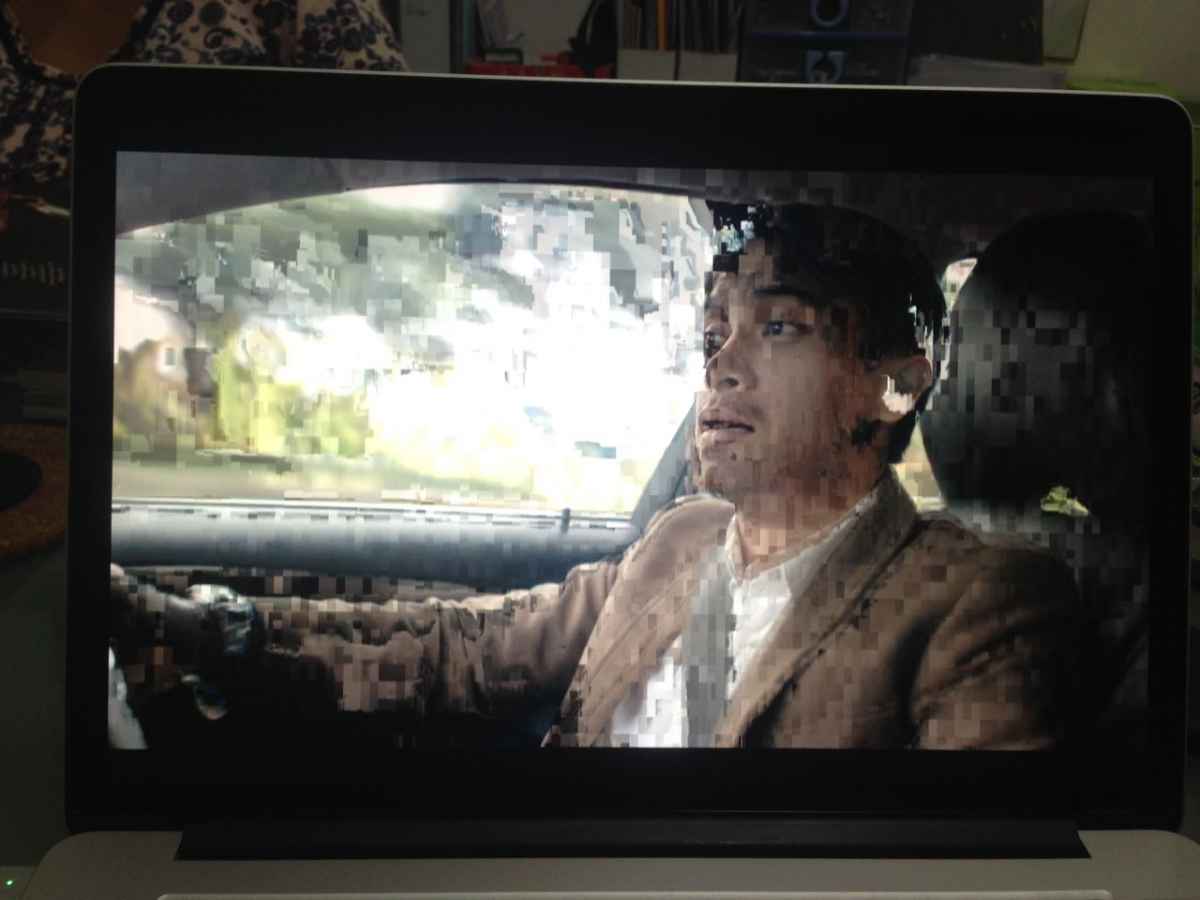
I found these drop frames in my exported movie.
Anybody knows how to solve this problem?
I tried zap RAM, trash preferences, clean out render files and re-render and re-export it.
It's still the same.
Anybody help me?
I found these drop frames in my exported movie.
Anybody knows how to solve this problem?
I tried zap RAM, trash preferences, clean out render files and re-render and re-export it.
It's still the same.
Anybody help me?



Please Log in to join the conversation.
- nils.dettmann
-

- Offline
- Elite Member
-

Less
More
- Posts: 161
- Thank you received: 13
21 Sep 2016 19:20 #80156
by nils.dettmann
Replied by nils.dettmann on topic Drop frames found in exported video.
You could have just posted again in your other thread, no need to open several threads for the same problem.
Is it only happening in your exported movies?
How do the frames look in the timeline?
Are there effects on the clips with the broken frames?
What are your system specs?
I remember reading a thread from a guy with an amount of RAM below the minimum specs for FCPX having a similar problem.
Found the thread: Export Problem
And I have seen frames like this as first and last frame of C300 source files.
Is it only happening in your exported movies?
How do the frames look in the timeline?
Are there effects on the clips with the broken frames?
What are your system specs?
I remember reading a thread from a guy with an amount of RAM below the minimum specs for FCPX having a similar problem.
Found the thread: Export Problem
And I have seen frames like this as first and last frame of C300 source files.
Please Log in to join the conversation.
