


3 Post Moderation Rule for New Boarders (25 Jan 2021)
New boarders will have their posts moderated - Don't worry if you cannot see your post immediately.
macOS Sierra - What works and what doesn't
- Tom Wolsky
-

- Offline
- Moderator
-

Please Log in to join the conversation.

Please Log in to join the conversation.
- Karsten Schlüter
-

- Offline
- Moderator
-
- Posts: 3790
- Thank you received: 718
Even worse: All features (transform, crop, …) closed, but no 'unfold' button!
Although a from the ground new installation, I tried trashing prefs (cmd-alt on launch) => tadaah, keyframe buttons back, all systems within paranormal kilometers. Or so.
:lol:
Please Log in to join the conversation.
- Karsten Schlüter
-
- Offline
- Moderator
-
- Posts: 3790
- Thank you received: 718
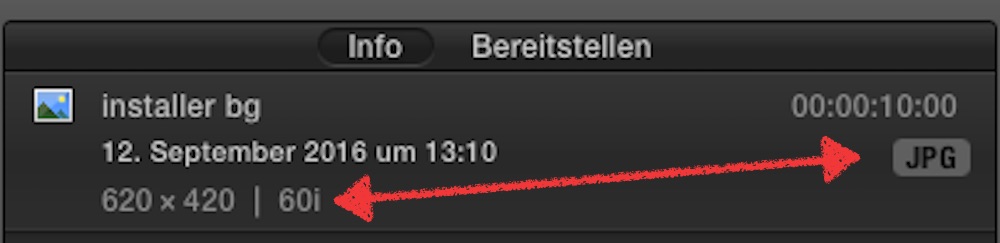
imported jpegs are shown in the Inspector/Info tab as '60i' .....
Please Log in to join the conversation.
- Tom Wolsky
-
- Offline
- Moderator
-
Please Log in to join the conversation.
- Karsten Schlüter
-
- Offline
- Moderator
-
- Posts: 3790
- Thank you received: 718
Tom Wolsky wrote: …may have to do with the size. …
nope:
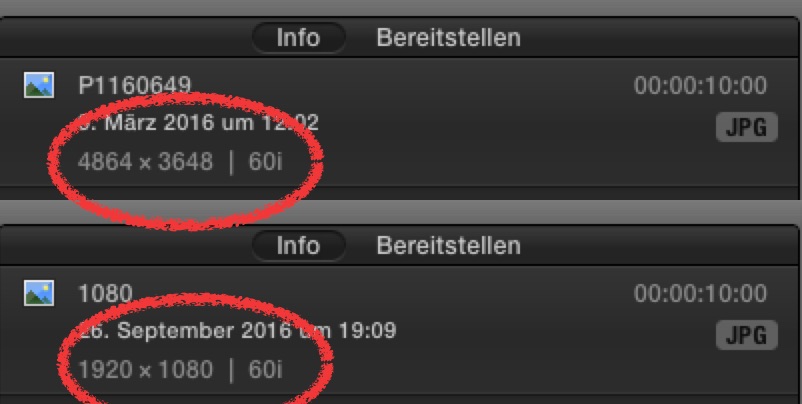
I vaguely remember, there was some similar misbehave in the past, 25p was identified as '50i' .... something, years ago.
Please Log in to join the conversation.
- Scrubelicious
-

- Offline
- Platinum Member
-

- Posts: 1228
- Thank you received: 114
coldsweat wrote: The 'keyframe diamonds' aren't showing up for me in the inspector window on mouse rollover.
They appear when I click where they should be & they still work, however they don't display when simply hovering the cursor over them as they did in El Cap.
Could you post a screenshot where?
I do see the keyframe diamonds when rolling over the location...
Please Log in to join the conversation.

I'm thinking of buying izotope's RX5 plugin pack for my home computer, (It's on sale for the next few days!). the problem is that my home computer is running macOS sierra. Anyone know if it's not working or if anything peculiar is going on? I haven't seen mention of it in the forum yet, so no news may be good news.
Also, is there any reason I shouldn't purchase it now? is a RX6 update imminent?
Thanks,
Please Log in to join the conversation.

Please Log in to join the conversation.
(i've since applied it within a Mulitcam clip on a separate audio channel.
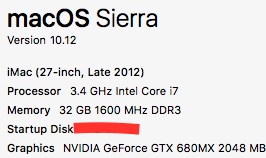
As a side note, I've noticed while on the import window, only my iMac has the "camera" option. I should have 2, my other monitor is a older LED Cinema display.
Please Log in to join the conversation.
- DmitriZigany
-

- Offline
- Platinum Member
-
- Posts: 730
- Thank you received: 26
The blue "Show" text that appears in the text window when hovering around the options (Face, Outline, Drop Shadow etc) doesn't always appear! Then I can't change that without restarting FCPX...
Please Log in to join the conversation.
Please Log in to join the conversation.
- DmitriZigany
-
- Offline
- Platinum Member
-
- Posts: 730
- Thank you received: 26
Thanks! Will try next time it happens!robertdee wrote: Try double clicking on the attribute name (Face, Outline,etc) - that seems to work for me.
Also seeing it with in the Audio window, with things such as Channel configuration etc...
Please Log in to join the conversation.
- DmitriZigany
-
- Offline
- Platinum Member
-
- Posts: 730
- Thank you received: 26
The text effects (outline, drop shadow, etc) seem to be behaving really weirdly, to the point of being unusable... Drop shadow angle just moves the shadow randomly and the shadow seems to be over the text, not under it... Damn. Anyone else seeing this?
Please Log in to join the conversation.
- Tom Wolsky
-
- Offline
- Moderator
-
Not having a problem with the drop shadow effect though.
Please Log in to join the conversation.
epdfilm wrote: I have RX5 and updated to Sierra and so far, so good
FernKraft wrote: Purchased the RX5 plugin pack, seems to be working. It crashed at first, however, it seems stable since the first crash.
I'm currently on RX4 full suite and considering buying the base RX5 plugin pack. Have either of you noticed great improvements relative to 4?
I felt RX4 Dialogue Denoiser was further refined and improved from RX3, but I'm wary of purchasing 5 if they are just repackaging 4 in a (nicely inexpensive) user friendly plug-in kit. Couldn't find any literature on it through their website.
Please Log in to join the conversation.
Please Log in to join the conversation.
- Karsten Schlüter
-
- Offline
- Moderator
-
- Posts: 3790
- Thank you received: 718
Tom Wolsky wrote: … text effects (outline, drop shadow, etc) … Definitely broken. Comes and goes as I try to change parameters. Flickers off and on. Can't get the drop angle to change. ….
hmm, not on my setup,, all text-effects fully functional, with built-in titles whereas 'homegrown' titles....
Again: what cured my issues was trashing prefs …
Please Log in to join the conversation.
Remember that is super important to send feedback to Apple regarding this issues.
As usual you can send feedback using the form at www.apple.com/feedback/finalcutpro.html
Also you can send screenshots and small videos to their twitter account @AppleSupport.
I have many issues since I updated my iMac to macOS Sierra, so let's help each other here and send that feedback!

--
Matias Canelson
www.canelson.us
Please Log in to join the conversation.
- DmitriZigany
-
- Offline
- Platinum Member
-
- Posts: 730
- Thank you received: 26
Maybe it's your german keyboard!Karsten Schlüter wrote: hmm, not on my setup,, all text-effects fully functional, with built-in titles whereas 'homegrown' titles....
Again: what cured my issues was trashing prefs …

Yes, if I choose a title or text-preset it all looks good... But trying to change angle of the drop shadow and things like that and everything goes bonkers...
Have trashed the prefs once, didn't help anything...
Please Log in to join the conversation.
