


3 Post Moderation Rule for New Boarders (25 Jan 2021)
New boarders will have their posts moderated - Don't worry if you cannot see your post immediately.
Codecs of compound clips


15 Sep 2016 15:50 #79997
by Gretta
Codecs of compound clips was created by Gretta
I am editing a feature doc by using CCs for different 'scenes'.
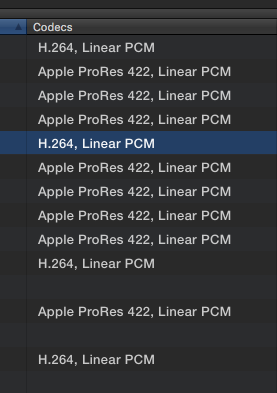
Attached is the browser column 'Codecs'. Why would some of them be H264? Are they created by the 'common clip properties if I selected clips and then Opt-G? there are no options for settings this way, as there is for creating a new CC.
Should I be concerned about these different codecs? Render is still set to proRes.
TIA
Attached is the browser column 'Codecs'. Why would some of them be H264? Are they created by the 'common clip properties if I selected clips and then Opt-G? there are no options for settings this way, as there is for creating a new CC.
Should I be concerned about these different codecs? Render is still set to proRes.
TIA
Please Log in to join the conversation.


15 Sep 2016 18:20 #80000
by davechap
Replied by davechap on topic Codecs of compound clips
I wouldn't worry about the Compound Clip. If the CC is inside a project, the background render is going to look to the project settings for what format to render to.
If you have ProRes 422 HQ footage, I've found that I need to change the project to match. The default render format is ProRes 422 and filters/effects take forever to transcode and render in the background vs keeping it 422 HQ for the project. It just takes more drive space to do so.
If you have ProRes 422 HQ footage, I've found that I need to change the project to match. The default render format is ProRes 422 and filters/effects take forever to transcode and render in the background vs keeping it 422 HQ for the project. It just takes more drive space to do so.
Please Log in to join the conversation.
15 Sep 2016 18:23 #80001
by davechap
Replied by davechap on topic Codecs of compound clips
PS: If you aren't adding effects inside the CC, then it won't render at all (unless it needs to for performance). That's why I said it doesn't matter. If you are editing extensively inside a CC and treating it like a project, then I would be a little more concerned about the render settings. But the default is ProRes 422. I think the browser may just be showing what either the first clip is or perhaps the majority? It's not going to render h264 in the background.
(unless I'm wrong. If so, someone correct me!)
(unless I'm wrong. If so, someone correct me!)
Please Log in to join the conversation.
15 Sep 2016 19:58 #80007
by Gretta
Replied by Gretta on topic Codecs of compound clips
thanx, davechap, no HQ. I had enabled the Codecs column for looking at the archival footage. Never saw it before related to CCs.
thanks again. not worrying…
thanks again. not worrying…
Please Log in to join the conversation.
