




- Posts: 45
- Thank you received: 0
3 Post Moderation Rule for New Boarders (25 Jan 2021)
New boarders will have their posts moderated - Don't worry if you cannot see your post immediately.
Text swap effect or plugin
14 Sep 2016 15:01 #79971
by truelife2
Text swap effect or plugin was created by truelife2
I'm trying to recreate the text effect used at :22 of this video:
vimeo.com/125352948
I know it should be fairly simple, but just wondering if anyone could suggest an existing plugin.
I know it should be fairly simple, but just wondering if anyone could suggest an existing plugin.
Please Log in to join the conversation.
- JarrodMFay
-

- Offline
- Elite Member
-

Less
More
- Posts: 172
- Thank you received: 34
15 Sep 2016 01:37 #79979
by JarrodMFay
Replied by JarrodMFay on topic Text swap effect or plugin
Well, there are many ways to do this effect. Essentially you want to mask the changing text with a feathered mask so that when you animate it going down, it feathers into being transparent. At the same time you have another text element that moves down into its own feathered mask to become visible. Pretty straight forward. Here are three options.
1. Use Motion to do this very simply and easily. Create a group that contains all of your text that will be moving. Add the feathered mask to the group. Animate your text out and in as you like and it will all appear and disappear like you want.
2. Buy a plugin for FCPX (like Fast Mask) to do this same thing inside FCPX. It's a bit more clunky to keyframe in FCPX but you can make it work.
3. Use what comes with FCPX to do it (with a little working around). The main problem with the built in mask effects in FCPX are that they move along with the layer (in this case, the text) so when the text moves down it stays inside the mask and therefore it stays visible. I was able to make it work using the "graduated mask" effect by key framing the center and amount sliders so that the mask moves over the text as the text moves down. Like I said, it's a bit of a workaround but you don't need a plugin to accomplish it.
I hope that helped.
---> Jarrod
1. Use Motion to do this very simply and easily. Create a group that contains all of your text that will be moving. Add the feathered mask to the group. Animate your text out and in as you like and it will all appear and disappear like you want.
2. Buy a plugin for FCPX (like Fast Mask) to do this same thing inside FCPX. It's a bit more clunky to keyframe in FCPX but you can make it work.
3. Use what comes with FCPX to do it (with a little working around). The main problem with the built in mask effects in FCPX are that they move along with the layer (in this case, the text) so when the text moves down it stays inside the mask and therefore it stays visible. I was able to make it work using the "graduated mask" effect by key framing the center and amount sliders so that the mask moves over the text as the text moves down. Like I said, it's a bit of a workaround but you don't need a plugin to accomplish it.
I hope that helped.
---> Jarrod
Please Log in to join the conversation.
- Karsten Schlüter
-

- Offline
- Moderator
-

Less
More
- Posts: 3790
- Thank you received: 718
15 Sep 2016 04:35 #79980
by Karsten Schlüter
when you watch closely, the text rotates around an anchor-point, slightly 'behind' the text ...
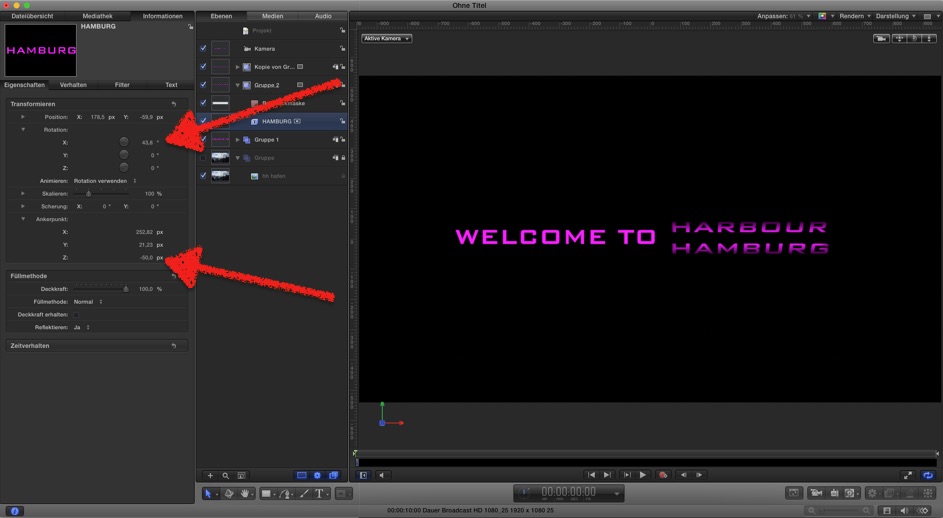
but indeed, easy in Motion, not aware, there's a plugin for such a '3D flip in out'-effect ...........
Replied by Karsten Schlüter on topic Text swap effect or plugin
JarrodMFay wrote: .. Use Motion to do this very simply and easily. Create a group that contains all of your text that will be moving. Add the feathered mask to the group. Animate your text out and in as you like and it will all appear and disappear like you want....
when you watch closely, the text rotates around an anchor-point, slightly 'behind' the text ...
but indeed, easy in Motion, not aware, there's a plugin for such a '3D flip in out'-effect ...........
Please Log in to join the conversation.
- JarrodMFay
-
- Offline
- Elite Member
-
Less
More
- Posts: 172
- Thank you received: 34
15 Sep 2016 13:39 #79991
by JarrodMFay
Replied by JarrodMFay on topic Text swap effect or plugin
Oh yeah. That's true, I had missed that. So basically the anchor points of the "revolving" text elements are set to a negative Z value and then those elements are rotated out (or in). Then the feathered mask on the group gives the disappear or appear effect. I guess you would just have to do this in Motion.
---> Jarrod
---> Jarrod
Please Log in to join the conversation.
19 Sep 2016 01:36 #80071
by truelife2
Replied by truelife2 on topic Text swap effect or plugin
Just to clarify would this be an image mask? Or some other type of mask? My Motion skills are rusty...
www.fcp.co/forum/4-final-cut-pro-x-fcpx/...r-plugin/reply/79991
Please Log in to join the conversation.
19 Sep 2016 01:40 #80073
by truelife2
Replied by truelife2 on topic Text swap effect or plugin
Also, I'm assuming I'd have to make this a 3D project to do the rotation trick?
Please Log in to join the conversation.
- Karsten Schlüter
-
- Offline
- Moderator
-
Less
More
- Posts: 3790
- Thank you received: 718
19 Sep 2016 02:17 #80074
by Karsten Schlüter
Replied by Karsten Schlüter on topic Text swap effect or plugin
.... not yet done, project is stilll 'under construction', therfore not in the plugin-section of this board:
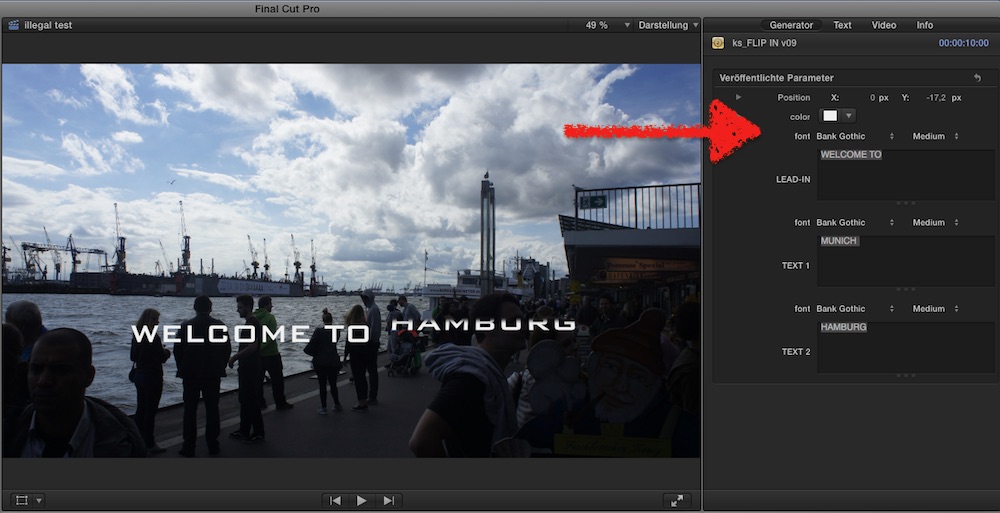
... and I somehow managed to made it a 'generator' instead of a 'title' :blink: (???)
no installer, so, dl and unzip and manually drop it into ~/Movies/Motion templates/generators...
hope to fix it, then avail in the plugin depository ...
... and I somehow managed to made it a 'generator' instead of a 'title' :blink: (???)
no installer, so, dl and unzip and manually drop it into ~/Movies/Motion templates/generators...
hope to fix it, then avail in the plugin depository ...
Please Log in to join the conversation.
19 Sep 2016 02:41 #80075
by truelife2
Replied by truelife2 on topic Text swap effect or plugin
Amazing- thank you for taking the time! Does this allow for the text to roll down or only up? And can I add additional text so that it rotates through 3 or more?
I suppose I can just edit the generator, eh?
Thanks again!
I suppose I can just edit the generator, eh?
Thanks again!
Please Log in to join the conversation.
- Karsten Schlüter
-
- Offline
- Moderator
-
Less
More
- Posts: 3790
- Thank you received: 718
19 Sep 2016 02:52 - 19 Sep 2016 03:35 #80076
by Karsten Schlüter
givin' an inch, you take an ell ... hahaha! :silly:
no, actually 'just' swapping word 1 with word 2 ... in one direction - but nice suggestions for a v1.1.
sure!
it's a quick'n dirty slammed together version, so not everything is properly named & perhaps a few German words ... but no rocket science ...
Don't forget to publish and share here your final version, with variable speeds, selectable ease-in/out, txt-list import, blinkin' light effects, and optional toon-like squeeze'n move :evil:
(kiddin'!!)
Replied by Karsten Schlüter on topic Text swap effect or plugin
truelife2 wrote: …Does this allow for the text to roll down or only up? And can I add additional text so that it rotates through 3 or more? …
givin' an inch, you take an ell ... hahaha! :silly:
no, actually 'just' swapping word 1 with word 2 ... in one direction - but nice suggestions for a v1.1.
truelife2 wrote: …...
I suppose I can just edit the generator, eh?
…
sure!
it's a quick'n dirty slammed together version, so not everything is properly named & perhaps a few German words ... but no rocket science ...
Don't forget to publish and share here your final version, with variable speeds, selectable ease-in/out, txt-list import, blinkin' light effects, and optional toon-like squeeze'n move :evil:
(kiddin'!!)
Last edit: 19 Sep 2016 03:35 by Karsten Schlüter. Reason: spell, lack of coffee
Please Log in to join the conversation.
