


- Posts: 45
- Thank you received: 9
3 Post Moderation Rule for New Boarders (25 Jan 2021)
New boarders will have their posts moderated - Don't worry if you cannot see your post immediately.
Playback issues with FS7 Footage in FCPX
- Threefold Films
-

- Offline
- Senior Member
-

Less
More
15 Sep 2016 10:44 #79986
by Threefold Films
Replied by Threefold Films on topic Playback issues with FS7 Footage in FCPX
I think the link is missing. As far as I can tell though from your description, there is nothing "wrong" with the FS7 slowmo footage. We deal with slowmo from the FS7 every day. It does not play back at 120fps (1sec = 1sec). You just have to speed it up 4x as I mentioned before.
Please Log in to join the conversation.

15 Sep 2016 14:56 #79992
by dgwvideo
Creating history....one edit at a time !
Replied by dgwvideo on topic Playback issues with FS7 Footage in FCPX
Yes this makes perfect sense now. I just read the recording specs of the FS7 and see that the variable rates above 60fps are done in camera. I had originally thought the OP had a clip whose native clip properties were 120FPS but this is not the case when the clip is imported. Threefold Films had the correct answer to this.
Creating history....one edit at a time !
Please Log in to join the conversation.
- Tom Wolsky
-

- Offline
- Moderator
-

15 Sep 2016 17:18 #79998
by Tom Wolsky
Replied by Tom Wolsky on topic Playback issues with FS7 Footage in FCPX
Anyone willing to share a small piece of this media? Maybe upload through WeTransfer?
Really would appreciate it.
Thanks.
Really would appreciate it.
Thanks.
Please Log in to join the conversation.

15 Sep 2016 19:07 #80004
by AppleGuru
If that is the case, then why does it work with other media ? The
I didn't upload any footage yet. I can't release the footage we are working on but I will shot something tomorrow and upload it over the weekend
Replied by AppleGuru on topic Playback issues with FS7 Footage in FCPX
Threefold Films wrote: I think the link is missing. As far as I can tell though from your description, there is nothing "wrong" with the FS7 slowmo footage. We deal with slowmo from the FS7 every day. It does not play back at 120fps (1sec = 1sec). You just have to speed it up 4x as I mentioned before.
If that is the case, then why does it work with other media ? The
I didn't upload any footage yet. I can't release the footage we are working on but I will shot something tomorrow and upload it over the weekend
Please Log in to join the conversation.
- Threefold Films
-
- Offline
- Senior Member
-
Less
More
- Posts: 45
- Thank you received: 9
15 Sep 2016 19:50 #80006
by Threefold Films
Replied by Threefold Films on topic Playback issues with FS7 Footage in FCPX
Because these cameras act more like traditional film cameras. If you shot 48 or 96fps the projector still plays back at 24. So it is slowmo. Getting slowmo out of 50 or 60p really was a bit of a hack which enabled slowmo in cameras which shot those rates for interlaced broadcast. it sort of carried over into DSLR shooting, and also GoPro etc.
Just so it's clear though, what the camera is doing is very much standard behaviour for actual slowmo as I explained earlier. You are either going to have to speed it up if you don't like that it's not real time on import, or slow it down if it comes in sped up to be real time.
I guess the reason it "works" on iPhones is that apple tags the footage as high speed in metadata, or does not set a base rate for the footage.
For me, if you shoot something slowmo, you want it to be slowmo. I don't want that jittery high shutter look of sped up slowmo either ideally that's what the normal speed footage is for. Also what's the point of playing back 240fps at 240fps on screens which have a refresh rate of 60? But your mileage may vary.
Just so it's clear though, what the camera is doing is very much standard behaviour for actual slowmo as I explained earlier. You are either going to have to speed it up if you don't like that it's not real time on import, or slow it down if it comes in sped up to be real time.
I guess the reason it "works" on iPhones is that apple tags the footage as high speed in metadata, or does not set a base rate for the footage.
For me, if you shoot something slowmo, you want it to be slowmo. I don't want that jittery high shutter look of sped up slowmo either ideally that's what the normal speed footage is for. Also what's the point of playing back 240fps at 240fps on screens which have a refresh rate of 60? But your mileage may vary.
Please Log in to join the conversation.
- Tom Wolsky
-
- Offline
- Moderator
-
15 Sep 2016 20:21 #80010
by Tom Wolsky
Replied by Tom Wolsky on topic Playback issues with FS7 Footage in FCPX
"Because these cameras act more like traditional film cameras. If you shot 48 or 96fps the projector still plays back at 24."
That's one reason why we'd really like to see this material. Because wants different here is not that it is the traditional way for recording slo-mo. What you're describing is the difference in playback, the old projector. Software doesn't have that problem. Software sees the frame rate as 120fps and places that back at 120fps, 120 frames in one second. It can do that, the projector couldn't. Software's always been able to do that.
The camera is doing something very different indeed.
iPhone video shoots at 120fps and flags it as slomo. Consumer apps like iMovie read the slomo flag and play the video back as slomo. iMovie as no problem with 24, 25, 30, 60. It plays them all correctly at the frame rate per second. 24fps isn't speeded up because the software only plays video at 30. It's plays it at its frame rate. It's only when it sees a flag that shows slomo that it doesn't play at the frame rate of the video. Software always been doing this, adjusting its playback for the actual speed to the recording.
What's different is what these cameras are doing that prevents the software from playing back at its supposed frame rate.
"Also what's the point of playing back 240fps at 240fps on screens which have a refresh rate of 60? But your mileage may vary."
You're talking about different things, what production software can do and what delivery formats are. Normally FCP will only do delivery output up to 60fps, even though they can perfectly well playback 240fps and try 240 per second. This is pretty common among most edit systems and has been since software editing's been around.
That's one reason why we'd really like to see this material. Because wants different here is not that it is the traditional way for recording slo-mo. What you're describing is the difference in playback, the old projector. Software doesn't have that problem. Software sees the frame rate as 120fps and places that back at 120fps, 120 frames in one second. It can do that, the projector couldn't. Software's always been able to do that.
The camera is doing something very different indeed.
iPhone video shoots at 120fps and flags it as slomo. Consumer apps like iMovie read the slomo flag and play the video back as slomo. iMovie as no problem with 24, 25, 30, 60. It plays them all correctly at the frame rate per second. 24fps isn't speeded up because the software only plays video at 30. It's plays it at its frame rate. It's only when it sees a flag that shows slomo that it doesn't play at the frame rate of the video. Software always been doing this, adjusting its playback for the actual speed to the recording.
What's different is what these cameras are doing that prevents the software from playing back at its supposed frame rate.
"Also what's the point of playing back 240fps at 240fps on screens which have a refresh rate of 60? But your mileage may vary."
You're talking about different things, what production software can do and what delivery formats are. Normally FCP will only do delivery output up to 60fps, even though they can perfectly well playback 240fps and try 240 per second. This is pretty common among most edit systems and has been since software editing's been around.
Please Log in to join the conversation.
- Tom Wolsky
-
- Offline
- Moderator
-
15 Sep 2016 20:35 - 15 Sep 2016 20:39 #80012
by Tom Wolsky
Replied by Tom Wolsky on topic Playback issues with FS7 Footage in FCPX
Just to add, FCP does see the slomo flag on media that has it, it just doesn't play it back in slomo, but in actual real time. How would it play it back in slomo? What would it set as the base playback frame rate? 23.98, 24, 25, 29.97, 30, 50, 59.94, 60?
Last edit: 15 Sep 2016 20:39 by Tom Wolsky.
Please Log in to join the conversation.
- Threefold Films
-
- Offline
- Senior Member
-
Less
More
- Posts: 45
- Thank you received: 9
15 Sep 2016 20:51 #80014
by Threefold Films
Replied by Threefold Films on topic Playback issues with FS7 Footage in FCPX
I'm totally not debating what the software is capable of, or what technology can achieve, or even wether fcpx is dealing with this in the right or wrong way. I'm simply explaining that the 120fps footage is not 120fps, it's 30fps as far as fcpx is concerned, it was simply shot at 120. Therefore what the OP is seeing is not wrong. It's to be expected. And I totally understand that if you don't deal with much slowmo footage it might seem confusing. If I have time tomorrow, I'll see if I can post some clips too to demonstrate.
Please Log in to join the conversation.
15 Sep 2016 22:07 #80015
by dgwvideo
Creating history....one edit at a time !
Replied by dgwvideo on topic Playback issues with FS7 Footage in FCPX
Here are some results of a test I just did with a Sony PXW-X180. I know it's not the FS7 but uses the same basic S&Q Motion function. This allows 120FPS in 1280x720 whereas the FS7 actually handles 180 fps in some modes.
I shot a short clip at 120 fps and then inspected the file in Media info. The first two screenshots are from Media Info revealing the video framerate is indeed 59.94 and the Capture Framerate is 119.880 fps. The camera recording mode was set to 1280 x 720 60P.
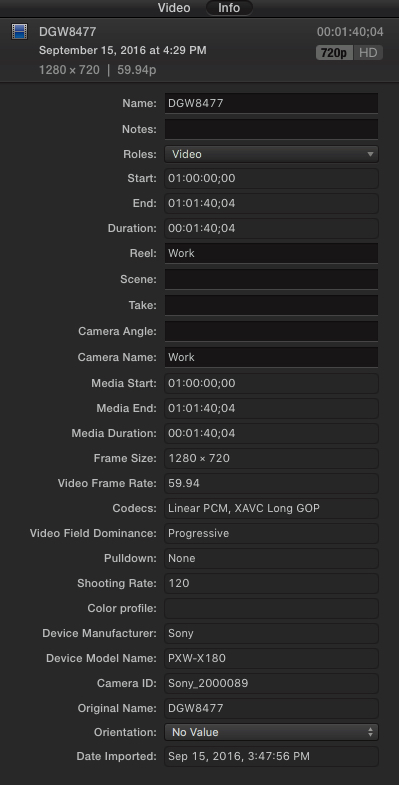
The third screen grab is from the FCPX inspector window revealing the video framerate is 59.94.
I created a new library and project for just this clip. I set the project settings to be based on the first clip. When I dropped the clip into the timeline, it played in perfect slow motion. I then selected the clip and thru the retime menu set it for "Automatic Speed". The clip length did not extend at all, but the retime bar appeared above it in green and showed 100%.
So, it certainly appears that Sony's S&Q function handles this in camera and when imported to FCPX it retains the slow motion metadata information. We hardly ever use this because in the X180 it is limited to the XAVC-L codec and 1280 x 720 frame size. BUT...I expect the FS7 and other Sony cameras with S&Q react similar.
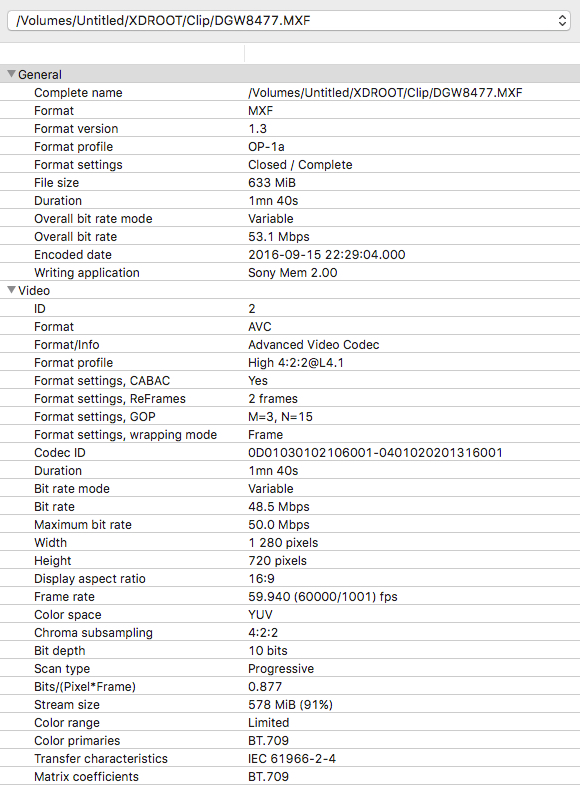
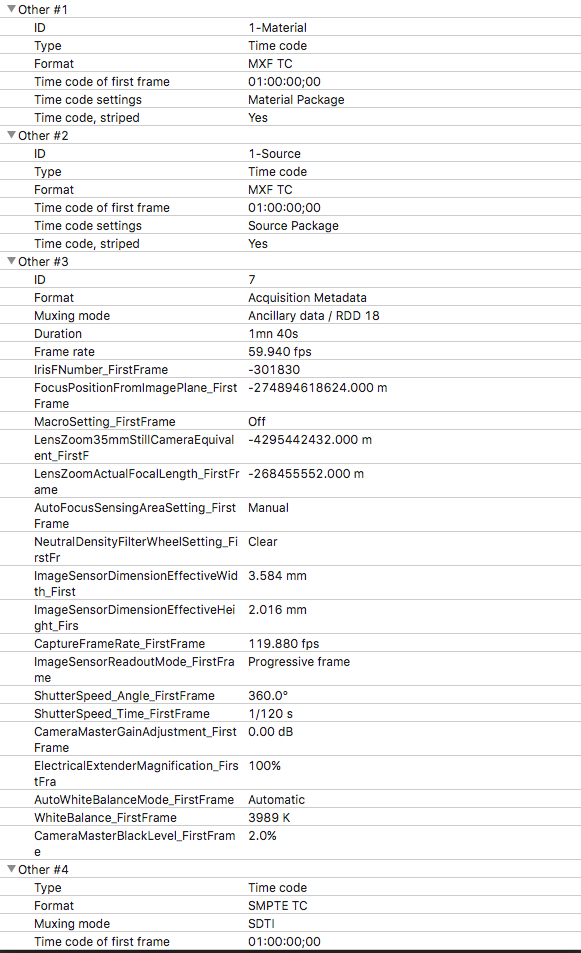
I shot a short clip at 120 fps and then inspected the file in Media info. The first two screenshots are from Media Info revealing the video framerate is indeed 59.94 and the Capture Framerate is 119.880 fps. The camera recording mode was set to 1280 x 720 60P.
The third screen grab is from the FCPX inspector window revealing the video framerate is 59.94.
I created a new library and project for just this clip. I set the project settings to be based on the first clip. When I dropped the clip into the timeline, it played in perfect slow motion. I then selected the clip and thru the retime menu set it for "Automatic Speed". The clip length did not extend at all, but the retime bar appeared above it in green and showed 100%.
So, it certainly appears that Sony's S&Q function handles this in camera and when imported to FCPX it retains the slow motion metadata information. We hardly ever use this because in the X180 it is limited to the XAVC-L codec and 1280 x 720 frame size. BUT...I expect the FS7 and other Sony cameras with S&Q react similar.
Creating history....one edit at a time !
Please Log in to join the conversation.
- Threefold Films
-
- Offline
- Senior Member
-
Less
More
- Posts: 45
- Thank you received: 9
16 Sep 2016 09:42 #80024
by Threefold Films
Replied by Threefold Films on topic Playback issues with FS7 Footage in FCPX
Here's a Wetranfer to some 150fps slowmo footage from the FS7. I'm in the UK, so it's PAL (6x slower)
we.tl/PuOMJyf9Ia
It's an XDROOT folder, so that it's possible to go through the import process, as you would with a card that has been offloaded to a drive. It's important not to go looking for the individual .MXF files within the folder structure.
Hope this demonstrates what the OP is seeing. I do have some Alexa slowmo and RED Dragon slowmo too, but the files are massive. They import in exactly the same way.
we.tl/PuOMJyf9Ia
It's an XDROOT folder, so that it's possible to go through the import process, as you would with a card that has been offloaded to a drive. It's important not to go looking for the individual .MXF files within the folder structure.
Hope this demonstrates what the OP is seeing. I do have some Alexa slowmo and RED Dragon slowmo too, but the files are massive. They import in exactly the same way.
Please Log in to join the conversation.
- Scrubelicious
-

- Offline
- Platinum Member
-

Less
More
- Posts: 1228
- Thank you received: 114
16 Sep 2016 09:53 - 16 Sep 2016 09:54 #80025
by Scrubelicious
Replied by Scrubelicious on topic Playback issues with FS7 Footage in FCPX
I wonder how Final Cut Pro X handles RED footage when shot on high speed but project fps set to 24fps.
Will have to try that out...
Threefold Films just saw your message, you already tested it?
Will have to try that out...
Threefold Films just saw your message, you already tested it?
Last edit: 16 Sep 2016 09:54 by Scrubelicious.
Please Log in to join the conversation.
- Threefold Films
-
- Offline
- Senior Member
-
Less
More
- Posts: 45
- Thank you received: 9
16 Sep 2016 10:05 #80026
by Threefold Films
Replied by Threefold Films on topic Playback issues with FS7 Footage in FCPX
Yep, the point is that shooting high speed in camera, it's shot at high fps. But what is recorded to camera inherits the cameras "base setting" in Sony terminology or "project frame rate" in Arri terminology. or "Project time base" in red terminology. Usually this can be 24/25/50/60 depending on what you want.
Please Log in to join the conversation.
16 Sep 2016 12:12 #80027
by AppleGuru
Replied by AppleGuru on topic Playback issues with FS7 Footage in FCPX
So if it was set correctly on the SONY FS7 it would work in FCPX using the Automatic Speed?
Thanks for the info!
Thanks for the info!
Please Log in to join the conversation.
- Threefold Films
-
- Offline
- Senior Member
-
Less
More
- Posts: 45
- Thank you received: 9
16 Sep 2016 12:50 #80029
by Threefold Films
Replied by Threefold Films on topic Playback issues with FS7 Footage in FCPX
No, not in this case. There isn't a setting for the base rate of the camera to be 120fps.
Please Log in to join the conversation.
16 Sep 2016 13:13 #80031
by dgwvideo
Agreed. I should have mentioned that the results I posted were from an import directly from the XDROOT folder (shown in the file path). I only showed the mxf file for clarity in how the media properties are read. In summary, the in camera over and under-cranking does NOT show up at that particular frame rate when imported into FCPX but rather the base frame rate of the camera setting as mentioned.
Creating history....one edit at a time !
Replied by dgwvideo on topic Playback issues with FS7 Footage in FCPX
It's an XDROOT folder, so that it's possible to go through the import process, as you would with a card that has been offloaded to a drive. It's important not to go looking for the individual .MXF files within the folder structure.
Agreed. I should have mentioned that the results I posted were from an import directly from the XDROOT folder (shown in the file path). I only showed the mxf file for clarity in how the media properties are read. In summary, the in camera over and under-cranking does NOT show up at that particular frame rate when imported into FCPX but rather the base frame rate of the camera setting as mentioned.
Creating history....one edit at a time !
Please Log in to join the conversation.
- Tom Wolsky
-
- Offline
- Moderator
-
16 Sep 2016 13:20 #80032
by Tom Wolsky
Replied by Tom Wolsky on topic Playback issues with FS7 Footage in FCPX
Thank you very much. Really appreciated.
Please Log in to join the conversation.
- Threefold Films
-
- Offline
- Senior Member
-
Less
More
- Posts: 45
- Thank you received: 9
16 Sep 2016 13:33 #80034
by Threefold Films
Replied by Threefold Films on topic Playback issues with FS7 Footage in FCPX
Pleasure, sorry about the content! just grabbed quickly this morning.
Please Log in to join the conversation.
- Tom Wolsky
-
- Offline
- Moderator
-
16 Sep 2016 21:49 #80040
by Tom Wolsky
Replied by Tom Wolsky on topic Playback issues with FS7 Footage in FCPX
Interesting that Media Info doesn't show the capture frame rate for the FS7 media. FCP sees it though.
Please Log in to join the conversation.
