


- Posts: 1
- Thank you received: 0
3 Post Moderation Rule for New Boarders (25 Jan 2021)
New boarders will have their posts moderated - Don't worry if you cannot see your post immediately.
Re Import not working.
- mark.hitchings
-
 Topic Author
- Offline
- New Member
-

Less
More
09 Sep 2016 08:57 #79768
by mark.hitchings
Re Import not working. was created by mark.hitchings
Hi.
I am working on a project which to be honest I didn't spot that the files are being read from the SD Card that the files were recorded on from the camera. Even after importing them!!!
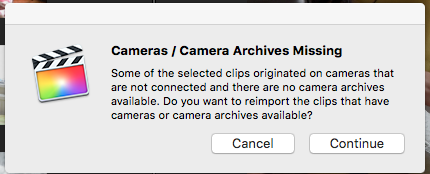
Now the problem is when I go to reimport the files which would be the standard way of dealing with it, it comes up with the error message I have attached. Which essentially says Camera Archives missing. Yet it seems to be reading the SD card to show the files in the first place... This is confusing me beyond words. Could someone help me with a solution as I have edited a project that I don't really don't want to re edit.
Cheers Guys
Mark
I am working on a project which to be honest I didn't spot that the files are being read from the SD Card that the files were recorded on from the camera. Even after importing them!!!
Now the problem is when I go to reimport the files which would be the standard way of dealing with it, it comes up with the error message I have attached. Which essentially says Camera Archives missing. Yet it seems to be reading the SD card to show the files in the first place... This is confusing me beyond words. Could someone help me with a solution as I have edited a project that I don't really don't want to re edit.
Cheers Guys
Mark
Please Log in to join the conversation.

09 Sep 2016 14:59 #79775
by VidGreg
Replied by VidGreg on topic Re Import not working.
Hi Mark
Welcome to the forums.
Just click the "Continue" button. FCPX will import the missing clips, which may be all of the them. This is of course if the SD card contains all of the media. Did you use more than 1 card?
If you have altered the SD card in any way, then FCPX may or not be able to recover missing files.
Assuming the original media is available, you will not lose any editing you did.
One aspect of FCPX is that it will allow you to begin editing while importing, but if FCPX does not finish the importation and you quit FCPX then you will get missing files. Importing is a background process and gets suspended while you edit. Make sure the import process finishes before quitting FCPX by opening up the background process window and making sure import is 100% finished.
Personally, I like to make a "Camera Archive" onto a separate external hdd immediately upon inserting SD card, then I "Import" the media onto a another external "Media" drive to edit from.
Archives and Import are separate and different operations.
Hope this helps, Greg
Welcome to the forums.
Just click the "Continue" button. FCPX will import the missing clips, which may be all of the them. This is of course if the SD card contains all of the media. Did you use more than 1 card?
If you have altered the SD card in any way, then FCPX may or not be able to recover missing files.
Assuming the original media is available, you will not lose any editing you did.
One aspect of FCPX is that it will allow you to begin editing while importing, but if FCPX does not finish the importation and you quit FCPX then you will get missing files. Importing is a background process and gets suspended while you edit. Make sure the import process finishes before quitting FCPX by opening up the background process window and making sure import is 100% finished.
Personally, I like to make a "Camera Archive" onto a separate external hdd immediately upon inserting SD card, then I "Import" the media onto a another external "Media" drive to edit from.
Archives and Import are separate and different operations.
Hope this helps, Greg
Please Log in to join the conversation.
