


- Posts: 14
- Thank you received: 0
3 Post Moderation Rule for New Boarders (25 Jan 2021)
New boarders will have their posts moderated - Don't worry if you cannot see your post immediately.
Filter Multiclips in order of Content created
06 Sep 2016 15:52 #79653
by ybr
Filter Multiclips in order of Content created was created by ybr
Hi guys,
I am working on a two-camera show with many hours of footage shot over many days, and many of the shots are synched into multicams. My issue is trying to sort through the material in order of content created in filmstrip mode in the browser.
Because the show is shot over a long span of time, it's important for me to be able to filter by content created so I can work my way through the day, using ACam and BCam footage, but the problem arises when trying to integrate the Multicam clips. The content created date for the Multicams naturally falls on the day they where created, not when the material was shot, so they all end up at the bottom of the Event, not so great for me. I can name the Multi the same as the ACam clip for example and sort by name, but then all my BCam footage is filtered to the bottom, also not great for me.
The only way I've thought of is using "Modify --> Adjust Content Created Date and Time" after each Multicam is created, but that is very long and tedious.
Can anyone think of quicker/better way to achieve this? If not, I can get the assitant to use Plural Eyes to make a big string out project with multicams and everything in there, but I'd much rather work from the browser.
Thanks,
Yves
I am working on a two-camera show with many hours of footage shot over many days, and many of the shots are synched into multicams. My issue is trying to sort through the material in order of content created in filmstrip mode in the browser.
Because the show is shot over a long span of time, it's important for me to be able to filter by content created so I can work my way through the day, using ACam and BCam footage, but the problem arises when trying to integrate the Multicam clips. The content created date for the Multicams naturally falls on the day they where created, not when the material was shot, so they all end up at the bottom of the Event, not so great for me. I can name the Multi the same as the ACam clip for example and sort by name, but then all my BCam footage is filtered to the bottom, also not great for me.
The only way I've thought of is using "Modify --> Adjust Content Created Date and Time" after each Multicam is created, but that is very long and tedious.
Can anyone think of quicker/better way to achieve this? If not, I can get the assitant to use Plural Eyes to make a big string out project with multicams and everything in there, but I'd much rather work from the browser.
Thanks,
Yves
Please Log in to join the conversation.
06 Sep 2016 16:51 #79654
by davechap
Replied by davechap on topic Filter Multiclips in order of Content created
The fastest and easiest thing that comes to mind is to create keyword collections for each day and apply the keywords to the multicam clips. You could also add the date into the Scene or Notes fields to sort in the browser.
Please Log in to join the conversation.
06 Sep 2016 17:09 #79656
by ybr
Replied by ybr on topic Filter Multiclips in order of Content created
Hi Davechap,
Thanks for the reply, but it doesn't solve the issue because regardless of how I filter the material, either on the Event level, or in the same keyword collections by date as you suggest (which they already are), the multicams end up at the bottom of the list because of the date created.
As for your suggestion of adding the date in the Scene or Notes fields, it would be much too time-consuming because it would mean doing that to all the clips, multicam or no, and we have TONS of material, so that's a no go!
in actuality, I think what I'm looking for is simply not possible other than the "Modify --> Adjust Content Created Date and Time" for each Multicam clip, but this is time-consuming to say the least. Just hoping for a magic bullet.
Thanks for the reply, but it doesn't solve the issue because regardless of how I filter the material, either on the Event level, or in the same keyword collections by date as you suggest (which they already are), the multicams end up at the bottom of the list because of the date created.
As for your suggestion of adding the date in the Scene or Notes fields, it would be much too time-consuming because it would mean doing that to all the clips, multicam or no, and we have TONS of material, so that's a no go!
in actuality, I think what I'm looking for is simply not possible other than the "Modify --> Adjust Content Created Date and Time" for each Multicam clip, but this is time-consuming to say the least. Just hoping for a magic bullet.
Please Log in to join the conversation.
- Scott Markowitz
-

- Offline
- Elite Member
-

Less
More
- Posts: 161
- Thank you received: 31
06 Sep 2016 21:05 #79684
by Scott Markowitz
Replied by Scott Markowitz on topic Filter Multiclips in order of Content created
Hey Davechap.
Welcome to the forum. I would agree with you that it's currently not possible to achieve what you're looking to do.
I would suggest that you begin to approach your problem from a different trajectory.
Here's my suggestion:
1. Create the multicams in the same order that they were originally shot in.
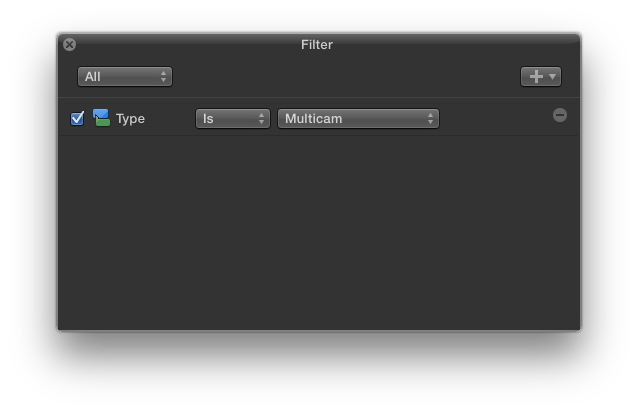
2. Make a Smart Collection
Type Is Multicam
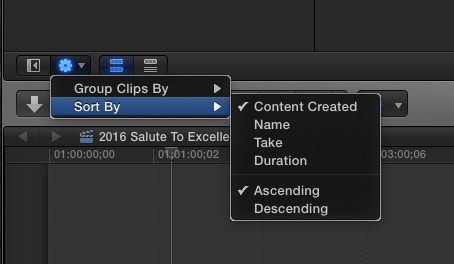
3. Configure Browser
Sort by Content Created
This way, the multicams will appear in the same order as they would had the software been able to do what you wish.
It won't be in the same keyword collections as your original media, but the net effect should be the same for your editorial purposes.
This, in fact, is how I usually arrange my browser when dealing with many multicam clips. In my process, I rarely have any need to go back to the original clips once multicams are generated, so my preference is to NOT see them while editing.
Hope this helps.
Cheers,
Scott
Welcome to the forum. I would agree with you that it's currently not possible to achieve what you're looking to do.
I would suggest that you begin to approach your problem from a different trajectory.
Here's my suggestion:
1. Create the multicams in the same order that they were originally shot in.
2. Make a Smart Collection
Type Is Multicam
3. Configure Browser
Sort by Content Created
This way, the multicams will appear in the same order as they would had the software been able to do what you wish.
It won't be in the same keyword collections as your original media, but the net effect should be the same for your editorial purposes.
This, in fact, is how I usually arrange my browser when dealing with many multicam clips. In my process, I rarely have any need to go back to the original clips once multicams are generated, so my preference is to NOT see them while editing.
Hope this helps.
Cheers,
Scott
Please Log in to join the conversation.
