


- Posts: 971
- Thank you received: 46
3 Post Moderation Rule for New Boarders (25 Jan 2021)
New boarders will have their posts moderated - Don't worry if you cannot see your post immediately.
How to mask out spot on floor
Less
More
31 Aug 2016 13:35 #79538
by MsJustine
How to mask out spot on floor was created by MsJustine
Hi All
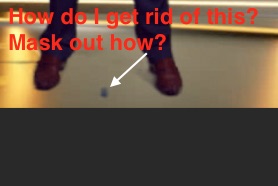
I have almost finished a project, there is 1 scene where the talent stands, his position to stand is marked on the floor, and I cannot find a way to "mask" it out so it is not seen after applying chroma-key.
I have tried cropping, but the crop cuts off his feet, it is on the floor midway between the shoes, grrrh!!!
Justine
I have almost finished a project, there is 1 scene where the talent stands, his position to stand is marked on the floor, and I cannot find a way to "mask" it out so it is not seen after applying chroma-key.
I have tried cropping, but the crop cuts off his feet, it is on the floor midway between the shoes, grrrh!!!
Justine
Please Log in to join the conversation.
- Karsten Schlüter
-

- Offline
- Moderator
-

Less
More
- Posts: 3790
- Thank you received: 718
31 Aug 2016 14:32 #79543
by Karsten Schlüter
Replied by Karsten Schlüter on topic How to mask out spot on floor
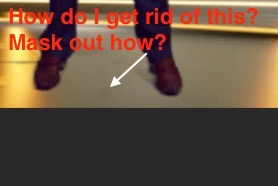
- double the lane = drag'n shift-up while holding alt (or opt)
- crop top lane to a little spot BESIDE the marker
- transform/shift top lane over marker
Please Log in to join the conversation.
- Scott Markowitz
-

- Offline
- Elite Member
-

Less
More
- Posts: 161
- Thank you received: 31
31 Aug 2016 14:34 #79544
by Scott Markowitz
Replied by Scott Markowitz on topic How to mask out spot on floor
Is the shot on a tripod?
Here's the first approach I would take.
1. Duplicate the same shot as a layer above the original shot.
2. Pick a frame where the lighting is most representative of the entire shot, and turn that into a freeze frame
3. retime the freeze frame to last the entire duration of the original shot, and trim away any of the remaining part of the shot.
4. adda "Draw mask" effect to the freeze frame clip, and draw a rough shape around a CLEAN part of the frame next to the talent marker.
5. Add feathering to soften the outlines of the mask
6. Use Transform to move this tiny masked layer over the talent marker that you want to get rid of.
7. animate the position of this transform as needed to keep the object covered by your cleaned up, masked layer.
If you have Slice-X, theres a great removal plugin that allows you to track the offending little bit for a precise replacement job.
(Is it too late to ask Apple for a planar tracker to be built into FCPX 10.3?)
Cheers
Scott
Here's the first approach I would take.
1. Duplicate the same shot as a layer above the original shot.
2. Pick a frame where the lighting is most representative of the entire shot, and turn that into a freeze frame
3. retime the freeze frame to last the entire duration of the original shot, and trim away any of the remaining part of the shot.
4. adda "Draw mask" effect to the freeze frame clip, and draw a rough shape around a CLEAN part of the frame next to the talent marker.
5. Add feathering to soften the outlines of the mask
6. Use Transform to move this tiny masked layer over the talent marker that you want to get rid of.
7. animate the position of this transform as needed to keep the object covered by your cleaned up, masked layer.
If you have Slice-X, theres a great removal plugin that allows you to track the offending little bit for a precise replacement job.
(Is it too late to ask Apple for a planar tracker to be built into FCPX 10.3?)
Cheers
Scott
Please Log in to join the conversation.
Less
More
- Posts: 971
- Thank you received: 46
31 Aug 2016 15:05 #79548
by MsJustine
Replied by MsJustine on topic How to mask out spot on floor
WWMD? What would Macgyver do? Simple solution, draw mask around offending object, invert key, and well Macgyver lives on...
Please Log in to join the conversation.


31 Aug 2016 20:31 #79553
by joema
Replied by joema on topic How to mask out spot on floor
You can also remove it with CoreMelt's SliceX:
www.coremelt.com/videos/slicex-remove-objects.html
Please Log in to join the conversation.
