


- Posts: 80
- Thank you received: 0
3 Post Moderation Rule for New Boarders (25 Jan 2021)
New boarders will have their posts moderated - Don't worry if you cannot see your post immediately.
HDV capture?
28 Aug 2016 04:23 #79470
by Nemo
HDV capture? was created by Nemo
I am new to FCPX but have been using FCP7 successfully for many years.
When capturing HDV footage into FCPX will the HDV format and quality be maintained when bumping the completed project to 'file'? From my test observations it seems like there is a definite loss of quality. I have an excellent monitor but the sharpness seems to be lacking.
Assistance would be greatly appreciated. Thank you.
When capturing HDV footage into FCPX will the HDV format and quality be maintained when bumping the completed project to 'file'? From my test observations it seems like there is a definite loss of quality. I have an excellent monitor but the sharpness seems to be lacking.
Assistance would be greatly appreciated. Thank you.
Please Log in to join the conversation.
- Scott Markowitz
-

- Offline
- Elite Member
-

Less
More
- Posts: 161
- Thank you received: 31
29 Aug 2016 15:04 - 29 Aug 2016 15:06 #79485
by Scott Markowitz
Hey Nemo.
Welcome to the forum!
There will be no "loss" of quality. FCPX maintains a very high level of image quality all throughout the process.
What you're experiencing is one of two things (Or combo of both)
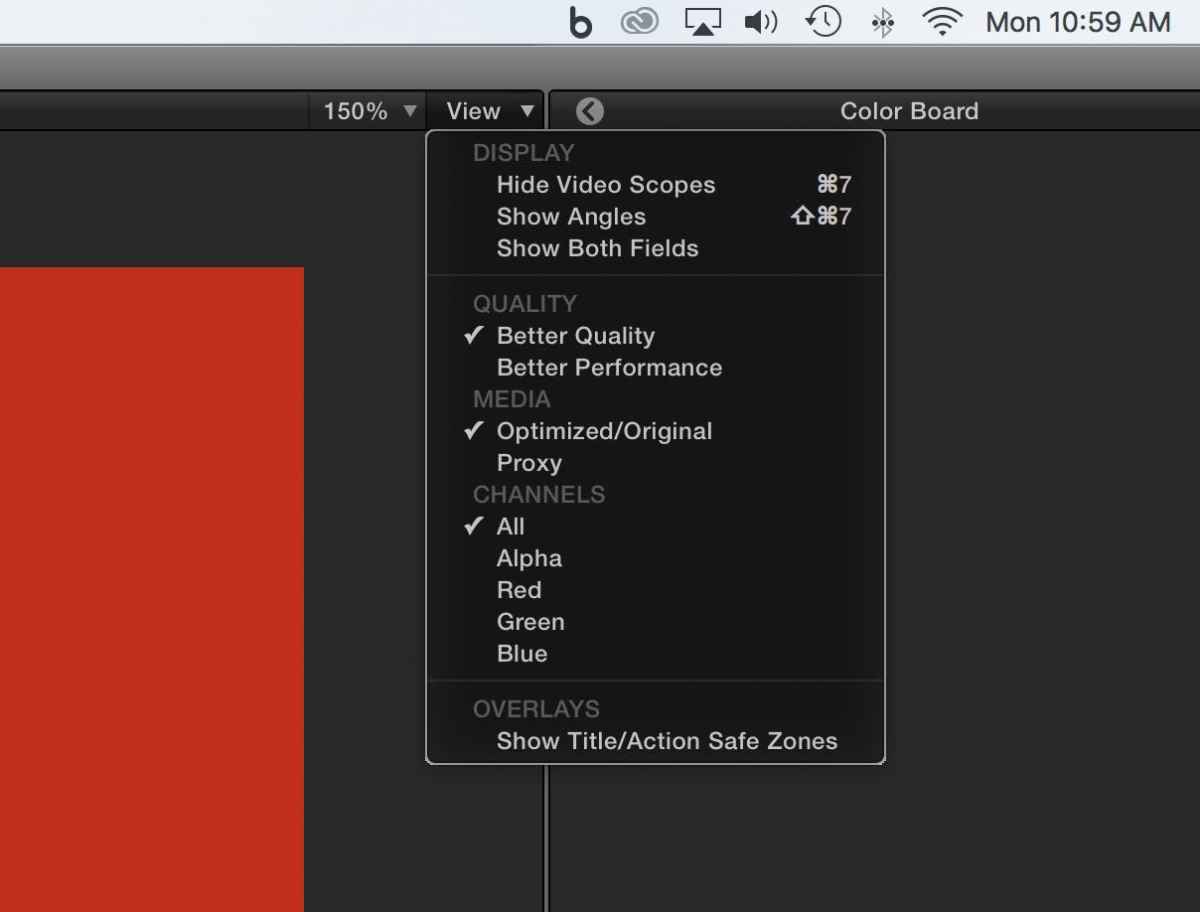
1. In the Viewer Settings, check to make sure that the "Quality" setting is set to "Better Quality" and not to "Better Performance"
2. Check that scale percentage is set to 100%, and not greater.
Also remember, HDV is not even close to being a great acquisition format to begin with. Any manipulation of the scale will compromise what kind of results you end up with. If you need to scale the footage up, then try applying the built-in sharpness effect.
Replied by Scott Markowitz on topic HDV capture?
Hey Nemo.
Welcome to the forum!
There will be no "loss" of quality. FCPX maintains a very high level of image quality all throughout the process.
What you're experiencing is one of two things (Or combo of both)
1. In the Viewer Settings, check to make sure that the "Quality" setting is set to "Better Quality" and not to "Better Performance"
2. Check that scale percentage is set to 100%, and not greater.
Also remember, HDV is not even close to being a great acquisition format to begin with. Any manipulation of the scale will compromise what kind of results you end up with. If you need to scale the footage up, then try applying the built-in sharpness effect.
Last edit: 29 Aug 2016 15:06 by Scott Markowitz.
Please Log in to join the conversation.
29 Aug 2016 16:55 #79490
by bogiesan
Replied by bogiesan on topic HDV capture?
What HDV device and how will you be attaching it to the Macintosh?
Please Log in to join the conversation.
29 Aug 2016 19:26 #79496
by Nemo
Replied by Nemo on topic HDV capture?
Thank you for your response to my question. Since posting the question I have found the answer which should been apparent to me. Thanks again.
Please Log in to join the conversation.
