


- Posts: 1
- Thank you received: 0
3 Post Moderation Rule for New Boarders (25 Jan 2021)
New boarders will have their posts moderated - Don't worry if you cannot see your post immediately.
Masking transition
25 Aug 2016 20:42 #79449
by apollovic
Masking transition was created by apollovic
how can one achieve this within fcpx:
@ 00:44 seconds - vimeo.com/178433501
the wipe transition as the beam enters and exits the frame to the girl walking.
@ 00:44 seconds - vimeo.com/178433501
the wipe transition as the beam enters and exits the frame to the girl walking.
Please Log in to join the conversation.
- Karsten Schlüter
-

- Offline
- Moderator
-

Less
More
- Posts: 3790
- Thank you received: 718
01 Sep 2016 14:23 #79570
by Karsten Schlüter
Replied by Karsten Schlüter on topic Masking transition
that's a 'hidden cut', or 'natural dissolve', no effect, but done on recording:
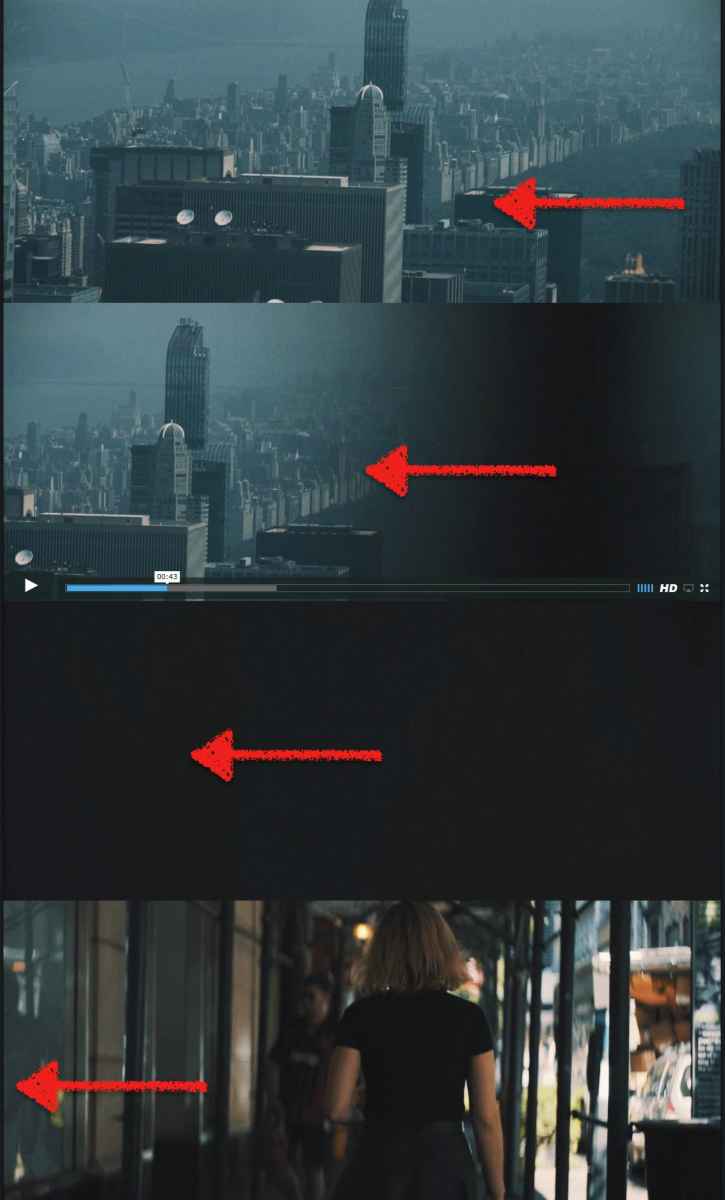
Some close-up obstacle = out of focus comes into view in clip A, and moves out with clip B.
By watching frame-by-frame, you'll notice, there's a full frame just black = that's where you cut.
Trick is, to have matching movements (and matching colors, esp. both 'blacks') ....-
You could emulate that, by moving/keyframe a black, blurred bar (cropped solid generator) across two clips ... doubt, that looks as 'organic' as real obstacles.
(btw: have seen movie-makers wiping some piece cardboard in front of their lense :woohoo: )
Some close-up obstacle = out of focus comes into view in clip A, and moves out with clip B.
By watching frame-by-frame, you'll notice, there's a full frame just black = that's where you cut.
Trick is, to have matching movements (and matching colors, esp. both 'blacks') ....-
You could emulate that, by moving/keyframe a black, blurred bar (cropped solid generator) across two clips ... doubt, that looks as 'organic' as real obstacles.
(btw: have seen movie-makers wiping some piece cardboard in front of their lense :woohoo: )
Please Log in to join the conversation.

01 Sep 2016 20:51 #79574
by archhill
Replied by archhill on topic Masking transition
As Karsten said, I've also done the exact same effect by creating a Shape from the Generator Browser in the Effects Palette and applying a Guassian Blur from the Effects Browser. Then animate that shape across an edit, making sure there is at least one full frame of black at the edit. Sometimes I've seen a slight lens aberration from an object in the foreground but I've cheated this quite a few times, even for an over-the-shoulder shot. Just don't linger on it too long 
Please Log in to join the conversation.
- nils.dettmann
-

- Offline
- Elite Member
-

Less
More
- Posts: 161
- Thank you received: 13
02 Sep 2016 06:44 #79582
by nils.dettmann
Replied by nils.dettmann on topic Masking transition
Depending on the moving object you don´t even need a black frame.
If you eg. have a person passing in the foreground, from right to left:
1. Draw a mask with only one side within the video frame. The border within the frame should resemble the right side of the person. Feather the mask.
2. Animate it from right to left with the right border of the person.
Even easier but with less control:
Just put the border of a swipe transition on the following edge of the moving object.
It even has feather control for the edge.
If you eg. have a person passing in the foreground, from right to left:
1. Draw a mask with only one side within the video frame. The border within the frame should resemble the right side of the person. Feather the mask.
2. Animate it from right to left with the right border of the person.
Even easier but with less control:
Just put the border of a swipe transition on the following edge of the moving object.
It even has feather control for the edge.
Please Log in to join the conversation.
- Karsten Schlüter
-
- Offline
- Moderator
-
Less
More
- Posts: 3790
- Thank you received: 718
02 Sep 2016 08:14 #79586
by Karsten Schlüter
Replied by Karsten Schlüter on topic Masking transition
... it asked, it demand for a free plug-in! 
made one, avail in our depository:
www.fcp.co/forum/transitions/25892-obsta...sed-the-camera#79585
made one, avail in our depository:
www.fcp.co/forum/transitions/25892-obsta...sed-the-camera#79585
Please Log in to join the conversation.
