


- Posts: 12
- Thank you received: 1
3 Post Moderation Rule for New Boarders (25 Jan 2021)
New boarders will have their posts moderated - Don't worry if you cannot see your post immediately.
Problem with Ken Burns Effect
24 Aug 2016 23:21 - 24 Aug 2016 23:27 #79418
by fabyoga
Problem with Ken Burns Effect was created by fabyoga
Hi,
every time I try to apply the Ken Burns effect I face the same problem. I choose a start and end area, but when I apply it the start area suddenly is scaled differently. See attached screenshots (see how there is a lot at the right side and at the top cut off). It suddenly shows only a smaller part of the picture at the start than what I initially chose as the starting area. Do you have any ideas what causes this problem and how this can be resolved?
Thanks,
Fabian
every time I try to apply the Ken Burns effect I face the same problem. I choose a start and end area, but when I apply it the start area suddenly is scaled differently. See attached screenshots (see how there is a lot at the right side and at the top cut off). It suddenly shows only a smaller part of the picture at the start than what I initially chose as the starting area. Do you have any ideas what causes this problem and how this can be resolved?
Thanks,
Fabian

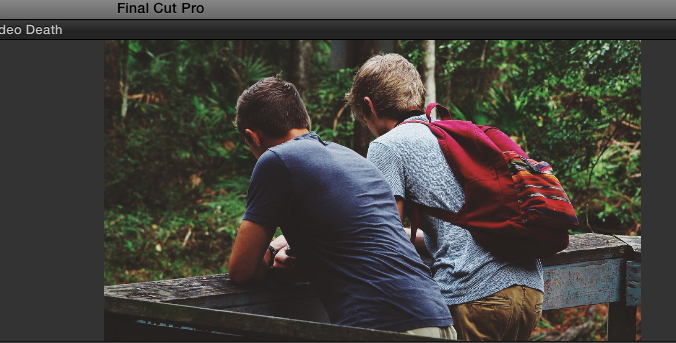
Last edit: 24 Aug 2016 23:27 by fabyoga.
Please Log in to join the conversation.
- Tom Wolsky
-

- Offline
- Moderator
-

24 Aug 2016 23:37 #79419
by Tom Wolsky
Replied by Tom Wolsky on topic Problem with Ken Burns Effect
Have you done any scaling or other changes to the image aside from the Ken Burns?
Please Log in to join the conversation.
24 Aug 2016 23:45 #79420
by fabyoga
Replied by fabyoga on topic Problem with Ken Burns Effect
Hi Tom, thanks for your reply. Yes, I increased the size with the transforming option to remove the black borders on the side.
Please Log in to join the conversation.
- Tom Wolsky
-
- Offline
- Moderator
-
25 Aug 2016 00:15 #79421
by Tom Wolsky
Replied by Tom Wolsky on topic Problem with Ken Burns Effect
Try resetting the scale and image to default conform. Let Ken Burns do the cropping for you.
Please Log in to join the conversation.
25 Aug 2016 00:29 #79422
by fabyoga
Replied by fabyoga on topic Problem with Ken Burns Effect
Oh yes I think that works!! I will try with a few more and see if the issue comes up again. Thank you so much Tom! That kind of drove me crazy 
Please Log in to join the conversation.
