


- Posts: 3
- Thank you received: 0
3 Post Moderation Rule for New Boarders (25 Jan 2021)
New boarders will have their posts moderated - Don't worry if you cannot see your post immediately.
MXF files showing up as green blurs in FCP X. Halp!
14 Aug 2016 03:56 #79196
by max.brown
MXF files showing up as green blurs in FCP X. Halp! was created by max.brown
Hi all,
First time poster n the forum- needing help from the more experienced editors here. I'm editing on FCPX 10.2 with Canon Mark II footage.
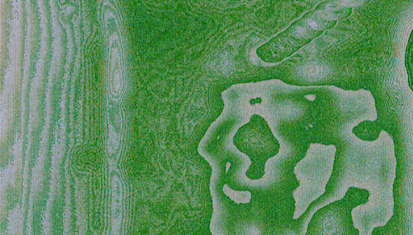
I had to wrap some of the footage as .mov files. When I import them, they show in the viewer as a blur (attachment below). I have also tried imported the original MXF files and had the same result.
However, they do play normally in the timeline. Unfortunately, when I export/share as a video, the clips revert back to a green blur.
Oddly enough, the clips shot in slomo show up fine.
Any ideas on what I can do? I can edit in the meantime, but obviously the output needs to be seen!
Thanks in advance.
First time poster n the forum- needing help from the more experienced editors here. I'm editing on FCPX 10.2 with Canon Mark II footage.
I had to wrap some of the footage as .mov files. When I import them, they show in the viewer as a blur (attachment below). I have also tried imported the original MXF files and had the same result.
However, they do play normally in the timeline. Unfortunately, when I export/share as a video, the clips revert back to a green blur.
Oddly enough, the clips shot in slomo show up fine.
Any ideas on what I can do? I can edit in the meantime, but obviously the output needs to be seen!
Thanks in advance.
Please Log in to join the conversation.
14 Aug 2016 05:30 #79197
by max.brown
Replied by max.brown on topic MXF files showing up as green blurs in FCP X. Halp!
Oh, and just to add that the slo mo being fine was a red herring. The slo mo footage was from Card 2 and everything on Card 2 is fine, so it must be Card 1's footage that got corrupted/missing meta data.
What I'm hoping is that there's a way around this, as I don't have the card anymmore.
Also, the .mov wrapped files play fine on QT.
What I'm hoping is that there's a way around this, as I don't have the card anymmore.
Also, the .mov wrapped files play fine on QT.
Please Log in to join the conversation.
- nils.dettmann
-

- Offline
- Elite Member
-

Less
More
- Posts: 161
- Thank you received: 13
16 Aug 2016 09:02 #79224
by nils.dettmann
Replied by nils.dettmann on topic MXF files showing up as green blurs in FCP X. Halp!
Recode the movs in question to ProRes for the time being eg. In Quicktime Player 7?
Though that wouldn´t help in resoving the problem.
Do you have any mxf plugins installed?
I had a similar problem that could be vaguely related.
In my case it was DNxHD-video wrapped in mov containers exported from Resolve.
They showed up in green and sometimes played distorted. Though they never played normal.
I ended up reinstalling OSX.
Warning: Guesswork ahead!
I think it was related to the wrapper process used in FCPX to use quicktime codecs. At least the process maxed out and sometimes crashed.
Though that wouldn´t help in resoving the problem.
Do you have any mxf plugins installed?
I had a similar problem that could be vaguely related.
In my case it was DNxHD-video wrapped in mov containers exported from Resolve.
They showed up in green and sometimes played distorted. Though they never played normal.
I ended up reinstalling OSX.
Warning: Guesswork ahead!
I think it was related to the wrapper process used in FCPX to use quicktime codecs. At least the process maxed out and sometimes crashed.
Please Log in to join the conversation.
18 Aug 2016 00:29 #79277
by max.brown
Replied by max.brown on topic MXF files showing up as green blurs in FCP X. Halp!
Hi Nils,
Yep, I ended up transcoding all the footage on that card to ProRes to edit with and that has worked fine.
I have the FCP X promedia plugin as well as the canon plugin (not the latest however, since my OSX can’t install it). And I wrapped the media using EditReady (excellent piece of software btw)
The other three cards work fine as wrapped .mov and mxf. It must be something to do with the original card or how it was copied over (dragged from card to desktop).
As the footage has been imported using such different formats…do I need to do anything special for the final output?
Everyone keeps telling me to migrate to Premier…
Yep, I ended up transcoding all the footage on that card to ProRes to edit with and that has worked fine.
I have the FCP X promedia plugin as well as the canon plugin (not the latest however, since my OSX can’t install it). And I wrapped the media using EditReady (excellent piece of software btw)
The other three cards work fine as wrapped .mov and mxf. It must be something to do with the original card or how it was copied over (dragged from card to desktop).
As the footage has been imported using such different formats…do I need to do anything special for the final output?
Everyone keeps telling me to migrate to Premier…
Please Log in to join the conversation.
