


3 Post Moderation Rule for New Boarders (25 Jan 2021)
New boarders will have their posts moderated - Don't worry if you cannot see your post immediately.
Generate proxies of clips in timeline only


11 Aug 2016 16:03 #79147
by Emmanuel
Generate proxies of clips in timeline only was created by Emmanuel
Hi guys
Is there a quick way to generate proxys only of the clips used in my timeline ?
Thanks !!!
Is there a quick way to generate proxys only of the clips used in my timeline ?
Thanks !!!
Please Log in to join the conversation.
- Tom Wolsky
-

- Offline
- Moderator
-

11 Aug 2016 16:59 #79149
by Tom Wolsky
Replied by Tom Wolsky on topic Generate proxies of clips in timeline only
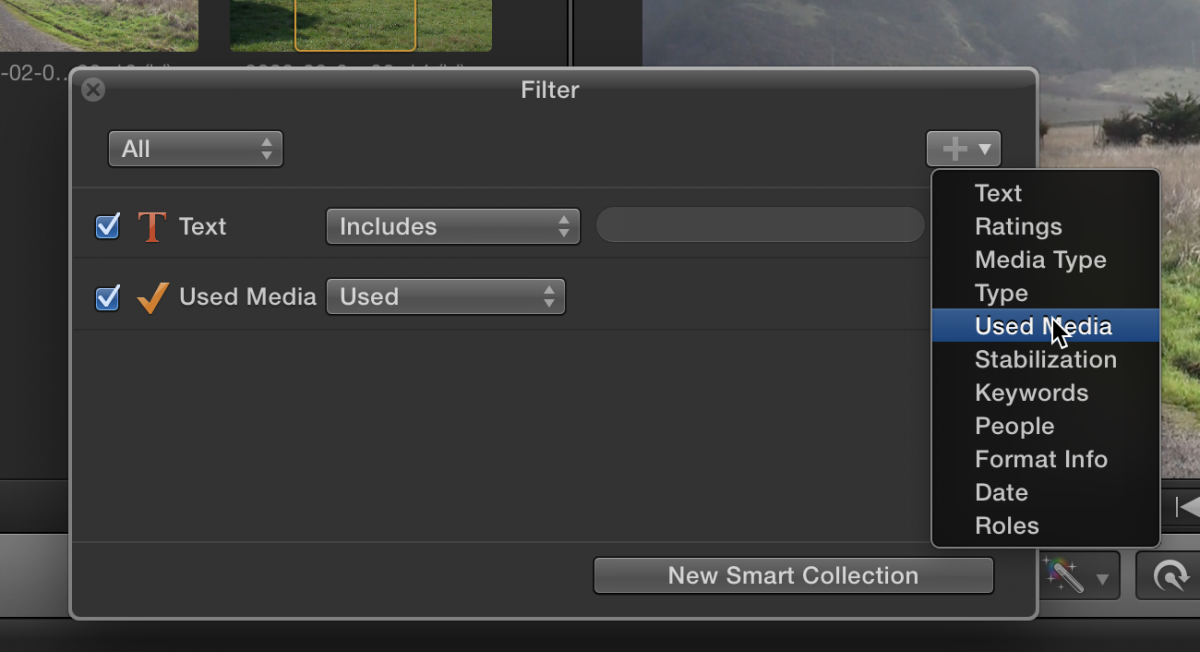
If you set the browser to show used clips you can select them and transcode.
Please Log in to join the conversation.


11 Aug 2016 17:10 #79150
by canelson
--
Matias Canelson
www.canelson.us
Replied by canelson on topic Generate proxies of clips in timeline only
Tom is right, but it's even easier!
Select the project (timeline) in your browser, right click, transcode media, proxy, enter. Wait. Done.
Select the project (timeline) in your browser, right click, transcode media, proxy, enter. Wait. Done.
--
Matias Canelson
www.canelson.us
Please Log in to join the conversation.
11 Aug 2016 17:24 #79154
by Emmanuel
Replied by Emmanuel on topic Generate proxies of clips in timeline only
Ah fantastic, thank you Tom and Matias !!!
Please Log in to join the conversation.
11 Aug 2016 17:38 #79156
by Emmanuel
Replied by Emmanuel on topic Generate proxies of clips in timeline only
Sorry me again
- Right click on a Project does not propose me this option
- I can't find where to set the browser to show used clips (I can see unused clips)
Thank you
- Right click on a Project does not propose me this option
- I can't find where to set the browser to show used clips (I can see unused clips)
Thank you
Please Log in to join the conversation.
11 Aug 2016 18:12 - 11 Aug 2016 19:33 #79157
by canelson
--
Matias Canelson
www.canelson.us
Replied by canelson on topic Generate proxies of clips in timeline only
My bad, I was doing the steps by memory... the correct workflow is:
Select project in browser, go to file menu, transcode media, proxy, ok, wait, done.
Select project in browser, go to file menu, transcode media, proxy, ok, wait, done.
--
Matias Canelson
www.canelson.us
Last edit: 11 Aug 2016 19:33 by canelson. Reason: Added more details to the answer.
Please Log in to join the conversation.
11 Aug 2016 18:17 #79158
by Emmanuel
Replied by Emmanuel on topic Generate proxies of clips in timeline only
That was the one ! Gracias !
Please Log in to join the conversation.
- Tom Wolsky
-
- Offline
- Moderator
-
12 Aug 2016 02:35 #79163
by Tom Wolsky
Replied by Tom Wolsky on topic Generate proxies of clips in timeline only
Used media is in the search box.
Please Log in to join the conversation.
