


- Posts: 15
- Thank you received: 2
3 Post Moderation Rule for New Boarders (25 Jan 2021)
New boarders will have their posts moderated - Don't worry if you cannot see your post immediately.
How to create this action "tarantino" style?
- iván.gonzález fernández
-
 Topic Author
- Offline
- New Member
-

Less
More
30 Jul 2016 15:44 #78902
by iván.gonzález fernández
Hello everyone
Can you tell me how can i create this effect 2:58 in motion 5?
I have seen that there is one tutorial from ripple training:
www.rippletraining.com/products/motion/c...d-title-in-motion-5/
But i want to make sure if it will help me in creating this effect, because i read that is more oriented to photos, but i want to do it with video.
Before i buy this tutorial, does anybody knows if it will help me or not?
thank you in advance
Can you tell me how can i create this effect 2:58 in motion 5?
I have seen that there is one tutorial from ripple training:
www.rippletraining.com/products/motion/c...d-title-in-motion-5/
But i want to make sure if it will help me in creating this effect, because i read that is more oriented to photos, but i want to do it with video.
Before i buy this tutorial, does anybody knows if it will help me or not?
thank you in advance
Please Log in to join the conversation.
- Karsten Schlüter
-

- Offline
- Moderator
-

Less
More
- Posts: 3790
- Thank you received: 718
30 Jul 2016 20:44 #78905
by Karsten Schlüter
Replied by Karsten Schlüter on topic How to create this action "tarantino" style?
… I don't want to keep a customer away from rippletraining, but in filmriots video you link to, Ivan, everything the whole recipe is explained.
ok, for AfterEffects,… but can be re-enacted (in less steps ) in Motion too:
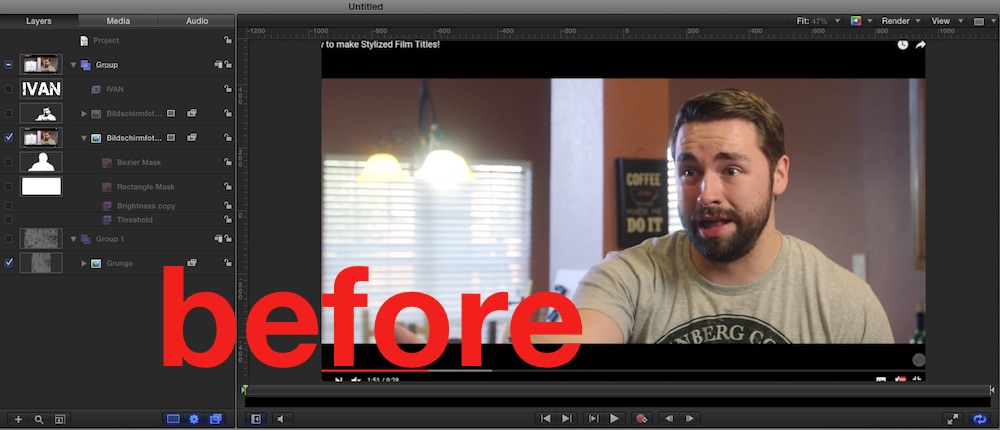
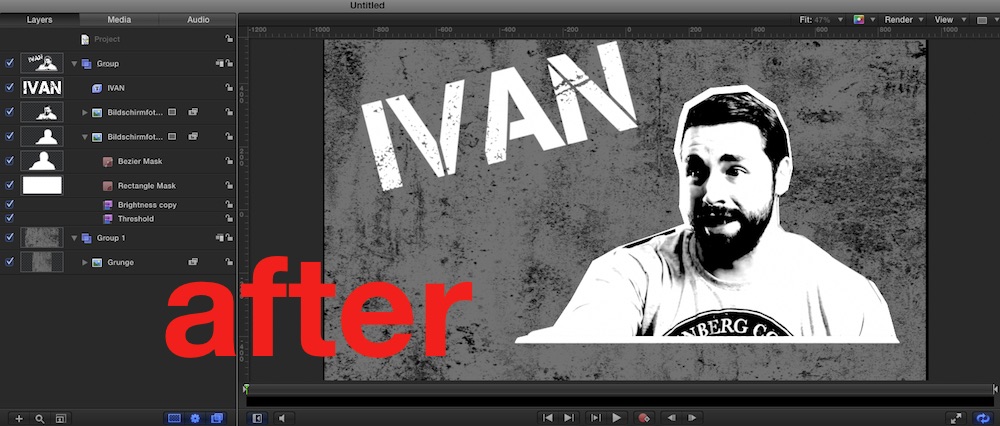
.... the RT tut is much more elaborated, incl. diff. title templates etc etc, I don't own it, but the RT tuts I purchased are worth every penny. Plus, on the website the lectures are listed ....
ok, for AfterEffects,… but can be re-enacted (in less steps
) in Motion too:
.... the RT tut is much more elaborated, incl. diff. title templates etc etc, I don't own it, but the RT tuts I purchased are worth every penny. Plus, on the website the lectures are listed ....
Please Log in to join the conversation.
- iván.gonzález fernández
-
Topic Author
- Offline
- New Member
-
Less
More
- Posts: 15
- Thank you received: 2
31 Jul 2016 03:29 #78909
by iván.gonzález fernández
Replied by iván.gonzález fernández on topic How to create this action "tarantino" style?
Thank you so much for your help Karsten as always, i'll give it a try with the video that i posted in motion. If i can't do it, i will buy the tutorial, as you said rp gives very detail tutorials.
Please Log in to join the conversation.
- Karsten Schlüter
-
- Offline
- Moderator
-
Less
More
- Posts: 3790
- Thank you received: 718
31 Jul 2016 05:45 #78911
by Karsten Schlüter
haven't erased my yesterdays quick'n dirty rebuild, so, here a step-by-step advice:
Step #1
in FCPX, set playhead to where you like that effect/title, hit M to set a maker, Share actual frame
or
open clip in Motion, 'freeze' frame ....
Step #2
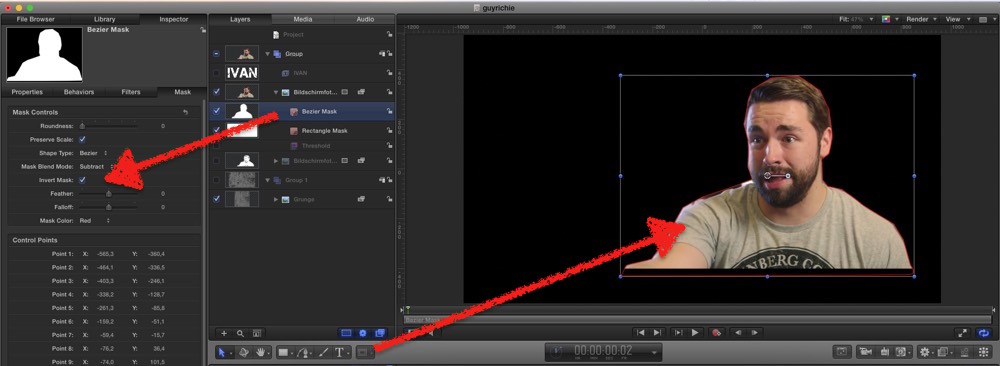
open that freeze inM5, and apply a Bezier mask
check 'Invert mask'
Step #3
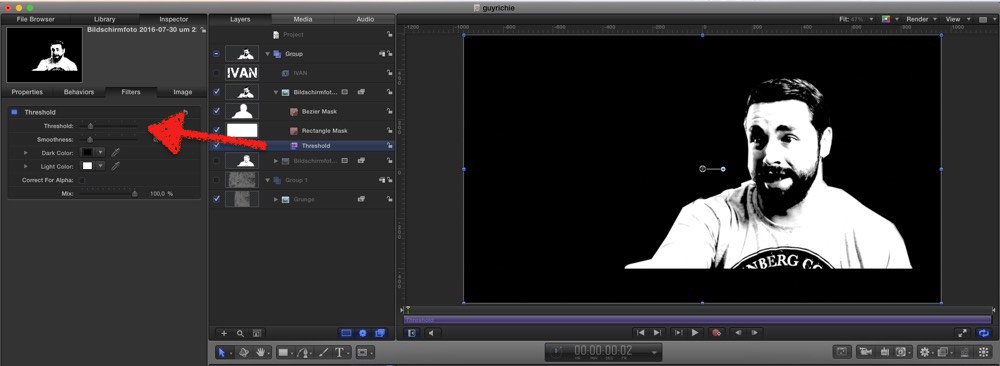
from Filters, apply Threshold
tweak settings to wanted look
Step #4
Lib/Content search for 'Grunge'
create a Group with it under your pic to create background
(applied 'Brightness' to adjust, or Colorize, or wotever)
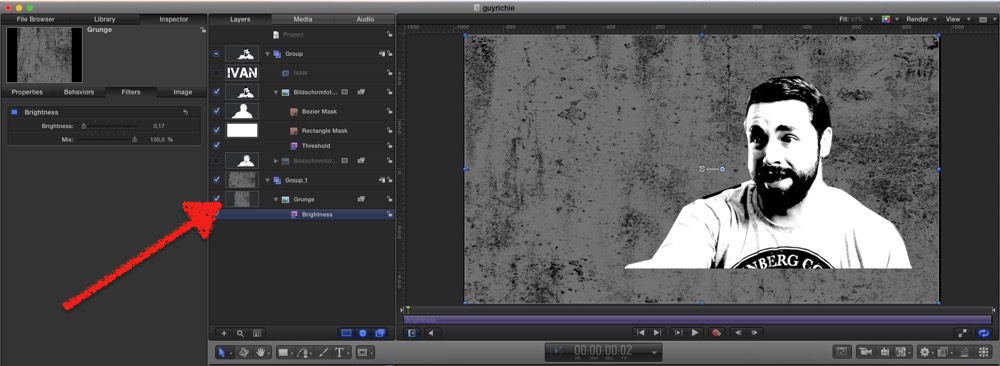
Step #5
for the White Outline, I duplicated the Pic Group, new group under original
applied from Filters 'Brightness', crank it up to max = all white
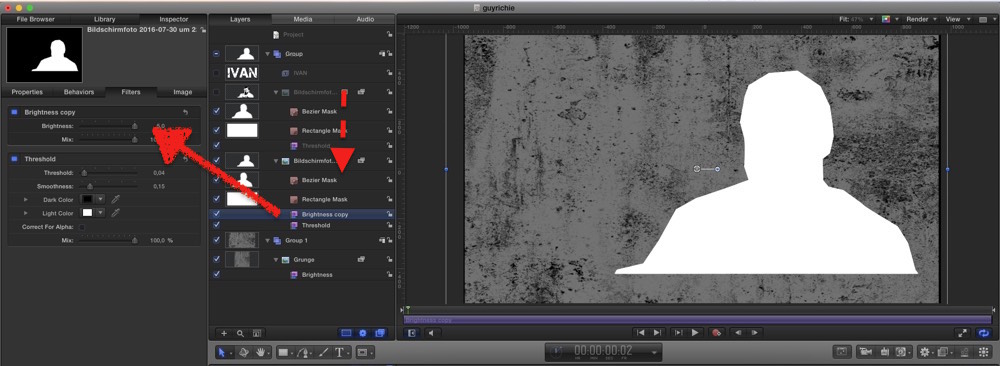
Step #6
scaled it to 105%, gave it a lil' x/y shift
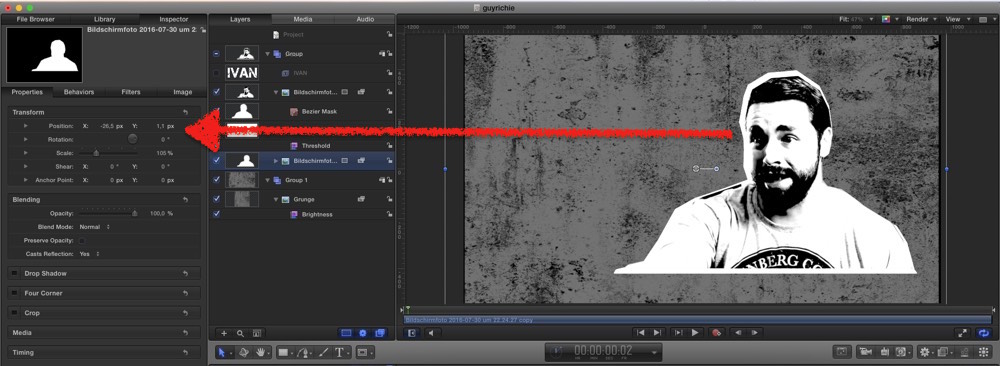
Step #7
last: added title...
export frame, import to FCPX, apply to Marked position
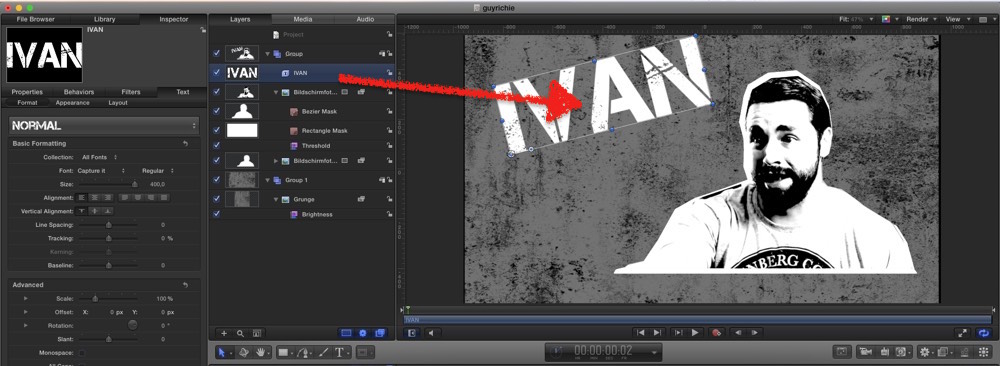
... no rocket science, no subscription, no $$
again: the RT tutorial offers much much more, just read the outline
www.rippletraining.com/products/motion/c...d-title-in-motion-5/
Replied by Karsten Schlüter on topic How to create this action "tarantino" style?
iván.gonzález fernández wrote: Thank you so much for your help Karsten as always, i'll give it a try ...
haven't erased my yesterdays quick'n dirty rebuild, so, here a step-by-step advice:
Step #1
in FCPX, set playhead to where you like that effect/title, hit M to set a maker, Share actual frame
or
open clip in Motion, 'freeze' frame ....
Step #2
open that freeze inM5, and apply a Bezier mask
check 'Invert mask'
Step #3
from Filters, apply Threshold
tweak settings to wanted look
Step #4
Lib/Content search for 'Grunge'
create a Group with it under your pic to create background
(applied 'Brightness' to adjust, or Colorize, or wotever)
Step #5
for the White Outline, I duplicated the Pic Group, new group under original
applied from Filters 'Brightness', crank it up to max = all white
Step #6
scaled it to 105%, gave it a lil' x/y shift
Step #7
last: added title...
export frame, import to FCPX, apply to Marked position
... no rocket science, no subscription, no $$
again: the RT tutorial offers much much more, just read the outline
www.rippletraining.com/products/motion/c...d-title-in-motion-5/
Please Log in to join the conversation.
- iván.gonzález fernández
-
Topic Author
- Offline
- New Member
-
Less
More
- Posts: 15
- Thank you received: 2
31 Jul 2016 16:15 #78920
by iván.gonzález fernández
Replied by iván.gonzález fernández on topic How to create this action "tarantino" style?
I have no words Karsten, thank you so much!! you're so brilliant!!
You just saved me 29 usd, you deserve heaven!
You just saved me 29 usd, you deserve heaven!
Please Log in to join the conversation.
- Karsten Schlüter
-
- Offline
- Moderator
-
Less
More
- Posts: 3790
- Thank you received: 718
31 Jul 2016 16:52 #78921
by Karsten Schlüter
… guess Mark&Steve (rippletraining) see it a bit different :silly:
But I really just translated filmriots advice! .... Adobe published a Guy Richie Title tut 2014 ... google lists advice back in 2006 ... I guess I did no harm, adding a Motion5 version
Glad you like it, Ivan .....
Replied by Karsten Schlüter on topic How to create this action "tarantino" style?
iván.gonzález fernández wrote: … You just saved me 29 usd, you deserve heaven!
… guess Mark&Steve (rippletraining) see it a bit different :silly:
But I really just translated filmriots advice! .... Adobe published a Guy Richie Title tut 2014 ... google lists advice back in 2006 ... I guess I did no harm, adding a Motion5 version
Glad you like it, Ivan .....
Please Log in to join the conversation.
- iván.gonzález fernández
-
Topic Author
- Offline
- New Member
-
Less
More
- Posts: 15
- Thank you received: 2
07 Aug 2016 17:57 - 07 Aug 2016 17:58 #79038
by iván.gonzález fernández
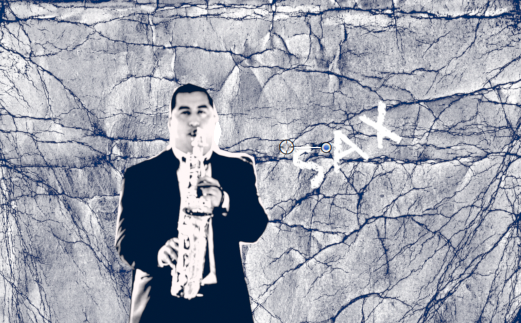
Thank you Karsten, it worked!!
Replied by iván.gonzález fernández on topic How to create this action "tarantino" style?
Thank you Karsten, it worked!!
Last edit: 07 Aug 2016 17:58 by iván.gonzález fernández.
Please Log in to join the conversation.
