


- Posts: 254
- Thank you received: 9
3 Post Moderation Rule for New Boarders (25 Jan 2021)
New boarders will have their posts moderated - Don't worry if you cannot see your post immediately.
Multicam Audio Weirdness
14 Jul 2016 02:26 #78593
by screendor
Multicam Audio Weirdness was created by screendor
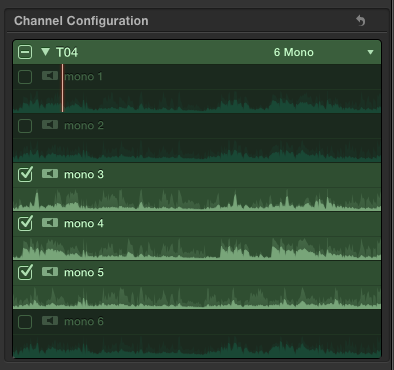
So I'm editing a multicam project. Audio is a WAV with 6 channels. In the multicam audio inspector, I've deselected channels 1 and 2, selected 3, 4 and 5 and deselected channel 6. Also, set the parameters to 6 mono for the WAV clip.
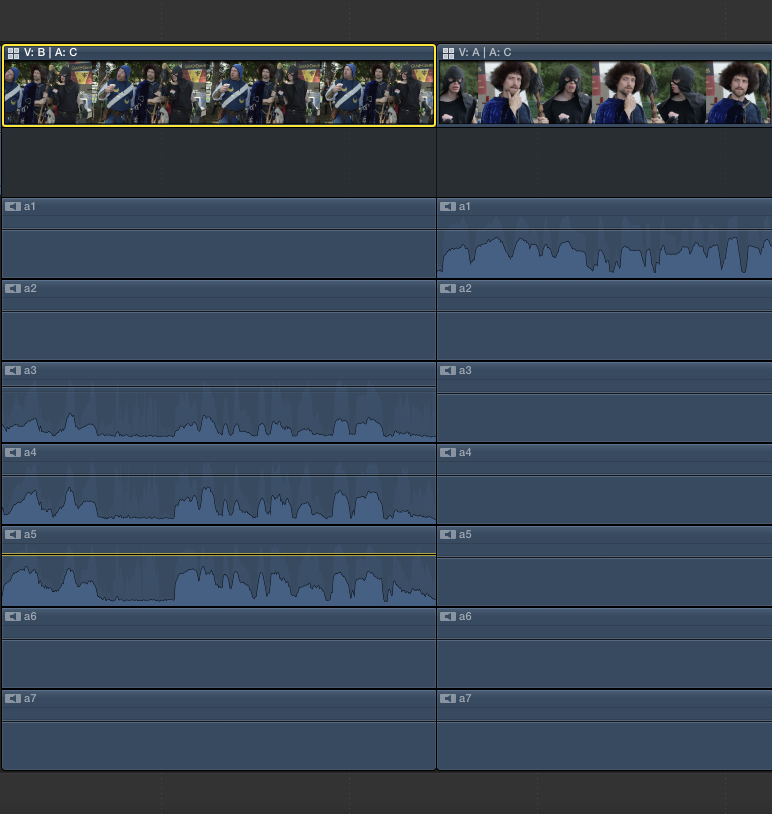
In the timeline, when I select Expand Audio, only channel 1 has audio in it--all the other channels, regardless of whether or not they were selected in the WAV file, are empty--i.e, no waveform, no audio.
Really strange. Any advice?
Thanks!
In the timeline, when I select Expand Audio, only channel 1 has audio in it--all the other channels, regardless of whether or not they were selected in the WAV file, are empty--i.e, no waveform, no audio.
Really strange. Any advice?
Thanks!
Please Log in to join the conversation.

14 Jul 2016 02:44 #78596
by BenB
Replied by BenB on topic Multicam Audio Weirdness
You want to "Expand Audio Components", Control-Option-S. I'm assuming, and I could be mistaken, you're using "Expand Audio/Video", Control-S. Audio components in the Timeline should show you all the channels as configured in the Inspector.
Please Log in to join the conversation.
14 Jul 2016 02:47 #78598
by screendor
Replied by screendor on topic Multicam Audio Weirdness
Yeah, thanks, but am using the control-option-s in the timeline. It does expand them, but it's like all three selected mono channels got mixed down to ch 1 and the rest are empty. And it's only on certain portions of the mutlicam clip in the timeline.
Please Log in to join the conversation.
14 Jul 2016 03:01 #78600
by BenB
Replied by BenB on topic Multicam Audio Weirdness
Screen shots? One clip that works correctly, one that doesn't?
Please Log in to join the conversation.
14 Jul 2016 03:06 #78601
by screendor
Replied by screendor on topic Multicam Audio Weirdness
So here's the audio inspector in the multicam clip and then the result in the timeline. Three actors, each with a lav and then a boom. Channels 1 and 2 were stereo mix and the boom on 6 was noisy so muted 1,2, and 6, leaving the three actors' lads 3, 4, and 5.
thanks for helping.
thanks for helping.
Please Log in to join the conversation.
14 Jul 2016 12:18 #78610
by BenB
Replied by BenB on topic Multicam Audio Weirdness
Something is not making sense. Inspector shows only 6 channels, the Timeline shows 7. And the Timeline should only show the 3 channels you have active, not the deactivated ones. That's just not right, something isn't adding up. I'm going to play around with a multiclip and verify some assumptions. But that is about the oddest thing I've ever seen in a multicam.
Please Log in to join the conversation.
14 Jul 2016 13:39 #78612
by screendor
Replied by screendor on topic Multicam Audio Weirdness
Well, some of the native WAV files do have 6 channels and some do have 7--sound recordist changed his mind based on only three talent.
I have even gone back and created a fourth angle in the multicam and added the native WAV file back in and muted the offending WAV file. Then NOTHING plays audio, even with the the 4th angle selected as the audio channel in the multicam.
And again, some of the files in the multicam behave as expected, others exhibit this weird behavior. And other multi cam's behave properly. Weird. Any insight appreciated!
I have even gone back and created a fourth angle in the multicam and added the native WAV file back in and muted the offending WAV file. Then NOTHING plays audio, even with the the 4th angle selected as the audio channel in the multicam.
And again, some of the files in the multicam behave as expected, others exhibit this weird behavior. And other multi cam's behave properly. Weird. Any insight appreciated!
Please Log in to join the conversation.
19 Jul 2016 12:01 #78724
by screendor
Replied by screendor on topic Multicam Audio Weirdness
Problem solved--or at least a limitation within FCPX uncovered.
So it turns out that in a mulitcam with multiple clips, the audio files (in this case a WAV files) must have the same number of channels in every instance. If they do not have the same number of channels, in the timeline, you will lose the ability to see and adjust individual channels. Everything gets mixed to channel 1.
My work around was to create shorter multicam clips with WAV files with matching numbers of channels.
FWIW, as we shot over the day, the sound mixer would adjust the number of channels in the WAV files depending on the the number of actors.
So, word of advice/warning: don't do that. At least until FCPX resolves this issue/bug.
On the plus side, glad I figured this out. Was driving me nuts.
So it turns out that in a mulitcam with multiple clips, the audio files (in this case a WAV files) must have the same number of channels in every instance. If they do not have the same number of channels, in the timeline, you will lose the ability to see and adjust individual channels. Everything gets mixed to channel 1.
My work around was to create shorter multicam clips with WAV files with matching numbers of channels.
FWIW, as we shot over the day, the sound mixer would adjust the number of channels in the WAV files depending on the the number of actors.
So, word of advice/warning: don't do that. At least until FCPX resolves this issue/bug.
On the plus side, glad I figured this out. Was driving me nuts.
Please Log in to join the conversation.
