


- Posts: 5
- Thank you received: 0
3 Post Moderation Rule for New Boarders (25 Jan 2021)
New boarders will have their posts moderated - Don't worry if you cannot see your post immediately.
FCPX text affect
- greg.willis
-
 Topic Author
- Offline
- New Member
-

Less
More
14 Jul 2016 01:24 #78592
by greg.willis
FCPX text affect was created by greg.willis
Hi, Newby here,
I know this question has probably been asked a million times but I can't find the answer.
The attachments are of an affect I would like to create. The affect starts with a dot or circle then extends a line with a text appearing then retracts to its starting point fading out.
Can anyone help explain how?
cheers
Greg
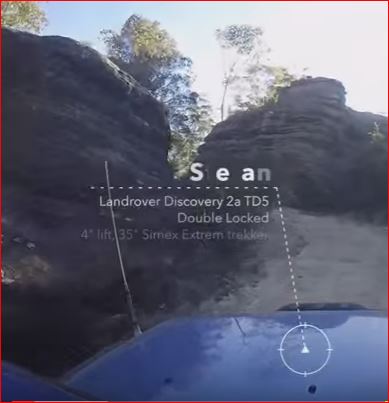
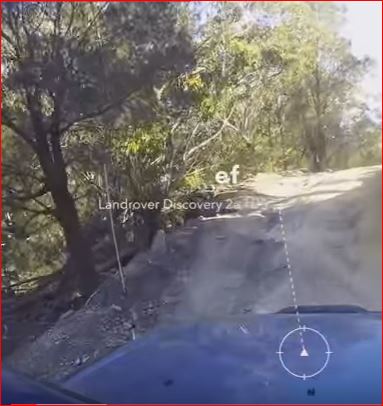
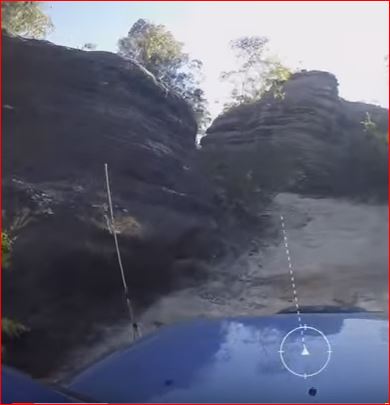
I know this question has probably been asked a million times but I can't find the answer.
The attachments are of an affect I would like to create. The affect starts with a dot or circle then extends a line with a text appearing then retracts to its starting point fading out.
Can anyone help explain how?
cheers
Greg
Please Log in to join the conversation.
- Karsten Schlüter
-

- Offline
- Moderator
-

Less
More
- Posts: 3790
- Thank you received: 718
14 Jul 2016 05:53 - 14 Jul 2016 05:57 #78602
by Karsten Schlüter
Replied by Karsten Schlüter on topic FCPX text affect
... would be handy to see a movin' example..
Generic advice:
asks for Motion5, based upon what I actually see, some write-on behavior to make the dotted line apear and some text-sequencing, or a simple wipe.
Do you know it's an commcercial effect? If so, I avoid lowering others income by rebuilding plugins
If it's an individual one, I could spend some brain-cells on that ... :woohoo:
... doesn't look toooo complicated.
oh, one more thing:
I guess it's tracked, right? attached to the car, following all shakes and moves?
that asks for painful manual keyframing, tracking in Motion or DriveX $$ from coremelt ...
for a start: have a look atthis one:
www.fcp.co/forum/generators/23254-callout-dotlinedot
And Welcome, Greg, to fcp.co
Generic advice:
asks for Motion5, based upon what I actually see, some write-on behavior to make the dotted line apear and some text-sequencing, or a simple wipe.
Do you know it's an commcercial effect? If so, I avoid lowering others income by rebuilding plugins
If it's an individual one, I could spend some brain-cells on that ... :woohoo:
... doesn't look toooo complicated.
oh, one more thing:
I guess it's tracked, right? attached to the car, following all shakes and moves?
that asks for painful manual keyframing, tracking in Motion or DriveX $$ from coremelt ...
for a start: have a look atthis one:
www.fcp.co/forum/generators/23254-callout-dotlinedot
And Welcome, Greg, to fcp.co
Last edit: 14 Jul 2016 05:57 by Karsten Schlüter.
Please Log in to join the conversation.
14 Jul 2016 14:59 #78616
by davechap
Replied by davechap on topic FCPX text affect
Hey Greg,
It looks like something done in After Effects, although the same could probably be accomplished in Motion with some plugins.
Q: Is the whole design grouped together, or does the top move freely (similar to a hinge) from the rest?
Basically, the point on the hood is tracked (or somewhere near) and the circle, triangle and expanding line is linked to that. From there, multiple parts are animated on. All of the text seems to be brought on with a text animator (opacity, position, rotation perhaps).
Think of it this way: The text and shapes are probably grouped as a whole. Yes, they are animated together to transition in and out, but forget the car for a second. Animating things like this even in FCPX are rather simple. It's just a fade and the timing of the fade. After that is complete, you will then track the whole thing to the car shot (or any shot).
I'm not sure if this was a single point tracked or if it was a 3D track (where it exists as a plane in 3D). If there's not obvious rotation or perspective change, a simple point track will stick it to the footage.
For me, this would be an After Effects task.
It looks like something done in After Effects, although the same could probably be accomplished in Motion with some plugins.
Q: Is the whole design grouped together, or does the top move freely (similar to a hinge) from the rest?
Basically, the point on the hood is tracked (or somewhere near) and the circle, triangle and expanding line is linked to that. From there, multiple parts are animated on. All of the text seems to be brought on with a text animator (opacity, position, rotation perhaps).
Think of it this way: The text and shapes are probably grouped as a whole. Yes, they are animated together to transition in and out, but forget the car for a second. Animating things like this even in FCPX are rather simple. It's just a fade and the timing of the fade. After that is complete, you will then track the whole thing to the car shot (or any shot).
I'm not sure if this was a single point tracked or if it was a 3D track (where it exists as a plane in 3D). If there's not obvious rotation or perspective change, a simple point track will stick it to the footage.
For me, this would be an After Effects task.
Please Log in to join the conversation.
- JarrodMFay
-
- Offline
- Elite Member
-

Less
More
- Posts: 172
- Thank you received: 34
14 Jul 2016 16:23 #78622
by JarrodMFay
Replied by JarrodMFay on topic FCPX text affect
Firstly, you would do this in Motion exactly the same way as in After Effects. Create animated lines/text group and motion track it to the point in the frame you want. But... in case you're lazy... 
store.pixelfilmstudios.com/product/prodicator-target/
---> Jarrod
store.pixelfilmstudios.com/product/prodicator-target/
---> Jarrod
Please Log in to join the conversation.
14 Jul 2016 16:26 #78623
by davechap
Replied by davechap on topic FCPX text affect
Yeah, what Jarrod said. 
Please Log in to join the conversation.
14 Jul 2016 16:41 #78625
by davechap
Replied by davechap on topic FCPX text affect
I was just scratching my head about why I never visit or even remember much about Pixel Film Studios. Browsing through their almost endless list of products made me wonder why they aren't on anyone's list of resources.
Then, I remembered...
MotionVFX vs PixelFilmStudios
www.motionvfx.com/mblog/how_to_make_mone...opyrights,p2217.html
Oh well. Maybe it was a mistake by a lone person there. Maybe not. But perhaps they are blacklisted now from sites. Am I wrong?
Then, I remembered...
MotionVFX vs PixelFilmStudios
www.motionvfx.com/mblog/how_to_make_mone...opyrights,p2217.html
Oh well. Maybe it was a mistake by a lone person there. Maybe not. But perhaps they are blacklisted now from sites. Am I wrong?
Please Log in to join the conversation.
- greg.willis
-
Topic Author
- Offline
- New Member
-
Less
More
- Posts: 5
- Thank you received: 0
15 Jul 2016 07:11 #78633
by greg.willis
Replied by greg.willis on topic FCPX text affect
Hi Jarrod,
Thank you, that's exactly what i was looking for.
regards
Thank you, that's exactly what i was looking for.
regards
Please Log in to join the conversation.
- greg.willis
-
Topic Author
- Offline
- New Member
-
Less
More
- Posts: 5
- Thank you received: 0
15 Jul 2016 07:12 #78634
by greg.willis
Replied by greg.willis on topic FCPX text affect
thanks DaveChap,
You have help greatly.
regards
You have help greatly.
regards
Please Log in to join the conversation.
- Karsten Schlüter
-
- Offline
- Moderator
-
Less
More
- Posts: 3790
- Thank you received: 718
15 Jul 2016 07:45 #78635
by Karsten Schlüter
Replied by Karsten Schlüter on topic FCPX text affect
excellent find, Jarrod!
they mention 'keyframing' in their description, so no auto-tracking ..
.... just to feed my curiosity, and testing my skills:
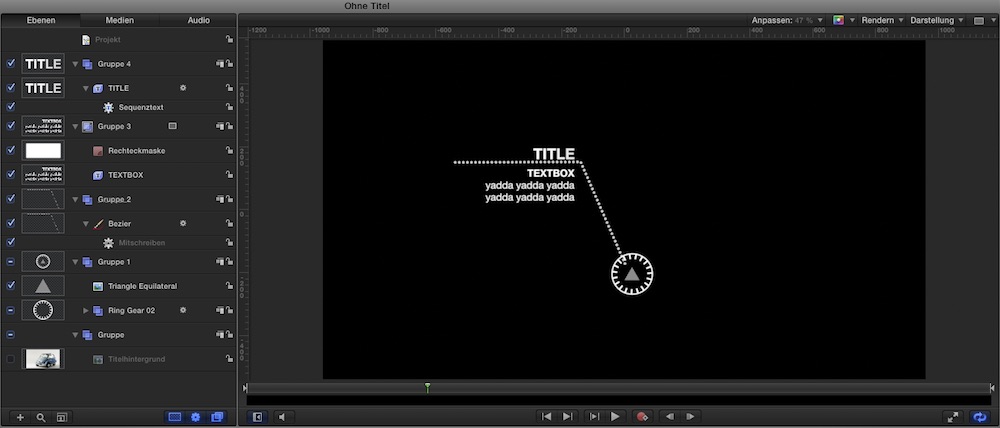
... done Motion in under 15min, circle rotates, dotted lines grow, text fades in ..
ok, the commercial poduct comes with some nice OSCs, that would ask for another 20min + loss of some brain cells ...
But, no AE needed.
And with DriveX you could make it 'trackable' in FCPX ...
.... the commercial one looks much better than mine ...
And yes, this motionvfx.com 'thing' killed their reputation...
they mention 'keyframing' in their description, so no auto-tracking ..
.... just to feed my curiosity, and testing my skills:
... done Motion in under 15min, circle rotates, dotted lines grow, text fades in ..
ok, the commercial poduct comes with some nice OSCs, that would ask for another 20min + loss of some brain cells ...
But, no AE needed.
And with DriveX you could make it 'trackable' in FCPX ...
.... the commercial one looks much better than mine ...
And yes, this motionvfx.com 'thing' killed their reputation...
Please Log in to join the conversation.

15 Jul 2016 11:53 - 15 Jul 2016 11:54 #78641
by thinkfilm
Replied by thinkfilm on topic FCPX text affect
While it's not exactly what the original OP was asking for - or perhaps even asking period - the motionVFX folks have also created a callout effect that might be working looking at. it's called mCallouts and they have a couple of design variations for sale that are well done imho. The advantage of mCallouts over Pixel Film Studios Proindicator series is that mCallouts has built in motion tracking - so no DriveX required to track or keyframe the effect if required.
Of course, Ripple training has a nice Callout plugin too.
Finally, as others have pointed out there the whole ugly Pixel Film Studioes rep thing…
Of course, Ripple training has a nice Callout plugin too.
Finally, as others have pointed out there the whole ugly Pixel Film Studioes rep thing…
Last edit: 15 Jul 2016 11:54 by thinkfilm.
Please Log in to join the conversation.

15 Jul 2016 12:26 #78642
by BenB
Replied by BenB on topic FCPX text affect
Actually you'd use TrackX for that. mCallouts are really nice, but you get what you get. If you want to do something custom, TrackX would be the way to go. Each has its place.
Please Log in to join the conversation.
- Karsten Schlüter
-
- Offline
- Moderator
-
Less
More
- Posts: 3790
- Thank you received: 718
15 Jul 2016 14:55 #78646
by Karsten Schlüter
To make homebrewn titles trackable, you'd actually use DriveX for that …
That's what it is intended for.
TrackX supports only its own titles… which is a lot, but not 3rd party ones …-
Replied by Karsten Schlüter on topic FCPX text affect
BenB wrote: Actually you'd use TrackX for that. ...
To make homebrewn titles trackable, you'd actually use DriveX for that …
That's what it is intended for.
TrackX supports only its own titles… which is a lot, but not 3rd party ones …-
Please Log in to join the conversation.
15 Jul 2016 21:20 #78654
by BenB
Replied by BenB on topic FCPX text affect
Well, then TrackX is tracking titles for me. DriveX allows particle generators and such to interact with a template, rather than be static. I use both daily.
Please Log in to join the conversation.
