


- Posts: 1
- Thank you received: 0
3 Post Moderation Rule for New Boarders (25 Jan 2021)
New boarders will have their posts moderated - Don't worry if you cannot see your post immediately.
How do I split a stereo audio channel inside a multicam clip?
11 Jul 2016 09:46 #78517
by Ray_Lion
Hey there,
with some help of this forum, I got a video project with 3 cameras and 8 audio clips inside a multicam clip working but I have encountered a problem:
I am splitting the work with a colleague who is editing the picture and I am responsible for matching the audio to the edited video-clips afterwards. Now I have noticed, that one stereo audio clip, that is quite important, actually consists of two mono recordings, of wich I only need one, as the other one has a lot of ambience noise wich I don't need. Is there any way, to split these two mono clips and only use one? The option, that normally lets you do just that, is greyed out inside the multi cam audio overview. (Included picture shows that, language is german I hope that's fine)
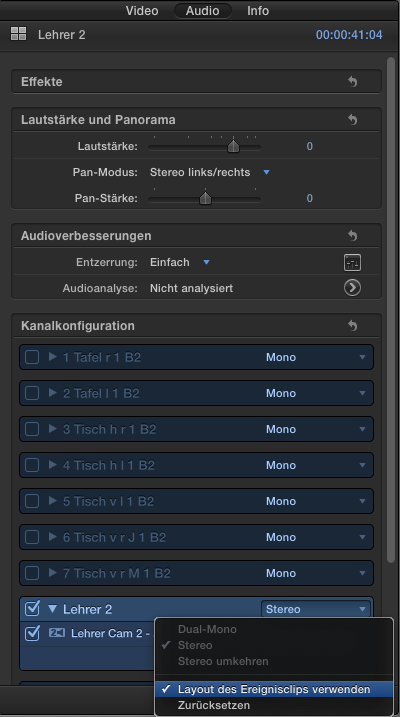
As I explained, the video is already cut in the right camera angles it would be a shame, having to create a new multicam clip with the right setting for the audio and therefor having to do the cut all over again.
I tried using the Pan setting and then just completely mute the right speaker, but of course, only one speaker is playing the sound, wich is not ideal ;P
I hope you understand my problem and maybe have a solution for me, I'd be very grateful!
Thanks for your effort
- Ray
with some help of this forum, I got a video project with 3 cameras and 8 audio clips inside a multicam clip working but I have encountered a problem:
I am splitting the work with a colleague who is editing the picture and I am responsible for matching the audio to the edited video-clips afterwards. Now I have noticed, that one stereo audio clip, that is quite important, actually consists of two mono recordings, of wich I only need one, as the other one has a lot of ambience noise wich I don't need. Is there any way, to split these two mono clips and only use one? The option, that normally lets you do just that, is greyed out inside the multi cam audio overview. (Included picture shows that, language is german I hope that's fine)
As I explained, the video is already cut in the right camera angles it would be a shame, having to create a new multicam clip with the right setting for the audio and therefor having to do the cut all over again.
I tried using the Pan setting and then just completely mute the right speaker, but of course, only one speaker is playing the sound, wich is not ideal ;P
I hope you understand my problem and maybe have a solution for me, I'd be very grateful!
Thanks for your effort
- Ray
Please Log in to join the conversation.
- Karsten Schlüter
-

- Offline
- Moderator
-

Less
More
- Posts: 3790
- Thank you received: 718
11 Jul 2016 15:59 - 11 Jul 2016 16:00 #78524
by Karsten Schlüter
finde ich großartig! :woohoo:
Double-click your MC to open it in its own timeline.
select the track Lehrer2
in the Inspector/Audio, switch from Stereo to Double Mono
back in your Project, you do have access to each indivual 'mono' track ...
And Welcome, Mathis, to fcp.co ...
Replied by Karsten Schlüter on topic How do I split a stereo audio channel inside a multicam clip?
Ray_Lion wrote: … language is german I hope that's fine…
finde ich großartig! :woohoo:
Double-click your MC to open it in its own timeline.
select the track Lehrer2
in the Inspector/Audio, switch from Stereo to Double Mono
back in your Project, you do have access to each indivual 'mono' track ...
And Welcome, Mathis, to fcp.co ...
Last edit: 11 Jul 2016 16:00 by Karsten Schlüter.
Please Log in to join the conversation.
