


- Posts: 12
- Thank you received: 0
3 Post Moderation Rule for New Boarders (25 Jan 2021)
New boarders will have their posts moderated - Don't worry if you cannot see your post immediately.
FCPX Timeline Issue
- stephenmick
-
 Topic Author
- Offline
- New Member
-

Less
More
05 Jul 2016 14:26 #78378
by stephenmick
FCPX Timeline Issue was created by stephenmick
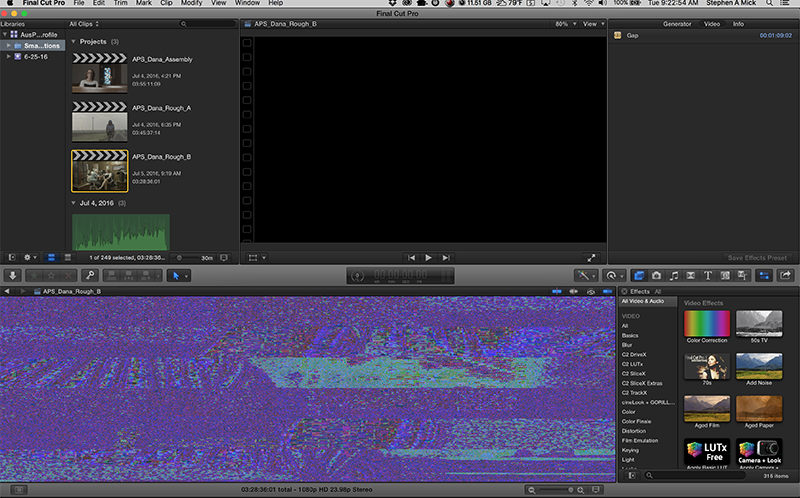
So, I keep getting this nonsense in my timeline on FCPX. I've restarted multiple times, and it doesn't seem to help. Obviously this makes editing a bit of a chore. Any thoughts as to why this might be happening?
Cheers!
Cheers!
Please Log in to join the conversation.
- ronny courtens
-

- Offline
- Moderator
-

Less
More
- Posts: 4455
- Thank you received: 962
05 Jul 2016 15:29 #78382
by ronny courtens
Replied by ronny courtens on topic FCPX Timeline Issue
Hi Stephen,
Maybe you could elaborate a little bit? "Nonsense on my timeline" does not really tell us very much. If you have added a screenshot and it does not appear, please re-attach it in your reply so we can see what's happening.
- Ronny
Maybe you could elaborate a little bit? "Nonsense on my timeline" does not really tell us very much. If you have added a screenshot and it does not appear, please re-attach it in your reply so we can see what's happening.
- Ronny
Please Log in to join the conversation.
- stephenmick
-
Topic Author
- Offline
- New Member
-
Less
More
- Posts: 12
- Thank you received: 0
05 Jul 2016 15:30 #78383
by stephenmick
Replied by stephenmick on topic FCPX Timeline Issue
Ah, my attachment didn't post for some reason. I'll try again.
Interestingly, I ran a System Software Update and the issue seems to have disappeared for now.
Interestingly, I ran a System Software Update and the issue seems to have disappeared for now.
Please Log in to join the conversation.
- ronny courtens
-
- Offline
- Moderator
-
Less
More
- Posts: 4455
- Thank you received: 962
05 Jul 2016 15:33 #78385
by ronny courtens
Replied by ronny courtens on topic FCPX Timeline Issue
Ouch, now I see what you mean. That could be due to a corrupt graphics driver, and the System Software Update might have fixed that. Good thinking, and thank you for posting the solution.
- Ronny
- Ronny
Please Log in to join the conversation.
- stephenmick
-
Topic Author
- Offline
- New Member
-
Less
More
- Posts: 12
- Thank you received: 0
05 Jul 2016 15:34 #78386
by stephenmick
Replied by stephenmick on topic FCPX Timeline Issue
To be honest, I'm not necessarily a big fan of running software updates mid-project. (I learned that the hard way about 20 years ago on Avid.) But it seems to have helped so far. If something changes, or if FCPX craps its knickers again, I'll update the thread.
Please Log in to join the conversation.
- ronny courtens
-
- Offline
- Moderator
-
Less
More
- Posts: 4455
- Thank you received: 962
05 Jul 2016 15:40 #78387
by ronny courtens
Replied by ronny courtens on topic FCPX Timeline Issue
20 years is a century in the way technology advances. I remember an Avid crashing on me some 15 years ago and losing 12 hours of intensive editing because CMD+S wasn't working as it should. The issue you have shown is very exceptional, and in many cases it is related to a faulty or dying graphics card or a faulty graphics card driver, not to FCP X. Please keep us updated if this happens again.
- Rony
- Rony
Please Log in to join the conversation.
- stephenmick
-
Topic Author
- Offline
- New Member
-
Less
More
- Posts: 12
- Thank you received: 0
05 Jul 2016 15:52 #78389
by stephenmick
Replied by stephenmick on topic FCPX Timeline Issue
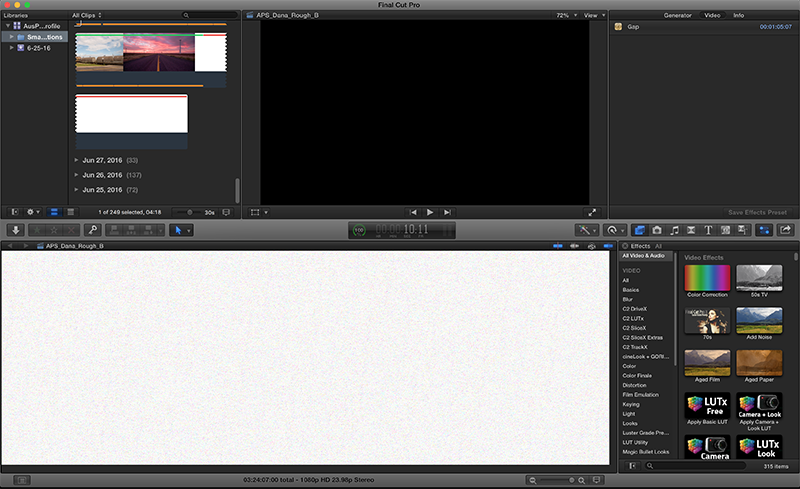
Okay, now things have gotten weird again. This is what my timeline looks like now…
Please Log in to join the conversation.
- ronny courtens
-
- Offline
- Moderator
-
Less
More
- Posts: 4455
- Thank you received: 962
05 Jul 2016 16:06 #78390
by ronny courtens
Replied by ronny courtens on topic FCPX Timeline Issue
Okay, this is a different animal. Let's troubleshoot this step-by-step. Please stay stand-by.
1. Close your current Library and open another one that sits on the same drive. Do you get the same issues when you open the other Library?
- If not, report back
- If so, got to the next step:
2. Close FCP X, then launch it again while holding the ALT+CMD keys pressed down. You will see a message asking you if you want to delete your FCP X preferences. Confirm and let FCP X launch. Then open the faulty Library to see if the issue is resolved.
- If this solves the issue, report back.
- If this does not solve the issue:
3. Create a new admin user and open the faulty Library with the new user.
- If you still see the issue running the new user, report back
- If you don't see the issue running the new user, follow these steps to reset your old user directory: www.fcpxbook.com/tips/resetting-the-user.html
Let's start with these ones and see where we get.
- Ronny
1. Close your current Library and open another one that sits on the same drive. Do you get the same issues when you open the other Library?
- If not, report back
- If so, got to the next step:
2. Close FCP X, then launch it again while holding the ALT+CMD keys pressed down. You will see a message asking you if you want to delete your FCP X preferences. Confirm and let FCP X launch. Then open the faulty Library to see if the issue is resolved.
- If this solves the issue, report back.
- If this does not solve the issue:
3. Create a new admin user and open the faulty Library with the new user.
- If you still see the issue running the new user, report back
- If you don't see the issue running the new user, follow these steps to reset your old user directory: www.fcpxbook.com/tips/resetting-the-user.html
Let's start with these ones and see where we get.
- Ronny
Please Log in to join the conversation.
- stephenmick
-
Topic Author
- Offline
- New Member
-
Less
More
- Posts: 12
- Thank you received: 0
05 Jul 2016 16:11 #78391
by stephenmick
Replied by stephenmick on topic FCPX Timeline Issue
Performed Step One…no difference.
Performed Step Two…no change.
Trying Step Three now.
Performed Step Two…no change.
Trying Step Three now.
Please Log in to join the conversation.
- ronny courtens
-
- Offline
- Moderator
-
Less
More
- Posts: 4455
- Thank you received: 962
05 Jul 2016 16:17 #78392
by ronny courtens
Replied by ronny courtens on topic FCPX Timeline Issue
Thank you for this information. Standing by for your next report.
- Ronny
- Ronny
Please Log in to join the conversation.
- stephenmick
-
Topic Author
- Offline
- New Member
-
Less
More
- Posts: 12
- Thank you received: 0
05 Jul 2016 16:20 #78393
by stephenmick
Replied by stephenmick on topic FCPX Timeline Issue
Step Three seems to have solved the problem. The timeline looks normal. So I'm guessing there may be some kind of conflict/issue with FCPX and something else?
Please Log in to join the conversation.
- ronny courtens
-
- Offline
- Moderator
-
Less
More
- Posts: 4455
- Thank you received: 962
05 Jul 2016 16:29 - 05 Jul 2016 16:31 #78395
by ronny courtens
Replied by ronny courtens on topic FCPX Timeline Issue
Let me explain what we have been doing and why.
Step 1 was to rule out project-specific problems. As two different Libraries produce the same issue, the problem is not with this specific project.
Step 2 was to rule out corrupt user preferences. As deleting the FCP X preferences did not make any difference, this has been ruled out as well.
Step 3 was to verify your current User account. And here we see a pending solution as you don't have the issues when working with the faulty Library using a new admin user account.
Now of course you cannot keep working with that test admin account, or you would need to re-enter all your user specific data such as passwords, e-maill settings etc... and you would need to move all the data and files from your old account to the new one, which can be quite a hassle.
That's why I would try to fix your old account following the steps in the link I have provided. If this works, all is good and you can continue to work with your old account and delete the new one. So can you try this first?
If this doesn't work, this indicates that you may have some corrupt third-party plugins in FCP X. That's also easy to detect, but first try to repair your old account and see where we get.
- Ronny
Step 1 was to rule out project-specific problems. As two different Libraries produce the same issue, the problem is not with this specific project.
Step 2 was to rule out corrupt user preferences. As deleting the FCP X preferences did not make any difference, this has been ruled out as well.
Step 3 was to verify your current User account. And here we see a pending solution as you don't have the issues when working with the faulty Library using a new admin user account.
Now of course you cannot keep working with that test admin account, or you would need to re-enter all your user specific data such as passwords, e-maill settings etc... and you would need to move all the data and files from your old account to the new one, which can be quite a hassle.
That's why I would try to fix your old account following the steps in the link I have provided. If this works, all is good and you can continue to work with your old account and delete the new one. So can you try this first?
If this doesn't work, this indicates that you may have some corrupt third-party plugins in FCP X. That's also easy to detect, but first try to repair your old account and see where we get.
- Ronny
Last edit: 05 Jul 2016 16:31 by ronny courtens.
Please Log in to join the conversation.
- stephenmick
-
Topic Author
- Offline
- New Member
-
Less
More
- Posts: 12
- Thank you received: 0
05 Jul 2016 16:31 #78396
by stephenmick
Replied by stephenmick on topic FCPX Timeline Issue
Will do. Thanks, Ronny!
Please Log in to join the conversation.
- ronny courtens
-
- Offline
- Moderator
-
Less
More
- Posts: 4455
- Thank you received: 962
05 Jul 2016 16:33 #78397
by ronny courtens
Replied by ronny courtens on topic FCPX Timeline Issue
No prob, I hope this will do it.
If not, get back so we can guide you through the steps of detecting corrupt third-party plugins.
- Ronny
If not, get back so we can guide you through the steps of detecting corrupt third-party plugins.
- Ronny
Please Log in to join the conversation.
- stephenmick
-
Topic Author
- Offline
- New Member
-
Less
More
- Posts: 12
- Thank you received: 0
05 Jul 2016 23:15 #78411
by stephenmick
Replied by stephenmick on topic FCPX Timeline Issue
Okay, so I went through step three, and the timeline is still garbled. How do I check for problem plug-ins?
Please Log in to join the conversation.
- ronny courtens
-
- Offline
- Moderator
-
Less
More
- Posts: 4455
- Thank you received: 962
06 Jul 2016 13:19 #78420
by ronny courtens
Replied by ronny courtens on topic FCPX Timeline Issue
Sorry for the late reply, it has been a very busy start of the day (-:
So you have repaired your old user directory and you still see a garbled timeline, while you don't see these issues when you open the Library using a new admin user account.
The next thing to do in this case is to remove any third-party plugins from FCP X to see if this solves the problem. Let me explain why.
- Third-party Motion Templates are stored inside your User > Movies folder.
- When you create a brand-new user account, there are obviously no Motion Templates stored inside that new user's Movies folder yet.
- If you have no problems with the new user, but you do have problems with the old one and these problems persist after you have repaired the old user directory, the next thing you should look for is a corrupt Motion Template plugin in the old user's Movies folder.
Before we do this, I need to know if you have purchased any commercial plugins from FxFactory, CoreMelt or other vendors.
If so, the very first thing you need to do is to update these plugins to their latest versions. To do this, you simply go to the respective websites and you download the latest versions of the plugins you have purchased. Once this is done, restart FCP X and check if you still have the issues.
- Ronny
So you have repaired your old user directory and you still see a garbled timeline, while you don't see these issues when you open the Library using a new admin user account.
The next thing to do in this case is to remove any third-party plugins from FCP X to see if this solves the problem. Let me explain why.
- Third-party Motion Templates are stored inside your User > Movies folder.
- When you create a brand-new user account, there are obviously no Motion Templates stored inside that new user's Movies folder yet.
- If you have no problems with the new user, but you do have problems with the old one and these problems persist after you have repaired the old user directory, the next thing you should look for is a corrupt Motion Template plugin in the old user's Movies folder.
Before we do this, I need to know if you have purchased any commercial plugins from FxFactory, CoreMelt or other vendors.
If so, the very first thing you need to do is to update these plugins to their latest versions. To do this, you simply go to the respective websites and you download the latest versions of the plugins you have purchased. Once this is done, restart FCP X and check if you still have the issues.
- Ronny
Please Log in to join the conversation.
- stephenmick
-
Topic Author
- Offline
- New Member
-
Less
More
- Posts: 12
- Thank you received: 0
06 Jul 2016 16:11 #78426
by stephenmick
Replied by stephenmick on topic FCPX Timeline Issue
Okay, so here's something interesting…
I opened up one of the auto-save files from before the Timeline started getting jacked, and it seems to work normally. I lost some work, but it wasn't too bad. I'll work with this for a bit to see if it remains stable. I've also turned off any kind of background rendering for now, just as a test.
I opened up one of the auto-save files from before the Timeline started getting jacked, and it seems to work normally. I lost some work, but it wasn't too bad. I'll work with this for a bit to see if it remains stable. I've also turned off any kind of background rendering for now, just as a test.
Please Log in to join the conversation.
- ronny courtens
-
- Offline
- Moderator
-
Less
More
- Posts: 4455
- Thank you received: 962
06 Jul 2016 16:15 #78427
by ronny courtens
Replied by ronny courtens on topic FCPX Timeline Issue
That is indeed very interesting. Please keep background rendering off at all times. Corrupt or unused render files can cause problems. It surprises me though that during our first tests you also had the problem with another Library, which uses totally different render files. Anyway, good news and thank you for posting this. Keep us updated.
- Ronny
- Ronny
Please Log in to join the conversation.
