


- Posts: 21
- Thank you received: 0
3 Post Moderation Rule for New Boarders (25 Jan 2021)
New boarders will have their posts moderated - Don't worry if you cannot see your post immediately.
Audio problem
02 Jul 2016 15:38 #78334
by chuckvid
Audio problem was created by chuckvid
I'm having a problem with my FCPX 10.2.1. After I import material from my Vixia HFG10 and have placed clips in the timeline, when I play them, the audio is (for lack of a better word) weird, the volume fluctuates. It also sounds as if the audio varies, the audio going from one speaker to the other. it's hard to explain. I've included samples of the problem. My OS is is El Capitan version 10.11.3 (15D21). If you guys can help me I would sure appreciate it.
Thanks
Chuck
Thanks
Chuck
Please Log in to join the conversation.

03 Jul 2016 17:30 #78342
by knesaren
Replied by knesaren on topic Audio problem
Is the problem persistent when it's exported? I've had audio issues inside FCPX, but everything is OK after export. Why don't you update FCPX to the newest version?
Please Log in to join the conversation.
03 Jul 2016 18:25 #78345
by John G
Replied by John G on topic Audio problem
Are you sure the problem is happening within FCPX and not with the recorded audio itself? If you were recording stereo, as process of elimination I would try importing and playing the audio into something other than FCPX like QT Player, or even I-Tunes or the Finder to see if the problem is evident there.
I believe the HFG10 has the option to record in stereo or 5.1 (but 5.1 only with the appropriate microphone). It maybe there is some sort of confusion going between FCPX and the audio setup of the camera. Have a look at the audio settings of your FCPX project.
Also yes, you should update to the latest FCPX version.
I believe the HFG10 has the option to record in stereo or 5.1 (but 5.1 only with the appropriate microphone). It maybe there is some sort of confusion going between FCPX and the audio setup of the camera. Have a look at the audio settings of your FCPX project.
Also yes, you should update to the latest FCPX version.
Please Log in to join the conversation.
- Karsten Schlüter
-

- Offline
- Moderator
-

Less
More
- Posts: 3790
- Thank you received: 718
04 Jul 2016 05:56 #78347
by Karsten Schlüter
your description reminds me of 'binaural beat' (hope this is the correct translation of Schwebung) , so two chanels with some very subtle difference mix.
In the Inspector/Tab Audio, can you uncheck one chanel? ...
Replied by Karsten Schlüter on topic Audio problem
chuckvid wrote: … the volume fluctuates. It also sounds as if the audio varies, the audio going from one speaker to the other. …
your description reminds me of 'binaural beat' (hope this is the correct translation of Schwebung) , so two chanels with some very subtle difference mix.
In the Inspector/Tab Audio, can you uncheck one chanel? ...
Please Log in to join the conversation.
04 Jul 2016 13:08 #78353
by chuckvid
Replied by chuckvid on topic Audio problem
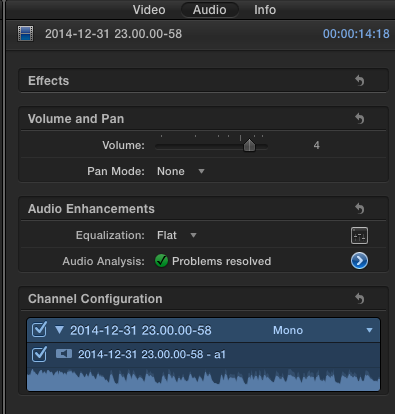
Thank you for your reply, I'm attaching a screenshot of the audio inspector and as far as I remember there hasn't been any changes, what do you think?
Please Log in to join the conversation.
- Karsten Schlüter
-
- Offline
- Moderator
-
Less
More
- Posts: 3790
- Thank you received: 718
04 Jul 2016 16:13 #78359
by Karsten Schlüter
hmm, looks mono, single to me
a) when you playback that file without FCPX, Finder/Quicktime ... it's ok?
b) in your timeline, when the audio misbehaves, there's only that clip? (screenshot)
Replied by Karsten Schlüter on topic Audio problem
chuckvid wrote: … attaching a screenshot of the audio inspector ...
hmm, looks mono, single to me
a) when you playback that file without FCPX, Finder/Quicktime ... it's ok?
b) in your timeline, when the audio misbehaves, there's only that clip? (screenshot)
Please Log in to join the conversation.
- ronny courtens
-

- Offline
- Moderator
-
Less
More
- Posts: 4455
- Thank you received: 962
05 Jul 2016 10:53 #78372
by ronny courtens
Replied by ronny courtens on topic Audio problem
Hey Chuck,
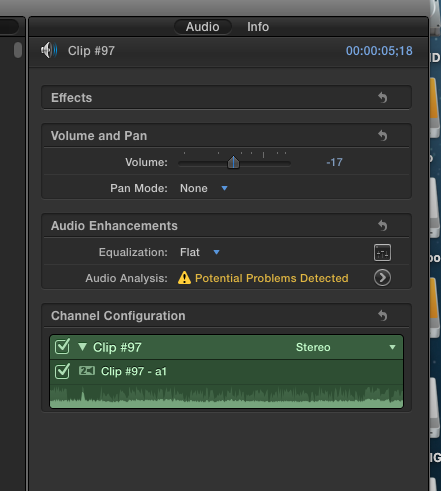
I notice in your screenshot that the audio has problems that have been automatically resolved by FCP X audio analysis. Can you click on the little arrow next to "Audio Analysis" and post a screenshot of the Audio Enhancements window so we can see what kind of problems FCP X has detected?
- Ronny
I notice in your screenshot that the audio has problems that have been automatically resolved by FCP X audio analysis. Can you click on the little arrow next to "Audio Analysis" and post a screenshot of the Audio Enhancements window so we can see what kind of problems FCP X has detected?
- Ronny
Please Log in to join the conversation.
05 Jul 2016 11:57 #78373
by chuckvid
Replied by chuckvid on topic Audio problem
First of all I want to thank you guys for helping, it really is appreciated.
Ron:
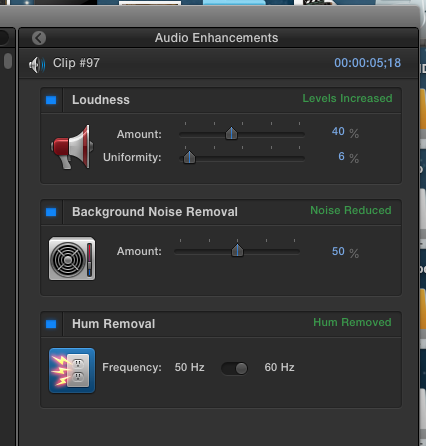
I've attached two screen shots of the inspector. The version of FCX I have is 10.2.1
Thanks again
Chuck
Ron:
I've attached two screen shots of the inspector. The version of FCX I have is 10.2.1
Thanks again
Chuck
Please Log in to join the conversation.
- ronny courtens
-
- Offline
- Moderator
-
Less
More
- Posts: 4455
- Thank you received: 962
05 Jul 2016 12:01 #78374
by ronny courtens
Replied by ronny courtens on topic Audio problem
Okay, thank you.
Please un-check the three blue checkboxes in the Audio Enhancements window. Then play your audio. Do you still hear the same audio issue now?
- Ronny
Please un-check the three blue checkboxes in the Audio Enhancements window. Then play your audio. Do you still hear the same audio issue now?
- Ronny
Please Log in to join the conversation.
- simon.a.billington
-

- Offline
- Elite Member
-

Less
More
- Posts: 179
- Thank you received: 10
12 Jul 2016 15:20 - 12 Jul 2016 15:21 #78538
by simon.a.billington
Could you be perhaps referring to phase cancellation?
Chuckvid...
That is actually possible. It happens when there are more than one recordings of the same sound source yet they aren't perfectly aligned in time. This can cause like a swirling type of sound effect to appear on the sound. It could also drastically reduce the levels even to the point where they totally disappear altogether,
You can eliminate the effect by either eliminating all but one track or by aligning the tracks.
Assuming this is your issue.
Replied by simon.a.billington on topic Audio problem
Karsten Schlüter wrote: your description reminds me of 'binaural beat' (hope this is the correct translation of Schwebung) , so two chanels with some very subtle difference mix.
.
Could you be perhaps referring to phase cancellation?
Chuckvid...
That is actually possible. It happens when there are more than one recordings of the same sound source yet they aren't perfectly aligned in time. This can cause like a swirling type of sound effect to appear on the sound. It could also drastically reduce the levels even to the point where they totally disappear altogether,
You can eliminate the effect by either eliminating all but one track or by aligning the tracks.
Assuming this is your issue.
Last edit: 12 Jul 2016 15:21 by simon.a.billington.
Please Log in to join the conversation.
- simon.a.billington
-
- Offline
- Elite Member
-
Less
More
- Posts: 179
- Thank you received: 10
12 Jul 2016 15:23 #78539
by simon.a.billington
Replied by simon.a.billington on topic Audio problem
Oh right... I missed that pic.
Try as Ronnie suggests. It may have been something that was ironically caused by FCPX "fixing" audio issues.
Try as Ronnie suggests. It may have been something that was ironically caused by FCPX "fixing" audio issues.
Please Log in to join the conversation.
17 Jul 2016 04:18 #78676
by chuckvid
Replied by chuckvid on topic Audio problem
Thank You Ronny and the rest of you guys, my audio is working fine. You guys have been great helping me solve past problems.
Chuck
Chuck
Please Log in to join the conversation.
