


- Posts: 636
- Thank you received: 167
3 Post Moderation Rule for New Boarders (25 Jan 2021)
New boarders will have their posts moderated - Don't worry if you cannot see your post immediately.
FCPX slow, every basic function is extremely slow :(
01 Jul 2023 23:25 - 03 Jul 2023 18:19 #126236
by DaveM
Replied by DaveM on topic FCPX slow, every basic function is extremely slow :(
@Slaughter, I don't think anyone asked the following yet, but answers might be very helpful...
1.What are the frame sizes, codecs, frame rates, and cameras used for the source media? I know you mentioned that you used archival footage. A list of each type of source media file used would be useful to know. Now having seen the Library, the missing info is the kind of codecs used for the source media, though it's not a crticial thing.
2. How did you "update" the Project "All Noises 4" from 720p to 1080p?Did you simply use the "modify" option in the Inspector and change settings there? Or, did you create a new Project and copy and paste everything from the older, 720p Project into the new 1080p one? Are the frame rate settings the same for both Projects? For some reason, the newer, 1080p timeline/Project is 29.97 fps where the previous 720p version was 25 fps. Found the post where you mentioned copying everything from the 720p timeline and pasting it into the newly created 1080p timeline/Project.
3. Do you currently, or did you previously, have Background Rendering turned on in the FCP Settings/Preferences? Have you rendered individual or groups of clips manually?
4. Are you using optimized or proxy media for the edit? It doesn't appear so, looking over the Library info...
Thanks.
1.
2. How did you "update" the Project "All Noises 4" from 720p to 1080p?
3. Do you currently, or did you previously, have Background Rendering turned on in the FCP Settings/Preferences? Have you rendered individual or groups of clips manually?
4. Are you using optimized or proxy media for the edit? It doesn't appear so, looking over the Library info...
Thanks.
Last edit: 03 Jul 2023 18:19 by DaveM.
Please Log in to join the conversation.


04 Jul 2023 03:12 - 04 Jul 2023 03:15 #126244
by Slaughter
Replied by Slaughter on topic FCPX slow, every basic function is extremely slow :(
@DaveM
1. I really couldn't exhaustively say which codecs cover everything. This is an archive based feature, so my only MO with video files has been for them to be compatible with FCPX. I started the project before I really knew what I was doing, and didn't start getting properly systematised and organised until a couple of years into it. My video sources are from factory + bootleg DVD's, my own VHS transfers, mpeg / mp4 / mkv / etc files acquired from a range of archive sources around the world.
2. > For some reason, the newer, 1080p timeline/Project is 29.97 fps where the previous 720p version was 25 fps.
Yes, that's correct. TBH I didn't even realise this until after I had spent several hours working on the 1080p iteration. I left it alone. In and of itself I would not think this explains the problems, though....
3. I've tried operating with background rendering on and off in my settings. In neither case are the fundamental problems solved. The beachballing happens either way.
> Have you rendered individual or groups of clips manually?
I've never used a manual render process and TBH did not know that I could until now. I've either had background rendering on or off...
4. No.
Additional info:
I've made the unhappy discovery that beachballing, which requires interaction with youtube on my web browser* to interrupt, is not unique to this project.
The project we've been discussing remains 300% worse, and is almost unworkable as it is, but in a new project on a different SSD within a new library is also starting to beachball. The new project is a 1080p one using mostly 4k video files which I have shot. So the media it uses is of a very different composition.
It usually happens when I am resizing a clip or using one slider or another. The damned beachball happens - and maybe 70% of the time it stops once I open youtube in Brave browser. In those instances, I can see FCPX in the background "flashing" for a second and the beachball becomes a pointer again. Ugh. WTF. I am guessing I am just suffering an incredibly unlucky marriage of FCPX and one specific Mac OS / iMac combo which does not play nicely with FCPX. I'm pretty sad about it TBH as my whole workflow is looking really doom now.
Mac OS Monterey 12.6.6
FCPX 10.6.5
(I have not upgraded to 6.6 out of disillusionment - NONE of the previous upgrades have done anything for me except cause new problems. They haven't even fixed the damned problem with the browser winder randomly resizing clips etc on startup).
Imac Pro 2017 w Radeon Pro Vega 56 8GB

*as previously discussed, I have totally removed Chrome from my imac. The beachballing behaves in a way which indicates that it *needs* me to interact with a youtube page for it to stop. The problem is *not* solved by not running a browser in the background.
1. I really couldn't exhaustively say which codecs cover everything. This is an archive based feature, so my only MO with video files has been for them to be compatible with FCPX. I started the project before I really knew what I was doing, and didn't start getting properly systematised and organised until a couple of years into it. My video sources are from factory + bootleg DVD's, my own VHS transfers, mpeg / mp4 / mkv / etc files acquired from a range of archive sources around the world.
2. > For some reason, the newer, 1080p timeline/Project is 29.97 fps where the previous 720p version was 25 fps.
Yes, that's correct. TBH I didn't even realise this until after I had spent several hours working on the 1080p iteration. I left it alone. In and of itself I would not think this explains the problems, though....
3. I've tried operating with background rendering on and off in my settings. In neither case are the fundamental problems solved. The beachballing happens either way.
> Have you rendered individual or groups of clips manually?
I've never used a manual render process and TBH did not know that I could until now. I've either had background rendering on or off...
4. No.
Additional info:
I've made the unhappy discovery that beachballing, which requires interaction with youtube on my web browser* to interrupt, is not unique to this project.
The project we've been discussing remains 300% worse, and is almost unworkable as it is, but in a new project on a different SSD within a new library is also starting to beachball. The new project is a 1080p one using mostly 4k video files which I have shot. So the media it uses is of a very different composition.
It usually happens when I am resizing a clip or using one slider or another. The damned beachball happens - and maybe 70% of the time it stops once I open youtube in Brave browser. In those instances, I can see FCPX in the background "flashing" for a second and the beachball becomes a pointer again. Ugh. WTF. I am guessing I am just suffering an incredibly unlucky marriage of FCPX and one specific Mac OS / iMac combo which does not play nicely with FCPX. I'm pretty sad about it TBH as my whole workflow is looking really doom now.
Mac OS Monterey 12.6.6
FCPX 10.6.5
(I have not upgraded to 6.6 out of disillusionment - NONE of the previous upgrades have done anything for me except cause new problems. They haven't even fixed the damned problem with the browser winder randomly resizing clips etc on startup).
Imac Pro 2017 w Radeon Pro Vega 56 8GB
*as previously discussed, I have totally removed Chrome from my imac. The beachballing behaves in a way which indicates that it *needs* me to interact with a youtube page for it to stop. The problem is *not* solved by not running a browser in the background.
Last edit: 04 Jul 2023 03:15 by Slaughter.
Please Log in to join the conversation.
04 Jul 2023 04:35 - 04 Jul 2023 04:47 #126246
by DaveM
Thanks for the additional info. Joe and I did a little bit more investigation of the issue over the past few days. Joe wants to do some further testing before reporting back, but it may be late this month or towards the end of next month (whatever he mentioned) before he likely has time. I similarly have projects stacked and funding applications to attend to.
If you need to do more work with the "ALL NOISES 4.0 1080p" Project/timeline, you might consider erasing an external SSD drive and installing Catalina or Big Sur on it, along with FCP 10.4.8, or thereabouts, so you could continue working without issue. I realize that this may be tough, as you've done work since updating the Library and moving the Project/timeline to 1080p.
It's a bit disheartening to hear that slowdowns are now affecting other Projects/timelines, as well.
When I tested your 10.6.5 Library, things were a bit laggy but I only got the SBOD when setting up smart collection filters and doing searches within the Event while using the Browsers. The SBODs would last maybe up to a minute, then go away. So, I didn't experience what you've been reporting (needing to switch to an other application and back, etc.).
Hmm.
You might be well-served by finding an FCP expert near you to check out your system in person (or possibly via screen sharing). That the issue is happening with another Library, Event, and Project might point to a macOS issue, HW, cables, "hidden" FCP-related temporary files (beyond the FCP preferences file), a corrupt FCP application itself, etc. I'm running macOS 12.6.7 and FCP 10.6.5 on my Mac Pro and don't have the massive lagginess that you report when I have your Library open in FCP. One reason to re-install FCP, and not just delete its preferences, is after repeated crashes.
FYI, FCP has over fifty of its own fonts within its application package, so just checking system fonts in Font Book may not be enough. That's just one example of a potential issue.
Replied by DaveM on topic FCPX slow, every basic function is extremely slow :(
@DaveM
...
Additional info:
I've made the unhappy discovery that beachballing, which requires interaction with youtube on my web browser* to interrupt, is not unique to this project.
The project we've been discussing remains 300% worse, and is almost unworkable as it is, but in a new project on a different SSD within a new library is also starting to beachball. The new project is a 1080p one using mostly 4k video files which I have shot. So the media it uses is of a very different composition.
It usually happens when I am resizing a clip or using one slider or another. The damned beachball happens - and maybe 70% of the time it stops once I open youtube in Brave browser. In those instances, I can see FCPX in the background "flashing" for a second and the beachball becomes a pointer again. Ugh. WTF.
...
Thanks for the additional info. Joe and I did a little bit more investigation of the issue over the past few days. Joe wants to do some further testing before reporting back, but it may be late this month or towards the end of next month (whatever he mentioned) before he likely has time. I similarly have projects stacked and funding applications to attend to.
If you need to do more work with the "ALL NOISES 4.0 1080p" Project/timeline, you might consider erasing an external SSD drive and installing Catalina or Big Sur on it, along with FCP 10.4.8, or thereabouts, so you could continue working without issue. I realize that this may be tough, as you've done work since updating the Library and moving the Project/timeline to 1080p.
It's a bit disheartening to hear that slowdowns are now affecting other Projects/timelines, as well.
When I tested your 10.6.5 Library, things were a bit laggy but I only got the SBOD when setting up smart collection filters and doing searches within the Event while using the Browsers. The SBODs would last maybe up to a minute, then go away. So, I didn't experience what you've been reporting (needing to switch to an other application and back, etc.).
Hmm.
You might be well-served by finding an FCP expert near you to check out your system in person (or possibly via screen sharing). That the issue is happening with another Library, Event, and Project might point to a macOS issue, HW, cables, "hidden" FCP-related temporary files (beyond the FCP preferences file), a corrupt FCP application itself, etc. I'm running macOS 12.6.7 and FCP 10.6.5 on my Mac Pro and don't have the massive lagginess that you report when I have your Library open in FCP. One reason to re-install FCP, and not just delete its preferences, is after repeated crashes.
FYI, FCP has over fifty of its own fonts within its application package, so just checking system fonts in Font Book may not be enough. That's just one example of a potential issue.
Last edit: 04 Jul 2023 04:47 by DaveM.
Please Log in to join the conversation.
04 Jul 2023 05:02 - 04 Jul 2023 05:04 #126248
by Slaughter
Replied by Slaughter on topic FCPX slow, every basic function is extremely slow :(
@DaveM
I appreciate all of the research and troubleshooting here.
> you might consider erasing an external SSD drive and installing Catalina or Big Sur on it, along with FCP 10.4.8, or thereabouts, so you could continue working without issue.
I've done this with Mojave, and the whole thing just runs too slow. It also causes too many housekeeping headaches having to run two different systems like this. My next thing to try is to start with a brand new library and copy this project over in sections. However, given the beachballs and requirement to "toggle" the beachball with youtube, in a new project, I must say I am just utterly disheartened here and might have to consider abandoning FCPX in the long game. These problems just shouldn't be happening with this imac pro. It makes no sense that upgrading my machine, upgrading my OS and applications has slowly but surely stopped me from doing my work. Things were a lot more smooth under Mojave w older versions of FCPX with a slower machine from 2014. Ugh.
I appreciate all of the research and troubleshooting here.
> you might consider erasing an external SSD drive and installing Catalina or Big Sur on it, along with FCP 10.4.8, or thereabouts, so you could continue working without issue.
I've done this with Mojave, and the whole thing just runs too slow. It also causes too many housekeeping headaches having to run two different systems like this. My next thing to try is to start with a brand new library and copy this project over in sections. However, given the beachballs and requirement to "toggle" the beachball with youtube, in a new project, I must say I am just utterly disheartened here and might have to consider abandoning FCPX in the long game. These problems just shouldn't be happening with this imac pro. It makes no sense that upgrading my machine, upgrading my OS and applications has slowly but surely stopped me from doing my work. Things were a lot more smooth under Mojave w older versions of FCPX with a slower machine from 2014. Ugh.
Last edit: 04 Jul 2023 05:04 by Slaughter.
Please Log in to join the conversation.

04 Jul 2023 13:12 #126249
by joema
Replied by joema on topic FCPX slow, every basic function is extremely slow :(
Do you think it was smoother on Mojave and older versions of FCP, or was your project and library less complex then?
I don't think your performance issue is due to a damaged library, or would be fixed by copy/paste to another one. You have an extremely complex timeline and event structure which is superficially masked by the compound clips.
Dave and I have spent lots of time investigating this and there is apparently some vaguely-defined threshold above which performance degrades exponentially. The parameters for that threshold cannot be simply defined. It includes things like # of clips in the library, # of compound clips, # of nested compound clips, timeline length, # of secondary storylines, rate conforming overhead from mixed frame rates, scaling overhead from numerous high-res stills, etc.
I don't know what the formula is for the complex interaction of all those variables, but as they increase, performance will degrade. There also seems to be some threshold whereby it starts degrading faster. It's possible you encountered that coincidentally during some MacOS or FCP upgrades, and it only appeared to be the upgrade which caused it.
As you said above, if you have already tried reverting your current project to Mojave and an older version of FCP and that's still slow, it could imply the root cause is the project/library complexity, not the MacOS or FCP version.
After much investigation, it seems unlikely this is caused by a fixable bug in FCP, or a simple library change. Scalability of FCP is generally good, e.g, this article shows a 64-layer timeline on a "trash can" Mac Pro: fcp.co/final-cut-pro/articles/1472-build...t-in-final-cut-pro-x
However, it has limits, though not easily defined. For a major post-production project, it's important for a technically savvy 1st Asst Editor or consultant to do workflow, reliability, and performance testing well in advance. On lower-end projects, you can often get by without that but on major projects, it's needed.
Dave and I understand your documentary is very important. That's one reason we've spent so much time trying to help, even though we don't work for Apple and we have our regular jobs to do. I personally am interested in doing more investigation, but I have some editing deadlines I must meet over the next few weeks, so I can't do any more significant work on this until well after that. I also have a several-week field assignment in August. Dave also has some commitments.
I know you want to stay on FCP, and it would be laborious to switch to Resolve, but that might be your best move. Both Dave and I tested your project on Resolve, and it seemed to work well (albeit that's without any data). I don't know how many fix-ups would be required to correct things after the XML import, but at least it's a theoretical path forward. For someone accustomed to a track-oriented audio or video background, Resolve can be more familiar and conventional.
As Dave mentioned, another possibility would be engaging the services of a skilled consultant who is experienced in FCP troubleshooting and workflow on large feature-length productions.
> DaveM: you might consider erasing an external SSD drive and installing Catalina or Big Sur on it, along
> with FCP 10.4.8, or thereabouts, so you could continue working without issue.
I've done this with Mojave, and the whole thing just runs too slow....Things were a lot more smooth under Mojave w older versions of FCPX with a slower machine from 2014. Ugh.
Do you think it was smoother on Mojave and older versions of FCP, or was your project and library less complex then?
I don't think your performance issue is due to a damaged library, or would be fixed by copy/paste to another one. You have an extremely complex timeline and event structure which is superficially masked by the compound clips.
Dave and I have spent lots of time investigating this and there is apparently some vaguely-defined threshold above which performance degrades exponentially. The parameters for that threshold cannot be simply defined. It includes things like # of clips in the library, # of compound clips, # of nested compound clips, timeline length, # of secondary storylines, rate conforming overhead from mixed frame rates, scaling overhead from numerous high-res stills, etc.
I don't know what the formula is for the complex interaction of all those variables, but as they increase, performance will degrade. There also seems to be some threshold whereby it starts degrading faster. It's possible you encountered that coincidentally during some MacOS or FCP upgrades, and it only appeared to be the upgrade which caused it.
As you said above, if you have already tried reverting your current project to Mojave and an older version of FCP and that's still slow, it could imply the root cause is the project/library complexity, not the MacOS or FCP version.
After much investigation, it seems unlikely this is caused by a fixable bug in FCP, or a simple library change. Scalability of FCP is generally good, e.g, this article shows a 64-layer timeline on a "trash can" Mac Pro: fcp.co/final-cut-pro/articles/1472-build...t-in-final-cut-pro-x
However, it has limits, though not easily defined. For a major post-production project, it's important for a technically savvy 1st Asst Editor or consultant to do workflow, reliability, and performance testing well in advance. On lower-end projects, you can often get by without that but on major projects, it's needed.
Dave and I understand your documentary is very important. That's one reason we've spent so much time trying to help, even though we don't work for Apple and we have our regular jobs to do. I personally am interested in doing more investigation, but I have some editing deadlines I must meet over the next few weeks, so I can't do any more significant work on this until well after that. I also have a several-week field assignment in August. Dave also has some commitments.
I know you want to stay on FCP, and it would be laborious to switch to Resolve, but that might be your best move. Both Dave and I tested your project on Resolve, and it seemed to work well (albeit that's without any data). I don't know how many fix-ups would be required to correct things after the XML import, but at least it's a theoretical path forward. For someone accustomed to a track-oriented audio or video background, Resolve can be more familiar and conventional.
As Dave mentioned, another possibility would be engaging the services of a skilled consultant who is experienced in FCP troubleshooting and workflow on large feature-length productions.
Please Log in to join the conversation.
05 Jul 2023 04:06 #126264
by Slaughter
Replied by Slaughter on topic FCPX slow, every basic function is extremely slow :(
I have an update to post about this schemozzle shortly -
but first, a black clip Q.
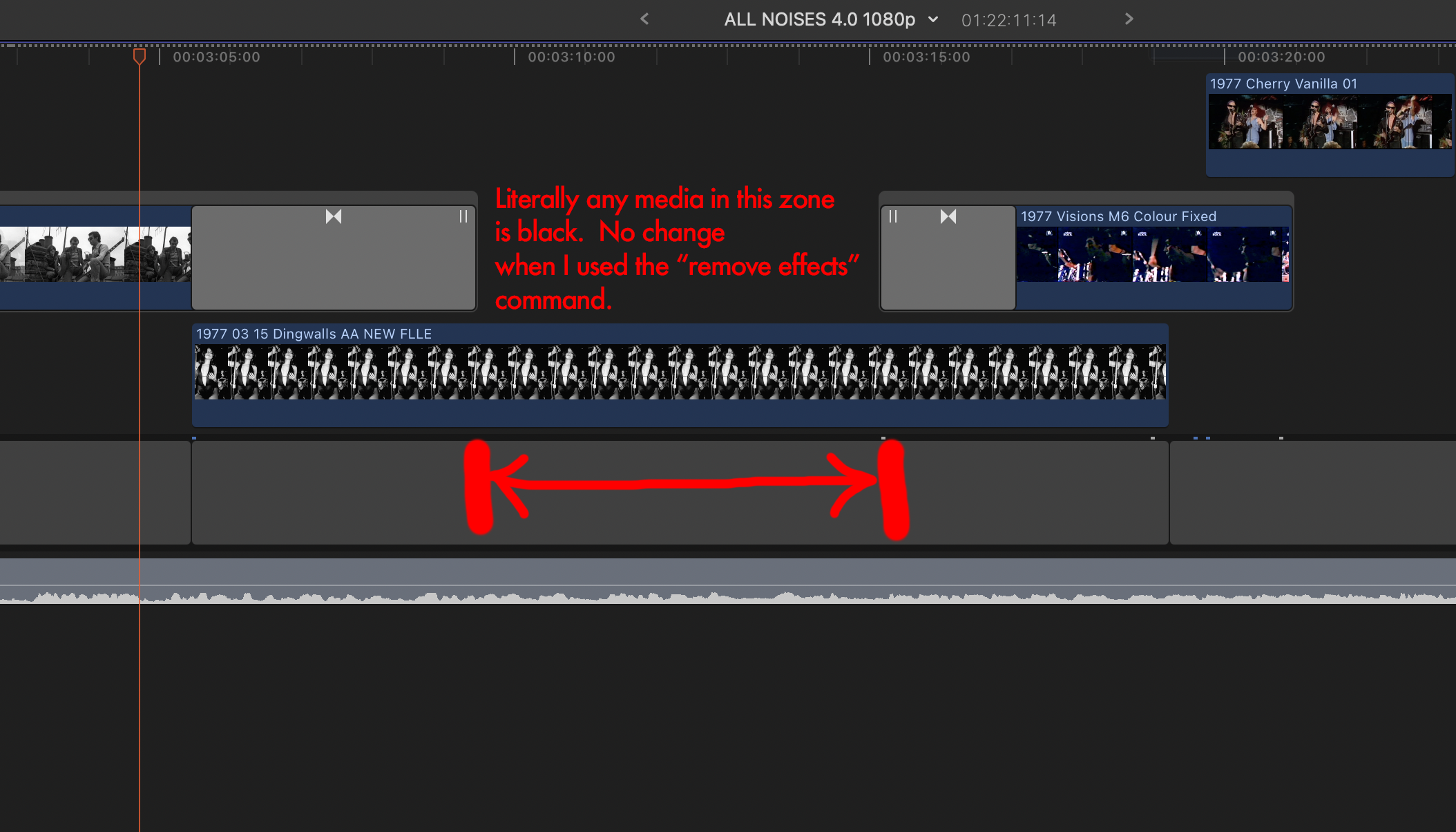
One of the oddities with this timeline is this weird thing where one or two specific clips - repeatedly - turn black. I delete render files etc but it happens again next session. The same place, every time.
Now, I figured ok, this clip is corrupt. So I delete it and replace it with a brand new file. I drop it into the same place. Black again. *This actual section of the timeline is black*. Anything I place there is black. What the? It's like this section of the timeline has become a literal black hole.
It’s hard to find anything about this because “black clip” turns up solutions related to the clip only, not the timeline.
What on earth do I do about this? I can't replace the clip, and I have deleted render / cache about a dozen times. It's a recurring problem.
but first, a black clip Q.
One of the oddities with this timeline is this weird thing where one or two specific clips - repeatedly - turn black. I delete render files etc but it happens again next session. The same place, every time.
Now, I figured ok, this clip is corrupt. So I delete it and replace it with a brand new file. I drop it into the same place. Black again. *This actual section of the timeline is black*. Anything I place there is black. What the? It's like this section of the timeline has become a literal black hole.
It’s hard to find anything about this because “black clip” turns up solutions related to the clip only, not the timeline.
What on earth do I do about this? I can't replace the clip, and I have deleted render / cache about a dozen times. It's a recurring problem.
Please Log in to join the conversation.
05 Jul 2023 15:50 - 05 Jul 2023 15:50 #126268
by joema
Sorry, I can only make some brief one-time remarks because I'm working on a deadline project for several weeks.
Do "Reveal in Finder" in the Event Browser for that clip and find what file type it is. There are some cases where a "bare" AVCHD file (typically with a .MTS suffix) is removed from the AVCHD package and imported using "leave files in place". That can cause a significant performance problem that may cause some clips to appear black for a while but not permanently.
Also, verify whether that clip is the original parent clip, compound clip or some other complex clip type. Sometimes a compound or multicam clip will contain two or more clips and a gap clip or transition, or be arranged so that portions of the clip have no video. FCP can build the thumbnail from the black region. It's possible one of those clip types can be edited into a timeline, appear OK, then later the parent clip can be edited so that black regions appear in the clip range used in timelines which inherit those.
If it's not "one or two specific clips" but ANY clip you place in the timeline at a certain point, that could be some kind of project damage. Try to put a single non-compound clip in that timeline position and see if it works OK. Verify there is nothing above or below that clip on another timeline "lane". If the single non-compound clip is still black, select that one timeline clip and do Edit>Remove Effects in case some effect on that clip or timeline region is stuck.
Replied by joema on topic FCPX slow, every basic function is extremely slow :(
... one or two specific clips - repeatedly - turn black. I delete render files etc but it happens again next session. The same place, every time.
Now, I figured ok, this clip is corrupt. So I delete it and replace it with a brand new file. I drop it into the same place. Black again. *This actual section of the timeline is black*. Anything I place there is black....
Sorry, I can only make some brief one-time remarks because I'm working on a deadline project for several weeks.
Do "Reveal in Finder" in the Event Browser for that clip and find what file type it is. There are some cases where a "bare" AVCHD file (typically with a .MTS suffix) is removed from the AVCHD package and imported using "leave files in place". That can cause a significant performance problem that may cause some clips to appear black for a while but not permanently.
Also, verify whether that clip is the original parent clip, compound clip or some other complex clip type. Sometimes a compound or multicam clip will contain two or more clips and a gap clip or transition, or be arranged so that portions of the clip have no video. FCP can build the thumbnail from the black region. It's possible one of those clip types can be edited into a timeline, appear OK, then later the parent clip can be edited so that black regions appear in the clip range used in timelines which inherit those.
If it's not "one or two specific clips" but ANY clip you place in the timeline at a certain point, that could be some kind of project damage. Try to put a single non-compound clip in that timeline position and see if it works OK. Verify there is nothing above or below that clip on another timeline "lane". If the single non-compound clip is still black, select that one timeline clip and do Edit>Remove Effects in case some effect on that clip or timeline region is stuck.
Last edit: 05 Jul 2023 15:50 by joema.
Please Log in to join the conversation.
06 Jul 2023 01:25 - 06 Jul 2023 01:58 #126273
by Slaughter
Replied by Slaughter on topic FCPX slow, every basic function is extremely slow :(
@joema
It is *any* clip I place on the timeline or above it. Does not matter if the clip is above or overwritten to timeline.
I also deleted all instances of the orginal media - in case the media file itself is problematic - and have replaced the media with a copy made in PS (it's a jpeg file).
I used the “remove effects” command on everything I have tried placing in the “black death zone”. Makes no difference.
Just now after following your advice and testing further, I found again that clearing all render files, proxy + optimised media “fixed” the problem. Voila! No more black zone.
However, after closing > quitting and then reopening, the black zone was back again.
I then quit and reopened *again*, and the black zone was *not* there.
I think this just a buggy situation.
I’m running a test on a friend’s brand new M1 mac tonight and then will have some conclusions based on some more work I have done here.
I really do appreciate all of the time and effort spent looking into this, and totally understand that you can only do so much. Stay tuned though…I think I may have my head around the fundamental problem....
It is *any* clip I place on the timeline or above it. Does not matter if the clip is above or overwritten to timeline.
I also deleted all instances of the orginal media - in case the media file itself is problematic - and have replaced the media with a copy made in PS (it's a jpeg file).
I used the “remove effects” command on everything I have tried placing in the “black death zone”. Makes no difference.
Just now after following your advice and testing further, I found again that clearing all render files, proxy + optimised media “fixed” the problem. Voila! No more black zone.
However, after closing > quitting and then reopening, the black zone was back again.
I then quit and reopened *again*, and the black zone was *not* there.
I think this just a buggy situation.
I’m running a test on a friend’s brand new M1 mac tonight and then will have some conclusions based on some more work I have done here.
I really do appreciate all of the time and effort spent looking into this, and totally understand that you can only do so much. Stay tuned though…I think I may have my head around the fundamental problem....
Last edit: 06 Jul 2023 01:58 by Slaughter.
Please Log in to join the conversation.
07 Jul 2023 01:19 - 07 Jul 2023 01:51 #126282
by Slaughter
Replied by Slaughter on topic FCPX slow, every basic function is extremely slow :(
I tested this project on:
Mac Studio 2022 (M1 Max)
Monterey 12.5
FCPX 10.6.2
I connected my SSD containing the library to this machine, using USB 3 connection. Same SSD, the only change here was the actual machine being used.
1. The project showed the “black death zone” again in the place previously described.
2. The project beach balled as soon as I undertook the following command: Delete clip.
The beachball hung there for 30 mins before I gave up and forced the application to quit.
This demonstrates that I could spend all the money I want on a new computer, the problem is in the relationship between FCPX and this project. So that’s valuable information. What is really interesting here is that the M1 is *significantly* faster and newer than my iMac Pro, *and* this project evidently *can’t even be run on this newer, more powerful machine*.
Re: black death zone - any clip, new or old, will be black in that zone - and if a clip extends beyond its boundaries, the parts of the clip before and after the black zone are visible, then magically the clip becomes black through that zone, then the rest of the clip is visible. So it behaves as if there was a black overlay hovering on top of everything in that section.
Horrifyingly, the black death zone is SPREADING.
I opened this project this morning and there are now two more of them preceding the one previously described.
I am about ready to throw my SSD and computer into a bonfire.
@joema @ davem - I have no expectation of further exploration especially with all you have going on. This is simply an update, just in case anyone has any ideas about this infernal black death disease which is now plaguing this project.
Note: I backed up this library before testing it on the M1. After the force-quit I had to do on it, I deleted the library and opened the backed up version this morning. So the spreading black death is not the result of the forced shutdown.
Mac Studio 2022 (M1 Max)
Monterey 12.5
FCPX 10.6.2
I connected my SSD containing the library to this machine, using USB 3 connection. Same SSD, the only change here was the actual machine being used.
1. The project showed the “black death zone” again in the place previously described.
2. The project beach balled as soon as I undertook the following command: Delete clip.
The beachball hung there for 30 mins before I gave up and forced the application to quit.
This demonstrates that I could spend all the money I want on a new computer, the problem is in the relationship between FCPX and this project. So that’s valuable information. What is really interesting here is that the M1 is *significantly* faster and newer than my iMac Pro, *and* this project evidently *can’t even be run on this newer, more powerful machine*.
Re: black death zone - any clip, new or old, will be black in that zone - and if a clip extends beyond its boundaries, the parts of the clip before and after the black zone are visible, then magically the clip becomes black through that zone, then the rest of the clip is visible. So it behaves as if there was a black overlay hovering on top of everything in that section.
Horrifyingly, the black death zone is SPREADING.
I opened this project this morning and there are now two more of them preceding the one previously described.
I am about ready to throw my SSD and computer into a bonfire.
@joema @ davem - I have no expectation of further exploration especially with all you have going on. This is simply an update, just in case anyone has any ideas about this infernal black death disease which is now plaguing this project.
Note: I backed up this library before testing it on the M1. After the force-quit I had to do on it, I deleted the library and opened the backed up version this morning. So the spreading black death is not the result of the forced shutdown.
Last edit: 07 Jul 2023 01:51 by Slaughter.
Please Log in to join the conversation.
07 Jul 2023 03:04 - 07 Jul 2023 03:26 #126283
by DaveM
Replied by DaveM on topic FCPX slow, every basic function is extremely slow :(
Slaughter, I would suggest you export an XML for each Project you'd like to (try to) keep, as well as for the Event, and the entire Library. This is kind of a stopgap. I would also suggest that you save a copy of the Library package itself and zip it.
The "black region" issue is likely a sign of corruption in the Project/timeline. There don't seem to be any clearcut answers, or definitive solutions for fixing it.
Like it or not, you have "broken" FCP. It isn't an FCP issue, a macOS issue, or a HW issue. It never has been. It's all user error, unfortunately. Your workflow and editing style will have iinevitably brought you to where you are now, sooner or later. Whereas a normal timeline for a more complex 90-ish minute film would look like an iceberg, yours is inverted. In other words, you have way too much (largely unnecessary) complexity going on in the top "half" (video) portion of the timeline.
Your "ALL NOISES 4.0 1080p" timeline/Project has 17 or more "layers" (vertically stacked connected clips/storylines, most of which are compound clips) as provided to us. I removed over half of the items in the timeline (leaving 4 layers) to see if UI responsiveness would improve. It did slightly (with no media, of course).
With the cut-down timeline, if you expand some of the compound clips, the vertical layers "explode" in number. For example, your original timeline when imported into DaVinci Resolve had over 20 video tracks. After expanding some (two, actually) of the Compound Clips, the number of video tracks lept up to 68. I stopped after that. There are many things you could have done to avoid the unnecessary complexity of your Project/timeline. While scanning your Library, I didn't see one keyword, nor use of Favorite-ing. You didn't take advantage of any of the metadata features of FCP, the use of which work hand-in-hand with the magnetic timeline.
It's unfortunate that this is happening after years of work and as you get close to finishing the film project. It's going to take a lot of work to fix or rebuild the timeline, most likely from scratch. You might want to look into some tutorials for FCP. Iain Anderson's book "Final Cut Pro Efficient Editing" is quite good and you'd certainly benefit from reading it, as well. Jacob Bricca and Sam Billinge, among others, have written very good, approachable books on documentary film editing, focusing on process and storytelling.
I hope you get things finished. Good luck.
P.S. - If you need to make just a few tweaks to the Project/timeline, you might actually save weeks or months rebuilding things in FCP by moving the project to DaVinci Resolve...
The "black region" issue is likely a sign of corruption in the Project/timeline. There don't seem to be any clearcut answers, or definitive solutions for fixing it.
Like it or not, you have "broken" FCP. It isn't an FCP issue, a macOS issue, or a HW issue. It never has been. It's all user error, unfortunately. Your workflow and editing style will have iinevitably brought you to where you are now, sooner or later. Whereas a normal timeline for a more complex 90-ish minute film would look like an iceberg, yours is inverted. In other words, you have way too much (largely unnecessary) complexity going on in the top "half" (video) portion of the timeline.
Your "ALL NOISES 4.0 1080p" timeline/Project has 17 or more "layers" (vertically stacked connected clips/storylines, most of which are compound clips) as provided to us. I removed over half of the items in the timeline (leaving 4 layers) to see if UI responsiveness would improve. It did slightly (with no media, of course).
With the cut-down timeline, if you expand some of the compound clips, the vertical layers "explode" in number. For example, your original timeline when imported into DaVinci Resolve had over 20 video tracks. After expanding some (two, actually) of the Compound Clips, the number of video tracks lept up to 68. I stopped after that. There are many things you could have done to avoid the unnecessary complexity of your Project/timeline. While scanning your Library, I didn't see one keyword, nor use of Favorite-ing. You didn't take advantage of any of the metadata features of FCP, the use of which work hand-in-hand with the magnetic timeline.
It's unfortunate that this is happening after years of work and as you get close to finishing the film project. It's going to take a lot of work to fix or rebuild the timeline, most likely from scratch. You might want to look into some tutorials for FCP. Iain Anderson's book "Final Cut Pro Efficient Editing" is quite good and you'd certainly benefit from reading it, as well. Jacob Bricca and Sam Billinge, among others, have written very good, approachable books on documentary film editing, focusing on process and storytelling.
I hope you get things finished. Good luck.
P.S. - If you need to make just a few tweaks to the Project/timeline, you might actually save weeks or months rebuilding things in FCP by moving the project to DaVinci Resolve...
Last edit: 07 Jul 2023 03:26 by DaveM.
Please Log in to join the conversation.
07 Jul 2023 03:36 - 07 Jul 2023 03:38 #126285
by Slaughter
Replied by Slaughter on topic FCPX slow, every basic function is extremely slow :(
Yes these are fair points.
Believe me, I've backed this thing up multiple times on several drives. I'm taking no chances.
I've also done a hard 422HQ print of the whole thing.
As I have mentioned earlier, this was my first "proper" FCPX project and I so I learned on the go with it.
5 years on, I obviously would have done things differently had I started it now.
I preferred seeing everything laid out in front of me in a totally transparent manner, not realising that as the length of the project grew, the less FCPX would cope with this unwieldy process.
Unfortunately I can't take my present knowledge and experience and use that to fix the problem, but I can hopefully find a way of making this thing manageable. I actually was in the process of doing this when this black death thing started happening. I have to clear render files etc before I start every edit on this project, now. At least that's a "workaround". I will have to try copying and pasting the entire thing into a new project, in sections, and see if this rids me of what is effectively a cancer on my timeline.
In my defence, and again as established through @joema's kind research into this, there remain plenty of glitches which are not my fault. FCPX has its own bugs which remain unfixed even with 10.6.6. There are likely problems which have emerged as this library has been forced through several OS and FCPX upgrades, requiring rebuilds of the library and I am certain various oddities have crept in as a result of this. The fact that Resolve is apparently able to handle this timeline is also interesting. Why can't FCPX? ¯\_(ツ)_/¯ It logically indicates to me that the problem is the software, not the editor. If the problem was me, then Resolve wouldn't be helping at all. Logically this stands up to me, but it's probably all beside the point. Ultimately this was not an efficiently built project, I acknowledge this, and it is also true that I'm paying a harsh penalty for that.
Believe me, I've backed this thing up multiple times on several drives. I'm taking no chances.
I've also done a hard 422HQ print of the whole thing.
As I have mentioned earlier, this was my first "proper" FCPX project and I so I learned on the go with it.
5 years on, I obviously would have done things differently had I started it now.
I preferred seeing everything laid out in front of me in a totally transparent manner, not realising that as the length of the project grew, the less FCPX would cope with this unwieldy process.
Unfortunately I can't take my present knowledge and experience and use that to fix the problem, but I can hopefully find a way of making this thing manageable. I actually was in the process of doing this when this black death thing started happening. I have to clear render files etc before I start every edit on this project, now. At least that's a "workaround". I will have to try copying and pasting the entire thing into a new project, in sections, and see if this rids me of what is effectively a cancer on my timeline.
In my defence, and again as established through @joema's kind research into this, there remain plenty of glitches which are not my fault. FCPX has its own bugs which remain unfixed even with 10.6.6. There are likely problems which have emerged as this library has been forced through several OS and FCPX upgrades, requiring rebuilds of the library and I am certain various oddities have crept in as a result of this. The fact that Resolve is apparently able to handle this timeline is also interesting. Why can't FCPX? ¯\_(ツ)_/¯ It logically indicates to me that the problem is the software, not the editor. If the problem was me, then Resolve wouldn't be helping at all. Logically this stands up to me, but it's probably all beside the point. Ultimately this was not an efficiently built project, I acknowledge this, and it is also true that I'm paying a harsh penalty for that.
Last edit: 07 Jul 2023 03:38 by Slaughter.
Please Log in to join the conversation.
07 Jul 2023 12:33 - 07 Jul 2023 12:41 #126289
by DaveM
That's good.
We don't know if Resolve will handle this Project/timeline well, or not. No one has had access to the full project except you. What one can analyze and troubleshoot is limited when all that is available is a "structural representation" of a project.
All that said (and there's a lot more), your approach to moving pieces of the Project/timeline into a new Library (and new Event) have some merit. Hopefully, the "black region" issue won't follow. I'd suggest backing up your new Library in the Finder before each section is moved there. You should make sure things play back well after you move each section.
I hope some of this feedback and advice helps. It's certainly offered in the hope that you can resolve the situation as well as possible...
Replied by DaveM on topic FCPX slow, every basic function is extremely slow :(
Yes these are fair points.
Believe me, I've backed this thing up multiple times on several drives. I'm taking no chances.
I've also done a hard 422HQ print of the whole thing.
That's good.
That point was clear.As I have mentioned earlier, this was my first "proper" FCPX project and I so I learned on the go with it.
5 years on, I obviously would have done things differently had I started it now.
If you had had training in the editing process or learned via tutorials or a class, you would have likely learned that the "laid out in front of me" approach is not the most efficient way of editing a project, nor conducive to yielding the best creative outcome. Yes, it was unwieldy, and it's surprising that you admit to it but still blame the software.I preferred seeing everything laid out in front of me in a totally transparent manner, not realising that as the length of the project grew, the less FCPX would cope with this unwieldy process.
I would strongly suggest you turn off background rendering until things stabilize. Set your playback quality to "Better Performance". Use of optimized and proxy media may help stabilize things (FCP works best with ProRes media).Unfortunately I can't take my present knowledge and experience and use that to fix the problem, but I can hopefully find a way of making this thing manageable. I actually was in the process of doing this when this black death thing started happening. I have to clear render files etc before I start every edit on this project, now. At least that's a "workaround". I will have to try copying and pasting the entire thing into a new project, in sections, and see if this rids me of what is effectively a cancer on my timeline.
Your reported "bugs" (Browser icons and list shifting, Untitled Library being created when previous open Library couldn't be found) are most likely not related to what we were investigating. In fact, we experienced none of those issues while testing your Library (though, without media). Your UI "bugs" are likely due, as I stated previously, to temporary files related to FCP (not primary FCP preferences file).In my defence, and again as established through @joema's kind research into this, there remain plenty of glitches which are not my fault. FCPX has its own bugs which remain unfixed even with 10.6.6.
What you've done in your approach is more than enough to cause serious performance and responsiveness issues in FCP, if not trigger some extreme edge case bugs or shortcomings. Are there bugs in FCP? Yes, there are bugs in every piece of software. Is there a lot of information avaialbe for those who want to learn about efficiently editing and using an NLE? Yup. Humility is also a good approach when asking for assistance. There are hard limits to what any software application can do or handle.There are likely problems which have emerged as this library has been forced through several OS and FCPX upgrades, requiring rebuilds of the library and I am certain various oddities have crept in as a result of this. The fact that Resolve is apparently able to handle this timeline is also interesting. Why can't FCPX? ¯\_(ツ)_/¯ It logically indicates to me that the problem is the software, not the editor. If the problem was me, then Resolve wouldn't be helping at all. Logically this stands up to me, but it's probably all beside the point. Ultimately this was not an efficiently built project, I acknowledge this, and it is also true that I'm paying a harsh penalty for that.
We don't know if Resolve will handle this Project/timeline well, or not. No one has had access to the full project except you. What one can analyze and troubleshoot is limited when all that is available is a "structural representation" of a project.
All that said (and there's a lot more), your approach to moving pieces of the Project/timeline into a new Library (and new Event) have some merit. Hopefully, the "black region" issue won't follow. I'd suggest backing up your new Library in the Finder before each section is moved there. You should make sure things play back well after you move each section.
I hope some of this feedback and advice helps. It's certainly offered in the hope that you can resolve the situation as well as possible...
Last edit: 07 Jul 2023 12:41 by DaveM.
Please Log in to join the conversation.
07 Jul 2023 12:51 - 07 Jul 2023 12:52 #126290
by Slaughter
Replied by Slaughter on topic FCPX slow, every basic function is extremely slow :(
>Yes, it was unwieldy, and it's surprising that you admit to it but still blame the software.
What I stated was:
“The fact that Resolve is apparently able to handle this timeline is also interesting. Why can't FCPX? ¯\_(ツ)_/¯ It logically indicates to me that the problem is the software, not the editor. If the problem was me, then Resolve wouldn't be helping at all. “
This isn’t blaming the software, it’s pointing out facts which I am logically processing. I've very clearly acknowledged my lack of efficiency. What I am saying is that it is true that this lack of efficiency was problematic. It is *also* true that Resolve, according to what I've been told, is fine here. There are two things which are true, therefore. 1. FCPX can't handle an inefficiently created timeline at this scale. 2. Resolve can. This logically raises the question of why FCPX has this limitation, but Resolve doesn't. I’ve been transparent all along about the way I edited this project. Just wanting to be clear about this.
> I would strongly suggest you turn off background rendering until things stabilize. Set your playback quality to "Better Performance". Use of optimized and proxy media may help stabilize things (FCP works best with ProRes media).
Thanks. Correct, I have background render turned off. Helpfully, FCPX occasionally turns it back on for me without me asking for it. ¯\_(ツ)_/¯
> Humility is also a good approach when asking for assistance.
@DaveM can you please point out where in this topic I have been anything other than transparent (ie honest) or grateful for the help I have received? I’m not sure what you’re referring to. Please school me if I have missed something here. I am very thankful and thought that I had been clear that I demand nothing and am grateful for all of the help.
On your last suggestions, yes, this sounds sensible and I intend to do this.
What I stated was:
“The fact that Resolve is apparently able to handle this timeline is also interesting. Why can't FCPX? ¯\_(ツ)_/¯ It logically indicates to me that the problem is the software, not the editor. If the problem was me, then Resolve wouldn't be helping at all. “
This isn’t blaming the software, it’s pointing out facts which I am logically processing. I've very clearly acknowledged my lack of efficiency. What I am saying is that it is true that this lack of efficiency was problematic. It is *also* true that Resolve, according to what I've been told, is fine here. There are two things which are true, therefore. 1. FCPX can't handle an inefficiently created timeline at this scale. 2. Resolve can. This logically raises the question of why FCPX has this limitation, but Resolve doesn't. I’ve been transparent all along about the way I edited this project. Just wanting to be clear about this.
> I would strongly suggest you turn off background rendering until things stabilize. Set your playback quality to "Better Performance". Use of optimized and proxy media may help stabilize things (FCP works best with ProRes media).
Thanks. Correct, I have background render turned off. Helpfully, FCPX occasionally turns it back on for me without me asking for it. ¯\_(ツ)_/¯
> Humility is also a good approach when asking for assistance.
@DaveM can you please point out where in this topic I have been anything other than transparent (ie honest) or grateful for the help I have received? I’m not sure what you’re referring to. Please school me if I have missed something here. I am very thankful and thought that I had been clear that I demand nothing and am grateful for all of the help.
On your last suggestions, yes, this sounds sensible and I intend to do this.
Last edit: 07 Jul 2023 12:52 by Slaughter.
Please Log in to join the conversation.
07 Jul 2023 13:22 #126291
by DaveM
I don't believe you mentioned having render issues until just now...
Background rendering should not just turn on without you setting it to do so. This indicates (at least) that you may have a bad preferences file. I'd suggest also re-installing FCP. To help clear out possibly bad cache files (maybe not all related to FCP), try restarting into Safe Mode, log in, wait ten minutes, then restart your Mac.
And, since you've been having ongoing issues, I'd suggest you back up things, erase your boot drive, and reinstall macOS and FCP from scratch.
Replied by DaveM on topic FCPX slow, every basic function is extremely slow :(
> I would strongly suggest you turn off background rendering until things stabilize. Set your playback quality to "Better Performance". Use of optimized and proxy media may help stabilize things (FCP works best with ProRes media).
Thanks. Correct, I have background render turned off. Helpfully, FCPX occasionally turns it back on for me without me asking for it. ¯\_(ツ)_/¯
I don't believe you mentioned having render issues until just now...
Background rendering should not just turn on without you setting it to do so. This indicates (at least) that you may have a bad preferences file. I'd suggest also re-installing FCP. To help clear out possibly bad cache files (maybe not all related to FCP), try restarting into Safe Mode, log in, wait ten minutes, then restart your Mac.
And, since you've been having ongoing issues, I'd suggest you back up things, erase your boot drive, and reinstall macOS and FCP from scratch.
Please Log in to join the conversation.
07 Jul 2023 14:10 - 07 Jul 2023 14:42 #126292
by joema
I use both Resolve Studio and FCP every day. Resolve is a good product but it has its own bugs, arguably more than FCP. I posted a few of these here: #125326
I would not let that scare you from moving to Resolve, as it might fit your current timeline structure better, but all NLE software has limitations and bugs.
Re unfixed bugs in 10.6.6, it's unclear if that's the root cause of this problem. There is a behavioral characteristic in FCP whereby it requires a certain amount of single-thread CPU cycles to manage certain timeline configurations or Event configurations. This is apparently related to the magnetic timeline and database-oriented event scheme. That's not a bug, it's a design characteristic.
In most cases FCP is very efficient. In 2018 I edited a complex documentary which had 8,500 4k H264 clips, 220 camera hours, about 150 4k multicam interviews, spread across seven events. That was mostly on a 2017 iMac 27 and an OWC Thunderbay 4 RAID-0 array. It mostly ran OK using proxies. The final timeline was only about 30 minutes but it contained many hundreds of clips and effects. Probably 25% of the clips had Neat Video which is very compute-intensive. It ran well because I did most of the curation in the Event Browser, making heavy use of keyword collections, smart collections and favorites/rejects. I also marked keywords/favorites/rejected RANGES on the 150 multicam interviews, so I only brought to the timeline a highly-filtered subset of those RANGES. I used few compound clips, and limited the number of snapshots and project versions.
I did one in 2019 that had a similar number of clips but a two-hour timeline, using a 10-core Vega64 iMac Pro. About 1/2 of the clips were 4k ProRes and 1/2 were 4k H264. I used proxies on the H264 clips. The timeline contained an immense number of edits and effects, about five video layers, and at the two-hour length became quite sluggish. I edited the first hour, exported that to ProRes 422, then re-imported that to the timeline. That enabled me to see the entire two hour timeline while I edited the second 1/2, and keep good performance.
Overall it ran well because I did all the curation in the Event Browser, and brought to the timeline only a tightly-filtered collection. I used a few compound clips but not many, also limited the number of snapshots and project versions.
The edit I'm working on now has 7,000 clips, mostly 4k H264, spread across five events. There are mostly no proxies. On an M1 Ultra (which has the same single-thread performance of an M1 Max) it runs very well.
It's true that as certain metrics of timeline and event size/complexity increase, FCP can incur a significant slowdown. Some experienced FCP editors and consultants know this, but it's not well documented by Apple or by any third-party tutorial. Using extreme numbers of compound clips and lots of projects and snapshots can cause significant slowdowns. You want to avoid dumping a ton of clips on the timeline and cutting down the project from there, and avoid frequent copying/pasting between multiple timelines. FCP is just not designed to work that way.
Any media should be curated for technical characteristics before importing. E.g, you don't want lots of mixed-frame-rate material or extreme-high-res stills. That forces FCP to do compute-intensive rate conforming and rescaling. Hiding those items inside a compound clip doesn't avoid that CPU burden.
You could argue that nobody told you all these things, it's not in the FCP documentation, you've seen dozens of FCP tutorials and it's not mentioned there. In some of those they do emphasize the FCP workflow of "curation first, timeline last". Doing that would have avoided a lot of problems. However, admittedly there should be better coverage in the docs and tutorials about performance impact and pitfalls related to event and timeline structure.
But we can't go back in time and change that. The problem is where do you go from here? If you delete the render files, turn off background rendering, delete and re-install FCP, that might avoid or reduce a few things like black clip problems. You want your library and FCP cache on a fast SSD. Using proxies can help a lot, and ideally, those should be on a fast SSD. If you haven't tried any of those, they are straightforward, simple steps.
However I'm not convinced given your current library structure and timeline design, there is a feasible short-term technical fix or procedural fix. Unbeknownst to you, your timeline development wandered into an "evolutionary blind alley". I don't see a possible easy way out. Moving it to Resolve would entail work, but likely less work than you've already expended trying to troubleshoot this. It would also avoid having to restructure your entire timeline.
Replied by joema on topic FCPX slow, every basic function is extremely slow :(
...FCPX has its own bugs which remain unfixed even with 10.6.6. There are likely problems which have emerged as this library has been forced through several OS and FCPX upgrades, requiring rebuilds of the library and I am certain various oddities have crept in as a result of this. The fact that Resolve is apparently able to handle this timeline is also interesting. Why can't FCPX? ¯\_(ツ)_/¯ It logically indicates to me that the problem is the software, not the editor. If the problem was me, then Resolve wouldn't be helping at all...
I use both Resolve Studio and FCP every day. Resolve is a good product but it has its own bugs, arguably more than FCP. I posted a few of these here: #125326
I would not let that scare you from moving to Resolve, as it might fit your current timeline structure better, but all NLE software has limitations and bugs.
Re unfixed bugs in 10.6.6, it's unclear if that's the root cause of this problem. There is a behavioral characteristic in FCP whereby it requires a certain amount of single-thread CPU cycles to manage certain timeline configurations or Event configurations. This is apparently related to the magnetic timeline and database-oriented event scheme. That's not a bug, it's a design characteristic.
In most cases FCP is very efficient. In 2018 I edited a complex documentary which had 8,500 4k H264 clips, 220 camera hours, about 150 4k multicam interviews, spread across seven events. That was mostly on a 2017 iMac 27 and an OWC Thunderbay 4 RAID-0 array. It mostly ran OK using proxies. The final timeline was only about 30 minutes but it contained many hundreds of clips and effects. Probably 25% of the clips had Neat Video which is very compute-intensive. It ran well because I did most of the curation in the Event Browser, making heavy use of keyword collections, smart collections and favorites/rejects. I also marked keywords/favorites/rejected RANGES on the 150 multicam interviews, so I only brought to the timeline a highly-filtered subset of those RANGES. I used few compound clips, and limited the number of snapshots and project versions.
I did one in 2019 that had a similar number of clips but a two-hour timeline, using a 10-core Vega64 iMac Pro. About 1/2 of the clips were 4k ProRes and 1/2 were 4k H264. I used proxies on the H264 clips. The timeline contained an immense number of edits and effects, about five video layers, and at the two-hour length became quite sluggish. I edited the first hour, exported that to ProRes 422, then re-imported that to the timeline. That enabled me to see the entire two hour timeline while I edited the second 1/2, and keep good performance.
Overall it ran well because I did all the curation in the Event Browser, and brought to the timeline only a tightly-filtered collection. I used a few compound clips but not many, also limited the number of snapshots and project versions.
The edit I'm working on now has 7,000 clips, mostly 4k H264, spread across five events. There are mostly no proxies. On an M1 Ultra (which has the same single-thread performance of an M1 Max) it runs very well.
It's true that as certain metrics of timeline and event size/complexity increase, FCP can incur a significant slowdown. Some experienced FCP editors and consultants know this, but it's not well documented by Apple or by any third-party tutorial. Using extreme numbers of compound clips and lots of projects and snapshots can cause significant slowdowns. You want to avoid dumping a ton of clips on the timeline and cutting down the project from there, and avoid frequent copying/pasting between multiple timelines. FCP is just not designed to work that way.
Any media should be curated for technical characteristics before importing. E.g, you don't want lots of mixed-frame-rate material or extreme-high-res stills. That forces FCP to do compute-intensive rate conforming and rescaling. Hiding those items inside a compound clip doesn't avoid that CPU burden.
You could argue that nobody told you all these things, it's not in the FCP documentation, you've seen dozens of FCP tutorials and it's not mentioned there. In some of those they do emphasize the FCP workflow of "curation first, timeline last". Doing that would have avoided a lot of problems. However, admittedly there should be better coverage in the docs and tutorials about performance impact and pitfalls related to event and timeline structure.
But we can't go back in time and change that. The problem is where do you go from here? If you delete the render files, turn off background rendering, delete and re-install FCP, that might avoid or reduce a few things like black clip problems. You want your library and FCP cache on a fast SSD. Using proxies can help a lot, and ideally, those should be on a fast SSD. If you haven't tried any of those, they are straightforward, simple steps.
However I'm not convinced given your current library structure and timeline design, there is a feasible short-term technical fix or procedural fix. Unbeknownst to you, your timeline development wandered into an "evolutionary blind alley". I don't see a possible easy way out. Moving it to Resolve would entail work, but likely less work than you've already expended trying to troubleshoot this. It would also avoid having to restructure your entire timeline.
Last edit: 07 Jul 2023 14:42 by joema.
Please Log in to join the conversation.
07 Jul 2023 15:56 - 07 Jul 2023 16:01 #126294
by DaveM
Replied by DaveM on topic FCPX slow, every basic function is extremely slow :(
Slaughter, adding to Joe's wonderful commentary, I offer some tips that may be useful to you in moving/fixing/rebuilding your Project/timeline (in addition what's already been provided):
- Be careful with retiming Compound Clips (CCs). There is a known bug that affects some instances of CCs. I don't believe this was reported soon enough to have been addressed by Apple for the 10.6.6 release.
- Where possible, you might want to consider replacing the "Ken Burns" effect with a 3rd party effect or something like this (as doing so will keep that effect from influencing the behavior of your transitions — and so you can eliminate the need for CCs in these instances):
A possibly even better alternative would be to use Alex4D's "Smooth Move" plugin:
blog.alex4d.com/2011/08/04/smooth-move-fpx-effect/
- You might consider the judicious use of CCs to group sections of your Project/timeline, in the form of scenes, "reels", or sequences, and then manually rendering those CCs in order to get better performance. This is how many of us _had_ to do it years ago, when computers were much less capable.
- If space permits, you might consider using optimized media, as well as proxies. Be sure to let the background processes complete before you do any heavy lifting in a Project/timeline (given that you are dealing with a "brittle" or somewhat "unstable" Project/timeline).
How this helps.
- Be careful with retiming Compound Clips (CCs). There is a known bug that affects some instances of CCs. I don't believe this was reported soon enough to have been addressed by Apple for the 10.6.6 release.
- Where possible, you might want to consider replacing the "Ken Burns" effect with a 3rd party effect or something like this (as doing so will keep that effect from influencing the behavior of your transitions — and so you can eliminate the need for CCs in these instances):
A possibly even better alternative would be to use Alex4D's "Smooth Move" plugin:
blog.alex4d.com/2011/08/04/smooth-move-fpx-effect/
- You might consider the judicious use of CCs to group sections of your Project/timeline, in the form of scenes, "reels", or sequences, and then manually rendering those CCs in order to get better performance. This is how many of us _had_ to do it years ago, when computers were much less capable.
- If space permits, you might consider using optimized media, as well as proxies. Be sure to let the background processes complete before you do any heavy lifting in a Project/timeline (given that you are dealing with a "brittle" or somewhat "unstable" Project/timeline).
How this helps.
Last edit: 07 Jul 2023 16:01 by DaveM.
Please Log in to join the conversation.
- timmay1369
-

- Offline
- New Member
-

- View my online portfolio at www.timothydavis.info
07 Jul 2023 16:26 #126295
by timmay1369
Replied by timmay1369 on topic FCPX slow, every basic function is extremely slow :(
It is still an issue to this day. I just spent 3 days, combing through logs, watching event monitor, reloading my mac and installing plugins individually trying to narrow down the issue. Eventually I came across some old posts complaining about chrome, without any real reasoning behind what the issue could be, but just saying chrome is the culprit.
I did a side by side comparison, playback with chrome open, vs completely closed, all processes killed, and the difference was night and day.
I was at my wits end. I have a maxed out last generation intel i9 (right before they went to apple silicon) and it was unable to play back even a single stream of 4k prores422 footage from a thunderbolt external. It seemed to happen very suddenly, over the past few weeks it was unbearable.
Killing Chrome seemed to fix it entirely.
TLDR: Still an issue, Kill any running chrome processes and try again after closing and reopening FCPX.
I did a side by side comparison, playback with chrome open, vs completely closed, all processes killed, and the difference was night and day.
I was at my wits end. I have a maxed out last generation intel i9 (right before they went to apple silicon) and it was unable to play back even a single stream of 4k prores422 footage from a thunderbolt external. It seemed to happen very suddenly, over the past few weeks it was unbearable.
Killing Chrome seemed to fix it entirely.
TLDR: Still an issue, Kill any running chrome processes and try again after closing and reopening FCPX.
Please Log in to join the conversation.
08 Jul 2023 00:10 - 08 Jul 2023 00:11 #126297
by Slaughter
Replied by Slaughter on topic FCPX slow, every basic function is extremely slow :(
Thanks @joema @DaveM
I am taking note of all advice, thankyou!
I appreciate the flipside commentary as well, eg @timmay1369
There are indeed flaws and problems which compound the issue. One bugbear I will have until it is fixed is the "messy office" that FCPX creates on startup by randomizing clip view settings in the browser. As we know, trashing prefs and saving / reloading a saved workspace does not work. Technically a small bug, but for me at least, it makes FCPX *feel* unreliable. Walking into a messy office will have this effect every time. This is a side issue of course but psychologically it has an impact. Messy offices suck.
@timmay1369 I de-installed Chrome completely and it has made no difference, but I note that *any* beachballing - in *any* project - is often "unstuck" by opening youtube in Brave browser and toggling play/stop. Is this a known phenomenon? It's completely bizarre to me.
I don't think I can replace all of my Ken Burns transitions with third part effects - this is a daunting prospect. But taking that aside, my school of thought was always that using native plugins instead of installing 3rd party plugins would always be the simplest and least problem-causing way to go. @joema even suggested a while back that 3rd party plugins may have been part of the problem. It still seems counter-intuitive to me to install *any* third party plugin where a native effect exists. Surely doing this only adds incrementally to the possibility of problems?
Anyway, I will keep chipping away at this and will post updates / developments as they come. I truly appreciate the wisdom and experience that has been shared with me here.
I am taking note of all advice, thankyou!
I appreciate the flipside commentary as well, eg @timmay1369
There are indeed flaws and problems which compound the issue. One bugbear I will have until it is fixed is the "messy office" that FCPX creates on startup by randomizing clip view settings in the browser. As we know, trashing prefs and saving / reloading a saved workspace does not work. Technically a small bug, but for me at least, it makes FCPX *feel* unreliable. Walking into a messy office will have this effect every time. This is a side issue of course but psychologically it has an impact. Messy offices suck.
@timmay1369 I de-installed Chrome completely and it has made no difference, but I note that *any* beachballing - in *any* project - is often "unstuck" by opening youtube in Brave browser and toggling play/stop. Is this a known phenomenon? It's completely bizarre to me.
I don't think I can replace all of my Ken Burns transitions with third part effects - this is a daunting prospect. But taking that aside, my school of thought was always that using native plugins instead of installing 3rd party plugins would always be the simplest and least problem-causing way to go. @joema even suggested a while back that 3rd party plugins may have been part of the problem. It still seems counter-intuitive to me to install *any* third party plugin where a native effect exists. Surely doing this only adds incrementally to the possibility of problems?
Anyway, I will keep chipping away at this and will post updates / developments as they come. I truly appreciate the wisdom and experience that has been shared with me here.
Last edit: 08 Jul 2023 00:11 by Slaughter.
Please Log in to join the conversation.
08 Jul 2023 00:46 - 08 Jul 2023 00:49 #126298
by DaveM
Everyone would likely agree that "messy offices suck".
However, you've beaten this dog to death. In nearly every post you make you seem pathologically obligated to whinge about this one thing. IT IS VERY UNCOMMON, as in extremely rare. And it is likely due to other temporary files realted to FCP, beyond just the regular preferences. I've stated this a couple of time, at least, to you. If you would follow advice that was given you'd likely not experience it anymore. In several days of working with your problematic Library, restarting FCP frequently, I NEVER, not once experienced what you've described ad naseum.
If you feel so strongly about it, take all the energy you have wasted whinging about it and created a reproducible situation, document it, and report it to Apple.
Part of troubleshooting a problem is to reduce the complexity. And, part of reducing complexity it to eliminate low-hanging fruit. Third-party plugins are low-hanging fruit. Built-in effects are low-hanging fruit. And so on...
Once some possible causes are identified, solutions can be considered. Using a Motion template, as provided by Alex4D, or made yourself by applying Mark Spencer's instructions, isn't part of the troubleshooting. It's part of the solution, which consists of reducing the use of compound clips.
So, when you are asked to eliminate compound clips and provided a viable alternative, you should take heed, as it surely IS NOT adding "incrementally to the possibility of the problems".
You mentioned "logic" in a previous post. Now, you invoke "counter-intuitive". WTF? Deduction involves progressively and methodically moving through stages of identifying, analyzing, researching, understanding, and the proposing solutions to a problem. Don't mix up the analyzing part with the proposing solutions part.
I doubt you'll ever truly appreciate the depth and quality of the advice Joe has provided (and me in to a lesser extent). I would imagine that you _would_ appreciate it if you had paid a consultant the approximately $1K to $3K it would have cost you (and likely more) to help with this issue.
Sorry for being so brusque, but subtleness and gentle persuasion have proven ineffective with you. Really.
Cheers.
Replied by DaveM on topic FCPX slow, every basic function is extremely slow :(
There are indeed flaws and problems which compound the issue. One bugbear I will have until it is fixed is the "messy office" that FCPX creates on startup by randomizing clip view settings in the browser. As we know, trashing prefs and saving / reloading a saved workspace does not work. Technically a small bug, but for me at least, it makes FCPX *feel* unreliable. Walking into a messy office will have this effect every time. This is a side issue of course but psychologically it has an impact. Messy offices suck.
Everyone would likely agree that "messy offices suck".
However, you've beaten this dog to death. In nearly every post you make you seem pathologically obligated to whinge about this one thing. IT IS VERY UNCOMMON, as in extremely rare. And it is likely due to other temporary files realted to FCP, beyond just the regular preferences. I've stated this a couple of time, at least, to you. If you would follow advice that was given you'd likely not experience it anymore. In several days of working with your problematic Library, restarting FCP frequently, I NEVER, not once experienced what you've described ad naseum.
If you feel so strongly about it, take all the energy you have wasted whinging about it and created a reproducible situation, document it, and report it to Apple.
I don't think I can replace all of my Ken Burns transitions with third part effects - this is a daunting prospect. But taking that aside, my school of thought was always that using native plugins instead of installing 3rd party plugins would always be the simplest and least problem-causing way to go. @joema even suggested a while back that 3rd party plugins may have been part of the problem. It still seems counter-intuitive to me to install *any* third party plugin where a native effect exists. Surely doing this only adds incrementally to the possibility of problems?
Part of troubleshooting a problem is to reduce the complexity. And, part of reducing complexity it to eliminate low-hanging fruit. Third-party plugins are low-hanging fruit. Built-in effects are low-hanging fruit. And so on...
Once some possible causes are identified, solutions can be considered. Using a Motion template, as provided by Alex4D, or made yourself by applying Mark Spencer's instructions, isn't part of the troubleshooting. It's part of the solution, which consists of reducing the use of compound clips.
So, when you are asked to eliminate compound clips and provided a viable alternative, you should take heed, as it surely IS NOT adding "incrementally to the possibility of the problems".
You mentioned "logic" in a previous post. Now, you invoke "counter-intuitive". WTF? Deduction involves progressively and methodically moving through stages of identifying, analyzing, researching, understanding, and the proposing solutions to a problem. Don't mix up the analyzing part with the proposing solutions part.
I doubt you'll ever truly appreciate the depth and quality of the advice Joe has provided (and me in to a lesser extent). I would imagine that you _would_ appreciate it if you had paid a consultant the approximately $1K to $3K it would have cost you (and likely more) to help with this issue.
Sorry for being so brusque, but subtleness and gentle persuasion have proven ineffective with you. Really.
Cheers.
Last edit: 08 Jul 2023 00:49 by DaveM.
Please Log in to join the conversation.
08 Jul 2023 01:02 #126299
by Slaughter
Replied by Slaughter on topic FCPX slow, every basic function is extremely slow :(
@DaveM
Your wisdom is appreciated, but your tone is not. At no point have I made demands, and throughout this thread I have clearly stated my appreciation of help *and* that I have not expected immediate or even necessarily timely responses from people who are very busy and have their own fish to fry. I have not been rude to anyone. You have not been expected to spend any time on this. That you have done so is appreciated, as I have done my best to note.
As far as the FCPX clip browser thing goes, It's a known and proven problem. This is provably a FCPX glitch which does need addressing. However. There is another thread dedicated to that problem which I appreciate I should probably have limited my comments to (I'll post the link below). My point in flogging that dead horse was one you already made, I should acknowledge, which is that all software has bugs.
You've provided a range of sensible and helpful tips. @joema has been amazing and has been consistently patient and friendly which I appreciate greatly, as I am painfully aware of how unwieldy the timeline in question is. You don't have to respond further. If you want to, because you have more wisdom and experience to share, then awesome. But bringing tonal heat into this discussion is something I am not really wanting to do.
Again, thankyou. x100.
fcp.co/forum/4-final-cut-pro-x-fcpx/3755...-settings-on-opening
Your wisdom is appreciated, but your tone is not. At no point have I made demands, and throughout this thread I have clearly stated my appreciation of help *and* that I have not expected immediate or even necessarily timely responses from people who are very busy and have their own fish to fry. I have not been rude to anyone. You have not been expected to spend any time on this. That you have done so is appreciated, as I have done my best to note.
As far as the FCPX clip browser thing goes, It's a known and proven problem. This is provably a FCPX glitch which does need addressing. However. There is another thread dedicated to that problem which I appreciate I should probably have limited my comments to (I'll post the link below). My point in flogging that dead horse was one you already made, I should acknowledge, which is that all software has bugs.
You've provided a range of sensible and helpful tips. @joema has been amazing and has been consistently patient and friendly which I appreciate greatly, as I am painfully aware of how unwieldy the timeline in question is. You don't have to respond further. If you want to, because you have more wisdom and experience to share, then awesome. But bringing tonal heat into this discussion is something I am not really wanting to do.
Again, thankyou. x100.
fcp.co/forum/4-final-cut-pro-x-fcpx/3755...-settings-on-opening
Please Log in to join the conversation.
