




- Posts: 51
- Thank you received: 1
3 Post Moderation Rule for New Boarders (25 Jan 2021)
New boarders will have their posts moderated - Don't worry if you cannot see your post immediately.
MultiCam Audio: Locked Then Switched?
29 Jun 2016 20:07 #78255
by Yarrow
MultiCam Audio: Locked Then Switched? was created by Yarrow
Hi all, I have what I hope is a simple question: I am editing our college graduation, and for the vast majority of it I want the audio locked to camera 4, which was fed directly from the sound board. Near the end of the program I want to switch to the on-board mics of the cameras I switch to. Can anyone tell me the easiest way to do this?
Please Log in to join the conversation.


29 Jun 2016 23:45 #78259
by davechap
Replied by davechap on topic MultiCam Audio: Locked Then Switched?
Have you already created a multicam clip with the video and audio sources? If so, you can bring up the angle viewer and cut the audio to another source. Or mix the feed with the mics as needed.
Please Log in to join the conversation.
- Karsten Schlüter
-

- Offline
- Moderator
-

Less
More
- Posts: 3790
- Thank you received: 718
30 Jun 2016 05:53 #78266
by Karsten Schlüter
Replied by Karsten Schlüter on topic MultiCam Audio: Locked Then Switched?
what Dave says ...
plus: don't forget you can apply a MC more than once ...
have a look:
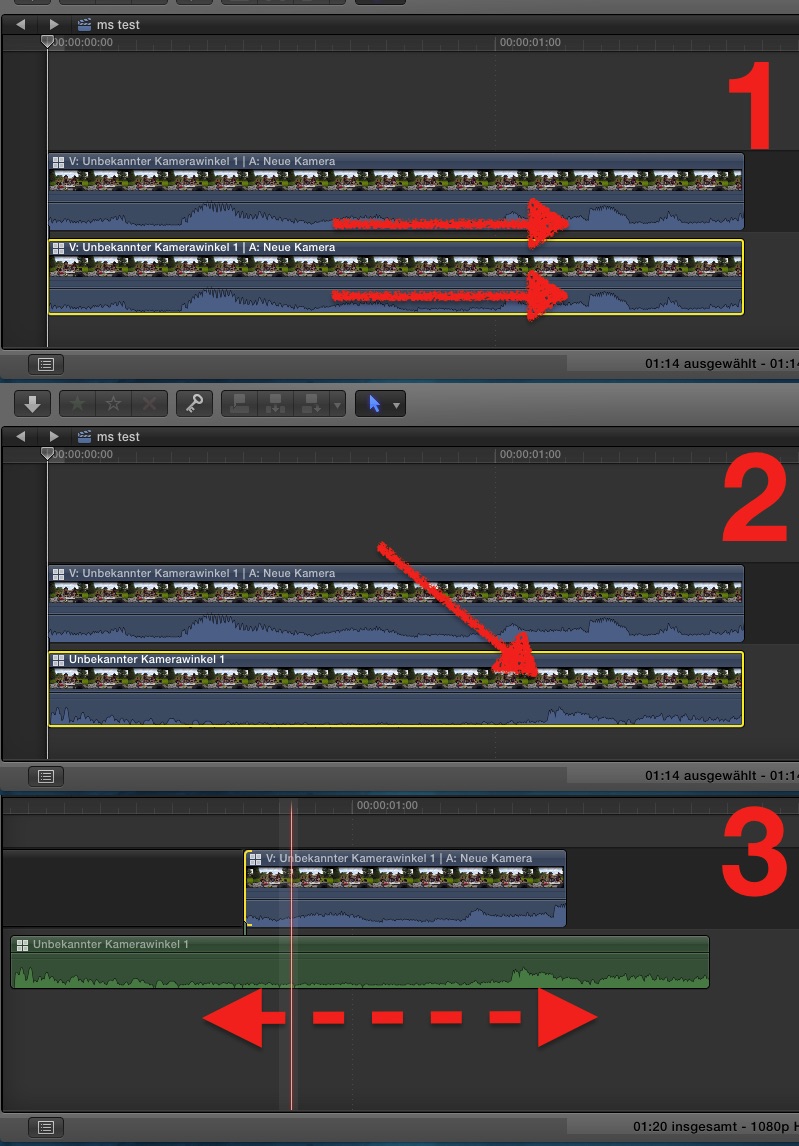
#1 hold opt/alt and drag the clip down under the original = doubles the clip, in synch
#2 then, select diff audio in both lanes, as Dave told you, notice the diff. waves in the screenshot
#3 for cosmetics/clean timeline, I extraxt audio from the lower lane (ctrl-shft-s) and erase the video part, keeping an in synch audio track , and, for example expand it for a nice fade ....
so, if cam#4 pics up stage audio, cam#2 some shouting fans, I can do a nice mix of BOTH audio sources ...
plus: don't forget you can apply a MC more than once ...
have a look:
#1 hold opt/alt and drag the clip down under the original = doubles the clip, in synch
#2 then, select diff audio in both lanes, as Dave told you, notice the diff. waves in the screenshot
#3 for cosmetics/clean timeline, I extraxt audio from the lower lane (ctrl-shft-s) and erase the video part, keeping an in synch audio track , and, for example expand it for a nice fade ....
so, if cam#4 pics up stage audio, cam#2 some shouting fans, I can do a nice mix of BOTH audio sources ...
Please Log in to join the conversation.
30 Jun 2016 16:21 - 30 Jun 2016 16:21 #78291
by Yarrow
Replied by Yarrow on topic MultiCam Audio: Locked Then Switched?
Thanks so much, guys! I had to get it done so I just ended up manually syncing the sound from the other angles directly on the timeline. Obviously I don't have much multicam experience- appreciate your tips very much. And thank you Karsten for taking the time to illustrate with annotated screenshots! Very cool. I did think of using the multicam clip again but I had already edited the original a bunch and didn't think of option-dragging just the sections I needed. Obvious in 20/20 hindsight
Last edit: 30 Jun 2016 16:21 by Yarrow. Reason: Added 'answered" checkmark
Please Log in to join the conversation.
