


- Posts: 10
- Thank you received: 0
3 Post Moderation Rule for New Boarders (25 Jan 2021)
New boarders will have their posts moderated - Don't worry if you cannot see your post immediately.
Frames dropping bad...
- Da_Arsun707
-
 Topic Author
- Offline
- New Member
-

Less
More
29 Jun 2016 06:26 #78238
by Da_Arsun707
Frames dropping bad... was created by Da_Arsun707
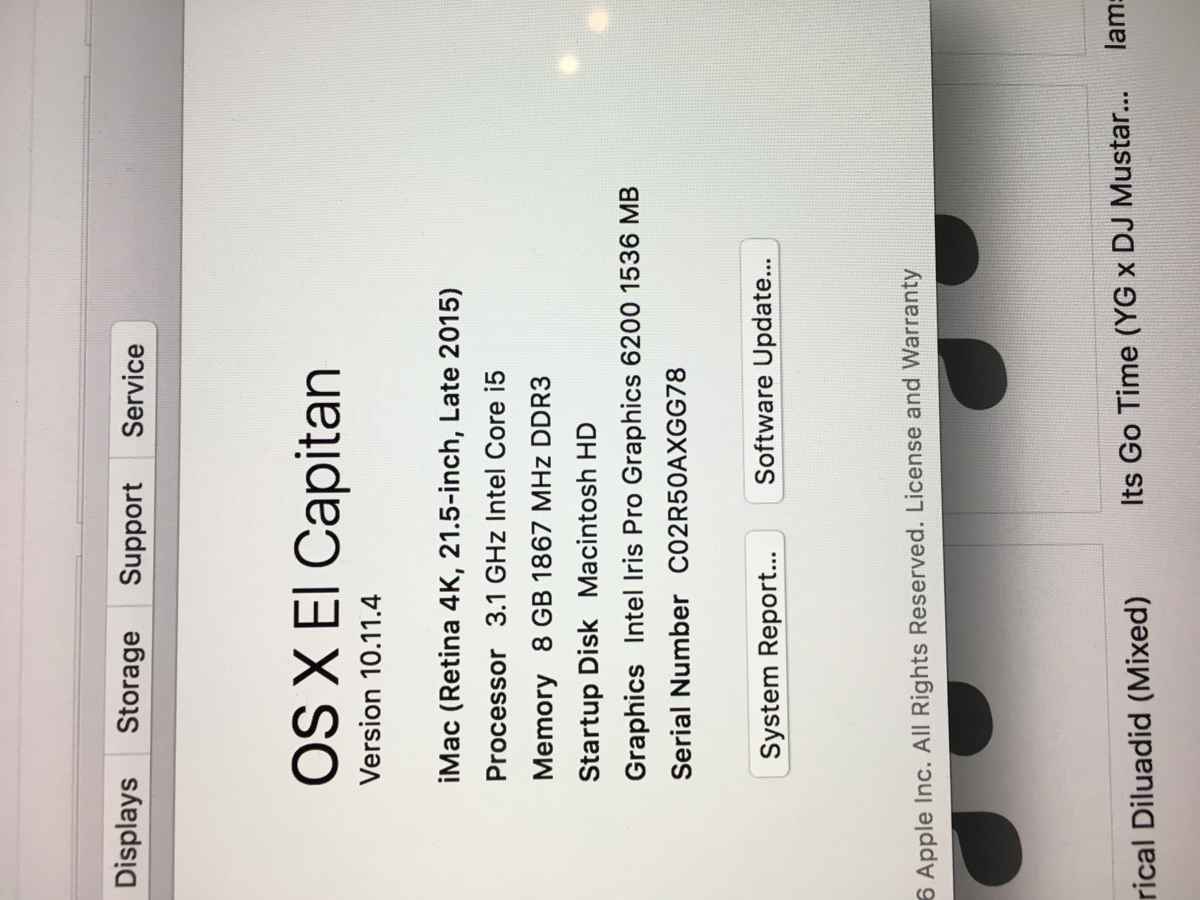
Attached is my iMac's specs which I just purchased 2 months ago. Is my computer strong enough to handle Final Cut Pro X and editing? I was told this computer would definitely be a work horse. But its running more like horse sh%t excuse my language just pretty frustrated at the moment.
I'm not using any effects, I even close all the windows thats not needed and its still slow, choppy and frames dropping. This is just ridiculous.
Can anyone give me any feedback what their thoughts are, about this issue. Thank you
I'm not using any effects, I even close all the windows thats not needed and its still slow, choppy and frames dropping. This is just ridiculous.
Can anyone give me any feedback what their thoughts are, about this issue. Thank you
Please Log in to join the conversation.
- ronny courtens
-

- Offline
- Moderator
-

Less
More
- Posts: 4455
- Thank you received: 962
29 Jun 2016 07:12 #78242
by ronny courtens
Replied by ronny courtens on topic Frames dropping bad...
Hey Drew,
Nothing wrong with your specs. I certainly wouldn't call it a "work horse" for editing because it only has the slower i5 processor and the far less performant Intel Iris GPU. But you should be able to edit simple HD projects on it without too many problems.
Let's do a step-by-step to see if we can find what's causing this problem.
1. Select your system drive and press CMD+i (or R-click and choose Get Info). What is the total capacity of your drive and how much available space do you have left?
- If your available drive space is less than 20% of your total capacity: your drive is full and you will need to make space. Full drives are a recipe for disaster and will slow down or even crash your computer.
- If your available drive space is OK:
2. Launch Disk Utility, select your system drive and click the First Aid button. Let Disk Utility verify your startup drive (this can take a few minutes, so just wait patiently until it's done).
- If you get and error: report back, something is wrong with your system drive
- If everything is okay:
3. Create a new admin account, launch FCP X using the new account and see if you still have slow performance.
- If everything works fine using the new admin account: report back, something is wrong with your old user account or with some third-party effects you may use in FCP X
- If you still get slow performance using the new account: take your iMac to an Apple repair store to perform a full hardware check of your RAM, processor and GPU.
Ronny
Nothing wrong with your specs. I certainly wouldn't call it a "work horse" for editing because it only has the slower i5 processor and the far less performant Intel Iris GPU. But you should be able to edit simple HD projects on it without too many problems.
Let's do a step-by-step to see if we can find what's causing this problem.
1. Select your system drive and press CMD+i (or R-click and choose Get Info). What is the total capacity of your drive and how much available space do you have left?
- If your available drive space is less than 20% of your total capacity: your drive is full and you will need to make space. Full drives are a recipe for disaster and will slow down or even crash your computer.
- If your available drive space is OK:
2. Launch Disk Utility, select your system drive and click the First Aid button. Let Disk Utility verify your startup drive (this can take a few minutes, so just wait patiently until it's done).
- If you get and error: report back, something is wrong with your system drive
- If everything is okay:
3. Create a new admin account, launch FCP X using the new account and see if you still have slow performance.
- If everything works fine using the new admin account: report back, something is wrong with your old user account or with some third-party effects you may use in FCP X
- If you still get slow performance using the new account: take your iMac to an Apple repair store to perform a full hardware check of your RAM, processor and GPU.
Ronny
Please Log in to join the conversation.
- Karsten Schlüter
-

- Offline
- Moderator
-
Less
More
- Posts: 3790
- Thank you received: 718
29 Jun 2016 07:13 #78243
by Karsten Schlüter
Replied by Karsten Schlüter on topic Frames dropping bad...
just the usual advice:
media on external drives?
lots of lanes? (stacked ckips in timeline)
usage of compounds wihtin compounds?
If using native formats (=not optimized/proxy) - which ones?
media on external drives?
lots of lanes? (stacked ckips in timeline)
usage of compounds wihtin compounds?
If using native formats (=not optimized/proxy) - which ones?
Please Log in to join the conversation.
- Da_Arsun707
-
Topic Author
- Offline
- New Member
-
Less
More
- Posts: 10
- Thank you received: 0
29 Jun 2016 18:25 - 30 Jun 2016 06:12 #78253
by Da_Arsun707
Ronny thank you very much for replying trying to assist me. Couple things I left out forgive me I'm actually a beginner at all this. Been filming things my whole life but never got into the editing part of it let alone computer technical aspect of it.
So I checked all the things you mentioned and everything is fine. Drive space is okay, disk you utility is okay. Another account user is okay. But I am editing 4k footage and I did upload everything into my desktop vs putting it on an external working off that. Well I did that with my 1st project now i"m on my 2nd, and I deleted everything off my desktop I originally loaded.
To back track... Can you explain to me the correct way my work flow should be? I think I upload all my footage to my external drive and pull footage I'd like to edit into FCPX correct?
Replied by Da_Arsun707 on topic Frames dropping bad...
ronny courtens wrote: /full-quote/
Ronny thank you very much for replying trying to assist me. Couple things I left out forgive me I'm actually a beginner at all this. Been filming things my whole life but never got into the editing part of it let alone computer technical aspect of it.
So I checked all the things you mentioned and everything is fine. Drive space is okay, disk you utility is okay. Another account user is okay. But I am editing 4k footage and I did upload everything into my desktop vs putting it on an external working off that. Well I did that with my 1st project now i"m on my 2nd, and I deleted everything off my desktop I originally loaded.
To back track... Can you explain to me the correct way my work flow should be? I think I upload all my footage to my external drive and pull footage I'd like to edit into FCPX correct?
Last edit: 30 Jun 2016 06:12 by Karsten Schlüter. Reason: please avoid full quotes ;)
Please Log in to join the conversation.
- Da_Arsun707
-
Topic Author
- Offline
- New Member
-
Less
More
- Posts: 10
- Thank you received: 0
29 Jun 2016 18:27 - 30 Jun 2016 06:12 #78254
by Da_Arsun707
So I originally uploaded all my 4k footage into my desk top iMac which I was told that wasn't a good thing to do. So I deleted it and now I'm working off my external drive. Timeline, no there isn't lots of clips stacked maybe 1 or 2 clips on top of one another but thats it. And I'm using proxy, doing my research they said proxy is better for editing.
Question? Is my iMac upgradable? Can I add more ram to it?
Replied by Da_Arsun707 on topic Frames dropping bad...
Karsten Schlüter wrote: /full quote /
So I originally uploaded all my 4k footage into my desk top iMac which I was told that wasn't a good thing to do. So I deleted it and now I'm working off my external drive. Timeline, no there isn't lots of clips stacked maybe 1 or 2 clips on top of one another but thats it. And I'm using proxy, doing my research they said proxy is better for editing.
Question? Is my iMac upgradable? Can I add more ram to it?
Last edit: 30 Jun 2016 06:12 by Karsten Schlüter. Reason: please avoi full-quotes ;)
Please Log in to join the conversation.
- Karsten Schlüter
-
- Offline
- Moderator
-
Less
More
- Posts: 3790
- Thank you received: 718
30 Jun 2016 06:15 #78269
by Karsten Schlüter
No.
since late2012, only the 27" iMacs can be upgraded after purchase ....
Replied by Karsten Schlüter on topic Frames dropping bad...
Da_Arsun707 wrote: .… Can I add more ram to it?
No.
since late2012, only the 27" iMacs can be upgraded after purchase ....
Please Log in to join the conversation.


30 Jun 2016 12:11 #78275
by joema
The problem is you are editing H264 4k, which is very CPU-intensive. I have a 2015 iMac 27 with 4Ghz CPU, 32GB RAM, M395X GPU and 1TB SSD, 8TB Thunderbolt RAID, and editing H264 4k can be a bit sluggish even on that, especially multicam. Adobe Premiere CC on the same hardware is even slower, so it's not that FCPX is inefficient but the task is computationally difficult. Each UHD 4k frame contains 24 times the data of a standard def 720x480 frame.
The problem is not the disk subsystem, nor GPU, it is a CPU limitation. The I/O data rate for H264 4k is not that high, else your camera could not record that to an SD card. The GPU cannot meaningfully accelerate H264 encode/decode as the core algorithm is sequential and not amenable to GPU-style parallelization.
Fortunately FCPX has built-in proxy mode which transcodes your material to a more efficient, lower-res working copy. You edit that, then it will sync up your edits to the original 4k material. The process is easy and streamlined.
You can transcode to proxy during import or afterward by selecting the clips in the event viewer, right-click, and picking "transcode media", then picking *only* "create proxy media". You don't need to pick "create optimized media".
Then click the drop-down triangle in the viewer at top right, and pick "proxy". This switches to the proxy media you just generated. Do all your editing but before final output switch the viewer back to "optimized/original", else the output will only be in proxy resolution.
This will greatly improve your editing performance.
Replied by joema on topic Frames dropping bad...
Da_Arsun707 wrote: ...I am editing 4k footage and I did upload everything into my desktop vs putting it on an external working off that...I think I upload all my footage to my external drive and pull footage I'd like to edit into FCPX correct?
The problem is you are editing H264 4k, which is very CPU-intensive. I have a 2015 iMac 27 with 4Ghz CPU, 32GB RAM, M395X GPU and 1TB SSD, 8TB Thunderbolt RAID, and editing H264 4k can be a bit sluggish even on that, especially multicam. Adobe Premiere CC on the same hardware is even slower, so it's not that FCPX is inefficient but the task is computationally difficult. Each UHD 4k frame contains 24 times the data of a standard def 720x480 frame.
The problem is not the disk subsystem, nor GPU, it is a CPU limitation. The I/O data rate for H264 4k is not that high, else your camera could not record that to an SD card. The GPU cannot meaningfully accelerate H264 encode/decode as the core algorithm is sequential and not amenable to GPU-style parallelization.
Fortunately FCPX has built-in proxy mode which transcodes your material to a more efficient, lower-res working copy. You edit that, then it will sync up your edits to the original 4k material. The process is easy and streamlined.
You can transcode to proxy during import or afterward by selecting the clips in the event viewer, right-click, and picking "transcode media", then picking *only* "create proxy media". You don't need to pick "create optimized media".
Then click the drop-down triangle in the viewer at top right, and pick "proxy". This switches to the proxy media you just generated. Do all your editing but before final output switch the viewer back to "optimized/original", else the output will only be in proxy resolution.
This will greatly improve your editing performance.
Please Log in to join the conversation.
- Da_Arsun707
-
Topic Author
- Offline
- New Member
-
Less
More
- Posts: 10
- Thank you received: 0
30 Jun 2016 20:13 - 01 Jul 2016 03:15 #78299
by Da_Arsun707
Replied by Da_Arsun707 on topic Frames dropping bad...
joema wrote:
Da_Arsun707 wrote: ......// full quote // …
Thank you very much I really appreciate the input on this whole 4k thing. It was really really frustrating not able to edit little 1 minute clips with out choppiness taking effect.
Last edit: 01 Jul 2016 03:15 by Karsten Schlüter. Reason: please avoid full-quotes ;)
Please Log in to join the conversation.
