


- Posts: 3
- Thank you received: 0
3 Post Moderation Rule for New Boarders (25 Jan 2021)
New boarders will have their posts moderated - Don't worry if you cannot see your post immediately.
Vignette above overexposed and repositioned clip
28 Jun 2016 01:12 #78180
by snowball
Vignette above overexposed and repositioned clip was created by snowball
Hey,
I am shooting a talking head video with white background. The background drop wasn't properly light the whole time, so I had to do some slight color correction within final cut that over exposes the left and right sides of the image a bit more.
What I have been trying to do now, was overlaying a vignette PNG over the whole image. It works well when I use the original frame, but there are some shots where I moved the person and whole clip to the right or left third of the frame. To cover up the empty background I just used a 100% white background image behind the clip. And in these parts it looks like the image correction is applied as well to the vignette PNG image. I get a break between where the clips end and the white background starts.
Its probabbly easier to understand with these images:
The shot I am talking about with a viginette applied

The same show without viginette (no difference between background and clip)

The mask applied to the overexposure color correction

The viginette PNG (take in mind that its background is transparent)

My timeline:

I tried to get the same effect using the build in viginette effect but encounter the exact same problem.
I am shooting a talking head video with white background. The background drop wasn't properly light the whole time, so I had to do some slight color correction within final cut that over exposes the left and right sides of the image a bit more.
What I have been trying to do now, was overlaying a vignette PNG over the whole image. It works well when I use the original frame, but there are some shots where I moved the person and whole clip to the right or left third of the frame. To cover up the empty background I just used a 100% white background image behind the clip. And in these parts it looks like the image correction is applied as well to the vignette PNG image. I get a break between where the clips end and the white background starts.
Its probabbly easier to understand with these images:
The shot I am talking about with a viginette applied
The same show without viginette (no difference between background and clip)
The mask applied to the overexposure color correction
The viginette PNG (take in mind that its background is transparent)
My timeline:
I tried to get the same effect using the build in viginette effect but encounter the exact same problem.
Please Log in to join the conversation.
- Karsten Schlüter
-

- Offline
- Moderator
-

Less
More
- Posts: 3790
- Thank you received: 718
28 Jun 2016 03:00 #78181
by Karsten Schlüter
Replied by Karsten Schlüter on topic Vignette above overexposed and repositioned clip
When you check your compo with the scopes you can see what's happening:
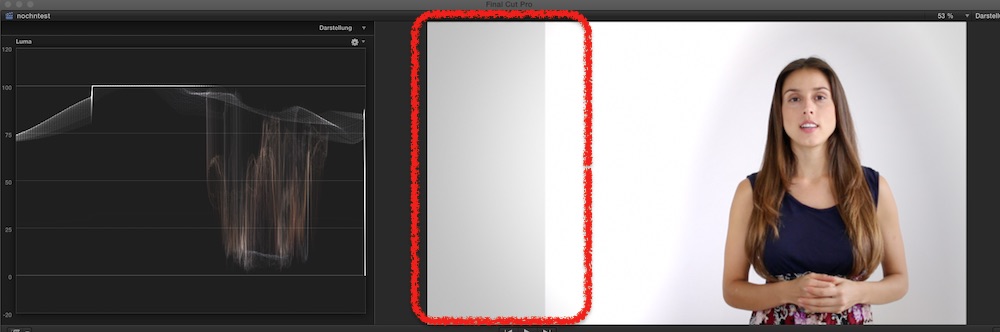
your vignette is applied to the added white generator, nice curve ... but your CC background behind your talent doesn't match the levels of the generator = flat/clipped white.
So, the 'sums' are different = that ugly border....
workaround: level both whites to the same level ... than apply vignette ...
your vignette is applied to the added white generator, nice curve ... but your CC background behind your talent doesn't match the levels of the generator = flat/clipped white.
So, the 'sums' are different = that ugly border....
workaround: level both whites to the same level ... than apply vignette ...
Please Log in to join the conversation.
