


3 Post Moderation Rule for New Boarders (25 Jan 2021)
New boarders will have their posts moderated - Don't worry if you cannot see your post immediately.
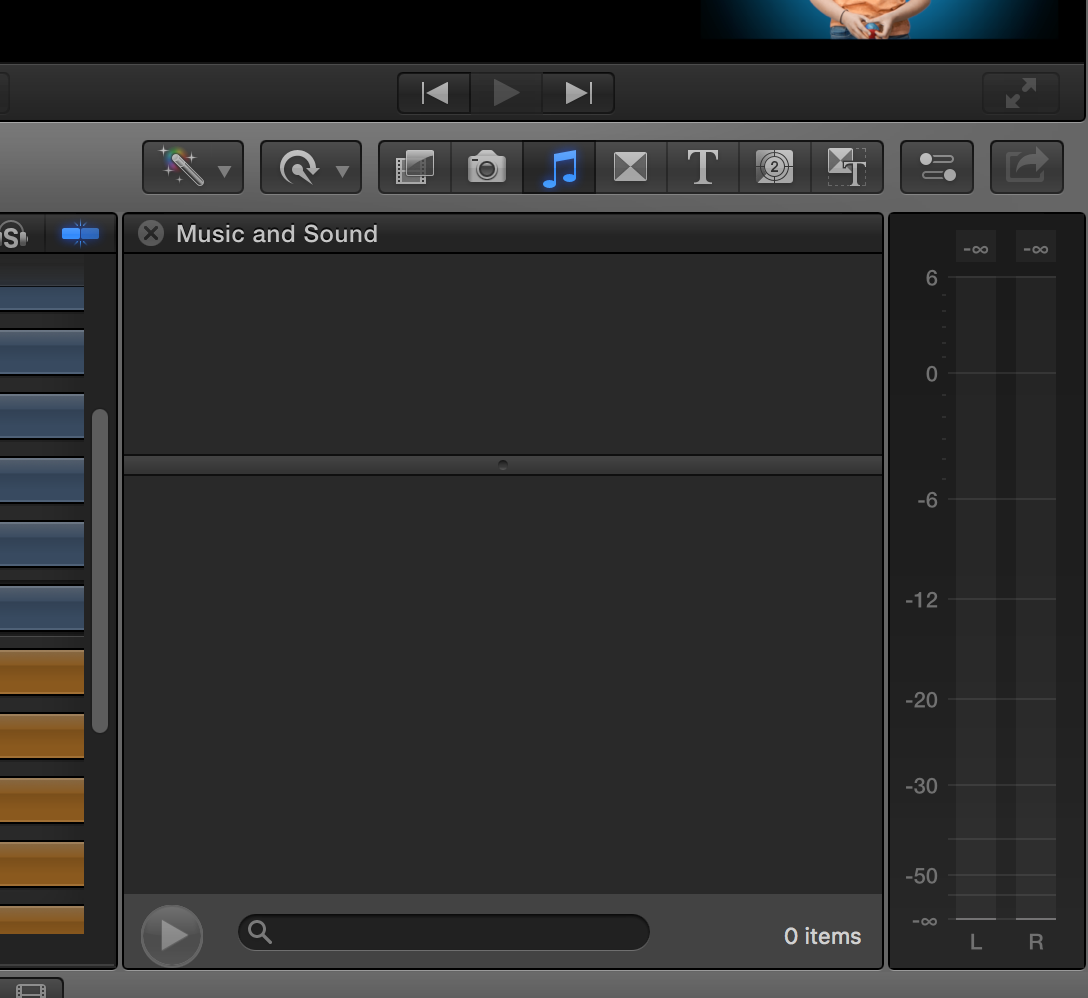
Music and Sound Browser is Suddenly Blank


I have installed (or upgraded) nothing in the last week and I have rebooted without any effect.
Any thoughts on what could cause this or more importantly, how to display those sound and music files again?
Thanks,
Chris
Please Log in to join the conversation.
Please Log in to join the conversation.
Please Log in to join the conversation.
Any suggestions?
Please Log in to join the conversation.


Terminal command below: use with caution. To use, open terminal, triple click the terminal command line below, copy and paste into terminal window. Enter your password and let permissions repair. When returned to your user name, COMMAND Q to quit terminal.
sudo /usr/libexec/repair_packages --repair --standard-pkgs --volume /
Creating history....one edit at a time !
Please Log in to join the conversation.
Second, I've run disk utility and everything seems okay. In fact, everything on my machine is running perfectly (as far as I can tell), except these two windows in FCPX are coming up blank. And they were working perfectly days ago.
I honestly haven't installed anything and I'm up to date on all my versions. So, it's really weird. I've spent hours searching google and found nothing. I've deleted preferences 3 times. Rebooted more times than I can count. I've even launched photos, iTunes, and garageband (because that was supposedly a fix for a similar problem years ago). But nothing works.
I'm stumped and i really need to get it working, as I'm in the middle of summer camp and i teach with this computer and I'm teaching kids how to use FCPX.

Please Log in to join the conversation.
Creating history....one edit at a time !
Please Log in to join the conversation.
- Karsten Schlüter
-

- Offline
- Moderator
-

- Posts: 3790
- Thank you received: 718
CMessineo wrote: .... i teach with this computer and I'm teaching kids how to use FCPX.
do the kids have access to your computer?
my son, then 6y old, managed to rename my HDD to "" (nix, nothing, nada) ... oh ohhhh

just to check:
~/Library/Audio/Apple Loops/Apple/Final Cut Pro Sound Effects/ ...
still exists? Under that name?
Please Log in to join the conversation.
Please Log in to join the conversation.
- ronny courtens
-

- Offline
- Moderator
-
- Posts: 4455
- Thank you received: 962
Sorry to hear you are having these issues.
Let's try to solve this step by step:
1. Launch FCP X and choose Window > Revert to Original Layout. If this does not fix it:
2. Reset the FCP X preferences. I see you have already done this a few times, so skip to:
3. Create a new admin user account and launch FCP X using this account.
- If your media browser shows up as expected using the new account, you may have a corrupt user account. As opposed to what we may think, this is not really difficult to repair. Just follow these guidelines: www.fcpxbook.com/tips/resetting-the-user.html
- If your media browser still turns up empty with the new user account, log back in with your old user account and go to the next step:
4. Completely remove FCP X from your system and install it again: support.apple.com/nl-be/HT202412
If this does not help:
5. Reinstall your OS on top over the existing one: osxdaily.com/2016/02/09/howto-reinstall-os-x-mac-recovery/
Keep us updated on your progress.
- Ronny
Please Log in to join the conversation.
1. Tried it - no luck.
2. Tried again - no luck again.
3. Tried this and the new account comes up with blank sound and photo browsers.
4. The reinstall makes me nervous for two reasons. One, I have many plugins installed that I think I would have to uninstall first and then reinstall. Two, I have a big project I am in the middle of (that uses many of these plugins). The project is fine right now, so I worry about the install breaking it.
5. I guess I could try this, but damn, I wish there was a less drastic solution.
Please Log in to join the conversation.
- ronny courtens
-
- Offline
- Moderator
-
- Posts: 4455
- Thank you received: 962
What version of OSX and FCP X are you running?
- Ronny
Please Log in to join the conversation.
So, I tried step 5 and reinstalled FCPX - no luck.
Then I tried step 6 and reinstalled the OS and that did it!
Thank you so much!!!
Chris
Please Log in to join the conversation.
- Karsten Schlüter
-
- Offline
- Moderator
-
- Posts: 3790
- Thank you received: 718
CMessineo wrote: ... no one has access to my machine to rename anything and, yes, the audio files are still there.
so, things are narrowed - FCPX just doesn't 'find' the libraries.
guess, you have to take the long route Ronny suggests ...
==edit==
oops, didn't saw you solved your prob! ... useless comment of mine ...............
Please Log in to join the conversation.
- ronny courtens
-
- Offline
- Moderator
-
- Posts: 4455
- Thank you received: 962
Good te hear you have been able to solve the problem.
This is a very uncommon issue. In 70% of the cases this problem gets solved by simply deleting the FCP X preferences, by repairing permissions or by repairing the user account. You had a worst-case scenario. Fortunately, reinstalling the current OS has become less of a hassle than it used to be and it's pretty safe to do with OSX.
Happy editing!
- Ronny
Please Log in to join the conversation.
Thanks again, it feels great to have everything working again.
Please Log in to join the conversation.
