


- Posts: 39
- Thank you received: 0
3 Post Moderation Rule for New Boarders (25 Jan 2021)
New boarders will have their posts moderated - Don't worry if you cannot see your post immediately.
synchronize clips
27 Jun 2016 15:17 #78165
by mblazer
synchronize clips was created by mblazer
Hi there,
What am I doing wrong?:
I have one video clip en two audio clips. When I synchronise them and select open in timeline I get a clip with two audio channels.
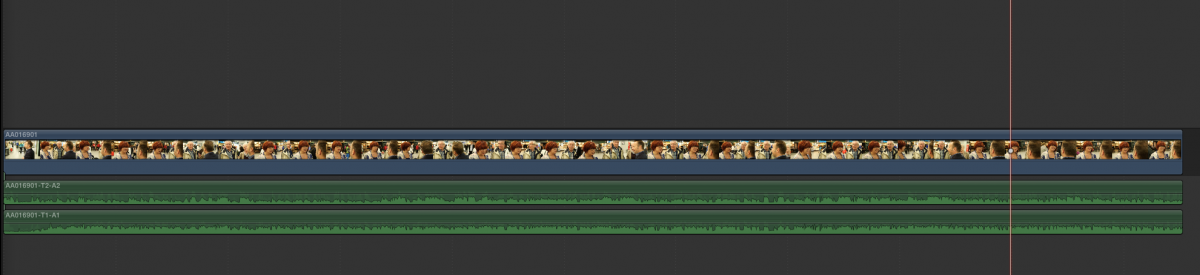
So far so good. But when I select the synchronised clip and look at the inspector, I see only one channel.
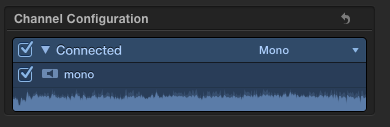
I would suspect that I could see the two channels in the inspector.
So again, what am I doing wrong?
What am I doing wrong?:
I have one video clip en two audio clips. When I synchronise them and select open in timeline I get a clip with two audio channels.
So far so good. But when I select the synchronised clip and look at the inspector, I see only one channel.
I would suspect that I could see the two channels in the inspector.
So again, what am I doing wrong?
Please Log in to join the conversation.

27 Jun 2016 17:59 - 27 Jun 2016 18:00 #78170
by canelson
--
Matias Canelson
www.canelson.us
Replied by canelson on topic synchronize clips
You have two solutions for this problem:
1) Create a multicam instead of a synchronized clip.
2) If you prefer use synchronized clips, the correct workflow is: sync audios together, then sync the new synchronized audios to your video and you will have all the channels. (Don't know why this hasn't been fixed yet to make it simpler).
1) Create a multicam instead of a synchronized clip.
2) If you prefer use synchronized clips, the correct workflow is: sync audios together, then sync the new synchronized audios to your video and you will have all the channels. (Don't know why this hasn't been fixed yet to make it simpler).
--
Matias Canelson
www.canelson.us
Last edit: 27 Jun 2016 18:00 by canelson. Reason: typos
Please Log in to join the conversation.

27 Jun 2016 22:14 - 27 Jun 2016 22:16 #78173
by BenB
Replied by BenB on topic synchronize clips
If you drop that Sync Clip inta a timeline, select it, you'd see all a channels. You are opening it into its OWN timeline, which shows the individual clips inside of that specific Sync a Clip. Don't right-click it, don't "Open into timeline". That's its own container timeline. Put it in a project timeline or just highlight it in the Browser, look at properties in the inspector. Only "open in timeline" when you want to edit the individual clips held inside of a Sync Clip container.
Last edit: 27 Jun 2016 22:16 by BenB.
Please Log in to join the conversation.
