


- Posts: 19
- Thank you received: 0
3 Post Moderation Rule for New Boarders (25 Jan 2021)
New boarders will have their posts moderated - Don't worry if you cannot see your post immediately.
Slow Slow Slow Slow... do I need a new Mac Pro?
- howard.ritchie
-
 Topic Author
- Offline
- New Member
-

Less
More
24 Jun 2016 00:50 #78084
by howard.ritchie
Slow Slow Slow Slow... do I need a new Mac Pro? was created by howard.ritchie
So I am using the following...
MacBook Pro (Retina, 13-inch, Early 2015)
2.9 i5
8gb ddr3
154gb left on hd.
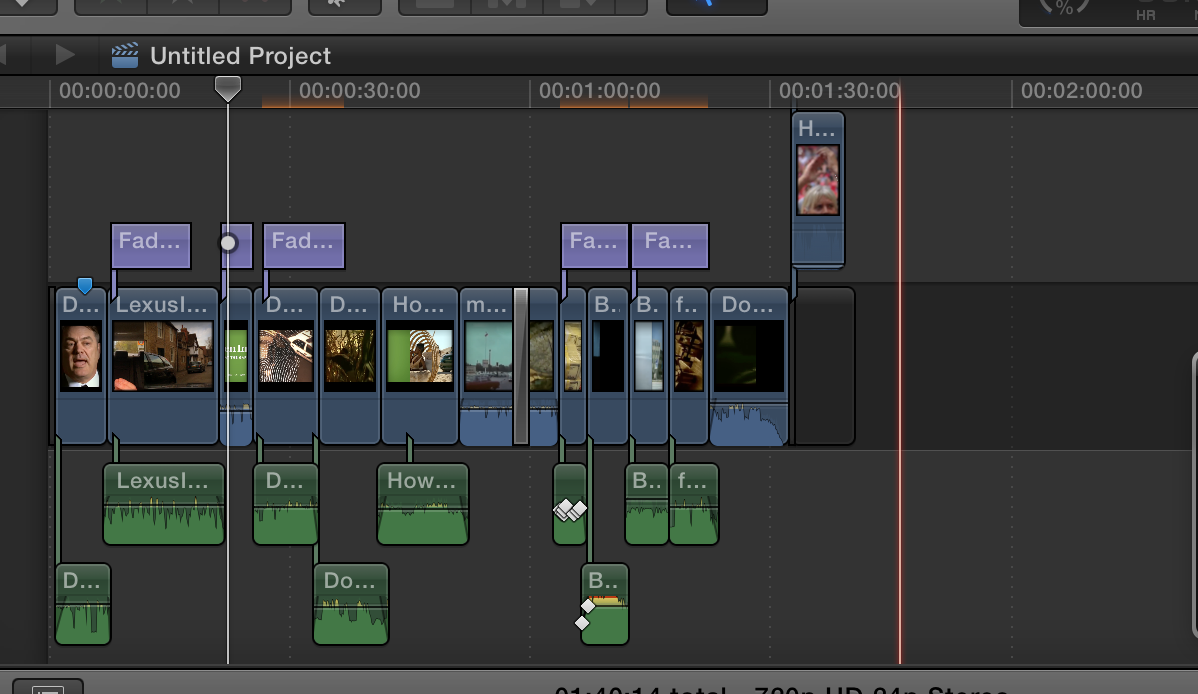
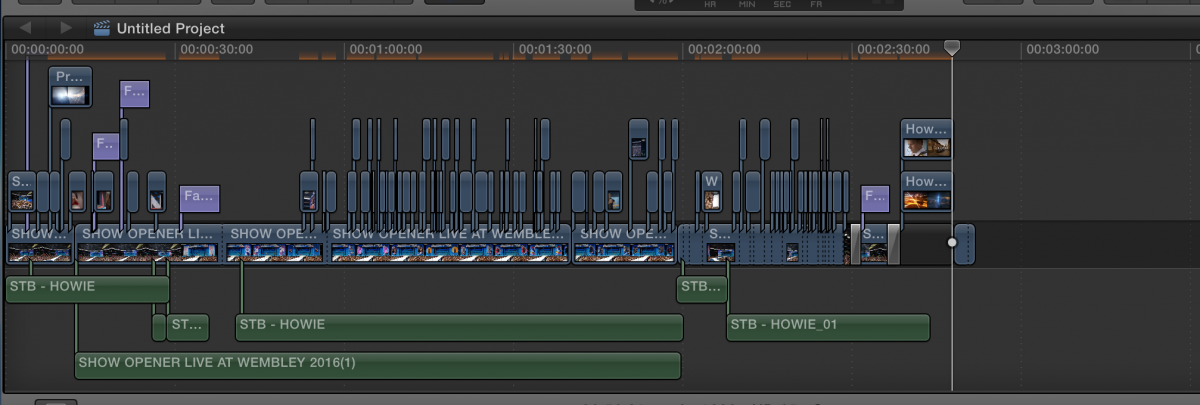
These two projects I had to stop because its too slow what ever I do.
Something wrong with mac?
I have done all the waiting... but the work flow is so slow its like a 90s PC.
MacBook Pro (Retina, 13-inch, Early 2015)
2.9 i5
8gb ddr3
154gb left on hd.
These two projects I had to stop because its too slow what ever I do.
Something wrong with mac?
I have done all the waiting... but the work flow is so slow its like a 90s PC.
Please Log in to join the conversation.
- Karsten Schlüter
-

- Offline
- Moderator
-

Less
More
- Posts: 3790
- Thank you received: 718
24 Jun 2016 07:25 #78089
by Karsten Schlüter
Replied by Karsten Schlüter on topic Slow Slow Slow Slow... do I need a new Mac Pro?
Put media external.
And your Untitled Project has tons of 'parallel' media - why that??
And your Untitled Project has tons of 'parallel' media - why that??
Please Log in to join the conversation.
- ronny courtens
-

- Offline
- Moderator
-
Less
More
- Posts: 4455
- Thank you received: 962
24 Jun 2016 09:27 #78094
by ronny courtens
Replied by ronny courtens on topic Slow Slow Slow Slow... do I need a new Mac Pro?
Althought the i5 processor with only 8 GB RAM is not really the best you can get for editing, your computer should not have any trouble dealing with such a simple project.
Computers that suddenly perform sluggish can indicate user corruption.
Try this:
Create a new admin user account, then launch FCP X with this same project and see if this solved the issue.
If your computer performs better with a new and clean user account, follow these guidelines to repair your old user account:
www.fcpxbook.com/tips/resetting-the-user.html
- Ronny
Computers that suddenly perform sluggish can indicate user corruption.
Try this:
Create a new admin user account, then launch FCP X with this same project and see if this solved the issue.
If your computer performs better with a new and clean user account, follow these guidelines to repair your old user account:
www.fcpxbook.com/tips/resetting-the-user.html
- Ronny
Please Log in to join the conversation.
- howard.ritchie
-
Topic Author
- Offline
- New Member
-
Less
More
- Posts: 19
- Thank you received: 0
24 Jun 2016 12:30 #78099
by howard.ritchie
Replied by howard.ritchie on topic Slow Slow Slow Slow... do I need a new Mac Pro?
Forgive me for my ungratefulness, but when you chose a new user the mac will start a fresh and only access any apps and not files that are associated with other users....
Also I do not know what parallel files are? I am a newb.
One more thing, does google crawl and index these pages under a name search, so if Joe Blogs posts someone can read them all via SERPS?
Also I do not know what parallel files are? I am a newb.
One more thing, does google crawl and index these pages under a name search, so if Joe Blogs posts someone can read them all via SERPS?
Please Log in to join the conversation.

24 Jun 2016 12:37 #78101
by davechap
Replied by davechap on topic Slow Slow Slow Slow... do I need a new Mac Pro?
I'd definitely try Ronny's advice.
My thoughts on external media:
The internal flash storage is so fast. With previous spinning hard drives, you wanted to keep your media off of the same drive that the OS and application were on so they all didn't compete for playback. That's not the case anymore and most people still state that media should be on an external drive from older best practices. My issue with that is most external drives are very, very slow compared. Just because a drive has a thunderbolt connection doesn't mean you'll get read/write speeds above 200mb/s. Even some G-Tech raids top out around 300mb/s compared to the internal 1800mb/s. I see Karsten's point, but it's not always going to save you.
If you have a ton of available space on your Mac, putting footage locally won't hurt. If you do have a ton of footage, store it on an external drive and then generate proxy media. The proxy media will be internal (if your library is on your Mac). This way you can unplug from the slower external drive, switch the viewer to change the project to use the proxy media and edit from there. Playback will be smooth as butter.
My thoughts on external media:
The internal flash storage is so fast. With previous spinning hard drives, you wanted to keep your media off of the same drive that the OS and application were on so they all didn't compete for playback. That's not the case anymore and most people still state that media should be on an external drive from older best practices. My issue with that is most external drives are very, very slow compared. Just because a drive has a thunderbolt connection doesn't mean you'll get read/write speeds above 200mb/s. Even some G-Tech raids top out around 300mb/s compared to the internal 1800mb/s. I see Karsten's point, but it's not always going to save you.
If you have a ton of available space on your Mac, putting footage locally won't hurt. If you do have a ton of footage, store it on an external drive and then generate proxy media. The proxy media will be internal (if your library is on your Mac). This way you can unplug from the slower external drive, switch the viewer to change the project to use the proxy media and edit from there. Playback will be smooth as butter.
Please Log in to join the conversation.
- howard.ritchie
-
Topic Author
- Offline
- New Member
-
Less
More
- Posts: 19
- Thank you received: 0
24 Jun 2016 12:43 #78102
by howard.ritchie
Replied by howard.ritchie on topic Slow Slow Slow Slow... do I need a new Mac Pro?
Hello and thanks for taking the time!
I have tried a HD and editing from there. Nightmare. Another post somewhere noted a ton of issues editing off "site" - and its not just FCPX - Serato also hates externals, a dude at the Mac store told me not neccessary or if you ever do - only ever use SS
I already use Proxy in my settings - either that or I don't. I recall reading tht it does it auto in the library mode and then auto bounces it out at nice quality?
Last time I also tried to use proxies, I got in a tiss and lost all my work and it was a learning curve that I had no idea about. Again the Mac guy said - really unless your making tons of 60 minute videos this should not be neccessary but - sure I am always willing to learn if I really need to do that.
Again can you explain the theory behind external media?
I have tried a HD and editing from there. Nightmare. Another post somewhere noted a ton of issues editing off "site" - and its not just FCPX - Serato also hates externals, a dude at the Mac store told me not neccessary or if you ever do - only ever use SS
I already use Proxy in my settings - either that or I don't. I recall reading tht it does it auto in the library mode and then auto bounces it out at nice quality?
Last time I also tried to use proxies, I got in a tiss and lost all my work and it was a learning curve that I had no idea about. Again the Mac guy said - really unless your making tons of 60 minute videos this should not be neccessary but - sure I am always willing to learn if I really need to do that.
Again can you explain the theory behind external media?
Please Log in to join the conversation.
- ronny courtens
-
- Offline
- Moderator
-
Less
More
- Posts: 4455
- Thank you received: 962
25 Jun 2016 13:40 #78122
by ronny courtens
Replied by ronny courtens on topic Slow Slow Slow Slow... do I need a new Mac Pro?
Hey Howard.
1. Creating a new admin user is only for test purposes. It does not matter how may user accounts your computer has or where your media is stored.
So please just create a new admin user, launch FCP X, create a new Library, import some footage into that Library, add graphics, titles etc... just like you normally do and see if you still have sluggish behavior or not. Then report back.
2. I think with "parallel clips" Karsten means you have tons of B-Roll clips above the primary storyline. This makes you timeline look a bit cluttered, but it will not affect the performance of your computer.
3. Keeping media off the boot drive has always been a golden rule because mechanical drives were too slow to handle both the applications and the media throughput. Nowadays SSD / Flash drives drives should allow you to keep HD media on the boot drive without affecting your editing performance. But always use fast external thunderbolt storage for your media if you work with resolutions higher than HD.
- Ronny
1. Creating a new admin user is only for test purposes. It does not matter how may user accounts your computer has or where your media is stored.
So please just create a new admin user, launch FCP X, create a new Library, import some footage into that Library, add graphics, titles etc... just like you normally do and see if you still have sluggish behavior or not. Then report back.
2. I think with "parallel clips" Karsten means you have tons of B-Roll clips above the primary storyline. This makes you timeline look a bit cluttered, but it will not affect the performance of your computer.
3. Keeping media off the boot drive has always been a golden rule because mechanical drives were too slow to handle both the applications and the media throughput. Nowadays SSD / Flash drives drives should allow you to keep HD media on the boot drive without affecting your editing performance. But always use fast external thunderbolt storage for your media if you work with resolutions higher than HD.
- Ronny
Please Log in to join the conversation.
- howard.ritchie
-
Topic Author
- Offline
- New Member
-
Less
More
- Posts: 19
- Thank you received: 0
25 Jun 2016 14:56 #78125
by howard.ritchie
Replied by howard.ritchie on topic Slow Slow Slow Slow... do I need a new Mac Pro?
Wow. um, helpful, but er ok this means taking media to USB and re importin for a mock project right? - as there will be no assets in the USER profile. thats what you mean right?
Excuse my dimness.
As for cluttered, for music video or super fast movie trailer edits, how else can you do it? you mean select all clips in a fast sequence and make them into a new compound clip?
Excuse my dimness.
As for cluttered, for music video or super fast movie trailer edits, how else can you do it? you mean select all clips in a fast sequence and make them into a new compound clip?
Please Log in to join the conversation.
- ronny courtens
-
- Offline
- Moderator
-
Less
More
- Posts: 4455
- Thank you received: 962
25 Jun 2016 16:34 #78126
by ronny courtens
Replied by ronny courtens on topic Slow Slow Slow Slow... do I need a new Mac Pro?
This is indeed meant to be a test project. You can import media from anywhere you wish, or you can use the same media that you have used for the project that ran so slow. In that case you only need to copy some media onto a stick and import it into your test Library.
One other advantage of testing with a new admin account is that none of your Motion-template based third-party plugins will be available in FCP X. Some third-party plugins that were created for outdated versions of FCP X and that haven't been updated can really slow down your system.
So pleas do the test with a new admin account and some test footage, and let us know if this solves the sluggishness of your system or not.
- Ronny
One other advantage of testing with a new admin account is that none of your Motion-template based third-party plugins will be available in FCP X. Some third-party plugins that were created for outdated versions of FCP X and that haven't been updated can really slow down your system.
So pleas do the test with a new admin account and some test footage, and let us know if this solves the sluggishness of your system or not.
- Ronny
Please Log in to join the conversation.

26 Jun 2016 00:57 #78128
by zzchu
Replied by zzchu on topic Slow Slow Slow Slow... do I need a new Mac Pro?
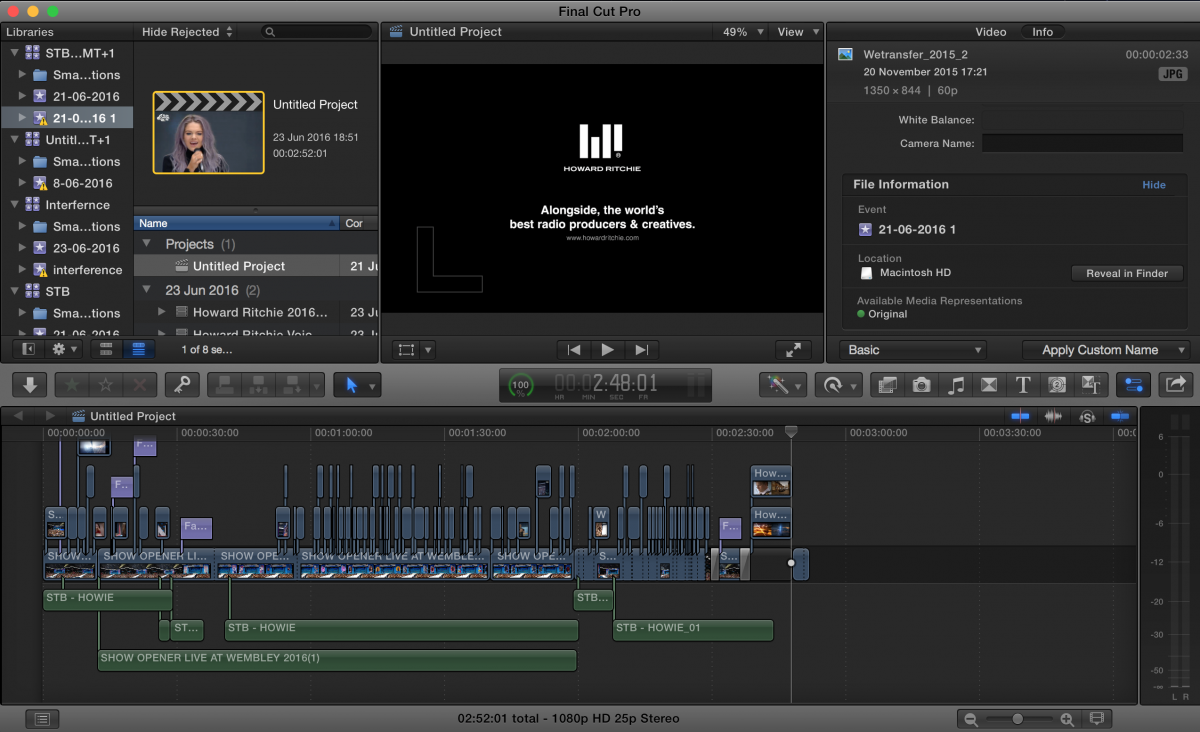
Just out of curiosity. I'm looking at your project properties on the screenshot above and it is 1080p 25, but what kind of original clips are you working with? Even though FCPX does not and should not care what resolution files you have (and you can mix them in the project)--- Is the project constantly "rendering" because the clips have to render to match the project properties? I remember this slowing a project for me a while back.
Please Log in to join the conversation.
- Karsten Schlüter
-
- Offline
- Moderator
-
Less
More
- Posts: 3790
- Thank you received: 718
26 Jun 2016 05:01 #78131
by Karsten Schlüter
… tried to avoid the bad word <cough> tracks <cough>
the OP's screenshot shows b- and c-rolls, several track stapled.
… and, in my experience, with media from a mechanical platter it HAS an effect, slowdown/stutter. As far as I understand, FCPX 'asks' for all media listed at a given point in time - wether on display or not, 'cause 'covered' by another clip on top. (that's why I'm, partly joking, partly serious, so grumpy about compounds...)
So, with the OS and the app and project and caches and three 'streams' of media, that one rec/read-head inside the int. drive is really busy ...
me no engineer, just sharing experiences at the low end of hardware .......
probably I should update my 'knowledge' ... :blink:
Replied by Karsten Schlüter on topic Slow Slow Slow Slow... do I need a new Mac Pro?
ronny courtens wrote: …
2. I think with "parallel clips" Karsten means you have tons of B-Roll clips above the primary storyline. … will not affect the performance of your computer.…
… tried to avoid the bad word <cough> tracks <cough>
the OP's screenshot shows b- and c-rolls, several track stapled.
… and, in my experience, with media from a mechanical platter it HAS an effect, slowdown/stutter. As far as I understand, FCPX 'asks' for all media listed at a given point in time - wether on display or not, 'cause 'covered' by another clip on top. (that's why I'm, partly joking, partly serious, so grumpy about compounds...)
So, with the OS and the app and project and caches and three 'streams' of media, that one rec/read-head inside the int. drive is really busy ...
me no engineer, just sharing experiences at the low end of hardware .......
probably I should update my 'knowledge' ... :blink:
Please Log in to join the conversation.

26 Jun 2016 13:48 #78135
by BenB
Replied by BenB on topic Slow Slow Slow Slow... do I need a new Mac Pro?
Apple referees to them as "lanes". Like a car can switch parallel lanes easily, but a train can't switch parallel tracks at all. Just throwing that out there. The term only becomes more important later on.
Please Log in to join the conversation.
- howard.ritchie
-
Topic Author
- Offline
- New Member
-
Less
More
- Posts: 19
- Thank you received: 0
26 Jun 2016 17:04 #78138
by howard.ritchie
Replied by howard.ritchie on topic Slow Slow Slow Slow... do I need a new Mac Pro?
So sorry about this.
I have tried to do the following.
Then
Login as test user
Locate file / library shown as 1.2gb on the external drive.
Open in FCP
All the files are missing.
I have tried this four times.
I have even tried to ensure that before exporting or copying the project I have all the media in place?
So sorry - this has taken me about 2 hours. Including a Youtube video.
Maybe I should just repair profile anyway?
The video is here, so you can see what detail or NOT there is
The files are all ripped from YT
The main long file is a we transfer copy of broadcasted content filmed on a broadcast camear but it is a bounce, not the original file.
The titles are a plug in which you should know from the font and the way they come in.
But.. the lagging started way before the titles were added
I did not change colourisation at all
The audio files is one long wav file of audio, which is running underneath the audio from the main braodcast clip from the event.
Audio Wav is 42mb
Main Footage is 412mb
Artist clips are small but all come from 20 files each of 40mb each however only a snip is being used.
Other videos I had LESS ISSUES with but nothing like as much lagging as the first one.
I have tried to do the following.
- Insert media drive
- Highlight project
- Create new Library on External drive.
- Copy project to that folder
Then
Login as test user
Locate file / library shown as 1.2gb on the external drive.
Open in FCP
All the files are missing.
I have tried this four times.
I have even tried to ensure that before exporting or copying the project I have all the media in place?
So sorry - this has taken me about 2 hours. Including a Youtube video.
Maybe I should just repair profile anyway?
The video is here, so you can see what detail or NOT there is
The files are all ripped from YT
The main long file is a we transfer copy of broadcasted content filmed on a broadcast camear but it is a bounce, not the original file.
The titles are a plug in which you should know from the font and the way they come in.
But.. the lagging started way before the titles were added
I did not change colourisation at all
The audio files is one long wav file of audio, which is running underneath the audio from the main braodcast clip from the event.
Audio Wav is 42mb
Main Footage is 412mb
Artist clips are small but all come from 20 files each of 40mb each however only a snip is being used.
Other videos I had LESS ISSUES with but nothing like as much lagging as the first one.
Please Log in to join the conversation.
- Threefold Films
-
- Offline
- Senior Member
-

Less
More
- Posts: 45
- Thank you received: 9
27 Jun 2016 16:45 #78169
by Threefold Films
Replied by Threefold Films on topic Slow Slow Slow Slow... do I need a new Mac Pro?
I have occasionally had issues with externals and permissions, make sure on the external you have clicked "ignore permissions on this drive" in the get info window. This may have your footage show up.
it's not the biggest machine, but it should handle those fine... especially if you "optimise media" mp4 is always going to be a bit tougher on the CPU than Prores.
Also how many libraries do you have open? from the screenshot it seemed like a few, but if you're using a test user then that should rule that out.
Final thing to try, which can help is to delete FCPX and re-install from the app store...
Hope you solve it.
it's not the biggest machine, but it should handle those fine... especially if you "optimise media" mp4 is always going to be a bit tougher on the CPU than Prores.
Also how many libraries do you have open? from the screenshot it seemed like a few, but if you're using a test user then that should rule that out.
Final thing to try, which can help is to delete FCPX and re-install from the app store...
Hope you solve it.
Please Log in to join the conversation.
- howard.ritchie
-
Topic Author
- Offline
- New Member
-
Less
More
- Posts: 19
- Thank you received: 0
28 Jun 2016 18:30 #78219
by howard.ritchie
Replied by howard.ritchie on topic Slow Slow Slow Slow... do I need a new Mac Pro?
Ah ok - yes that might be worth a try.
I spoke to apple, because I am dumb and they said with only 45gb on your hd left you are an idiot so get a thunderbolt and work off that, or keep your drive clean???!
I spoke to apple, because I am dumb and they said with only 45gb on your hd left you are an idiot so get a thunderbolt and work off that, or keep your drive clean???!
Please Log in to join the conversation.
- Threefold Films
-
- Offline
- Senior Member
-
Less
More
- Posts: 45
- Thank you received: 9
28 Jun 2016 18:47 #78221
by Threefold Films
Replied by Threefold Films on topic Slow Slow Slow Slow... do I need a new Mac Pro?
Oh yeah. That will definitely slow everything right down.
Can't stress enough how important drive speed is for FCPX performance.
Can't stress enough how important drive speed is for FCPX performance.
Please Log in to join the conversation.
- howard.ritchie
-
Topic Author
- Offline
- New Member
-
Less
More
- Posts: 19
- Thank you received: 0
29 Jun 2016 10:10 #78248
by howard.ritchie
Replied by howard.ritchie on topic Slow Slow Slow Slow... do I need a new Mac Pro?
Ah, right ok haha - what an imbecile... So I guess I will need to shell out for a Thunderbolt put libraries and all footage on that and keep the drive really clean.
That way if I spend the right money If I need to come back and re cut then I can. Presently I delete all content, and the lirbraries once I have bounced out. To keep clutter from building up.
I carry all my serato music and production music here so that probably wont be good, perhaps even move all that to a cheaper HD and keep assets local then transfer.
Hm helpful forum this.
That way if I spend the right money If I need to come back and re cut then I can. Presently I delete all content, and the lirbraries once I have bounced out. To keep clutter from building up.
I carry all my serato music and production music here so that probably wont be good, perhaps even move all that to a cheaper HD and keep assets local then transfer.
Hm helpful forum this.
Please Log in to join the conversation.
- Threefold Films
-
- Offline
- Senior Member
-
Less
More
- Posts: 45
- Thank you received: 9
29 Jun 2016 10:34 #78249
by Threefold Films
Replied by Threefold Films on topic Slow Slow Slow Slow... do I need a new Mac Pro?
I definitely wouldn't be deleting all the content if you don't have to. Depending on your work some shots which don't make it into one project, can totally be used in another future project.
There are a bunch of strategies for how you deal with your media in FCPX, some keep media and render files outside of libraries on a fast external drive, and keep the libraries locally even in a dropbox folder which keeps them backed up.
Others keep all their media inside the libraries. And whilst you're getting up to speed with fcpx, this probably makes a lot of sense. It's worth researching into these to decide what works best for you.
if you don't ave to go for a portable drive, find something nice and fast... something from G-Technology ( www.g-technology.com/products ), or faster drives from Lacie should make life easier!
There are a bunch of strategies for how you deal with your media in FCPX, some keep media and render files outside of libraries on a fast external drive, and keep the libraries locally even in a dropbox folder which keeps them backed up.
Others keep all their media inside the libraries. And whilst you're getting up to speed with fcpx, this probably makes a lot of sense. It's worth researching into these to decide what works best for you.
if you don't ave to go for a portable drive, find something nice and fast... something from G-Technology ( www.g-technology.com/products ), or faster drives from Lacie should make life easier!
Please Log in to join the conversation.


30 Jun 2016 02:48 #78261
by dgwvideo
Creating history....one edit at a time !
Replied by dgwvideo on topic Slow Slow Slow Slow... do I need a new Mac Pro?
While external drives for media are a definite plus, I think the advice Apple was trying to give you was to be sure your drive had at least 15% to 20% free drive space available. Any drive needs this overhead for it's internal management and caching and when it begins to fill up things slow down and become unstable. A 1 TB drive, for example should have a minimum of 150 to 200 GB free space at all times. This is true for all drives used on your system.
Creating history....one edit at a time !
Please Log in to join the conversation.
- howard.ritchie
-
Topic Author
- Offline
- New Member
-
Less
More
- Posts: 19
- Thank you received: 0
06 Jul 2016 21:28 - 06 Jul 2016 21:29 #78443
by howard.ritchie
Replied by howard.ritchie on topic Slow Slow Slow Slow... do I need a new Mac Pro?
All exceptional helps... here.. wow.
I am now having lag issues again on a 5 min project.
I have added "blockbuster" colour template from MLooks2..
Should I start compounding the clips now in this so that I can keep moving about before I drop voice on it... its virually sticking whatever I do now. And so in order to complete this and move on I need not to add anything more in - Only option might be to remove all or most of the colour fx finish the session and then add them back in ????
I am now having lag issues again on a 5 min project.
I have added "blockbuster" colour template from MLooks2..
Should I start compounding the clips now in this so that I can keep moving about before I drop voice on it... its virually sticking whatever I do now. And so in order to complete this and move on I need not to add anything more in - Only option might be to remove all or most of the colour fx finish the session and then add them back in ????
Last edit: 06 Jul 2016 21:29 by howard.ritchie.
Please Log in to join the conversation.
