


- Posts: 18
- Thank you received: 1
3 Post Moderation Rule for New Boarders (25 Jan 2021)
New boarders will have their posts moderated - Don't worry if you cannot see your post immediately.
Broadcast Safe
16 Jun 2016 20:02 #77909
by TMav
Broadcast Safe was created by TMav
When making my videos broadcast safe I notice it often results in making the overall picture darker. What I do is I bring down the exposure of the highlights until the peaks are below IRE 100 using the RGB Parade and Luma waveform monitor. Then I apply two instances of the Broadcast Safe filter and make sure there isn't any noticeable clipping when toggling the filters on and off. But what I've noticed is that there seems to be a lot of spiking in the highlights in my cameras thus resulting in the darker picture when bringing them down below IRE 100. I also notice when I just apply the Broadcast Safe filters without reducing the exposure of the highlights first the picture retains the brightness. But, doing so can result in some weird clipping that is noticeable in the picture.
Anybody with suggestions or better techniques would be appreciated.
Anybody with suggestions or better techniques would be appreciated.
Please Log in to join the conversation.
- Karsten Schlüter
-

- Offline
- Moderator
-

Less
More
- Posts: 3790
- Thank you received: 718
17 Jun 2016 09:42 #77915
by Karsten Schlüter
Why that?!?
twice the BSF is one too many...
and keep in mind, you can arrange what filter should come first by dragging the filters in the Inspector up and down. Otherwise, your corrections get corrected
What I would do:
balance clip first (that is a must before any C)
apply your personal CC
then finally Broadcast Safe Filter
It could happen, that you have to adjust your personal CCs, because the BSF affects midtones too
And Welcome, Todd, to fcp.co
Replied by Karsten Schlüter on topic Broadcast Safe
TMav wrote: … Then I apply two instances of the Broadcast Safe filter….
Why that?!?
twice the BSF is one too many...
and keep in mind, you can arrange what filter should come first by dragging the filters in the Inspector up and down. Otherwise, your corrections get corrected
What I would do:
balance clip first (that is a must before any C)
apply your personal CC
then finally Broadcast Safe Filter
It could happen, that you have to adjust your personal CCs, because the BSF affects midtones too
And Welcome, Todd, to fcp.co
Please Log in to join the conversation.


17 Jun 2016 13:49 - 18 Jun 2016 12:51 #77921
by dgwvideo
To the OP: If good initial exposure and color saturation adjustments are made, often no BSF is even needed. When used, the filters default to 100% but can be adjusted down to the point where they achieve the reduction desired based on your scopes. You may find minimal adjustments of 20% to 30% often are enough to remove some peaks without further altering the image.
Creating history....one edit at a time !
Replied by dgwvideo on topic Broadcast Safe
He is probably applying one instance to correct luma levels and another instance to correct chroma saturation levels, which is OK but not always necessary.Karsten Schlüter wrote:
Why that?!?
twice the BSF is one too many
To the OP: If good initial exposure and color saturation adjustments are made, often no BSF is even needed. When used, the filters default to 100% but can be adjusted down to the point where they achieve the reduction desired based on your scopes. You may find minimal adjustments of 20% to 30% often are enough to remove some peaks without further altering the image.
Creating history....one edit at a time !
Last edit: 18 Jun 2016 12:51 by dgwvideo.
Please Log in to join the conversation.
17 Jun 2016 15:16 #77922
by VidGreg
Replied by VidGreg on topic Broadcast Safe
Hello TMav, welcome to the forums
Did you apply the BS filter(s) to an adjustment layer for the entire timeline, or to each individual clip?
On a project I did where I applied the BS to the entire project timeline via an adjustment layer, I found that I lost a lot of dynamic range. In essence, it would appear to darken the video as the highlights were most affected.
I then deactivated the adjustment layer and selected one clip where I lost dynamic range and independently applied the BS filter to just that. What I found via scopes, was that the BS affect when added just to a single clip was less than if it was applied to entire timeline at the same clip.
Not sure if (but I suspect) this was due to the BS applying the same level of reduction for the entire timeline based on making the worst clip Broadcast Safe, in other words treating the entire timeline as a single clip, or if it was due to a third party Color Corrector I was using.
Be interested to hear if anyone else has seen this or willing to test.
I ended up applying BS filter to each clip I thought needed it and did more secondary mask CC to eliminate stray Super whites (my main problem with footage). I was trying to use the BS filter to just squash spikes in clips that were caused by spot lighting and windows.
Took a lot longer and was not as convenient to apply and disable, but much better results. I also removed the 3rd party plug-in for the most part.
Of course do all your CC first and only use BS in end of chain.
Rendering times went way up using BS filters especially when applied as an adjustment layer.
Hope this helps, Greg
Did you apply the BS filter(s) to an adjustment layer for the entire timeline, or to each individual clip?
On a project I did where I applied the BS to the entire project timeline via an adjustment layer, I found that I lost a lot of dynamic range. In essence, it would appear to darken the video as the highlights were most affected.
I then deactivated the adjustment layer and selected one clip where I lost dynamic range and independently applied the BS filter to just that. What I found via scopes, was that the BS affect when added just to a single clip was less than if it was applied to entire timeline at the same clip.
Not sure if (but I suspect) this was due to the BS applying the same level of reduction for the entire timeline based on making the worst clip Broadcast Safe, in other words treating the entire timeline as a single clip, or if it was due to a third party Color Corrector I was using.
Be interested to hear if anyone else has seen this or willing to test.
I ended up applying BS filter to each clip I thought needed it and did more secondary mask CC to eliminate stray Super whites (my main problem with footage). I was trying to use the BS filter to just squash spikes in clips that were caused by spot lighting and windows.
Took a lot longer and was not as convenient to apply and disable, but much better results. I also removed the 3rd party plug-in for the most part.
Of course do all your CC first and only use BS in end of chain.
Rendering times went way up using BS filters especially when applied as an adjustment layer.
Hope this helps, Greg
Please Log in to join the conversation.
17 Jun 2016 16:38 #77924
by TMav
Two instances of Broadcast Safe filter for both luminance and saturation.
Broadcast Safe filters are applied last in effects chain.
Replied by TMav on topic Broadcast Safe
Karsten Schlüter wrote:
TMav wrote: … Then I apply two instances of the Broadcast Safe filter….
Why that?!?
twice the BSF is one too many...
and keep in mind, you can arrange what filter should come first by dragging the filters in the Inspector up and down. Otherwise, your corrections get corrected
What I would do:
balance clip first (that is a must before any C)
apply your personal CC
then finally Broadcast Safe Filter
It could happen, that you have to adjust your personal CCs, because the BSF affects midtones too
And Welcome, Todd, to fcp.co
Two instances of Broadcast Safe filter for both luminance and saturation.
Broadcast Safe filters are applied last in effects chain.
Please Log in to join the conversation.
17 Jun 2016 16:49 #77926
by TMav
Replied by TMav on topic Broadcast Safe
Hi Greg!
I'm applying the Broadcast filters last in the effects chain inside each angle in multicam clips. So if I have three angles I apply the Broadcast Safe filter to every clip on the angles.
My process is usually creating the multicam clips, editing the multicam clip in a project (selecting the angles etc) and lastly color correcting the multicam clips. Color correcting is my least favorite thing to do, hence why I do it last. Plus I figure this will create less cpu strain while editing.
I'm applying the Broadcast filters last in the effects chain inside each angle in multicam clips. So if I have three angles I apply the Broadcast Safe filter to every clip on the angles.
My process is usually creating the multicam clips, editing the multicam clip in a project (selecting the angles etc) and lastly color correcting the multicam clips. Color correcting is my least favorite thing to do, hence why I do it last. Plus I figure this will create less cpu strain while editing.
Please Log in to join the conversation.
17 Jun 2016 16:53 #77928
by TMav
Yes, I do try to make good exposure and color saturation adjustments so that the Broadcast Safe filters are only being used to catch any overs I didn't adjust for. However, I am not a colorist so....but I am a one man army and have to rely on my self to do it all. My techniques may not be correct. I'm going to post a more detailed example of what I have going on and some examples to see what you guys think.
Replied by TMav on topic Broadcast Safe
dgwvideo wrote:
He is probably applying one instance to correct luma levels and another instance to correct chroma levels, which is OK but not always necessary.Karsten Schlüter wrote:
Why that?!?
twice the BSF is one too many
To the OP: If good initial exposure and color saturation adjustments are made, often no BSF is even needed. When used, the filters default to 100% but can be adjusted down to the point where they achieve the reduction desired based on your scopes. You may find minimal adjustments of 20% to 30% often are enough to remove some peaks without further altering the image.
Yes, I do try to make good exposure and color saturation adjustments so that the Broadcast Safe filters are only being used to catch any overs I didn't adjust for. However, I am not a colorist so....but I am a one man army and have to rely on my self to do it all. My techniques may not be correct. I'm going to post a more detailed example of what I have going on and some examples to see what you guys think.
Please Log in to join the conversation.
17 Jun 2016 17:11 #77929
by TMav
Replied by TMav on topic Broadcast Safe
Here are two recent examples of events...
Do they look too dark to you guys? My initial impression when correcting the video was that it was getting too dark. But I did that to make them broadcast safe and I just went with it. Again, I'm always working in unideal lighting conditions so you have to make due and I realize that.
Do they look too dark to you guys? My initial impression when correcting the video was that it was getting too dark. But I did that to make them broadcast safe and I just went with it. Again, I'm always working in unideal lighting conditions so you have to make due and I realize that.
Please Log in to join the conversation.
17 Jun 2016 19:19 #77932
by TMav
Replied by TMav on topic Broadcast Safe
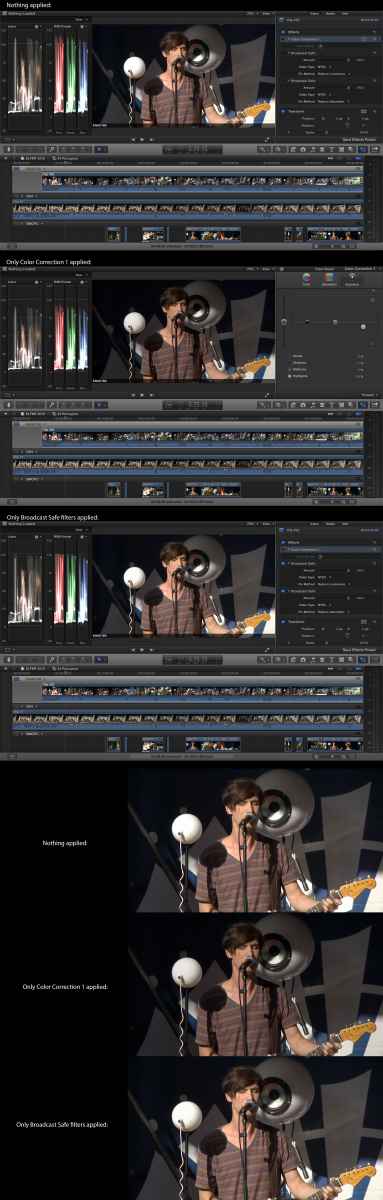
OK, here is an typical example of me attempting to make something broadcast safe in FCPX. What I find is to get rid of over peaking in highlights results in a darker image. Is there a better way? or is this fine? Seems like DaVinci Resolve just clips my cinema DNG footage on output when anything is above 100 IRE. However, FCPX Broadcast Safe filters don't seem to do this as transparently.
Please Log in to join the conversation.
