


- Posts: 8
- Thank you received: 0
3 Post Moderation Rule for New Boarders (25 Jan 2021)
New boarders will have their posts moderated - Don't worry if you cannot see your post immediately.
Lift clip above adjustment layer - shortcut?
- LukeHighLife
-
 Topic Author
- Offline
- New Member
-

Less
More
10 Jun 2016 14:18 #77717
by LukeHighLife
Lift clip above adjustment layer - shortcut? was created by LukeHighLife
Hi,
I have a project with an adjustment layer running over the top of the entire timeline (magic bullet looks applied)
I need to place all the titles above the adjustment layer, is there a shortcut so that when a clip/title is selected, i can lift it above an existing clip/layer in the timeline?
Thanks
Luke
I have a project with an adjustment layer running over the top of the entire timeline (magic bullet looks applied)
I need to place all the titles above the adjustment layer, is there a shortcut so that when a clip/title is selected, i can lift it above an existing clip/layer in the timeline?
Thanks
Luke
Please Log in to join the conversation.
- Karsten Schlüter
-

- Offline
- Moderator
-

Less
More
- Posts: 3790
- Thank you received: 718
11 Jun 2016 04:26 #77730
by Karsten Schlüter
Replied by Karsten Schlüter on topic Lift clip above adjustment layer - shortcut?
what about:
select all titles in the Timeline Index, then lift all together manually ...
select all titles in the Timeline Index, then lift all together manually ...
Please Log in to join the conversation.


11 Jun 2016 04:30 #77731
by dgwvideo
Creating history....one edit at a time !
Replied by dgwvideo on topic Lift clip above adjustment layer - shortcut?
Or select the adjustment layer and drag it down just beneath the titles until they slide up over it.
Creating history....one edit at a time !
Please Log in to join the conversation.

11 Jun 2016 11:05 #77741
by BenB
Replied by BenB on topic Lift clip above adjustment layer - shortcut?
Hold the Shift key while dragging. It constrains you to only vertical movements, and seems to make things move more smoothly.
Please Log in to join the conversation.
- LukeHighLife
-
Topic Author
- Offline
- New Member
-
Less
More
- Posts: 8
- Thank you received: 0
14 Jun 2016 13:59 - 14 Jun 2016 14:00 #77827
by LukeHighLife
Replied by LukeHighLife on topic Lift clip above adjustment layer - shortcut?
I find if i shift drag the selected titles it then selects all other clips on that level (bug?)
I found best way is to add all titles to a storyline and shift/drag this above the layer
*I'll try the timeline index method and see if that also works
I found best way is to add all titles to a storyline and shift/drag this above the layer
*I'll try the timeline index method and see if that also works
Last edit: 14 Jun 2016 14:00 by LukeHighLife.
Please Log in to join the conversation.
14 Jun 2016 19:35 #77829
by Overturf
Replied by Overturf on topic Lift clip above adjustment layer - shortcut?
You have ro let go of the mouse button between selecting and moving. Lasso your clips (use CMD to make additional selections). Once all is selected, let go the mouse button. Click on selection again, keep button pressed and hold down SHIFT. Move clips up. Done.
Please Log in to join the conversation.
- Karsten Schlüter
-
- Offline
- Moderator
-
Less
More
- Posts: 3790
- Thank you received: 718
15 Jun 2016 06:15 #77835
by Karsten Schlüter
or, just one click in the Timeline Index ... why are people so shy using that awesome tool?? :blink:
Replied by Karsten Schlüter on topic Lift clip above adjustment layer - shortcut?
Overturf wrote: You have ro let go of the mouse button between selecting and moving. Lasso your clips ….
or, just one click in the Timeline Index ... why are people so shy using that awesome tool?? :blink:
Please Log in to join the conversation.
15 Jun 2016 06:32 #77836
by Overturf
Replied by Overturf on topic Lift clip above adjustment layer - shortcut?
This is a misunderstanding, Karsten. The TI is an awesome tool indeed. Just wanted to explain why Luke could not drag the clips and instead kept selecting more and more when trying to.
Please Log in to join the conversation.
- Karsten Schlüter
-
- Offline
- Moderator
-
Less
More
- Posts: 3790
- Thank you received: 718
15 Jun 2016 08:52 #77839
by Karsten Schlüter
Replied by Karsten Schlüter on topic Lift clip above adjustment layer - shortcut?
@overturf
sorry, wasn't meant as an offense to you , but longer projects, with lots of compos ('tracks'), etc etc could make that 'manual catch' a tricky thing.
You were just helpful, for sure... but:
Doing it right avoids fixing the wrong ..
sorry, wasn't meant as an offense to you , but longer projects, with lots of compos ('tracks'), etc etc could make that 'manual catch' a tricky thing.
You were just helpful, for sure... but:
Doing it right avoids fixing the wrong ..
Please Log in to join the conversation.
- LukeHighLife
-
Topic Author
- Offline
- New Member
-
Less
More
- Posts: 8
- Thank you received: 0
15 Jun 2016 09:49 #77842
by LukeHighLife
Replied by LukeHighLife on topic Lift clip above adjustment layer - shortcut?
Ah ok, mistake i was making was to press Shift before dragging the titles, hence selecting everything else on that level.
Tried the Timeline Index approach, a great timesaver for selecting all titles on a larger project! Will definitely be using that in the future,
Many thanks for all the tips
Tried the Timeline Index approach, a great timesaver for selecting all titles on a larger project! Will definitely be using that in the future,
Many thanks for all the tips
Please Log in to join the conversation.
- Karsten Schlüter
-
- Offline
- Moderator
-
Less
More
- Posts: 3790
- Thank you received: 718
15 Jun 2016 09:58 #77844
by Karsten Schlüter
… and another Brownie for the TI is: it 'finds' any title in any <cough> 'track'!
And when you create and apply own roles, it finds & selects all clips to be colorcorrected or without live audio or clips needed to be dubbed or ...
Or, while editing, you can switch-off all music-tracks or jump to markers or ... endless possibilities.
Ignored it for more than a year, until I realized what is capable for ... :ohmy:
Replied by Karsten Schlüter on topic Lift clip above adjustment layer - shortcut?
LukeHighLife wrote: …Tried the Timeline Index approach, a great timesaver for selecting all titles on a larger project! …
… and another Brownie for the TI is: it 'finds' any title in any <cough> 'track'!
And when you create and apply own roles, it finds & selects all clips to be colorcorrected or without live audio or clips needed to be dubbed or ...
Or, while editing, you can switch-off all music-tracks or jump to markers or ... endless possibilities.
Ignored it for more than a year, until I realized what is capable for ... :ohmy:
Please Log in to join the conversation.
- LukeHighLife
-
Topic Author
- Offline
- New Member
-
Less
More
- Posts: 8
- Thank you received: 0
15 Jun 2016 10:30 #77846
by LukeHighLife
Replied by LukeHighLife on topic Lift clip above adjustment layer - shortcut?
Yes, I did a refresher course last year on FCPX where the value of TI/roles was taught....I never did get round to taking advantage of them, maybe its time....
" it finds & selects all clips to be colorcorrected" this would be a huge benefit, how would i assign the relevant clips to this role?
" it finds & selects all clips to be colorcorrected" this would be a huge benefit, how would i assign the relevant clips to this role?
Please Log in to join the conversation.
- Karsten Schlüter
-
- Offline
- Moderator
-
Less
More
- Posts: 3790
- Thank you received: 718
15 Jun 2016 16:34 - 15 Jun 2016 17:29 #77868
by Karsten Schlüter
create a new role, here tbcc/to be color corrected
select clip, apply role (manually)
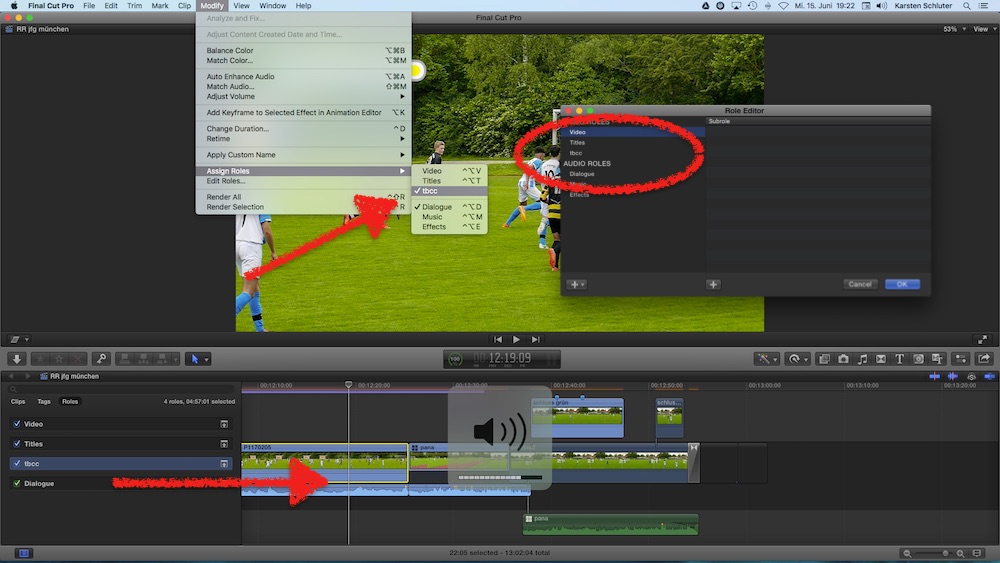
in the Timeline Index, my new role tbcc is listed, one click = all clips I assigned that role to are selected ...
...
Replied by Karsten Schlüter on topic Lift clip above adjustment layer - shortcut?
LukeHighLife wrote: …....
" it finds & selects all clips to be colorcorrected" this would be a huge benefit, how would i assign the relevant clips to this role?
create a new role, here tbcc/to be color corrected
select clip, apply role (manually)
in the Timeline Index, my new role tbcc is listed, one click = all clips I assigned that role to are selected ...
...
Last edit: 15 Jun 2016 17:29 by Karsten Schlüter.
Please Log in to join the conversation.
