


- Posts: 32
- Thank you received: 0
3 Post Moderation Rule for New Boarders (25 Jan 2021)
New boarders will have their posts moderated - Don't worry if you cannot see your post immediately.
Setting a marker on timeline for vine videos
- dans.klimkowski
-
 Topic Author
- Offline
- Junior Member
-

Less
More
08 Jun 2016 19:25 #77614
by dans.klimkowski
Setting a marker on timeline for vine videos was created by dans.klimkowski
Hi I make alot of vines, which need to be less than six and a half seconds long, so i spend alot of time clicking on the top of the timeline to move the playhead to find out exactly where 6.5 seconds is at (only takes a few seconds, but it adds up when i do it thirty times every project) . I know you can use M to set a marker on the clip, but whenever i edit/move the clip the marker will move with it. Is there any way to set a marker on the timeline itself so i can quickly see where the clips must end?
Please Log in to join the conversation.


08 Jun 2016 19:31 #77617
by Shane M
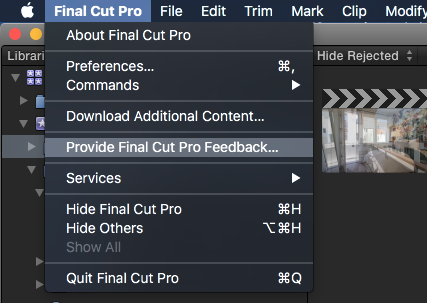
Not currently...definitely fill out the feedback form and ask for this though...it would be very nice to have.
Replied by Shane M on topic Setting a marker on timeline for vine videos
dans.klimkowski wrote: Hi I make alot of vines, which need to be less than six and a half seconds long, so i spend alot of time clicking on the top of the timeline to move the playhead to find out exactly where 6.5 seconds is at (only takes a few seconds, but it adds up when i do it thirty times every project) . I know you can use M to set a marker on the clip, but whenever i edit/move the clip the marker will move with it. Is there any way to set a marker on the timeline itself so i can quickly see where the clips must end?
Not currently...definitely fill out the feedback form and ask for this though...it would be very nice to have.
Please Log in to join the conversation.

08 Jun 2016 19:32 #77618
by BenB
Replied by BenB on topic Setting a marker on timeline for vine videos
Make a connected Gap Clip, to the first frame of the first clip. Put a marker on it.
Or put that Gap Clip with the marker in the Primary Storyline. Make all your edits as connected clips, or connected storylines. When done, simply overwrite it all to the Primary Storyline.
And don't forget you always have your timeline's current duration at the bottom center of your screen, to glance at occasionally.
Or put that Gap Clip with the marker in the Primary Storyline. Make all your edits as connected clips, or connected storylines. When done, simply overwrite it all to the Primary Storyline.
And don't forget you always have your timeline's current duration at the bottom center of your screen, to glance at occasionally.
Please Log in to join the conversation.
08 Jun 2016 20:57 - 08 Jun 2016 20:58 #77630
by davechap
Replied by davechap on topic Setting a marker on timeline for vine videos
Another option which I use when timing commercials...
1. Create a new Project to your specs.
2. Create a Compound Clip to your specs.
3. Edit the Compound Clip into the Project and cut it at your desired show length (6.5 seconds).
4. Open the Compound Clip from the timeline and perform your edits here. You will see hard guides where the time boundaries are, so you won't need to worry about checking the timecode display anymore.
1. Create a new Project to your specs.
2. Create a Compound Clip to your specs.
3. Edit the Compound Clip into the Project and cut it at your desired show length (6.5 seconds).
4. Open the Compound Clip from the timeline and perform your edits here. You will see hard guides where the time boundaries are, so you won't need to worry about checking the timecode display anymore.
Last edit: 08 Jun 2016 20:58 by davechap. Reason: I keep calling Projects, Timelines. Ugh.
Please Log in to join the conversation.
- dans.klimkowski
-
Topic Author
- Offline
- Junior Member
-
Less
More
- Posts: 32
- Thank you received: 0
10 Jun 2016 03:27 #77706
by dans.klimkowski
Replied by dans.klimkowski on topic Setting a marker on timeline for vine videos
Awesome! I'll try all of these and see what works best, this will save alot of time, thanks so much for the suggestions!
Please Log in to join the conversation.
