


- Posts: 12
- Thank you received: 2
3 Post Moderation Rule for New Boarders (25 Jan 2021)
New boarders will have their posts moderated - Don't worry if you cannot see your post immediately.
FCPX - wrong clip timecode? Always starts at 0?
- heyitsjulian
-
 Topic Author
- Offline
- New Member
-

Less
More
08 Jun 2016 07:34 #77577
by heyitsjulian
FCPX - wrong clip timecode? Always starts at 0? was created by heyitsjulian
Hi everyone,
new to these forums and fairly new to FCPX (been cutting in it the last couple months), so sorry if this has been asked already, but I couldn't seem to find the answer anywhere online.
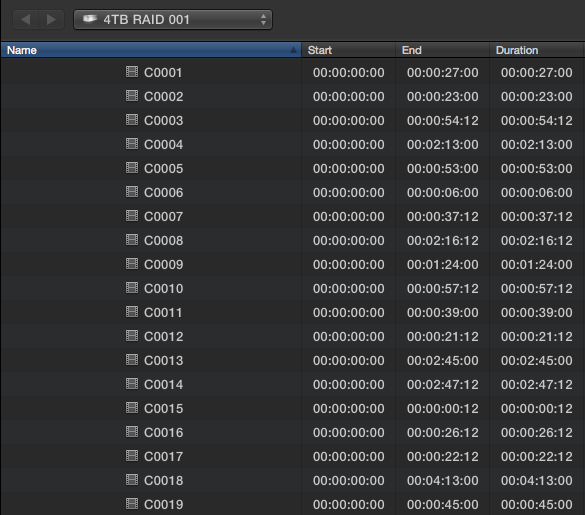
-It seems like FCPX is not retaining the timecode of the clips, as it shows all clips as starting at 00:00:00:00.
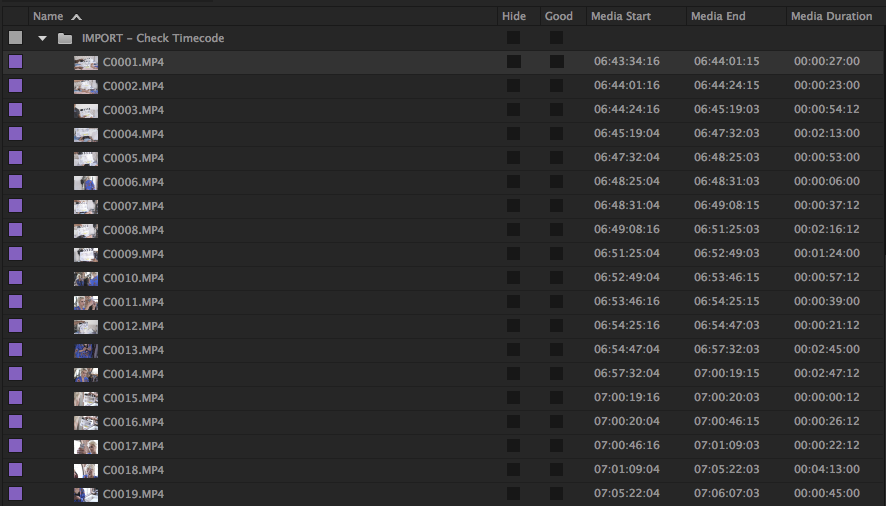
-In the first screenshot of the FCPX Import window, notice that the timecodes for FCPX always start at 0. In the 2nd screenshot, Premiere has a unique timecode for the same clips.
Does anyone have any info into how FCPX reads clip timecode, or if there's something I'm just stupidly overlooking? I'm trying to export an XML of a cut from FCPX to Premiere, and of course some things don't port over such as speed ramps etc., but it's really difficult to manually match them up because the timecode doesn't match. Much appreciated!
new to these forums and fairly new to FCPX (been cutting in it the last couple months), so sorry if this has been asked already, but I couldn't seem to find the answer anywhere online.
-It seems like FCPX is not retaining the timecode of the clips, as it shows all clips as starting at 00:00:00:00.
-In the first screenshot of the FCPX Import window, notice that the timecodes for FCPX always start at 0. In the 2nd screenshot, Premiere has a unique timecode for the same clips.
Does anyone have any info into how FCPX reads clip timecode, or if there's something I'm just stupidly overlooking? I'm trying to export an XML of a cut from FCPX to Premiere, and of course some things don't port over such as speed ramps etc., but it's really difficult to manually match them up because the timecode doesn't match. Much appreciated!
Please Log in to join the conversation.
- Tom Wolsky
-

- Offline
- Moderator
-

08 Jun 2016 09:28 #77582
by Tom Wolsky
Replied by Tom Wolsky on topic FCPX - wrong clip timecode? Always starts at 0?
What camera is this?
Please Log in to join the conversation.
- Andreas Kiel
-
- Offline
- Platinum Member
-

Less
More
- Posts: 1077
- Thank you received: 189
08 Jun 2016 10:51 #77583
by Andreas Kiel
Replied by Andreas Kiel on topic FCPX - wrong clip timecode? Always starts at 0?
I would ask the same.
Can you post a clip?
- Andreas
Can you post a clip?
- Andreas
Please Log in to join the conversation.
- heyitsjulian
-
Topic Author
- Offline
- New Member
-
Less
More
- Posts: 12
- Thank you received: 2
08 Jun 2016 18:32 #77612
by heyitsjulian
Replied by heyitsjulian on topic FCPX - wrong clip timecode? Always starts at 0?
Hi guys, sorry about that, this is the Sony A7R II. Footage was captured at 4k (3840x2160) at 23.98. Footage was copied to the drives with all card folder structure intact.
Here's a link to the smallest clip in the folder: www.dropbox.com/s/1dlpgv8qeege0oo/C0006.MP4?dl=0
Here's a link to the smallest clip in the folder: www.dropbox.com/s/1dlpgv8qeege0oo/C0006.MP4?dl=0
Please Log in to join the conversation.
- Andreas Kiel
-
- Offline
- Platinum Member
-
Less
More
- Posts: 1077
- Thank you received: 189
09 Jun 2016 12:09 #77664
by Andreas Kiel
Replied by Andreas Kiel on topic FCPX - wrong clip timecode? Always starts at 0?
Thanks Julian.
Are there any more files (beside the movie clips) on the card?
- Andreas
Are there any more files (beside the movie clips) on the card?
- Andreas
Please Log in to join the conversation.
- heyitsjulian
-
Topic Author
- Offline
- New Member
-
Less
More
- Posts: 12
- Thank you received: 2
09 Jun 2016 18:05 #77677
by heyitsjulian
Replied by heyitsjulian on topic FCPX - wrong clip timecode? Always starts at 0?
There are XML files alongside every clip. Come to think of it, I did import the clips into FCPX via drag n drop, because since the folder is an exact duplicate of the camera card structure, FCPX will not let me import via the import window with the "Leave in Place" option ticked (it will only allow copying to the Library). However, as it shows in the screenshot earlier, the clips still read as a 00:00:00:00 start timecode in the import window anyway, so I'm still not sure what the case is.
Here is the folder of the A7R II footage, on my external hard drive (2-drive G-RAID Thunderbolt 2, RAID 1). The "THMBNL" folder has .JPGs of all the clips.
Thanks again everyone!
Here is the folder of the A7R II footage, on my external hard drive (2-drive G-RAID Thunderbolt 2, RAID 1). The "THMBNL" folder has .JPGs of all the clips.
Thanks again everyone!

Please Log in to join the conversation.
- Tom Wolsky
-
- Offline
- Moderator
-
09 Jun 2016 19:27 #77684
by Tom Wolsky
Replied by Tom Wolsky on topic FCPX - wrong clip timecode? Always starts at 0?
When you import from a camera structure you cannot leave in place. It always has to be copied to the library location, managed or external. Would be interested to know if it works correctly when imported using the application procedure for camera imports.
Please Log in to join the conversation.
- Andreas Kiel
-
- Offline
- Platinum Member
-
Less
More
- Posts: 1077
- Thank you received: 189
09 Jun 2016 21:23 #77690
by Andreas Kiel
Replied by Andreas Kiel on topic FCPX - wrong clip timecode? Always starts at 0?
Hi Julian
That explains a lot.
Could you post the XML as well?
- Andreas
That explains a lot.
Could you post the XML as well?
- Andreas
Please Log in to join the conversation.
- heyitsjulian
-
Topic Author
- Offline
- New Member
-
Less
More
- Posts: 12
- Thank you received: 2
09 Jun 2016 21:27 #77691
by heyitsjulian
Replied by heyitsjulian on topic FCPX - wrong clip timecode? Always starts at 0?
I brought the clips in via the import window, copying it to the Library. It still reads in the import window as 00:00:00:00 starting timecode, and once brought into the program it still reads as such.
I finally stumbled across this forum post where a user surmised that the problem was FCPX could not read the timecode through Sony's MP4 XAC-S wrapper. He re-wrapped it to a .mov via EditReady and then FCPX was able to read the timecode.
In the screenshots here, you can see the difference in timecode in FCPX between the original MP4, and the re-wrapped .mov. Premiere is able to read them in both cases. The one spot where my situation differed to the user from the other forum was that he was able to read the MP4 timecode in Davinci Resolve 12, whereas in my case, Resolve was still showing it as 00:00:00:00, before re-wrapping fixed it.
I guess that answers my question for now... It seems like the potential workaround is to re-wrap all the footage before starting a project in FCPX with Sony A7R II footage, which is less than ideal. Any other thoughts on if there's any other ways to get FCPX to read the clip timecode?
RE: Andreas: here is the XML for the clip I posted earlier: www.dropbox.com/s/kuy78pwwmtwb9z1/C0006M01.XML?dl=0
I finally stumbled across this forum post where a user surmised that the problem was FCPX could not read the timecode through Sony's MP4 XAC-S wrapper. He re-wrapped it to a .mov via EditReady and then FCPX was able to read the timecode.
In the screenshots here, you can see the difference in timecode in FCPX between the original MP4, and the re-wrapped .mov. Premiere is able to read them in both cases. The one spot where my situation differed to the user from the other forum was that he was able to read the MP4 timecode in Davinci Resolve 12, whereas in my case, Resolve was still showing it as 00:00:00:00, before re-wrapping fixed it.
I guess that answers my question for now... It seems like the potential workaround is to re-wrap all the footage before starting a project in FCPX with Sony A7R II footage, which is less than ideal. Any other thoughts on if there's any other ways to get FCPX to read the clip timecode?
RE: Andreas: here is the XML for the clip I posted earlier: www.dropbox.com/s/kuy78pwwmtwb9z1/C0006M01.XML?dl=0




Please Log in to join the conversation.
- Andreas Kiel
-
- Offline
- Platinum Member
-
Less
More
- Posts: 1077
- Thank you received: 189
09 Jun 2016 23:27 #77697
by Andreas Kiel
Replied by Andreas Kiel on topic FCPX - wrong clip timecode? Always starts at 0?
That's what I thought after you said that there are XMLs for each file.
It's kind of shame FCPx can't handle that – I personally think.
Probably I have a solution for this.
Please drop me an email: kiel@spherico.com
- Andreas
It's kind of shame FCPx can't handle that – I personally think.
Probably I have a solution for this.
Please drop me an email: kiel@spherico.com
- Andreas
Please Log in to join the conversation.
10 Jun 2016 05:35 #77708
by fmaurin
Replied by fmaurin on topic FCPX - wrong clip timecode? Always starts at 0?
This is odd, I had the same problem with A7s and FCPX 10.1.4, but then it was fixed with a subsequent update of FCP (I don't remember which version.)
With 10.2.3 I have proper TC on all clips. That's with an A7s in HD, haven't tried the A7R II in 4k.
- François
With 10.2.3 I have proper TC on all clips. That's with an A7s in HD, haven't tried the A7R II in 4k.
- François
Please Log in to join the conversation.
10 Jun 2016 05:57 #77709
by fmaurin
Replied by fmaurin on topic FCPX - wrong clip timecode? Always starts at 0?
Yep, I downloaded your A7R II 4k clip and TC is 00:00:00:00 indeed...
I guess we need a FCP update.
In the meantime if you have CC you can use AME to batch convert to Prores with proper TC.
Not ideal, but not too bad.
I guess we need a FCP update.
In the meantime if you have CC you can use AME to batch convert to Prores with proper TC.
Not ideal, but not too bad.
Please Log in to join the conversation.
