


- Posts: 17
- Thank you received: 0
3 Post Moderation Rule for New Boarders (25 Jan 2021)
New boarders will have their posts moderated - Don't worry if you cannot see your post immediately.
Reveal text list, item by item?
04 Jun 2016 23:25 #77467
by JungleNYC
Reveal text list, item by item? was created by JungleNYC
I know this is probably dumb-stupid-simple…but after wasting hours failing on this (and a lot of searching), i decided to ask:
What's the easiest way to animate a bulleted list?
Simple text. No swooping or growing or shimmering
#1
#2
#3
etc
I want #1 to come up when the presenter is talking about that topic.
When he moves to topic #2 I want #1 to stay there, and #2 to come up underneath.
Repeat for #3 and so on.
Ideally (gasp!) I'd like them to fade on a bit. But that's it.
I can "hack" it with multiple Basic Titles, but I know there's a way to do it w/ one. Right?
Again, I know this is something sooooo simple, and I'm just missing something obvious.
Thanks in advance!
What's the easiest way to animate a bulleted list?
Simple text. No swooping or growing or shimmering
#1
#2
#3
etc
I want #1 to come up when the presenter is talking about that topic.
When he moves to topic #2 I want #1 to stay there, and #2 to come up underneath.
Repeat for #3 and so on.
Ideally (gasp!) I'd like them to fade on a bit. But that's it.
I can "hack" it with multiple Basic Titles, but I know there's a way to do it w/ one. Right?
Again, I know this is something sooooo simple, and I'm just missing something obvious.
Thanks in advance!
Please Log in to join the conversation.

05 Jun 2016 05:31 #77468
by dgwvideo
Creating history....one edit at a time !
Replied by dgwvideo on topic Reveal text list, item by item?
If you use Motion, this is fairly easy to create and publish to FCPX, but using the titles as you mentioned is also pretty easy and effective. Unless you have quite a few bullet points to add, stretching titles across your timeline is a snap. Select the beginning of the title and Command-T to add a dissolve and it fades on. The other options are to use a plugin of which there are a few paid and free versions. Both Motion Master Templates and Leno FX have great free bullet point title templates that you can find on their website, or in the free FCPX plugin section of this site.
Creating history....one edit at a time !
Please Log in to join the conversation.
- Karsten Schlüter
-

- Offline
- Moderator
-

Less
More
- Posts: 3790
- Thank you received: 718
05 Jun 2016 07:23 - 05 Jun 2016 07:24 #77472
by Karsten Schlüter
Replied by Karsten Schlüter on topic Reveal text list, item by item?
FCPX built-in CUSTOM title has a often overseen, highly customizable Inspector tab, incl. Text to appear per line, dissolved...
Last edit: 05 Jun 2016 07:24 by Karsten Schlüter.
Please Log in to join the conversation.
05 Jun 2016 14:35 #77480
by JungleNYC
Yeah, don't have Motion. I've been running into a lot of things that (naively) I assume FCPX should do…but is really a "Motion thing." Or a plug-in.
I guess I was trying to be "pure" or some stupid thing, lol, by just trying to track it out myself w/ the default tools. Because it just seems like it should be SO EASY to do. Right? Lol.
I'll definitely check those plug-ins though!
Replied by JungleNYC on topic Reveal text list, item by item?
dgwvideo wrote: If you use Motion, this is fairly easy to create and publish to FCPX, but using the titles as you mentioned is also pretty easy and effective. Unless you have quite a few bullet points to add, stretching titles across your timeline is a snap. Select the beginning of the title and Command-T to add a dissolve and it fades on. The other options are to use a plugin of which there are a few paid and free versions. Both Motion Master Templates and Leno FX have great free bullet point title templates that you can find on their website, or in the free FCPX plugin section of this site.
Yeah, don't have Motion. I've been running into a lot of things that (naively) I assume FCPX should do…but is really a "Motion thing." Or a plug-in.
I guess I was trying to be "pure" or some stupid thing, lol, by just trying to track it out myself w/ the default tools. Because it just seems like it should be SO EASY to do. Right? Lol.
I'll definitely check those plug-ins though!
Please Log in to join the conversation.
05 Jun 2016 14:37 #77481
by JungleNYC
Yup. And that's the one I spent the most time with. For some reason I just couldn't get the "IN = on keyframe" / "IN = by line" to work. I don't do a lot of titles (which is my problem, apparently) so my thought was that he solution was somewhere in that exact CUSTOM title. Maybe I just don't understand those parameters? I thought I did
Replied by JungleNYC on topic Reveal text list, item by item?
Karsten Schlüter wrote: FCPX built-in CUSTOM title has a often overseen, highly customizable Inspector tab, incl. Text to appear per line, dissolved...
Yup. And that's the one I spent the most time with. For some reason I just couldn't get the "IN = on keyframe" / "IN = by line" to work. I don't do a lot of titles (which is my problem, apparently) so my thought was that he solution was somewhere in that exact CUSTOM title. Maybe I just don't understand those parameters? I thought I did
Please Log in to join the conversation.
- Karsten Schlüter
-
- Offline
- Moderator
-
Less
More
- Posts: 3790
- Thank you received: 718
05 Jun 2016 14:56 #77482
by Karsten Schlüter
Replied by Karsten Schlüter on topic Reveal text list, item by item?
[quote="JungleNYC" post=77481... I just couldn't get the "IN = on keyframe" / "IN = by line" to work. ...[/quote]
these are I my settings to fade in 3 lines of text:
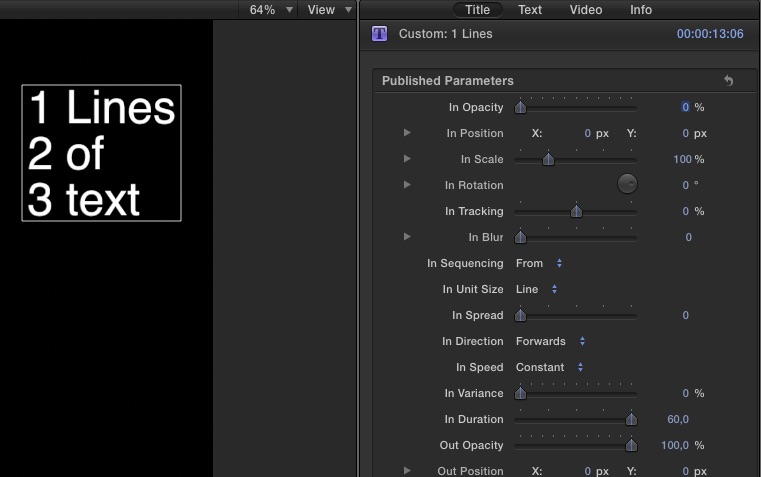
these are I my settings to fade in 3 lines of text:
Please Log in to join the conversation.
05 Jun 2016 17:08 #77491
by JungleNYC
Replied by JungleNYC on topic Reveal text list, item by item?
Thanks for that. Turns out I was doing pretty much the same thing…and it certainly works with a set "in duration."
I was trying to get each line to reveal via Keyframe in "In Sequencing" dropdown. But I think my lack of keyframe chops is hurting me here, lol.
I was trying to get each line to reveal via Keyframe in "In Sequencing" dropdown. But I think my lack of keyframe chops is hurting me here, lol.
Please Log in to join the conversation.

06 Jun 2016 14:35 #77517
by bogiesan
Replied by bogiesan on topic Reveal text list, item by item?
The automated text generators is great for these things after you get it figured out. In the olden days, we'd set up the completed list to run the whole length of the clip and then work backwards, splitting the clip on the audio hooks, and removing one bullet at a time. Then we'd put in transitions appropriate to the program.
Please Log in to join the conversation.
- jonniecharles
-

- Offline
- New Member
-

Less
More
- Posts: 4
- Thank you received: 0
21 Aug 2020 10:59 - 21 Aug 2020 11:03 #109417
by jonniecharles
Replied by jonniecharles on topic Reveal text list, item by item?
All very useful. And Karsten's post got me digging around, he's right, there are some great settings built-in. But in 2020 ( 10.4.8 ) although I can make my list appear one by one (using "Continuous" ) there does not seem to be a way to slow down each appearance. I wondered if it is now in another preset, I can't find, or maybe I am missing something. Thank you
Last edit: 21 Aug 2020 11:03 by jonniecharles.
Please Log in to join the conversation.
- Carsten Orlt
-

- Offline
- Platinum Member
-

Less
More
- Posts: 422
- Thank you received: 82
21 Aug 2020 22:11 #109438
by Carsten Orlt
Replied by Carsten Orlt on topic Reveal text list, item by item?
Not to be a smart as but you described the simplest and fastest method already in your post: one title per line.
Sometimes trying to accomplish something with a plugin which needs to cater for a million other 'but I want this' makes it longer to tweak then doing it the old fashion way.
Computer only go so far...
Sometimes trying to accomplish something with a plugin which needs to cater for a million other 'but I want this' makes it longer to tweak then doing it the old fashion way.
Computer only go so far...
Please Log in to join the conversation.
