


- Posts: 1011
- Thank you received: 208
3 Post Moderation Rule for New Boarders (25 Jan 2021)
New boarders will have their posts moderated - Don't worry if you cannot see your post immediately.
Rotoscoping and keyframes
31 May 2016 20:01 #77299
by VidGreg
Rotoscoping and keyframes was created by VidGreg
Hi friends I have a problem with keyframes for rotoscoping.
I'm working on a movie where a green screen should have been used for certain scenes, but wasn't. I need to rotoscope in order to isolate the actors for some special effects. I have been trying to do this in FCPX 10.2.3. OS 10.11.3
Essentially, I have actors appearing in front of a "Time Portal" where another video clip is playing in a small section of the clip and then they jump in individually.
I am using a multi-point mask; smooth bezier points, then key framing frame by frame the movement. Lots of work and I have to do this for many clips.
Creating and key framing is just grunt work, but my problem is that after I finish, the keyframes aren't sticking. Many of the points I create for the clip are appearing either early or late so the shape of the mask is wrong for that frame.
Workflow…
I go to beginning of clip, apply "Mask", create points and close the shape around actor, select all points and make sure they are bezier/smooth, apply keyframe, advance to next frame, move any points that need new positions, go to next frame, and so on. All the time I make sure that the keyframe icon lights up when I adjust a point for every frame, so FCPX should be tracking properly.
When I then view/play the clip, the Mask is there and moves, but not correctly. The mask doesn't follow the actor's outline. I have tried several times and can't for the life of me figure out what is happening to make the mask misbehave.
Glitch/bug or operator error. Is there a limit to the number of points, and point re-positioning FCPX can handle?
Think I will export a range and open in Motion5 to see if it will manage points properly.
Any ideas or help much appreciated.
Thanks, Greg
I'm working on a movie where a green screen should have been used for certain scenes, but wasn't. I need to rotoscope in order to isolate the actors for some special effects. I have been trying to do this in FCPX 10.2.3. OS 10.11.3
Essentially, I have actors appearing in front of a "Time Portal" where another video clip is playing in a small section of the clip and then they jump in individually.
I am using a multi-point mask; smooth bezier points, then key framing frame by frame the movement. Lots of work and I have to do this for many clips.
Creating and key framing is just grunt work, but my problem is that after I finish, the keyframes aren't sticking. Many of the points I create for the clip are appearing either early or late so the shape of the mask is wrong for that frame.
Workflow…
I go to beginning of clip, apply "Mask", create points and close the shape around actor, select all points and make sure they are bezier/smooth, apply keyframe, advance to next frame, move any points that need new positions, go to next frame, and so on. All the time I make sure that the keyframe icon lights up when I adjust a point for every frame, so FCPX should be tracking properly.
When I then view/play the clip, the Mask is there and moves, but not correctly. The mask doesn't follow the actor's outline. I have tried several times and can't for the life of me figure out what is happening to make the mask misbehave.
Glitch/bug or operator error. Is there a limit to the number of points, and point re-positioning FCPX can handle?
Think I will export a range and open in Motion5 to see if it will manage points properly.
Any ideas or help much appreciated.
Thanks, Greg
Please Log in to join the conversation.
31 May 2016 21:02 #77301
by tpayton
Replied by tpayton on topic Rotoscoping and keyframes
When you say mask, you mean the "Draw Mask" effect right? Or are you using another masking tool?
Make sure you have keyframes the "Control Points" in Draw Mask.
Also, SliceX/TrackX can do a decent tracked rotoscope automatically.
Make sure you have keyframes the "Control Points" in Draw Mask.
Also, SliceX/TrackX can do a decent tracked rotoscope automatically.
Please Log in to join the conversation.
- Darren Roark
-

- Offline
- Platinum Member
-

31 May 2016 22:23 #77303
by Darren Roark
Replied by Darren Roark on topic Rotoscoping and keyframes
+1 For what T. said.
Slice-X has Mocha the industry standard rotoscoping/tracking software built in. It can track the shape you make and automatically adjust the size and mask points.
There is a two week free trial of it if you haven't tried it before.
www.coremelt.com/products/slicex-powered-by-mocha.html
Slice-X has Mocha the industry standard rotoscoping/tracking software built in. It can track the shape you make and automatically adjust the size and mask points.
There is a two week free trial of it if you haven't tried it before.
www.coremelt.com/products/slicex-powered-by-mocha.html
Please Log in to join the conversation.
31 May 2016 23:06 #77304
by VidGreg
Replied by VidGreg on topic Rotoscoping and keyframes
Hi tpayton
Yes I mean Draw Mask included with FCPX.
I am key framing the control points. You can see them change in the inspector pane when you move a point while setting them up and if moving them, and you can see the position move as you scrub or advance thru the clip.
But later when I play the clip, the mask is there, but the control points no longer correspond to the frame of the clip that I positioned them to.
Very frustrating.
Thanks to you and Darren re TrackX. I do know about it, haven't tried it yet. Might have to.
Not sure how well it would work in this project as the "Portal" is in the forest so the actors are moving between trees, crossing in front of each other, and there is not much color differentiation between their clothes and trees. I think auto tracking would have a hard time.
Guess with a free trial, nothing to lose and no gain without downloading and trying. Anyone know if any trial work done stays after 2 weeks? Are there water marks? If I have to do a lot of manual corrections to tracking, but then buy the product, do I have to redo whatever I did during trial?
Have seen the Coremelt product combos on sale from time to time. Should have grabbed them then.
Just totally weird that FCPX is messing up on the control point keyframes. Ever happen to anyone?
Now if the "Time Portal" was real, I could just port back to the shoot and hang a green screen, problem solved. :silly:
Thanks, Greg
Yes I mean Draw Mask included with FCPX.
I am key framing the control points. You can see them change in the inspector pane when you move a point while setting them up and if moving them, and you can see the position move as you scrub or advance thru the clip.
But later when I play the clip, the mask is there, but the control points no longer correspond to the frame of the clip that I positioned them to.
Very frustrating.
Thanks to you and Darren re TrackX. I do know about it, haven't tried it yet. Might have to.
Not sure how well it would work in this project as the "Portal" is in the forest so the actors are moving between trees, crossing in front of each other, and there is not much color differentiation between their clothes and trees. I think auto tracking would have a hard time.
Guess with a free trial, nothing to lose and no gain without downloading and trying. Anyone know if any trial work done stays after 2 weeks? Are there water marks? If I have to do a lot of manual corrections to tracking, but then buy the product, do I have to redo whatever I did during trial?
Have seen the Coremelt product combos on sale from time to time. Should have grabbed them then.
Just totally weird that FCPX is messing up on the control point keyframes. Ever happen to anyone?
Now if the "Time Portal" was real, I could just port back to the shoot and hang a green screen, problem solved. :silly:
Thanks, Greg
Please Log in to join the conversation.
31 May 2016 23:07 #77305
by tpayton
Replied by tpayton on topic Rotoscoping and keyframes
Indeed it is odd that the points are not corresponding. Before responding to your OP, I did test this on my system just to double check everything was working well. Any chance you have re-timed this clip?
Please Log in to join the conversation.
31 May 2016 23:57 #77306
by VidGreg
Replied by VidGreg on topic Rotoscoping and keyframes
No re-timing.
The only abnormal thing is I use a transition where the actors step through the "Portal", but the clip I'm working on is just a plain duplicated clip so the actors can be seen (isolated by the draw mask) in front of the video clip playing in another Mask in between some trees.
I have done this on a few of clips so far, a couple are OK, but another clip which is more complicated and a little longer (~20-30 secs or so) it is really messed up and the missed aligned mask really shows up. I have redone the Draw Mask or Control Points at least 3 or 4 times including deleting the draw mask altogether and starting from scratch. Same issue.
Haven't seen this before.
Given that the title of this movie is "Portal of Dreams" and I have several more "portal transports" to do, I would like to resolve the problem.
Did it work fine for you?
Thanks, Greg
The only abnormal thing is I use a transition where the actors step through the "Portal", but the clip I'm working on is just a plain duplicated clip so the actors can be seen (isolated by the draw mask) in front of the video clip playing in another Mask in between some trees.
I have done this on a few of clips so far, a couple are OK, but another clip which is more complicated and a little longer (~20-30 secs or so) it is really messed up and the missed aligned mask really shows up. I have redone the Draw Mask or Control Points at least 3 or 4 times including deleting the draw mask altogether and starting from scratch. Same issue.
Haven't seen this before.
Given that the title of this movie is "Portal of Dreams" and I have several more "portal transports" to do, I would like to resolve the problem.
Did it work fine for you?
Thanks, Greg
Please Log in to join the conversation.
01 Jun 2016 00:16 #77308
by VidGreg
Replied by VidGreg on topic Rotoscoping and keyframes
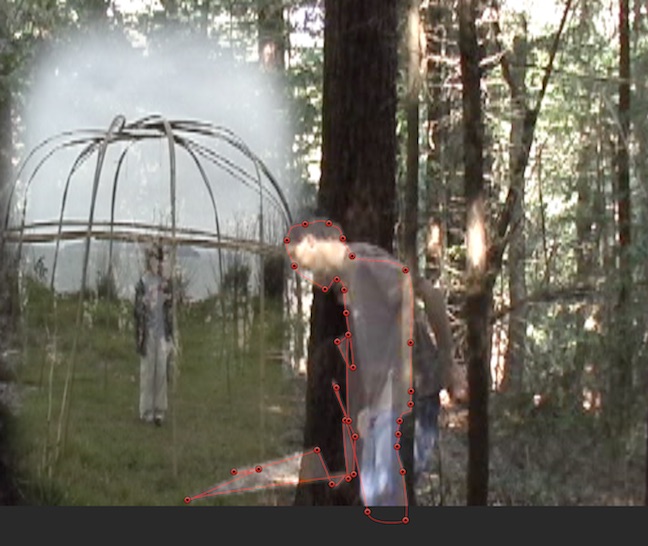
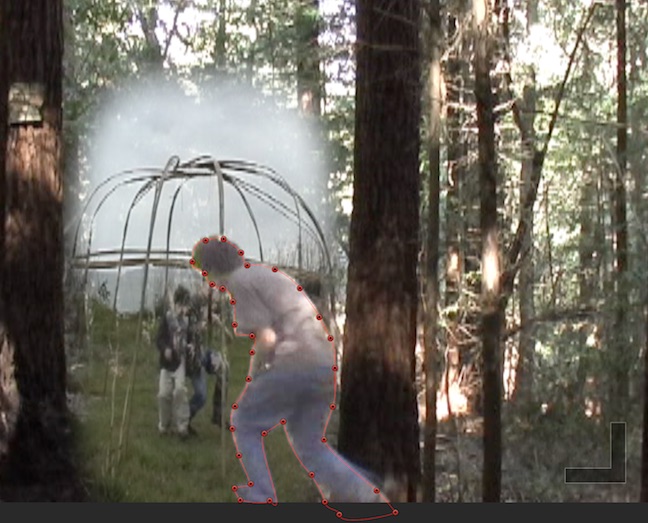
Here's the last frame from the same clip showing how the Mask is now aligning, but through out the playing of the clip, the Draw Mask control points are moving and re-drawing the mask.
Please Log in to join the conversation.
01 Jun 2016 00:45 #77309
by VidGreg
Replied by VidGreg on topic Rotoscoping and keyframes
Guess I should also tell you that I have Quit out of FCPX many times, rebooted the Mac several of times and this has been happening for over a week. I typically reboot from a cold dead Mac before launching FCPX, just like to clear out any caches/junk before editing.
I haven't deleted preferences yet, but will soon. Doesn't seem like a preference issue tho.
Don't think it is a 3rd party plug-in either. I re-download any I have, and check compatibility when I upgrade OS and none are being used for this clip anyway. Have used a couple in this project however. Still don't think that is the issue.
Just seems to lose the keyframe data. Actually not lose, more like scramble the keyframes for the control points from frame to frame.
In the first screen shot "YUK" there is no frame in the clip that has those control points. FCPX is mixing up the control points in a random manner from different video frames. :huh:
Again I did pay very careful attention to make sure the keyframe icon lights up when I advance a frame and moved a control point. Every control point and keyframe was changed/added before I moved to next frame in clip.
Not sure what is going on.
Thanks, Greg
I haven't deleted preferences yet, but will soon. Doesn't seem like a preference issue tho.
Don't think it is a 3rd party plug-in either. I re-download any I have, and check compatibility when I upgrade OS and none are being used for this clip anyway. Have used a couple in this project however. Still don't think that is the issue.
Just seems to lose the keyframe data. Actually not lose, more like scramble the keyframes for the control points from frame to frame.
In the first screen shot "YUK" there is no frame in the clip that has those control points. FCPX is mixing up the control points in a random manner from different video frames. :huh:
Again I did pay very careful attention to make sure the keyframe icon lights up when I advance a frame and moved a control point. Every control point and keyframe was changed/added before I moved to next frame in clip.
Not sure what is going on.
Thanks, Greg
Please Log in to join the conversation.
- MarkNelsonMovies
-
- Offline
- Elite Member
-

Less
More
- Posts: 256
- Thank you received: 48
01 Jun 2016 01:46 #77310
by MarkNelsonMovies
Replied by MarkNelsonMovies on topic Rotoscoping and keyframes
Somewhere there's a known glitch, where keyframes end up on the wrong frame, as the playhead jumps when changing a parameter. I'm not sure if that pertains to the issue you're having, or what the fix was(if there was one) but I just thought I'd throw that out there.
Please Log in to join the conversation.
- Squamish ed
-
- Offline
- Elite Member
-
Less
More
- Posts: 238
- Thank you received: 20
01 Jun 2016 03:52 #77311
by Squamish ed
Ed
Replied by Squamish ed on topic Rotoscoping and keyframes
Greg,
The SliceX tracking and keyframes will stay put after the trial - a watermark saying Trial Ended is put over the clip as I recall. If you purchase a license the watermark goes away and you're good to carry on. IMO you'll find SliceX much easier and more reliable than the FCPX mask - that's been my experience.
The SliceX tracking and keyframes will stay put after the trial - a watermark saying Trial Ended is put over the clip as I recall. If you purchase a license the watermark goes away and you're good to carry on. IMO you'll find SliceX much easier and more reliable than the FCPX mask - that's been my experience.
Ed
Please Log in to join the conversation.
01 Jun 2016 04:31 #77312
by VidGreg
Replied by VidGreg on topic Rotoscoping and keyframes
Thanks for the info Squamish.
Greg
Greg
Please Log in to join the conversation.
01 Jun 2016 14:27 #77328
by VidGreg
Replied by VidGreg on topic Rotoscoping and keyframes
I have a possible idea about what is going on. Will try again and report back if it works.
Thanks all, Greg
Thanks all, Greg
Please Log in to join the conversation.
- Karsten Schlüter
-

- Offline
- Moderator
-

Less
More
- Posts: 3790
- Thank you received: 718
01 Jun 2016 14:38 #77329
by Karsten Schlüter
Replied by Karsten Schlüter on topic Rotoscoping and keyframes
@Greg
those 'pikes' in the mask, shown in your Yuk.jpg, look familiar.
Happened to me, when rotoscoping and start to go back&forth to adjust points ...
That frequently killed my mask, thought it is my fault, missing keyframes, wotever ...
'Fixed' by consequently keyframing forward-only....
sidenote:
yours is the worst background for masking - ever! :woohoo: poor Greg ...
dare to say, TrackX/SliceX will fail to track on THAT!
Plan B ) ...
exporting sequence as picture sequence, roto in some designated paint.app - lucky concidence: Pixelmators new Magnetic Lasso!- ; convert b/w masks into mov; use that as 'image-mask'
.... painstaking ....
but, anyhow, who came on the idea, to apply masks in the woods - without color-key??
(trivia: for Predator/Schwarzenegger, mostly in jungle, so green is no good idea, they used <drumroll> ……… PINK as bg on location .. smart.- )
those 'pikes' in the mask, shown in your Yuk.jpg, look familiar.
Happened to me, when rotoscoping and start to go back&forth to adjust points ...
That frequently killed my mask, thought it is my fault, missing keyframes, wotever ...
'Fixed' by consequently keyframing forward-only....
sidenote:
yours is the worst background for masking - ever! :woohoo: poor Greg ...
dare to say, TrackX/SliceX will fail to track on THAT!
Plan B ) ...
exporting sequence as picture sequence, roto in some designated paint.app - lucky concidence: Pixelmators new Magnetic Lasso!- ; convert b/w masks into mov; use that as 'image-mask'
.... painstaking ....
but, anyhow, who came on the idea, to apply masks in the woods - without color-key??
(trivia: for Predator/Schwarzenegger, mostly in jungle, so green is no good idea, they used <drumroll> ……… PINK as bg on location .. smart.- )
Please Log in to join the conversation.
