


- Posts: 107
- Thank you received: 0
3 Post Moderation Rule for New Boarders (25 Jan 2021)
New boarders will have their posts moderated - Don't worry if you cannot see your post immediately.
best way to change white balance
31 May 2016 18:31 #77294
by mitchino
best way to change white balance was created by mitchino
I did a multi dslr music shoot last week with theatre lighting, all cameras were set to tungsten or so I thought! Discovered afterwards that one was set to cloudy.
What's the easiest and most accurate method of changing my cloudy balance clips to tungsten so they match the others?
Plug-in? Tried the colour board and not really getting there.
What's the easiest and most accurate method of changing my cloudy balance clips to tungsten so they match the others?
Plug-in? Tried the colour board and not really getting there.
Please Log in to join the conversation.
- Karsten Schlüter
-

- Offline
- Moderator
-

Less
More
- Posts: 3790
- Thank you received: 718
01 Jun 2016 16:11 - 01 Jun 2016 16:12 #77341
by Karsten Schlüter
Replied by Karsten Schlüter on topic best way to change white balance
don't know if that is 'best', but most convenient and giving (me) good results is FCPX' built in Color Balance
opt-cmd-B
help.apple.com/finalcutpro/mac/10.2/?lang=en#/verbbd363f5
allways better than my manual approaches :lol:
opt-cmd-B
help.apple.com/finalcutpro/mac/10.2/?lang=en#/verbbd363f5
allways better than my manual approaches :lol:
Last edit: 01 Jun 2016 16:12 by Karsten Schlüter.
Please Log in to join the conversation.
01 Jun 2016 18:03 #77346
by mitchino
Replied by mitchino on topic best way to change white balance
Not getting a good result with that or by using match colour.
Screen grab attached - left shot has tungsten balance and right has cloudy, need right to match tungsten.

Screen grab attached - left shot has tungsten balance and right has cloudy, need right to match tungsten.
Please Log in to join the conversation.

01 Jun 2016 18:09 #77349
by bogiesan
Replied by bogiesan on topic best way to change white balance
We use CineFlare White Balancer for FXFactory. I believe it was US$35. Tons of options but the simple point-click eyedropper is what I use most often.
Please Log in to join the conversation.
- Karsten Schlüter
-
- Offline
- Moderator
-
Less
More
- Posts: 3790
- Thank you received: 718
01 Jun 2016 18:20 - 01 Jun 2016 18:27 #77351
by Karsten Schlüter
but your 'cloudy' grab proofs: the white spotlight IS white ....
so, this is no WBfix, but some grading prob.
Sad the Matching effect doesn't work here ... guess, back to Manual ... saturation, colors, midtones ...
Try Larry Jordans famous trick by cropping down to a tiny piece of skin ...
<diggin' bookmarks..>
ahh, found it:
probably skip the first 24 minutes
Replied by Karsten Schlüter on topic best way to change white balance
mitchino wrote: Not getting a good result with that or by using match colour....
but your 'cloudy' grab proofs: the white spotlight IS white ....
so, this is no WBfix, but some grading prob.
Sad the Matching effect doesn't work here ... guess, back to Manual ... saturation, colors, midtones ...
Try Larry Jordans famous trick by cropping down to a tiny piece of skin ...
<diggin' bookmarks..>
ahh, found it:
probably skip the first 24 minutes
Last edit: 01 Jun 2016 18:27 by Karsten Schlüter.
Please Log in to join the conversation.
01 Jun 2016 18:28 #77352
by mitchino
Replied by mitchino on topic best way to change white balance
The camera was set to cloudy, the other to tungsten, so it IS a WB issue.
What I'd like is a selective colour adjustment as in Photoshop. Is there a plug-in available that offers that kind of functionality?
What I'd like is a selective colour adjustment as in Photoshop. Is there a plug-in available that offers that kind of functionality?
Please Log in to join the conversation.
- Karsten Schlüter
-
- Offline
- Moderator
-
Less
More
- Posts: 3790
- Thank you received: 718
01 Jun 2016 18:37 - 01 Jun 2016 18:49 #77353
by Karsten Schlüter
the whites in both pics (e.g. on her shoulders) are plain 100% white ... the cam applied a look to pic #2, but that's an academic discussion leading to nothing. :lol:
again, try Larrys approach to color correct skintones ....
that's where the problem is btw #1 and #2 ....
no need to make the whites whiter ..
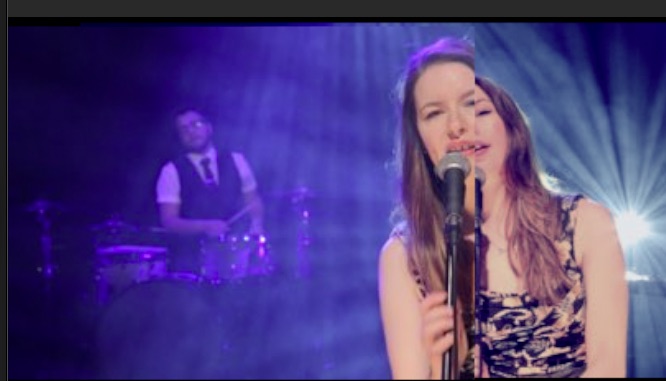
5 minutes with MrJordan .. close.I'd say ......
Replied by Karsten Schlüter on topic best way to change white balance
mitchino wrote: The camera was set to cloudy, the other to tungsten, so it IS a WB issue....
the whites in both pics (e.g. on her shoulders) are plain 100% white ... the cam applied a look to pic #2, but that's an academic discussion leading to nothing. :lol:
again, try Larrys approach to color correct skintones ....
that's where the problem is btw #1 and #2 ....
no need to make the whites whiter ..
5 minutes with MrJordan .. close.I'd say ......
Last edit: 01 Jun 2016 18:49 by Karsten Schlüter.
Please Log in to join the conversation.
02 Jun 2016 07:28 #77361
by mitchino
Replied by mitchino on topic best way to change white balance
Thanks for all the advice - watched the LJ tutorial and now have a better understanding of scopes. Got the footage matching much better now.
Please Log in to join the conversation.


02 Jun 2016 10:04 #77364
by joema
Replied by joema on topic best way to change white balance
Hawaiki Automatch works well and allows matching for multiple colors. However IMO it is complicated to use because of how it's integrated with the FCPX UI:
fxfactory.com/info/hawaikiautomatch/
The previously-mentioned Larry Jordan method of using the vector scope on a cropped skin region works very well.
The previously-mentioned Larry Jordan method of using the vector scope on a cropped skin region works very well.
Please Log in to join the conversation.
- Karsten Schlüter
-
- Offline
- Moderator
-
Less
More
- Posts: 3790
- Thank you received: 718
02 Jun 2016 10:19 #77365
by Karsten Schlüter
... when you keep his numbers/values in mind, very handy, indeed.
For this case, you have to tweak a bit the midtone saturations to keep the dark blue of the bg....
Does not work allways, one of my cheap 'sacrifice actioncams' creates some weird purple blacks... by no means I get that close to match with my other cams :lol:
But for 'colorful' clips (theatre, show lights like here) a good start!
Replied by Karsten Schlüter on topic best way to change white balance
joema wrote: ...mentioned Larry Jordan method of using the vector scope on a cropped skin region works very well.
... when you keep his numbers/values in mind, very handy, indeed.
For this case, you have to tweak a bit the midtone saturations to keep the dark blue of the bg....
Does not work allways, one of my cheap 'sacrifice actioncams' creates some weird purple blacks... by no means I get that close to match with my other cams :lol:
But for 'colorful' clips (theatre, show lights like here) a good start!
Please Log in to join the conversation.
