


- Posts: 3
- Thank you received: 0
3 Post Moderation Rule for New Boarders (25 Jan 2021)
New boarders will have their posts moderated - Don't worry if you cannot see your post immediately.
Lose effects
- ray.madrigal
-
 Topic Author
- Offline
- New Member
-

Less
More
30 May 2016 08:38 #77245
by ray.madrigal
Lose effects was created by ray.madrigal
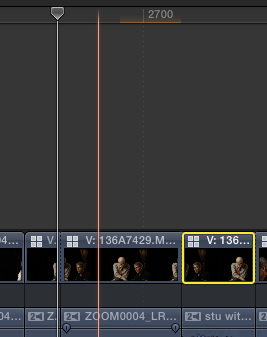
I'm using fcpx 10.2.3, latest version...having a hell of a time with effects "sticking". I'm adding a sharpening effect to clips as I'm editing. One way to tell the effect is "in hand" is the little red bar that appears over the clip. As I'm editing, for some unknown reason, suddenly a whole slew of clips "lose" the effect (in this case the sharpen effect). If I leave the computer and the screen goes to sleep, when I come back and wake it up, invariably every single effect "is gone" when I'm back. I had the same trouble with 10.2.2, but it seems even worse with this.
What's up? a bug?
What's up? a bug?
Please Log in to join the conversation.
- Karsten Schlüter
-

- Offline
- Moderator
-

Less
More
- Posts: 3790
- Thank you received: 718
30 May 2016 09:38 - 30 May 2016 09:39 #77249
by Karsten Schlüter
It's an orange bar, and tells "this part of the Project needs to be rendered"
In case you set up your system to 'Background render' (most don't), after a few seconds you don't touch your Mac. FCPX starts to render, and the bar is gone.
But...
That doesn't mean, the efffect is gone!
select the clip, open the Inspector, and have a look under 'Effects'.
And Welcome, Ray, to fcp.co
Replied by Karsten Schlüter on topic Lose effects
ray.madrigal wrote: … One way to tell the effect is "in hand" is the little red bar that appears over the clip. ..
It's an orange bar, and tells "this part of the Project needs to be rendered"
In case you set up your system to 'Background render' (most don't), after a few seconds you don't touch your Mac. FCPX starts to render, and the bar is gone.
But...
That doesn't mean, the efffect is gone!
select the clip, open the Inspector, and have a look under 'Effects'.
And Welcome, Ray, to fcp.co
Last edit: 30 May 2016 09:39 by Karsten Schlüter.
Please Log in to join the conversation.
- ray.madrigal
-
Topic Author
- Offline
- New Member
-
Less
More
- Posts: 3
- Thank you received: 0
30 May 2016 18:49 #77262
by ray.madrigal
Replied by ray.madrigal on topic Lose effects
I will look at this, but in the last project that I did, with this problem, when I exported, the effect was not there. Why does it not show up on the screen, after initially showing (in this case the effect the clip sharpened, on screen, and later unsharpened).? This make no sense to me. If I'm working in Photoshop, when I change something, it changes, it doesn't go away after a few moments.
Please Log in to join the conversation.
- ray.madrigal
-
Topic Author
- Offline
- New Member
-
Less
More
- Posts: 3
- Thank you received: 0
30 May 2016 20:35 #77263
by ray.madrigal
Replied by ray.madrigal on topic Lose effects
Thank you for your answer. I am working with proxy and when I went back to optimized viewing the sharpening effect came into view. The inspector, of course showed my myriad attempts at sharpening, to no avail in proxy mode. Still I wish that, even in proxy effects would hold their effects when working...perhaps too much to ask for in terms of memory and function.
Please Log in to join the conversation.
- Karsten Schlüter
-
- Offline
- Moderator
-
Less
More
- Posts: 3790
- Thank you received: 718
31 May 2016 04:36 #77267
by Karsten Schlüter
Replied by Karsten Schlüter on topic Lose effects
hmmm ... something's wrong in your set-up:
it doesn't matter, wether you use proxies or the original files - you can apply any effect. And a Sharpening filter in Proxy afffects the originl version too. And when you delete an effect in Original mode, the Proxy has it lost too ....
for a test, start from scratch:
transcode one clip to proxy, add it to a new project, switch modes....and?
it doesn't matter, wether you use proxies or the original files - you can apply any effect. And a Sharpening filter in Proxy afffects the originl version too. And when you delete an effect in Original mode, the Proxy has it lost too ....
for a test, start from scratch:
transcode one clip to proxy, add it to a new project, switch modes....and?
Please Log in to join the conversation.
- nils.dettmann
-
- Offline
- Elite Member
-

Less
More
- Posts: 161
- Thank you received: 13
31 May 2016 13:44 #77279
by nils.dettmann
Replied by nils.dettmann on topic Lose effects
The sharpening effect is effecting finer details of the image. As the proxys are only 1/4 the resolution of the source it´s quite possible you won´t see it´s effect in proxy mode.
Generally sharpening should be judged with original source and zoomed to at least 100% view.
Generally sharpening should be judged with original source and zoomed to at least 100% view.
Please Log in to join the conversation.
