


- Posts: 5
- Thank you received: 0
3 Post Moderation Rule for New Boarders (25 Jan 2021)
New boarders will have their posts moderated - Don't worry if you cannot see your post immediately.
Distorted graphics png, jpg etc
26 May 2016 08:04 #77125
by Proyal
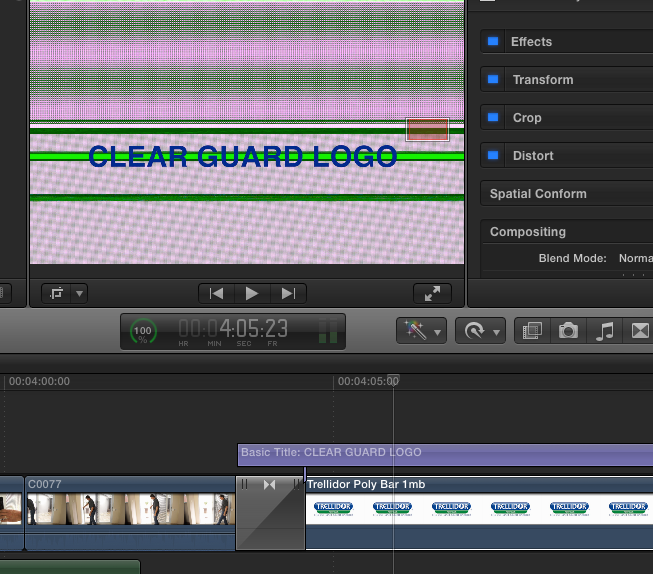
When I bring a graphic png or jpg onto the timeline it is fine until I 'transform or crop' it - then it looks like something is not syncing - a distorted green & magenta image.
Distorted graphics png, jpg etc was created by Proyal
When I bring a graphic png or jpg onto the timeline it is fine until I 'transform or crop' it - then it looks like something is not syncing - a distorted green & magenta image.
Please Log in to join the conversation.

26 May 2016 12:15 #77132
by BenB
Replied by BenB on topic Distorted graphics png, jpg etc
Can you zoom out so we see the whole frame?
Please Log in to join the conversation.
26 May 2016 19:34 #77148
by Proyal
Replied by Proyal on topic Distorted graphics png, jpg etc
Hi BenB
that is the whole frame.
that is the whole frame.
Please Log in to join the conversation.


26 May 2016 20:08 #77153
by Redifer
Replied by Redifer on topic Distorted graphics png, jpg etc
Are your graphics in RGB? They definitely shouldn't be in CMYK.
Please Log in to join the conversation.
27 May 2016 05:20 #77159
by Proyal
Replied by Proyal on topic Distorted graphics png, jpg etc
Yes definitely RGB. thanks
Please Log in to join the conversation.
27 May 2016 06:34 #77161
by Proyal
Replied by Proyal on topic Distorted graphics png, jpg etc
The strange thing is that if I bring any of my other completed movies into the timeline and start working on them again - the graphic goes crazy! all been working fine for 3 years, now a problem.
Please Log in to join the conversation.
27 May 2016 08:27 #77164
by Proyal
Replied by Proyal on topic Distorted graphics png, jpg etc
Ok all sorted. Lowered the res of the graphics and file size and appears to be ok. It is still a mystery why the graphics have been fine in past videos until I upload them again to timeline. Any way thanks all. PR
Please Log in to join the conversation.
