


- Posts: 4
- Thank you received: 0
3 Post Moderation Rule for New Boarders (25 Jan 2021)
New boarders will have their posts moderated - Don't worry if you cannot see your post immediately.
Aged Film Effect Issue
- Nicholas Langley
-
 Topic Author
- Offline
- New Member
-

Less
More
19 May 2016 18:11 #76934
by Nicholas Langley
Aged Film Effect Issue was created by Nicholas Langley
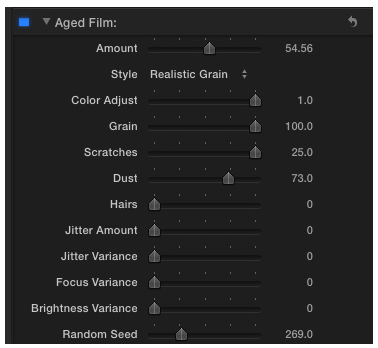
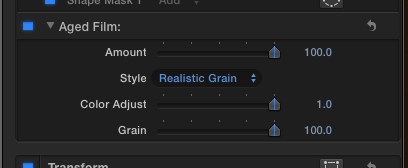
A few days ago I was applying the Aged Film Effect native to FCPX to a clip and it was working well (see image 1). Today I open FCPX and the effect as been stripped down to the basic functions in image 2 below. Any have any idea what is going on here?
Please Log in to join the conversation.
- Tom Wolsky
-

- Offline
- Moderator
-

19 May 2016 19:21 #76937
by Tom Wolsky
Replied by Tom Wolsky on topic Aged Film Effect Issue
Try reinstalling the application from the App Store.
Please Log in to join the conversation.

20 May 2016 14:16 #76956
by bogiesan
Replied by bogiesan on topic Aged Film Effect Issue
Hope reinstalling works for you and all of your effects parameters are reinstated. Please let us know.
But if Aged Film has been truncated, certainly others have been, too. Aged Film can be opened in Motion, have you tried that? If it's busted in FCPX, it will also be broken in Motion since both apps reference the same filter file.
Editorial comment: Reinstalling. Sheesh. That's how little Apple' s software stability has progressed in twenty years?
But if Aged Film has been truncated, certainly others have been, too. Aged Film can be opened in Motion, have you tried that? If it's busted in FCPX, it will also be broken in Motion since both apps reference the same filter file.
Editorial comment: Reinstalling. Sheesh. That's how little Apple' s software stability has progressed in twenty years?
Please Log in to join the conversation.

20 May 2016 17:08 #76962
by BenB
Replied by BenB on topic Aged Film Effect Issue
Yes, because reinstalling an app has become very fast and super easy. As opposed to when folks reinstalled the whole OS from scratch to fix things. Files on computers get corrupted, not nearly as much as they once did, but it happens, always will, nature of the beast.
Please Log in to join the conversation.
