


3 Post Moderation Rule for New Boarders (25 Jan 2021)
New boarders will have their posts moderated - Don't worry if you cannot see your post immediately.
Urgent ! Workflow tip needed

I have 48h to edit a short narrative. Unfortunately, I have been given the files in the worst possible configuration and I am really panicking:
- RED footage with clap but no sound reference
- 4 tracks on a Zoom H6. Each take comes in a different folder, each track on a different file
I have to sync all this the fastest I can, but I am really stuck at the moment. I was thinking of first creating multichannel audio files, and then sync them with the video.
But:
- How to create on multichannel audio file out of the Zoom H6 files ? If I create a multicam clip, I cannot add the video on it later on (you cannot create multicam of multicam)
- Or shall I first create multicam audio clip and then a compound clip with the video ? But then it becomes a really unhandy clip, right ?
- I thought of creating multicam audio of the Zoom H6 with pluraleyes, but if you insert one folder in PluralEyes, it puts the 4 files on the same line
Thank you for your help !!!!
Manu
Please Log in to join the conversation.
Please Log in to join the conversation.
Shall I then:
- create a multicam of my 6 audio tracks automatically
- then add an angle with the video (using markers??)
Would you be able to describe a more precise workflow ?
Thank you so much...
Please Log in to join the conversation.
- Beeldcomponist
-

- Offline
- Junior Member
-

- Posts: 33
- Thank you received: 8
what you could do is open the video file in it's own timeline and put the Zoom audio files in that timeline.
Of course you need a sync point and alien the Zoom files, you can hear when it is sync, and assign the roles.
I did this often with multicam shows where all the iso audiotracks are in the program stream.
Greetings Hans
Please Log in to join the conversation.

that’s what I would do indeed.
- First create your multicam clip with audio files only
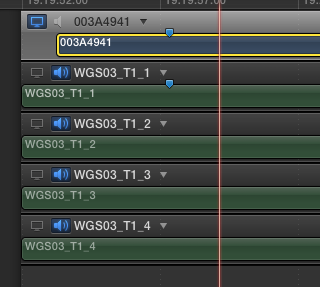
- Open it in the angle editor, and add an angle
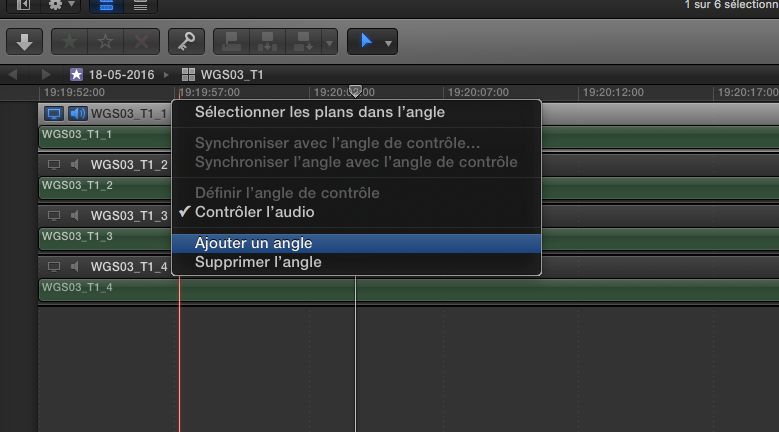
where you insert your video, which you’ll synchronize manually with the position tool.
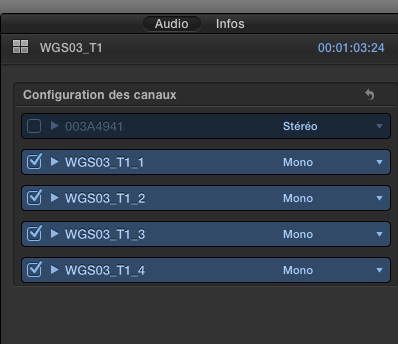
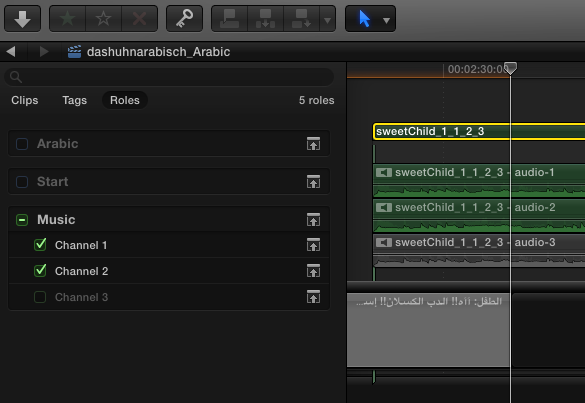
- In your event browser, select your multicam clip, and be sure each audio channel is checked in the inspector.
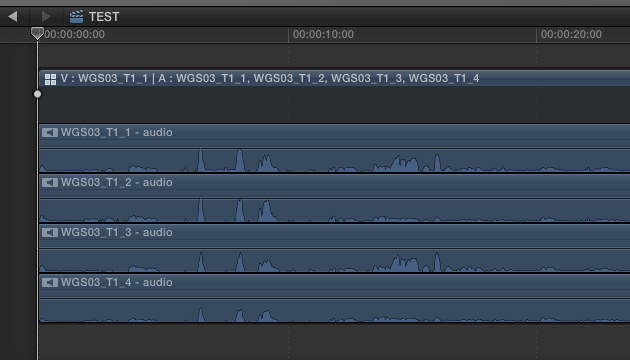
That way, when you edit your multicam clip in your project, you just have to develop audio components to see all your audio tracks
Please Log in to join the conversation.
Not sure if all the audio has the "clap" in them but if you do you can then sync them and then add markers for the visual "clap" if they shot it. Otherwise find a visual marker you can "sync" to the audio files. Remember you can set the connection point for audio to the clip.
Good luck, Greg
Please Log in to join the conversation.
Please Log in to join the conversation.
Is that normal ?
Please Log in to join the conversation.
OK I'm in the middle of doing what you said (it's taking me hours and hours) but I realize I've made a big mistake: I forgot to assign roles to the audio tracks BEFORE I create the multicam clips.
The original files are called xxtr1 xxxtr2 etc so it's handy to filter them by name and assign them roles. But now they are in the multicam clips...
Can I still do something about it easily before I start the actual edit ?
Please Log in to join the conversation.
- after assigning roles to audio files in event browser, open each multicam clip and do a Match Frame - Replace on each audio file.
- assign roles affer editing, by developing audio components in the project, then lassoing-selecting all components 1 > role 1. All components 2 > role 2...
Please Log in to join the conversation.
Thanks Dawar !!!
Please Log in to join the conversation.
- Andreas Kiel
-
- Offline
- Platinum Member
-

- Posts: 1077
- Thank you received: 189
Why not create polyphonic .wav files first??
- Andreas
Please Log in to join the conversation.
Please Log in to join the conversation.
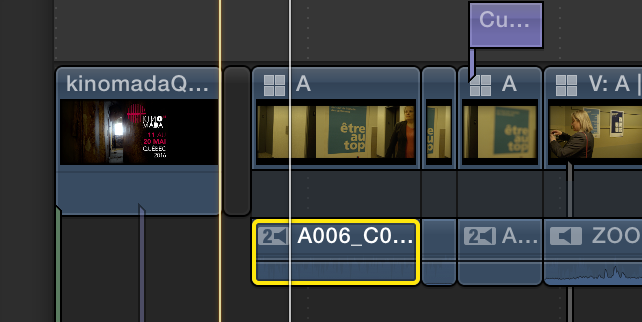
If not, just select all your multicam clips in your project, and enable the audio angles in the inspector.
Please Log in to join the conversation.
That was it indeed. It went faster than I thought. I litteraly spent the last 28 hours editing, that was fun...
Please Log in to join the conversation.
- Andreas Kiel
-
- Offline
- Platinum Member
-
- Posts: 1077
- Thank you received: 189
Please Log in to join the conversation.
Polyphonic files could have been created using Wave Agent, then synchronized.
Please Log in to join the conversation.
I didnt know you could do polyphonic files with Wave Agent.
In any case the project was a massive success at the screening and I am extremely grateful to all of you.
Please Log in to join the conversation.
- Andreas Kiel
-
- Offline
- Platinum Member
-
- Posts: 1077
- Thank you received: 189
- Andreas
Please Log in to join the conversation.
