


- Posts: 18
- Thank you received: 0
3 Post Moderation Rule for New Boarders (25 Jan 2021)
New boarders will have their posts moderated - Don't worry if you cannot see your post immediately.
Prevent FCPX from rendering High Quality Media Files
17 May 2016 00:44 #76810
by steve.d
Prevent FCPX from rendering High Quality Media Files was created by steve.d
I'm editing a passion project documentary currently, which was shot on red camera.
I've been editing exclusively in proxy mode. But when I go back to original media mode to export a first cut, FCPX automatically renders ProRess 'High Quality Media' versions as well. How do I prevent this?
It ends up taking a lot of memory, and I don't want to even use the High Quality ProRes versions, I just want the proxy and original RED files. What do I do?
Also, quick side question. If I want to transfer a FCPX library to a remote laptop, is dropbox a good method to do so? the library is about 240gb, and I would have enough to fit in Dropbox. But I remember reading awhile back that using Dropbox is a bad idea to edit in, because it might not save everything perfectly. I just want to use it to transfer between devices, then take it out of dropbox on the 2nd computer to edit on. Is it ok do so? Any other recommendations?
Thanks!
I've been editing exclusively in proxy mode. But when I go back to original media mode to export a first cut, FCPX automatically renders ProRess 'High Quality Media' versions as well. How do I prevent this?
It ends up taking a lot of memory, and I don't want to even use the High Quality ProRes versions, I just want the proxy and original RED files. What do I do?
Also, quick side question. If I want to transfer a FCPX library to a remote laptop, is dropbox a good method to do so? the library is about 240gb, and I would have enough to fit in Dropbox. But I remember reading awhile back that using Dropbox is a bad idea to edit in, because it might not save everything perfectly. I just want to use it to transfer between devices, then take it out of dropbox on the 2nd computer to edit on. Is it ok do so? Any other recommendations?
Thanks!
Please Log in to join the conversation.
- venkarnafel
-

- Offline
- New Member
-

Less
More
- Posts: 10
- Thank you received: 1
17 May 2016 01:42 - 17 May 2016 01:45 #76811
by venkarnafel
Replied by venkarnafel on topic Prevent FCPX from rendering High Quality Media Files
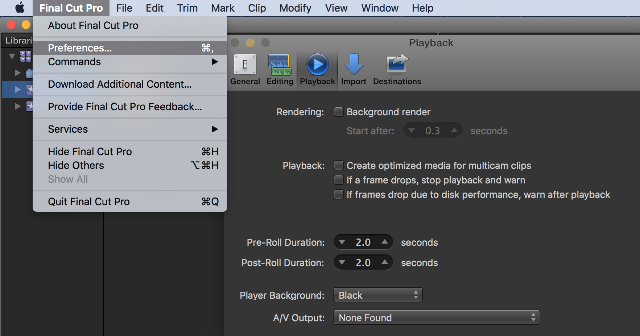
Go to Preferences or (Command+,) in the Playback options uncheck what you don't want.
I don't like when it renders my self quality is not the problem when editing with videos.
I let all the rendering happen when export the project.
hope this helps.
I don't like when it renders my self quality is not the problem when editing with videos.
I let all the rendering happen when export the project.
hope this helps.
Last edit: 17 May 2016 01:45 by venkarnafel.
Please Log in to join the conversation.
- venkarnafel
-
- Offline
- New Member
-
Less
More
- Posts: 10
- Thank you received: 1
17 May 2016 01:49 #76812
by venkarnafel
Replied by venkarnafel on topic Prevent FCPX from rendering High Quality Media Files
Proxy good be a good way and faster to get it to your remote laptop and its going to take less space
Please Log in to join the conversation.
- ronny courtens
-

- Offline
- Moderator
-

Less
More
- Posts: 4455
- Thank you received: 962
17 May 2016 07:50 #76824
by ronny courtens
Replied by ronny courtens on topic Prevent FCPX from rendering High Quality Media Files
Hey Steve,
You can disable Background rendering in the FCP X preferences, as shown by Ben.
If you want to upload an FCP X Library to DropBox you need to ZIP the Library first. This will ensure that everything transfers without any issues.
But if your Library is 240GB, it will take quite some time to upload. Then you will have to download it again to your remote laptop, because DropBox is not fast enough to edit straight off the DB folder. That's why I think it would be much, much easier to just put the Library onto a small external drive and take it with you to the remote location.
- Ronny
You can disable Background rendering in the FCP X preferences, as shown by Ben.
If you want to upload an FCP X Library to DropBox you need to ZIP the Library first. This will ensure that everything transfers without any issues.
But if your Library is 240GB, it will take quite some time to upload. Then you will have to download it again to your remote laptop, because DropBox is not fast enough to edit straight off the DB folder. That's why I think it would be much, much easier to just put the Library onto a small external drive and take it with you to the remote location.
- Ronny
Please Log in to join the conversation.
