


- Posts: 1
- Thank you received: 0
3 Post Moderation Rule for New Boarders (25 Jan 2021)
New boarders will have their posts moderated - Don't worry if you cannot see your post immediately.
Stabilization
16 May 2016 12:50 #76769
by Lorenam
Stabilization was created by Lorenam
Hi everybody,
I'm new in final cut and i didn't know how to do a good stabilization. I've tried with "stabilization box" but it is not good :S also i publish on youtube and i use their stabilization but it's worst.
I made my videos with my iphone.
Please if anybody know how to do it or know any way to do it help meeee!!!!

Thanks
I'm new in final cut and i didn't know how to do a good stabilization. I've tried with "stabilization box" but it is not good :S also i publish on youtube and i use their stabilization but it's worst.
I made my videos with my iphone.
Please if anybody know how to do it or know any way to do it help meeee!!!!
Thanks
Please Log in to join the conversation.

16 May 2016 13:08 - 18 May 2016 13:54 #76777
by BenB
Replied by BenB on topic Stabilization
Lock & Load from Coremelt is about the best stabilizer you'll find. And keep in mind, if there is TOO MUCH shake, movement, jitter, then NOTHING will fix it well at all. Can you post a sample clip?
Last edit: 18 May 2016 13:54 by BenB.
Please Log in to join the conversation.


18 May 2016 02:53 - 18 May 2016 02:56 #76859
by dgwvideo
Creating history....one edit at a time !
Replied by dgwvideo on topic Stabilization
I think Ben means Lock and Load X from Coremelt, not TrackX.
...And, there is a stabilization feature in FCPX. Select your clip in the timeline and choose stabilization from the inspector.
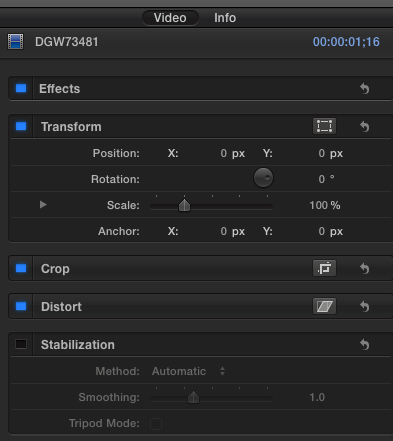
...And, there is a stabilization feature in FCPX. Select your clip in the timeline and choose stabilization from the inspector.
Creating history....one edit at a time !
Last edit: 18 May 2016 02:56 by dgwvideo.
Please Log in to join the conversation.
18 May 2016 13:54 #76886
by BenB
Replied by BenB on topic Stabilization
Lock & Load, yes, thanks.
Please Log in to join the conversation.
18 May 2016 14:00 #76887
by VidGreg
Replied by VidGreg on topic Stabilization
Hi Lorenam,
Welcome to the forums.
So the "Best" stabilization happens during the shooting. Use a tripod or other method to hold the camera (iPhone) if at all possible.
If you have to move with the cam, then there are various "steadicams" or other camera stabilizers up to gyro based devices to help remove camera shake. iPhones and small cams are the most suspectable to camera shake, especially while hand held, so filming technique is really important.
It is also important to understand how post "stabilization" works. FCPX or other software will analyze the footage and then it will need to change the image details, mostly by reducing the total image (zoom in effectively) in order to "fix" the objects in the frame. This can lead to degraded images. The greater the shaking of the camera, the worst this will affect the clip.
Speaking of clips, shorter clips tend to respond better than long clips to stabilization. If you only need to stabilize a small part of a long clip, then blade the area into a smaller clip and then apply the stabilization to that portion only.
Hope this helps, Greg
Welcome to the forums.
So the "Best" stabilization happens during the shooting. Use a tripod or other method to hold the camera (iPhone) if at all possible.
If you have to move with the cam, then there are various "steadicams" or other camera stabilizers up to gyro based devices to help remove camera shake. iPhones and small cams are the most suspectable to camera shake, especially while hand held, so filming technique is really important.
It is also important to understand how post "stabilization" works. FCPX or other software will analyze the footage and then it will need to change the image details, mostly by reducing the total image (zoom in effectively) in order to "fix" the objects in the frame. This can lead to degraded images. The greater the shaking of the camera, the worst this will affect the clip.
Speaking of clips, shorter clips tend to respond better than long clips to stabilization. If you only need to stabilize a small part of a long clip, then blade the area into a smaller clip and then apply the stabilization to that portion only.
Hope this helps, Greg
Please Log in to join the conversation.
- Karsten Schlüter
-

- Offline
- Moderator
-

Less
More
- Posts: 3790
- Thank you received: 718
19 May 2016 08:12 #76914
by Karsten Schlüter
Replied by Karsten Schlüter on topic Stabilization
(… just watched rippletrainings latest vids, 60k cam, 2k gyro.. got the urgent need to share CHEAP advice!! )
in addendum to gregs excellent advice, here some low-budget tricks for stabilizing on recording:
• Lean camera or yourself against something
A table, a column, a car ... it not only stablizes the camera. often it gives a new, better perspective, than the <yawn> upright, head high position
• The Bag Stabilizer: hang a bag over the cam hands wrist, the heavier the better! OK, a bit exhausting, but the additional weight adds inertia=stabilization. Works perfect when you shoot&run: the bag forces your arm to work like a suspension.....
• Grab your camera! tough! It's made of metal!! and: the only part you shouldn't cover is the lense... which is on phones just a fraction of the surface

ok, you want access/view to the screen... but don't pick your cam like a poison insect!
• build yourself a StringPod, the cheapest, smallest, lightest-weight monopod ever (asks for a tripod connector, cameras have it all, phones less)
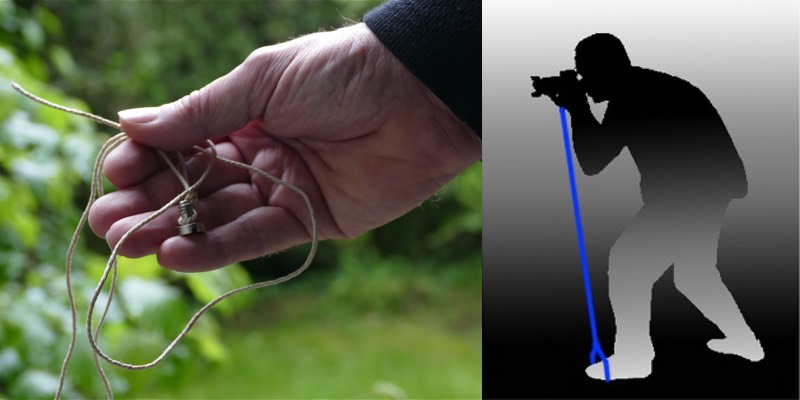
you need a 1/4" screw (homedepot, camera shop, amazon...) and some string. Knot screw, on the other end create a bow...
For use, attach to your cam, step inside the bow, tighten string...
• Pistolgrip - you find this clever device from several manufacturers:
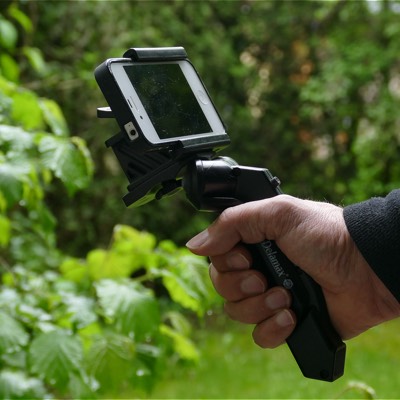
you clip your phone into it, and instantly, you have an adjustable grip! The one I'm showing here, also allows to attach camcorders/cameras, and is a small table-tripod (some additional legs fold out) ... 15€!!
Again: don't rely on post-stabilization... that's just the last chance to save a shot.
in addendum to gregs excellent advice, here some low-budget tricks for stabilizing on recording:
• Lean camera or yourself against something
A table, a column, a car ... it not only stablizes the camera. often it gives a new, better perspective, than the <yawn> upright, head high position
• The Bag Stabilizer: hang a bag over the cam hands wrist, the heavier the better! OK, a bit exhausting, but the additional weight adds inertia=stabilization. Works perfect when you shoot&run: the bag forces your arm to work like a suspension.....
• Grab your camera! tough! It's made of metal!! and: the only part you shouldn't cover is the lense... which is on phones just a fraction of the surface
ok, you want access/view to the screen... but don't pick your cam like a poison insect!
• build yourself a StringPod, the cheapest, smallest, lightest-weight monopod ever (asks for a tripod connector, cameras have it all, phones less)
you need a 1/4" screw (homedepot, camera shop, amazon...) and some string. Knot screw, on the other end create a bow...
For use, attach to your cam, step inside the bow, tighten string...
• Pistolgrip - you find this clever device from several manufacturers:
you clip your phone into it, and instantly, you have an adjustable grip! The one I'm showing here, also allows to attach camcorders/cameras, and is a small table-tripod (some additional legs fold out) ... 15€!!
Again: don't rely on post-stabilization... that's just the last chance to save a shot.
Please Log in to join the conversation.
