


- Posts: 85
- Thank you received: 2
3 Post Moderation Rule for New Boarders (25 Jan 2021)
New boarders will have their posts moderated - Don't worry if you cannot see your post immediately.
Relinking xml with .mxf files to .mov media
16 May 2016 12:02 #76762
by BJansch
Relinking xml with .mxf files to .mov media was created by BJansch
Probably impossible but hoping someone clever has worked this out!
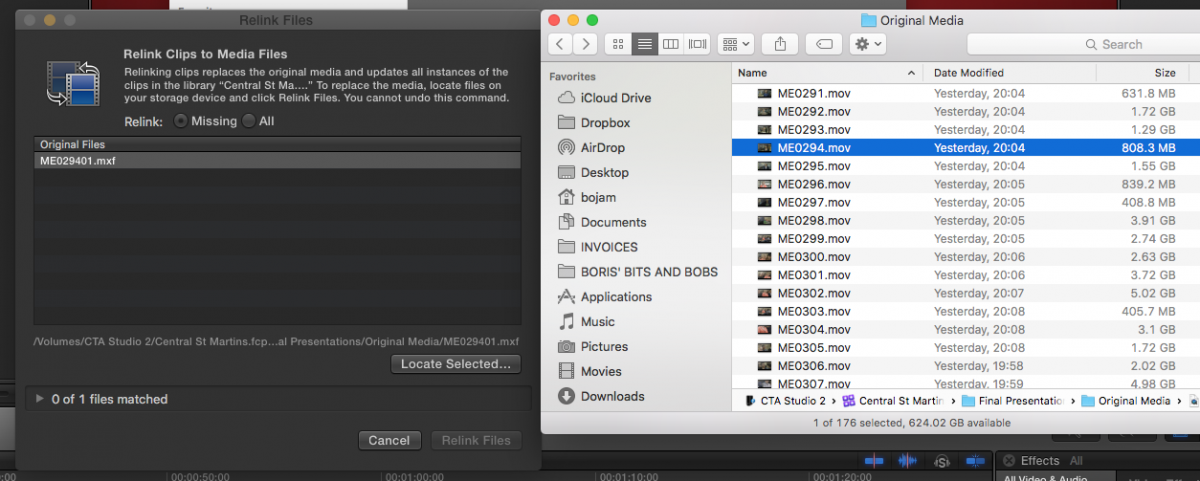
I'm trying to relink files in an XML. The media is from a C300 but I suspect the media was incorrectly imported because the file extensions for the offline media is .mxf ie it's looking for files not only matching the name but also the file extension, and my imported C300 media is obviously all .mov, because it was correctly imported.
Anyone know a way of relinking the media in spite of the incorrect file extension?
Thanks,
I'm trying to relink files in an XML. The media is from a C300 but I suspect the media was incorrectly imported because the file extensions for the offline media is .mxf ie it's looking for files not only matching the name but also the file extension, and my imported C300 media is obviously all .mov, because it was correctly imported.
Anyone know a way of relinking the media in spite of the incorrect file extension?
Thanks,
Please Log in to join the conversation.

16 May 2016 12:55 #76772
by BenB
Replied by BenB on topic Relinking xml with .mxf files to .mov media
Observation from your screen shot, "ME029401" is not the same file as "ME0294". That "01" on the end makes it a totally different file name, meaning you're looking at two different files for comparison.
Please Log in to join the conversation.
16 May 2016 13:13 - 16 May 2016 13:15 #76780
by BJansch
Replied by BJansch on topic Relinking xml with .mxf files to .mov media
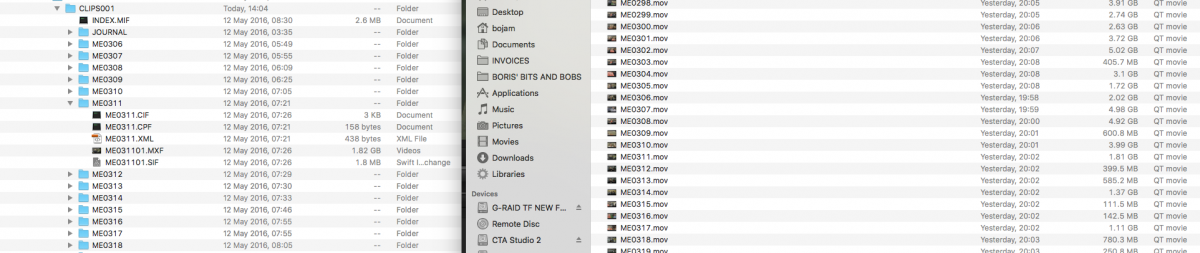
It's absolutely the same original media, however, if you import into FCPX via the import window, the files appear without the additional '01' on the end of the file name and appear as .mov files as apposed to .mxf in the 'Original media' folder.
Last edit: 16 May 2016 13:15 by BJansch.
Please Log in to join the conversation.
16 May 2016 13:15 - 16 May 2016 13:23 #76781
by BenB
Replied by BenB on topic Relinking xml with .mxf files to .mov media
You optimized the media during import, correct? Cause I see an optimized .mov and an original .mxf, not two copies of the same physical file.
I suspect, without seeing your Browser, that the file from the camera card/archive didn't finish importing all the way? I'm not sure. But seems it is trying to find the original mxf file instead of the Optimized .mov file FCPX created on import.
I suspect, without seeing your Browser, that the file from the camera card/archive didn't finish importing all the way? I'm not sure. But seems it is trying to find the original mxf file instead of the Optimized .mov file FCPX created on import.
Last edit: 16 May 2016 13:23 by BenB.
Please Log in to join the conversation.
16 May 2016 13:24 - 16 May 2016 14:00 #76782
by BJansch
Replied by BJansch on topic Relinking xml with .mxf files to .mov media
No need.
You can see from the import window, which is referencing the exact same back up drive used by the previous editor, that the files appear without the additional '01'. I suspect he did something like drag and drop from the back up drive instead of importing from FCPX.
I never optimise mxf footage.
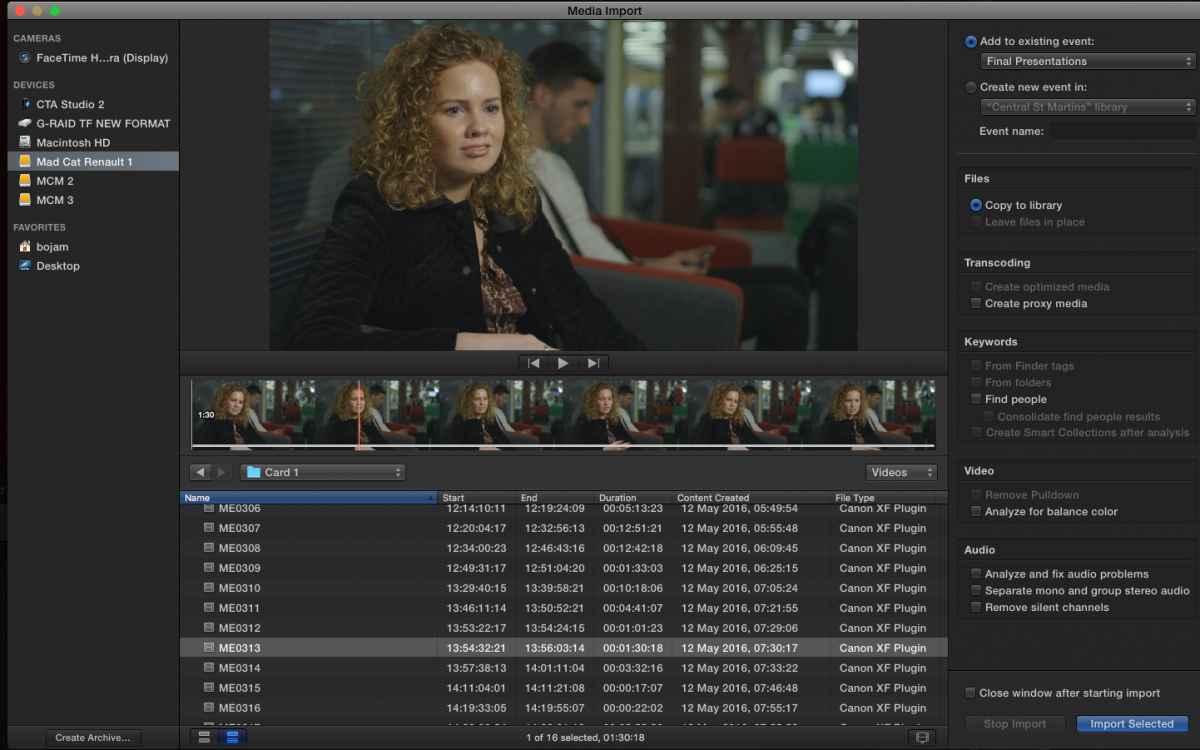
You can see from the import window, which is referencing the exact same back up drive used by the previous editor, that the files appear without the additional '01'. I suspect he did something like drag and drop from the back up drive instead of importing from FCPX.
I never optimise mxf footage.
Last edit: 16 May 2016 14:00 by BJansch. Reason: missed something
Please Log in to join the conversation.
- nils.dettmann
-

- Offline
- Elite Member
-

Less
More
- Posts: 161
- Thank you received: 13
16 May 2016 15:28 - 16 May 2016 15:29 #76788
by nils.dettmann
Replied by nils.dettmann on topic Relinking xml with .mxf files to .mov media
The last two digits of C300 files have to do with spanning.
When you import in FCPX they will be cut away. That´s quite normal.
Though spanned C300 clips can make problems with relinking I don´t think that´s your problem.
In the first picture you attached the footage was originally imported into Final Cut and not linked.
It looks like Final Cut rewraps them as mov in this case.
The media on the backup drive is probably just copied content of the camera cards.
What happens when in the relinking panes file dialogue you chose the right file?
Did you look into the XML what filenames it points to?
Should the files from the xml already be in your library?
When you import in FCPX they will be cut away. That´s quite normal.
Though spanned C300 clips can make problems with relinking I don´t think that´s your problem.
In the first picture you attached the footage was originally imported into Final Cut and not linked.
It looks like Final Cut rewraps them as mov in this case.
The media on the backup drive is probably just copied content of the camera cards.
What happens when in the relinking panes file dialogue you chose the right file?
Did you look into the XML what filenames it points to?
Should the files from the xml already be in your library?
Last edit: 16 May 2016 15:29 by nils.dettmann.
Please Log in to join the conversation.
16 May 2016 15:38 #76790
by BJansch
Replied by BJansch on topic Relinking xml with .mxf files to .mov media
Yes the drive is the copied content from the camera cards.
What happens when in the relinking panes file dialogue you chose the right file?
The library is self contained so I can only point to that library and since the xml is looking for matching file names with .xmf, it therefore fails to find a match.
Did you look into the XML what filenames it points to?
The files in the XML are showing the .xmf name, ie they show the number followed by 01 or 02.
Should the files from the xml already be in your library?
I imported the media from the same back up drive and as you see in the previous post, the files are showing the correct names in the import window.
I'll give the editor a call and find out what he did to get the files into FCPX.
What happens when in the relinking panes file dialogue you chose the right file?
The library is self contained so I can only point to that library and since the xml is looking for matching file names with .xmf, it therefore fails to find a match.
Did you look into the XML what filenames it points to?
The files in the XML are showing the .xmf name, ie they show the number followed by 01 or 02.
Should the files from the xml already be in your library?
I imported the media from the same back up drive and as you see in the previous post, the files are showing the correct names in the import window.
I'll give the editor a call and find out what he did to get the files into FCPX.
Please Log in to join the conversation.

16 May 2016 15:43 #76791
by FernKraft
Replied by FernKraft on topic Relinking xml with .mxf files to .mov media
The difference may be that one computer had the Canon plug in, and the other did not.
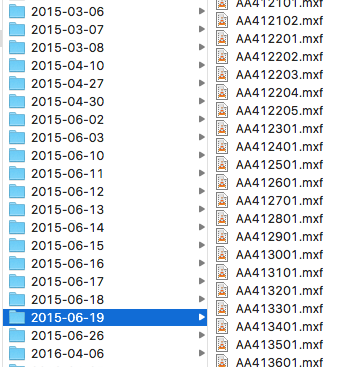
When you have the plug in FCPX will rewrap, and merge spanned clips. If you DON'T have the plug in, it will just import the MXF as individual files.
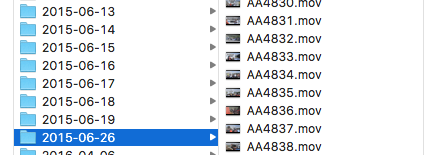
You can see in my attached photo's that in this project, one day was imported without the plug in, and the following day, we used the plug in.
This may be what is causing the relink issue.
Hope that helps!
When you have the plug in FCPX will rewrap, and merge spanned clips. If you DON'T have the plug in, it will just import the MXF as individual files.
You can see in my attached photo's that in this project, one day was imported without the plug in, and the following day, we used the plug in.
This may be what is causing the relink issue.
Hope that helps!
Please Log in to join the conversation.
16 May 2016 15:45 #76792
by BJansch
Replied by BJansch on topic Relinking xml with .mxf files to .mov media
I think you've nailed it FernKraft. I'm sure that's the issue, thanks!
Please Log in to join the conversation.
16 May 2016 15:54 #76794
by FernKraft
Replied by FernKraft on topic Relinking xml with .mxf files to .mov media
Please let us know if it actually worked!!
Thanks,
Thanks,
Please Log in to join the conversation.
16 May 2016 16:13 #76797
by BJansch
Replied by BJansch on topic Relinking xml with .mxf files to .mov media
I just got the previous editor to install the latest 3.1 C300 Mark ii driver for FCPX and the files now show up in the .mov wrapper. So thanks v much for you help!
Please Log in to join the conversation.
- nils.dettmann
-
- Offline
- Elite Member
-
Less
More
- Posts: 161
- Thank you received: 13
16 May 2016 16:17 - 16 May 2016 16:18 #76798
by nils.dettmann
Replied by nils.dettmann on topic Relinking xml with .mxf files to .mov media
Interesting!
What are the advantages of the Canon XF plugin?
Handling of spanned clips?
What are the advantages of the Canon XF plugin?
Handling of spanned clips?
Last edit: 16 May 2016 16:18 by nils.dettmann.
Please Log in to join the conversation.
16 May 2016 16:20 #76799
by BJansch
Replied by BJansch on topic Relinking xml with .mxf files to .mov media
It allows you to import all your clips as a group without having to individually locate each mxf file.
Please Log in to join the conversation.
- nils.dettmann
-
- Offline
- Elite Member
-
Less
More
- Posts: 161
- Thank you received: 13
16 May 2016 16:26 - 16 May 2016 16:30 #76800
by nils.dettmann
Replied by nils.dettmann on topic Relinking xml with .mxf files to .mov media
I don´t have the plugin installed and I imported a whole bunch of C300 files just chosing the parent folders (one per day)
Edit: But it´s the old C300 not the MKII in my case.
Edit: But it´s the old C300 not the MKII in my case.
Last edit: 16 May 2016 16:30 by nils.dettmann.
Please Log in to join the conversation.
16 May 2016 17:04 #76801
by FernKraft
Replied by FernKraft on topic Relinking xml with .mxf files to .mov media
Spanned clips is the main advantage, but I really like that one can 'quick look' the .mov in finder as well.
it could be argued that being unable to 'leave in place' is a great disadvantage though... (at least, I think you can't leave in place, it's been a while....)
it could be argued that being unable to 'leave in place' is a great disadvantage though... (at least, I think you can't leave in place, it's been a while....)
Please Log in to join the conversation.
16 May 2016 18:02 #76803
by BJansch
Replied by BJansch on topic Relinking xml with .mxf files to .mov media
Pretty sure you can leave in place. I did that with my last project on the C300 Mark ii.
Please Log in to join the conversation.
