


- Posts: 2
- Thank you received: 0
3 Post Moderation Rule for New Boarders (25 Jan 2021)
New boarders will have their posts moderated - Don't worry if you cannot see your post immediately.
Final Cut Pro X - Effect.
- TheHawkSFX
-
 Topic Author
- Offline
- New Member
-

Less
More
15 May 2016 21:23 #76731
by TheHawkSFX
Final Cut Pro X - Effect. was created by TheHawkSFX
Hello, my name is Hawk.
I'm using Final Cut Pro X & I've just gotten a new avatar for myself (just not using it here) & there's a personalized intro I want to use with it for my YouTube videos.
I've already gone through the effects myself & searched the internet but I've gotten no results.
What I'm looking for is a combination of the "Cross Dissolve" (so fade in & fade out) effect, along with a spin/flip.
As in, I want my avatar to fade-in spin from left to right a few times & back-out. I've seen it before somewhere but it was a long time ago.
After looking through the effects I've found I can use some other effect which I think is called "spiral"? I didn't memorize the name of it, but I was wondering if there even IS an effect specifically like that for Final Cut Pro X? Is there?...
Any help will be appreciated.
I'm using Final Cut Pro X & I've just gotten a new avatar for myself (just not using it here) & there's a personalized intro I want to use with it for my YouTube videos.
I've already gone through the effects myself & searched the internet but I've gotten no results.
What I'm looking for is a combination of the "Cross Dissolve" (so fade in & fade out) effect, along with a spin/flip.
As in, I want my avatar to fade-in spin from left to right a few times & back-out. I've seen it before somewhere but it was a long time ago.
After looking through the effects I've found I can use some other effect which I think is called "spiral"? I didn't memorize the name of it, but I was wondering if there even IS an effect specifically like that for Final Cut Pro X? Is there?...
Any help will be appreciated.
Please Log in to join the conversation.
- Karsten Schlüter
-

- Offline
- Moderator
-

Less
More
- Posts: 3790
- Thank you received: 718
16 May 2016 05:52 #76743
by Karsten Schlüter
Replied by Karsten Schlüter on topic Final Cut Pro X - Effect.
instead of 'ready mades' of effects, I would consider keyframing…
help.apple.com/finalcutpro/mac/10.2/?lang=en#/ver8e3f20ea
apply your transformations (scale, rotation, position) and keyframe all those.. from you discription, this shouldn't be no rocket science
And Welcome Hawk, to fcp.co
help.apple.com/finalcutpro/mac/10.2/?lang=en#/ver8e3f20ea
apply your transformations (scale, rotation, position) and keyframe all those.. from you discription, this shouldn't be no rocket science
And Welcome Hawk, to fcp.co
Please Log in to join the conversation.
- TheHawkSFX
-
Topic Author
- Offline
- New Member
-
Less
More
- Posts: 2
- Thank you received: 0
17 May 2016 16:50 #76844
by TheHawkSFX
Replied by TheHawkSFX on topic Final Cut Pro X - Effect.
Yes, after reading your response I immediately knew what you meant, but at the same time I decided to explore the alternate options for the effects. I found that FCPX does have the "Flip" effect & that's what I'm looking for, but I want it to flip 2 or 3 times now at LEAST. Not just once.
I haven't tried your method yet but will it work? I'm aware with the key-framing (from what I can recall...) that I can change the opacity in order to create the fade-in/out effect, I think.
Either way I think I have that down... but how would I accomplish the multiple flipping?
I haven't actually done much with key-framing before, therefore I don't know ALL my options.
If you could tell me beforehand, that the key-framing will grant me what I'm looking for, I'd be very grateful. Just... in my mind I don't recall it having that ability. Haha.
& thank you, Karsten. : )
I haven't tried your method yet but will it work? I'm aware with the key-framing (from what I can recall...) that I can change the opacity in order to create the fade-in/out effect, I think.
Either way I think I have that down... but how would I accomplish the multiple flipping?
I haven't actually done much with key-framing before, therefore I don't know ALL my options.
If you could tell me beforehand, that the key-framing will grant me what I'm looking for, I'd be very grateful. Just... in my mind I don't recall it having that ability. Haha.
& thank you, Karsten. : )
Please Log in to join the conversation.
- Karsten Schlüter
-
- Offline
- Moderator
-
Less
More
- Posts: 3790
- Thank you received: 718
18 May 2016 07:10 - 18 May 2016 07:20 #76870
by Karsten Schlüter
no promises...
e.g. 'flip' is no effect, but a transition... sorry for being so German-wise-guyish, but that's a huge difference...
and you instantly see why:
you apply an effect to a clip, but for a transition you need two clips..hm?
so, when you want two flips, you need 1>flip>2>flip>3 clips....
apply ypur graphic 3 times, or Blade the existing one into pieces....
I provided you the link to the Manual... read it, try it.
Sorry to say, but FCPX is no 'one click wonder', it asks for some degree of learning.....
with a combo of scaling, positioning, transforming, you can create almost any fly-route... incl. a flip effect.... look:
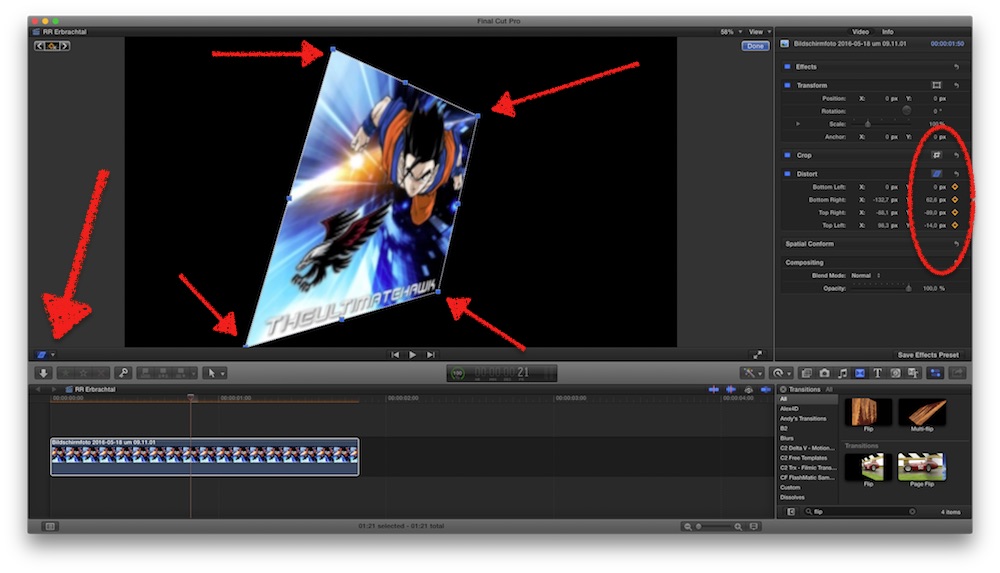
graphic selected, on the left choose Distort, arrange handles (blue dots), set keyframes (yellow diamonds)
move playhead forward, set new keyframe...
later, when you like to fine-adjust settings and/or timing, open the Video Animation Editor
help.apple.com/finalcutpro/mac/10.2/?lang=en#/ver8e3f20ea
Replied by Karsten Schlüter on topic Final Cut Pro X - Effect.
TheHawkSFX wrote: … If you could tell me beforehand, that the key-framing will grant me what I'm looking for, I'd be very grateful. …
no promises...
e.g. 'flip' is no effect, but a transition... sorry for being so German-wise-guyish, but that's a huge difference...
and you instantly see why:
you apply an effect to a clip, but for a transition you need two clips..hm?
so, when you want two flips, you need 1>flip>2>flip>3 clips....
apply ypur graphic 3 times, or Blade the existing one into pieces....
I provided you the link to the Manual... read it, try it.
Sorry to say, but FCPX is no 'one click wonder', it asks for some degree of learning.....
with a combo of scaling, positioning, transforming, you can create almost any fly-route... incl. a flip effect.... look:
graphic selected, on the left choose Distort, arrange handles (blue dots), set keyframes (yellow diamonds)
move playhead forward, set new keyframe...
later, when you like to fine-adjust settings and/or timing, open the Video Animation Editor
help.apple.com/finalcutpro/mac/10.2/?lang=en#/ver8e3f20ea
Last edit: 18 May 2016 07:20 by Karsten Schlüter.
Please Log in to join the conversation.

18 May 2016 10:04 #76875
by lichinho
Replied by lichinho on topic Final Cut Pro X - Effect.
Karsten, all good advice as always.
Just a quick note to say that there is a "Flipped" effect which may be used to achieve what the OP wanted - by using keyframes
Just a quick note to say that there is a "Flipped" effect which may be used to achieve what the OP wanted - by using keyframes
Please Log in to join the conversation.
- Karsten Schlüter
-
- Offline
- Moderator
-
Less
More
- Posts: 3790
- Thank you received: 718
18 May 2016 10:06 #76876
by Karsten Schlüter
You're right!
should have set FCPX to English before answering...........
Replied by Karsten Schlüter on topic Final Cut Pro X - Effect.
lichinho wrote: … there is a "Flipped" effect …
You're right!
should have set FCPX to English before answering...........
Please Log in to join the conversation.
