


- Posts: 96
- Thank you received: 2
3 Post Moderation Rule for New Boarders (25 Jan 2021)
New boarders will have their posts moderated - Don't worry if you cannot see your post immediately.
Roles When Exporting a .MXF File
15 May 2016 11:28 #76717
by Finbo
Roles When Exporting a .MXF File was created by Finbo
Is there any way to export a .mxf file using Roles?
From what I can see, it looks as though this only works on a Quicktime Multitrack export...
It seems strange for FCP X to update and allow .mxf files to be imported and exported, but to stop short of being able to use Roles.
From what I can see, it looks as though this only works on a Quicktime Multitrack export...
It seems strange for FCP X to update and allow .mxf files to be imported and exported, but to stop short of being able to use Roles.
Please Log in to join the conversation.
- ronny courtens
-

- Offline
- Moderator
-

Less
More
- Posts: 4455
- Thank you received: 962
16 May 2016 07:14 #76748
by ronny courtens
Replied by ronny courtens on topic Roles When Exporting a .MXF File
Hi Kevin,
You can easily export a regular 2-channel OP1a MXF file straight from within FCP X.
For multichannel audio MXF based on Roles you need to export a QT multichannel file based on Roles first, then rewrap the multichannel QT to MXF in Compressor using one of the many MXF presets.
We have requested an option to be able to export a multichannel MXF straight from FCP X, adding a "Roles as Multichannel MXF movie" share destination. But I don't know if this will ever be implemented because the existing workflow is quite simple as it is, and it is already used by everyone who needs to deliver multichannel MXF for broadcast.
- Ronny
You can easily export a regular 2-channel OP1a MXF file straight from within FCP X.
For multichannel audio MXF based on Roles you need to export a QT multichannel file based on Roles first, then rewrap the multichannel QT to MXF in Compressor using one of the many MXF presets.
We have requested an option to be able to export a multichannel MXF straight from FCP X, adding a "Roles as Multichannel MXF movie" share destination. But I don't know if this will ever be implemented because the existing workflow is quite simple as it is, and it is already used by everyone who needs to deliver multichannel MXF for broadcast.
- Ronny
Please Log in to join the conversation.
16 May 2016 07:55 #76752
by Finbo
Replied by Finbo on topic Roles When Exporting a .MXF File
Many thanks
Please Log in to join the conversation.
16 May 2016 12:20 #76764
by Finbo
Replied by Finbo on topic Roles When Exporting a .MXF File
Is it recommended to assign & check roles before starting the edit or when you export or doesn't it make any difference?
Please Log in to join the conversation.
- ronny courtens
-
- Offline
- Moderator
-
Less
More
- Posts: 4455
- Thank you received: 962
16 May 2016 12:34 #76766
by ronny courtens
Replied by ronny courtens on topic Roles When Exporting a .MXF File
Although in the end it does not make a big difference, it's always better to assign and check Roles before starting the edit. This ensures that any clip you put onto the timeline will have the correct Role applied to it from the start, and you won't have to fiddle with applying Roles to cut up clips in the timeline anymore.
Of course, sometimes you need to start editing a piece for which all the media hasn't been imported yet. But even then, it's best to assign the correct Roles to any newly imported clips before you cut them onto the timeline.
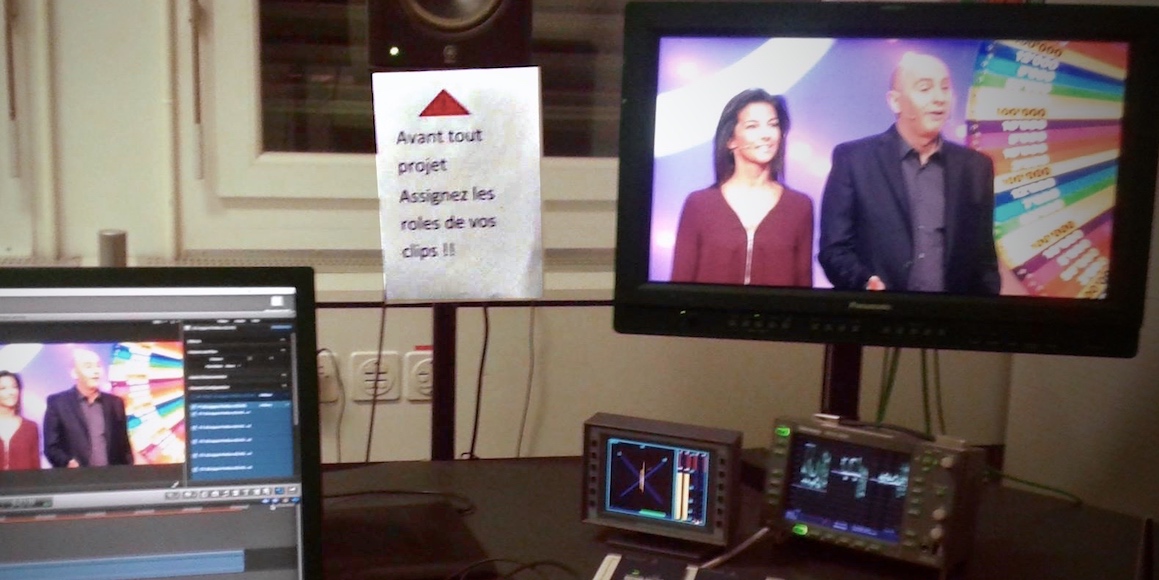
Our friends at Swiss national tv have even put a card in all their editing suites, remembering their editors to apply Roles prior to editing:
- Ronny
Of course, sometimes you need to start editing a piece for which all the media hasn't been imported yet. But even then, it's best to assign the correct Roles to any newly imported clips before you cut them onto the timeline.
Our friends at Swiss national tv have even put a card in all their editing suites, remembering their editors to apply Roles prior to editing:
- Ronny
Please Log in to join the conversation.
