


- Posts: 29
- Thank you received: 1
3 Post Moderation Rule for New Boarders (25 Jan 2021)
New boarders will have their posts moderated - Don't worry if you cannot see your post immediately.
AVID to FCPX Workflow
- James Branch
-
 Topic Author
- Offline
- Junior Member
-

Less
More
13 May 2016 10:31 #76672
by James Branch
AVID to FCPX Workflow was created by James Branch
Hello all,
I am trying to lock down an AVID to FCPX workflow. I haven't used AVID regularly for over 10 years and I was never an expert user. However, I occasionally have to transfer edits from AVID to FCPX and I get it done fairly easily but I have to involve Resolve and various other tools such as FCP7 (with autoduck plugins) and 7toX - now called CCtoX.
I transfer the video using Resolve* and the audio using FCP7 with Autoduck Pro Import and Export Pro and CCtoX.**
There's one thing I don't understand and if you have the time to investigate this then I really appreciate it. This download link contain an AVID MXF file that plays just fine in Resolve but FCPX hates it. It skips and pixelates. Why?
www.dropbox.com/s/x15h1v6jcxfnjq0/BB7908...43_5640F943.mxf?dl=0
It an XDCAM HD422 1080/25p, (50 Mb/s) clip.
I've transferred other edits with this codec just fine and I just can't figure out what the issue is with this clip and all the others like it this project. For instance, this clip plays perfectly.
www.dropbox.com/s/2dw2z9lfigfo50l/AA0053...0%28fcp1%29.mxf?dl=0
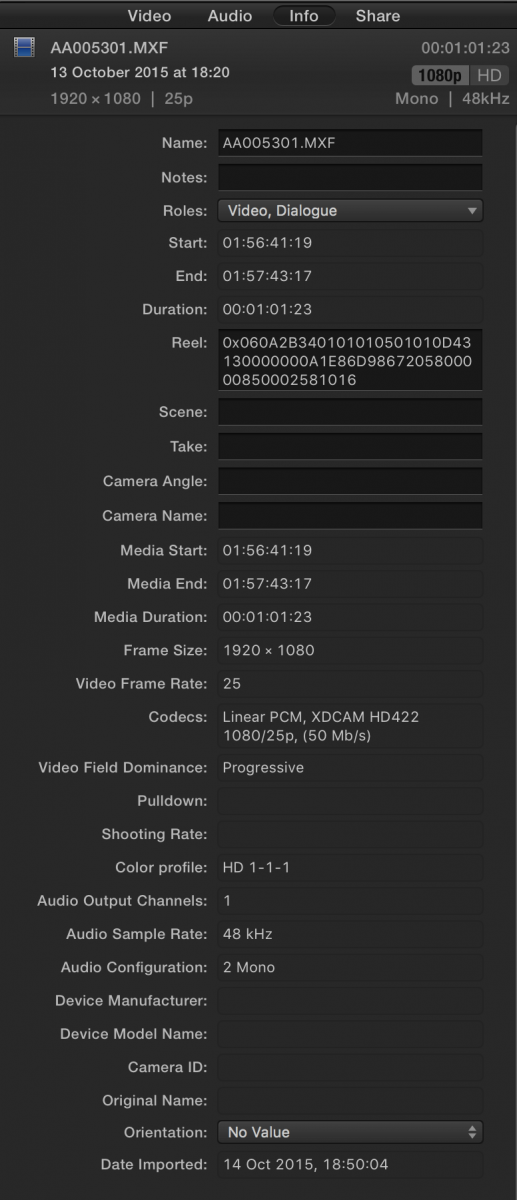
I have attached the metadata for both clips.
In order to get around the issue I've had to transcode the clips in Resolve or export the edit as a single file but I'd prefer to use the original media.
Any help with this is gratefully received.
Thanks!
*I export an empty AAF out of AVID then import that into Resolve. I then reconform the clips and export an FCPXML.
**For the audio I export a AAF with embedded media and import that into FCP7, transcoding the audio to WAV using the Autoduck Pro Import FCP plugin. I then export and XML, translate that to an FCPXML using CCtoX.
I am trying to lock down an AVID to FCPX workflow. I haven't used AVID regularly for over 10 years and I was never an expert user. However, I occasionally have to transfer edits from AVID to FCPX and I get it done fairly easily but I have to involve Resolve and various other tools such as FCP7 (with autoduck plugins) and 7toX - now called CCtoX.
I transfer the video using Resolve* and the audio using FCP7 with Autoduck Pro Import and Export Pro and CCtoX.**
There's one thing I don't understand and if you have the time to investigate this then I really appreciate it. This download link contain an AVID MXF file that plays just fine in Resolve but FCPX hates it. It skips and pixelates. Why?
www.dropbox.com/s/x15h1v6jcxfnjq0/BB7908...43_5640F943.mxf?dl=0
It an XDCAM HD422 1080/25p, (50 Mb/s) clip.
I've transferred other edits with this codec just fine and I just can't figure out what the issue is with this clip and all the others like it this project. For instance, this clip plays perfectly.
www.dropbox.com/s/2dw2z9lfigfo50l/AA0053...0%28fcp1%29.mxf?dl=0
I have attached the metadata for both clips.
In order to get around the issue I've had to transcode the clips in Resolve or export the edit as a single file but I'd prefer to use the original media.
Any help with this is gratefully received.
Thanks!
*I export an empty AAF out of AVID then import that into Resolve. I then reconform the clips and export an FCPXML.
**For the audio I export a AAF with embedded media and import that into FCP7, transcoding the audio to WAV using the Autoduck Pro Import FCP plugin. I then export and XML, translate that to an FCPXML using CCtoX.

Please Log in to join the conversation.
- ronny courtens
-

- Offline
- Moderator
-

Less
More
- Posts: 4455
- Thank you received: 962
16 May 2016 08:15 #76753
by ronny courtens
Replied by ronny courtens on topic AVID to FCPX Workflow
Hey James,
I have downloaded your samples to do a test.
Although both files use the XDCAM 422P@HL Long-GOP codec, the files are very different.
The one that works in FCP X without issues is an original "OP1a" MXF file created by a Canon EOS C 300:

The other file imports in FCP X but plays back with artifacts. That file is a rewrapped "Specialized OP Atom" MXF file, which is a proprietary OP version created by Avid:
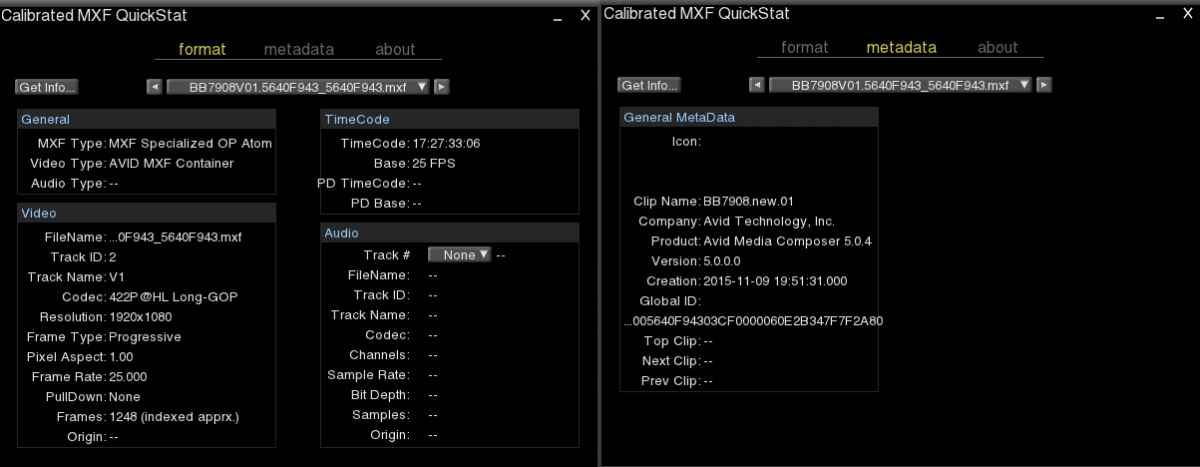
FCP X fully supports the OP1a MXF format, which is the current "industry-standard". But it seems to have issues with playing back the proprietary OP version created by Avid.
I have tried to play both files in different players. VLC for instance plays the OP1a file perfectly, but refuses to play the Avid MXF. OTOH QT Player X plays both files without any issues after re-wrapping them. So does Resolve.
When I re-wrap the Avid file in QTX and I import the re-wrapped file in FCP X, it plays without any artifacts.
My conclusion: FCP X indeed does not like the proprietary Avid Specialized OP Atom MXF format. Even VLC does not want to play that format. Converting it in Resolve or re-wrapping it in QTX seems to solve the issue.
There are many pitfalls when you want to port projects between different NLEs. Most of those pitfalls are related to proprietary video and metadata exchange formats not being compatible. That's why I always will advise against such workflows.
But I do understand that sometimes you have no other options, and then you need to work around the issues. We have tried once to port a quite complex Avid project over to FCP X. By the time we managed to do this using many different workarounds and third-party tools, we could easily have re-edited the complete project from scratch in FCP X.
- Ronny
I have downloaded your samples to do a test.
Although both files use the XDCAM 422P@HL Long-GOP codec, the files are very different.
The one that works in FCP X without issues is an original "OP1a" MXF file created by a Canon EOS C 300:
The other file imports in FCP X but plays back with artifacts. That file is a rewrapped "Specialized OP Atom" MXF file, which is a proprietary OP version created by Avid:
FCP X fully supports the OP1a MXF format, which is the current "industry-standard". But it seems to have issues with playing back the proprietary OP version created by Avid.
I have tried to play both files in different players. VLC for instance plays the OP1a file perfectly, but refuses to play the Avid MXF. OTOH QT Player X plays both files without any issues after re-wrapping them. So does Resolve.
When I re-wrap the Avid file in QTX and I import the re-wrapped file in FCP X, it plays without any artifacts.
My conclusion: FCP X indeed does not like the proprietary Avid Specialized OP Atom MXF format. Even VLC does not want to play that format. Converting it in Resolve or re-wrapping it in QTX seems to solve the issue.
There are many pitfalls when you want to port projects between different NLEs. Most of those pitfalls are related to proprietary video and metadata exchange formats not being compatible. That's why I always will advise against such workflows.
But I do understand that sometimes you have no other options, and then you need to work around the issues. We have tried once to port a quite complex Avid project over to FCP X. By the time we managed to do this using many different workarounds and third-party tools, we could easily have re-edited the complete project from scratch in FCP X.
- Ronny
Please Log in to join the conversation.
- James Branch
-
Topic Author
- Offline
- Junior Member
-
Less
More
- Posts: 29
- Thank you received: 1
16 May 2016 08:59 #76754
by James Branch
Replied by James Branch on topic AVID to FCPX Workflow
Ronny, thanks so much for taking the time to look at this.
Luckily I don't need to do this too often and it's only on short form projects.
I'm going to hunt down a copy of MXF Quick Stat right now.
Thanks again!
James
Luckily I don't need to do this too often and it's only on short form projects.
I'm going to hunt down a copy of MXF Quick Stat right now.
Thanks again!
James
Please Log in to join the conversation.
