


- Posts: 14
- Thank you received: 0
3 Post Moderation Rule for New Boarders (25 Jan 2021)
New boarders will have their posts moderated - Don't worry if you cannot see your post immediately.
Duplicate of all clips in library
12 May 2016 14:25 - 12 May 2016 14:48 #76634
by ybr
Duplicate of all clips in library was created by ybr
Hi everyone,
Long time reader, first time poster. I'm working on a big broadcast show contains a large amount of clips that reside inside of one event, divided up into different keyword collections. Somewhere along the line there was a duplicate of every clip created in the event. What's really strange is that each duplicate links back to the same file. For example, we will have two instances of CAMA952 that point to the exact same file, CAMEA952.MOV. We are also working with proxies, and again there was only one proxi made for every file so that even in proxi mode, you have two clips that point to the same file. All the media (except for proxies) are housed outside the library and for consistency between computers, we are on 10.1.3.
Has anyone seen this kind of behaviour before? And can you foresee any major pitfalls? So far, it does not seem to effect the edit or performance of the system but I'm worried that we will run into to big problems later on in the edit or the export to sound mix and colour.
We are unsure at what point this happened, but we are positive that it was not the case when I first started on the edit. I am the main editor, but occasionally the library is used by the assistant to add or sync material, and the the director goes in from time to time so perhaps something happened then. My gut tells me that the best thing would be start fresh, but it is a massif project that already has a ton of work in syncing, organizing, keywording and editing. Basically it is impossible to start from scratch at this point.
I know I'm not asking a direct question here, but any advice or thoughts are very much welcomed.
yb
Long time reader, first time poster. I'm working on a big broadcast show contains a large amount of clips that reside inside of one event, divided up into different keyword collections. Somewhere along the line there was a duplicate of every clip created in the event. What's really strange is that each duplicate links back to the same file. For example, we will have two instances of CAMA952 that point to the exact same file, CAMEA952.MOV. We are also working with proxies, and again there was only one proxi made for every file so that even in proxi mode, you have two clips that point to the same file. All the media (except for proxies) are housed outside the library and for consistency between computers, we are on 10.1.3.
Has anyone seen this kind of behaviour before? And can you foresee any major pitfalls? So far, it does not seem to effect the edit or performance of the system but I'm worried that we will run into to big problems later on in the edit or the export to sound mix and colour.
We are unsure at what point this happened, but we are positive that it was not the case when I first started on the edit. I am the main editor, but occasionally the library is used by the assistant to add or sync material, and the the director goes in from time to time so perhaps something happened then. My gut tells me that the best thing would be start fresh, but it is a massif project that already has a ton of work in syncing, organizing, keywording and editing. Basically it is impossible to start from scratch at this point.
I know I'm not asking a direct question here, but any advice or thoughts are very much welcomed.
yb
Last edit: 12 May 2016 14:48 by peteramwiggins.
Please Log in to join the conversation.

12 May 2016 15:30 - 12 May 2016 15:36 #76642
by BenB
Replied by BenB on topic Duplicate of all clips in library
I've seen this in a long ago previous version as a bug, but that was fixed long ago, and I've never seen it or heard of it since. But let's make sure it isn't just a misunderstanding of the GUI...
Right off the bat, make sure to check the Browser Clip Filter, top left of the Browser pane. If it is set to show only Favorites or not show Rejected, then yes, you'll see that clip cut up into sub-clips that are the result of showing only, or not showing, specific ranges in the clip.
First image is a clip in full, with Favorite ranges. Next, the same clip showing only the Favorite ranges. Notice the Filter setting top left of the Browser (All Clips vs Favorite [ranges only]).
Same thing happens in the Filmstrip View of the Browser. Only thing I can think of that is happening with you. If not, we have a major issue. Ouch!
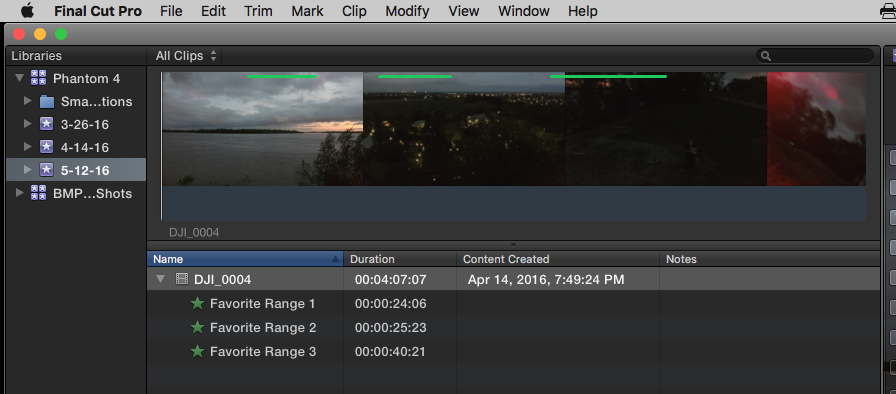
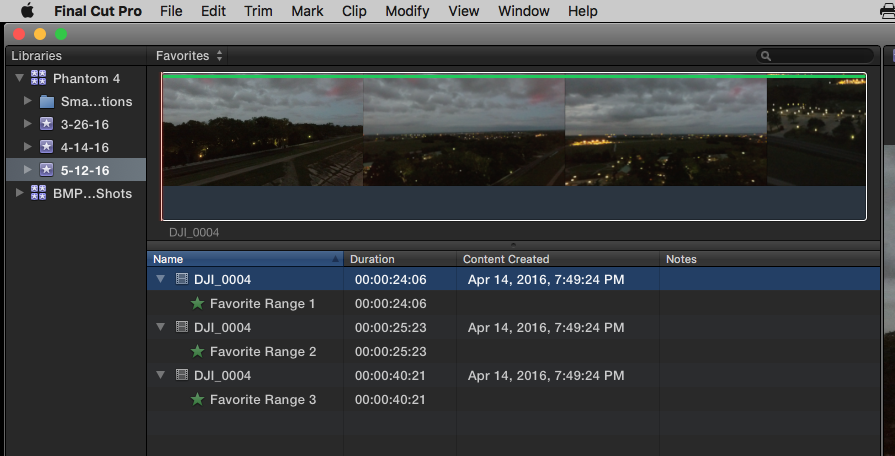
Right off the bat, make sure to check the Browser Clip Filter, top left of the Browser pane. If it is set to show only Favorites or not show Rejected, then yes, you'll see that clip cut up into sub-clips that are the result of showing only, or not showing, specific ranges in the clip.
First image is a clip in full, with Favorite ranges. Next, the same clip showing only the Favorite ranges. Notice the Filter setting top left of the Browser (All Clips vs Favorite [ranges only]).
Same thing happens in the Filmstrip View of the Browser. Only thing I can think of that is happening with you. If not, we have a major issue. Ouch!
Last edit: 12 May 2016 15:36 by BenB.
Please Log in to join the conversation.
12 May 2016 15:56 #76645
by ybr
Replied by ybr on topic Duplicate of all clips in library
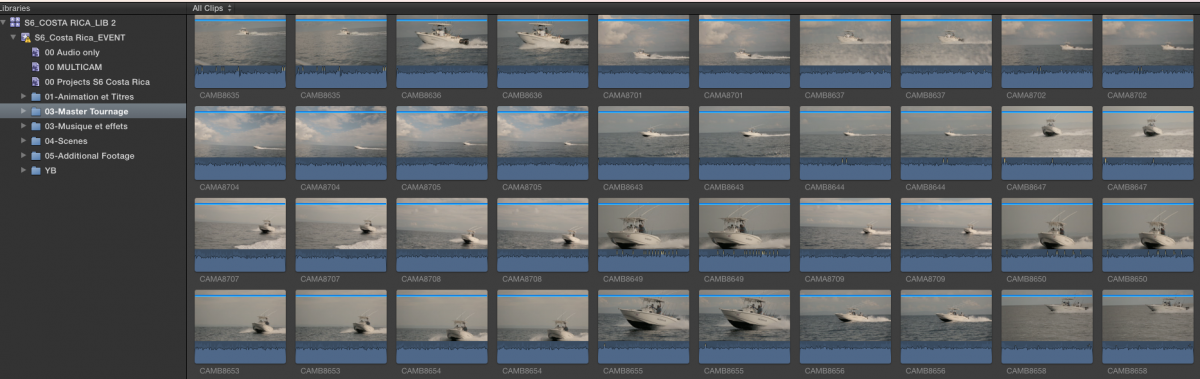
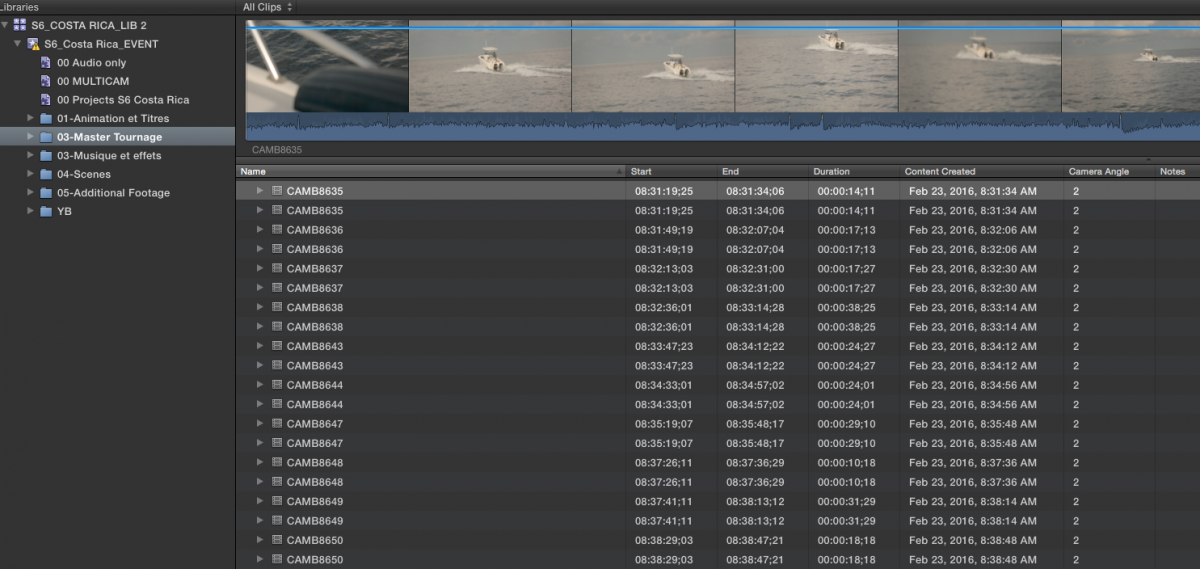
Thanks for the quick response Ben. Unfortunately, it's not such an easy fix... It's really each shot doubled that link back to the same file, regardless of Browser clip filters. It shows up in both Filmstrip and list view. Each duplicate clip has the same name.
You say you remember this happening in the past? As I mentioned we are on an older version of FCP, 10.1.3, to keep consistency between editing stations and OSes as the project moves between 4-5 computers. Everything, media and library is contained one drive.
yb
You say you remember this happening in the past? As I mentioned we are on an older version of FCP, 10.1.3, to keep consistency between editing stations and OSes as the project moves between 4-5 computers. Everything, media and library is contained one drive.
yb
Please Log in to join the conversation.
- Karsten Schlüter
-

- Offline
- Moderator
-

Less
More
- Posts: 3790
- Thank you received: 718
12 May 2016 16:06 #76648
by Karsten Schlüter
if you were on the latest version of FCPX, you could keep consistency automatically in a shared enviroment
Replied by Karsten Schlüter on topic Duplicate of all clips in library
ybr wrote: … we are on an older version of FCP, 10.1.3, to keep consistency between editing stations and OSes as the project moves between 4-5 computers. ...
if you were on the latest version of FCPX, you could keep consistency automatically in a shared enviroment
Please Log in to join the conversation.
12 May 2016 16:09 #76650
by ybr
Replied by ybr on topic Duplicate of all clips in library
Yes, but that is beyond my control or decision making power! On my own system, I always keep up to date with FCPx releases, but for a variety of reasons, they have stuck to 10.1.3.
yb
yb
Please Log in to join the conversation.
- nils.dettmann
-

- Offline
- Elite Member
-

Less
More
- Posts: 161
- Thank you received: 13
12 May 2016 18:53 #76659
by nils.dettmann
Replied by nils.dettmann on topic Duplicate of all clips in library
In Final Cut the relation between files on your disk and the references you see within FCPX is:
"File on disk" ->
Internal Asset with unique ID (UID) ->
Clip in the Event Browser ->
Child Clips in {synchronized clips, compound clips, multicam clips, projects}
From left to right one item can be referenced by multiple items.
It´s for example possible and sometimes even useful to have more than on clip in the event browser pointing to one internal asset.
This should be no problem.
To be sure the duplicate clips are referencing the same internal asset you could export an XML for two of the same clips and open it in a text editor.
In the first part there is a <resources> ... <resources> section which contains all the resources for this XML.
Here you will find
<asset id="r..." name="..." uid="..." src="file:///Volumes/.../VIDEOFILE.mov" start="...s" ........ >
each resource has its own id r1,r2,r3,... and the source files have a unique uid (uid="..." attribute within the asset tag)
In the second part you will see your clips from the event pointing back to theses resources by ref="id"
If there is only one reference to the source file on your disk in the <resources> part everything should be fine.
Did you share your work between libraries ? Copying events or using xml? I had duplicate clips but it was clearly my fault.
"File on disk" ->
Internal Asset with unique ID (UID) ->
Clip in the Event Browser ->
Child Clips in {synchronized clips, compound clips, multicam clips, projects}
From left to right one item can be referenced by multiple items.
It´s for example possible and sometimes even useful to have more than on clip in the event browser pointing to one internal asset.
This should be no problem.
To be sure the duplicate clips are referencing the same internal asset you could export an XML for two of the same clips and open it in a text editor.
In the first part there is a <resources> ... <resources> section which contains all the resources for this XML.
Here you will find
<asset id="r..." name="..." uid="..." src="file:///Volumes/.../VIDEOFILE.mov" start="...s" ........ >
each resource has its own id r1,r2,r3,... and the source files have a unique uid (uid="..." attribute within the asset tag)
In the second part you will see your clips from the event pointing back to theses resources by ref="id"
If there is only one reference to the source file on your disk in the <resources> part everything should be fine.
Did you share your work between libraries ? Copying events or using xml? I had duplicate clips but it was clearly my fault.
Please Log in to join the conversation.
- Karsten Schlüter
-
- Offline
- Moderator
-
Less
More
- Posts: 3790
- Thank you received: 718
12 May 2016 19:11 #76661
by Karsten Schlüter
Replied by Karsten Schlüter on topic Duplicate of all clips in library
@ybr
not sure, you noticed allready our personal messages service, so 'in public'...
you asked:
to minimize spam, we have a
New members 3 post approval process
and sorry, we Mods are not 24/24 on duty
apologizes for this inconvenience!!
And, btw, Welcome to fcp.co
not sure, you noticed allready our personal messages service, so 'in public'...
you asked:
I posted an answer to this reply a few hours ago, is there a reason it is not showing up? Perhaps I did not hit send?
to minimize spam, we have a
New members 3 post approval process
and sorry, we Mods are not 24/24 on duty
apologizes for this inconvenience!!
And, btw, Welcome to fcp.co
Please Log in to join the conversation.
13 May 2016 10:01 #76669
by BenB
Replied by BenB on topic Duplicate of all clips in library
It is possible to manually duplicate a clip in the Browser, but if it is happening automatically, something is wrong. I'd post that to the FCPX feedback page ASAP.
If you delete several of those duplicates, quit, relaunch FCPX, are they fixed, or still duplicated?
If you delete several of those duplicates, quit, relaunch FCPX, are they fixed, or still duplicated?
Please Log in to join the conversation.
13 May 2016 13:33 - 13 May 2016 13:34 #76676
by ybr
Replied by ybr on topic Duplicate of all clips in library
Hi everyone,
Thanks so much for the responses.
@Karsten Schlüter sorry I was not aware of the three post limit for newbies. I was a little anxious to get feedback!
But I think @nils.dettmann got it right. After speaking to the assistant, we realized that a duplicate of the library was merged into this one to add the work of the director to the project and FCP must have duplicated all the clips then. I have not done the XML test but will look at that during the course of the day. It seems like you're saying that as long as we can verify that the clips are pointing to the same assets, we should be fine and I fully expect that this is what we will find as "reveal in finder" for each set of duplicates point back to same asset. I'll update this thread with our findings.
Thanks again everyone for the help.
yb
Thanks so much for the responses.
@Karsten Schlüter sorry I was not aware of the three post limit for newbies. I was a little anxious to get feedback!
But I think @nils.dettmann got it right. After speaking to the assistant, we realized that a duplicate of the library was merged into this one to add the work of the director to the project and FCP must have duplicated all the clips then. I have not done the XML test but will look at that during the course of the day. It seems like you're saying that as long as we can verify that the clips are pointing to the same assets, we should be fine and I fully expect that this is what we will find as "reveal in finder" for each set of duplicates point back to same asset. I'll update this thread with our findings.
Thanks again everyone for the help.
yb
Last edit: 13 May 2016 13:34 by ybr. Reason: Typo
Please Log in to join the conversation.
15 May 2016 00:59 #76705
by ybr
Replied by ybr on topic Duplicate of all clips in library
Hi again,
Just following up, the assistant did the XML test described by @nils.dettmann and each clip does link to the same asset. She cloned the drive and will work to clean up all the dups, so it would seem like this story has a happy ending.
Thanks all for the advice
yb
Just following up, the assistant did the XML test described by @nils.dettmann and each clip does link to the same asset. She cloned the drive and will work to clean up all the dups, so it would seem like this story has a happy ending.
Thanks all for the advice
yb
Please Log in to join the conversation.
