


- Posts: 87
- Thank you received: 5
3 Post Moderation Rule for New Boarders (25 Jan 2021)
New boarders will have their posts moderated - Don't worry if you cannot see your post immediately.
Taking a Master 25fps File and Converting it to 24fps??
11 May 2016 01:23 - 12 May 2016 17:37 #76546
by odedh
Taking a Master 25fps File and Converting it to 24fps?? was created by odedh
Hey guys, so here's my problem
My girlfriend just finished her Film School short film(final project) and the film was shot and edited using 25fps. The movie will be shown in a local Film Festival using DCP and her Film School suggested doing the DCP at 24fps for distribution abroad.
I want the option to also create a Prores for her at 24fps, and this is where things get weird, I created a new project(sequence) in FCPX and set it to 24fps, I took her Online Master file which is a Prores 25fps for second file and wanted to put it on the timeline. in the browser the length of the file is 25:00:00 on the timeline it's 26:02:12 meaning over a minutes was added to the film, so now I'm confused since I thought FCPX was supposed to keep it in the same length of time.
next thing I did was go to Compressor and in compressor I noticed that there's a retiming box and by default it says "Set duration to 100% of source" but there's also the option of choosing "So source frames play at 24 fps which will make the movie the same length as FCPX made it.
So my question here is was is the correct choice/path here?
Thanks
Oded
My girlfriend just finished her Film School short film(final project) and the film was shot and edited using 25fps. The movie will be shown in a local Film Festival using DCP and her Film School suggested doing the DCP at 24fps for distribution abroad.
I want the option to also create a Prores for her at 24fps, and this is where things get weird, I created a new project(sequence) in FCPX and set it to 24fps, I took her Online Master file which is a Prores 25fps for second file and wanted to put it on the timeline. in the browser the length of the file is 25:00:00 on the timeline it's 26:02:12 meaning over a minutes was added to the film, so now I'm confused since I thought FCPX was supposed to keep it in the same length of time.
next thing I did was go to Compressor and in compressor I noticed that there's a retiming box and by default it says "Set duration to 100% of source" but there's also the option of choosing "So source frames play at 24 fps which will make the movie the same length as FCPX made it.
So my question here is was is the correct choice/path here?
Thanks
Oded
Last edit: 12 May 2016 17:37 by odedh.
Please Log in to join the conversation.

11 May 2016 07:57 #76555
by rjvddoes
Replied by rjvddoes on topic Taking a Master 25fps File and Converting it to 24fps??
When you use the method to play your 25 fps film at 24 fps, you will indeed get a film that is a little longer in duration and it will play a little bit slower. Nevertheless it will play every frame in your film.
But when you convert it to 24 fps and keep the film at the same length, you will skip a frame every 25 frames so it will look a little stuttery.
I would go for the first method. You could apply a pitch correction to the audio to compensate for the slightly slower playback speed.
But when you convert it to 24 fps and keep the film at the same length, you will skip a frame every 25 frames so it will look a little stuttery.
I would go for the first method. You could apply a pitch correction to the audio to compensate for the slightly slower playback speed.
Please Log in to join the conversation.
11 May 2016 10:37 #76562
by odedh
Replied by odedh on topic Taking a Master 25fps File and Converting it to 24fps??
OK that brings me to a new problem, The movie has just finished it's color grading and is about to be sent to the audio design guy to make the mix, should the audio design guy get an AAF based on the 25fps file or the 24fps file?
same goes for subtitles as the movie needs to be sent for that as well
same goes for subtitles as the movie needs to be sent for that as well
Please Log in to join the conversation.
11 May 2016 11:15 - 11 May 2016 11:16 #76563
by rjvddoes
Replied by rjvddoes on topic Taking a Master 25fps File and Converting it to 24fps??
Maybe there are other forum members who have more experience in this, because I never had to deliver a 24 fps file. But my gut feeling would be to finish everything as a regular 25 fps film and when the subtitles and the final audiomix is done (in 25 fps) just import your finished film in a new 24 fps project.
Go to the Retime editor and check "Automatic Speed" and make sure that "Preserve Pitch" is also checked.
You can now export it as a 24 fps film without stuttering and your audio will be pitch corrected and sound normal although it is running at a slower speed.
But maybe it is also possible to uncheck "Preserve Pitch" if you want to be sure there are no artefacts introduced by the Pitch Correction. Of course the downside to this will be that your audio tonality is lowered by a small amount. You can run a small test to check if the difference is too obvious or not
Go to the Retime editor and check "Automatic Speed" and make sure that "Preserve Pitch" is also checked.
You can now export it as a 24 fps film without stuttering and your audio will be pitch corrected and sound normal although it is running at a slower speed.
But maybe it is also possible to uncheck "Preserve Pitch" if you want to be sure there are no artefacts introduced by the Pitch Correction. Of course the downside to this will be that your audio tonality is lowered by a small amount. You can run a small test to check if the difference is too obvious or not
Last edit: 11 May 2016 11:16 by rjvddoes.
Please Log in to join the conversation.
- Karsten Schlüter
-

- Offline
- Moderator
-

Less
More
- Posts: 3790
- Thank you received: 718
11 May 2016 11:40 #76566
by Karsten Schlüter
Replied by Karsten Schlüter on topic Taking a Master 25fps File and Converting it to 24fps??
btmk, the other way round 24>>25, just by faster playback, is in use for decades here in the 25fps-zone - many databases note a diff. length for movies in the 'TVversion'; not because of heavy editing, but by simple faster playback 
And I guess, only excellent musicians note the diff. pitch in audio...
so, I would follow Robberts advice:
finish the whole thing, incl audio, in 25, put the final version into a 24 project, conform speed, done.
And I guess, only excellent musicians note the diff. pitch in audio...
so, I would follow Robberts advice:
finish the whole thing, incl audio, in 25, put the final version into a 24 project, conform speed, done.
Please Log in to join the conversation.

11 May 2016 13:14 #76571
by BenB
Replied by BenB on topic Taking a Master 25fps File and Converting it to 24fps??
I'd take the final 25fps as a ProRes file, into Compressor, and set it to do a 24 > 24 conversion. It does this really well, and better than inside FCPX. You have way more control. And you can preserve original audio using Compressor.
help.apple.com/compressor/mac/4.2/#/cpsrd305b215
help.apple.com/compressor/mac/4.2/#/cpsrd305b215
Please Log in to join the conversation.
11 May 2016 13:28 #76578
by odedh
I suppose you meant do a 25 > 24 conversion but would you recommend in the retiming menu to choose set duration to 100% or "so source frames play at 24" (which makes it 104%)

Replied by odedh on topic Taking a Master 25fps File and Converting it to 24fps??
BenB wrote: I'd take the final 25fps as a ProRes file, into Compressor, and set it to do a 24 > 24 conversion. It does this really well, and better than inside FCPX. You have way more control. And you can preserve original audio using Compressor.
help.apple.com/compressor/mac/4.2/#/cpsrd305b215
I suppose you meant do a 25 > 24 conversion but would you recommend in the retiming menu to choose set duration to 100% or "so source frames play at 24" (which makes it 104%)
Please Log in to join the conversation.
12 May 2016 17:39 #76656
by odedh
Replied by odedh on topic Taking a Master 25fps File and Converting it to 24fps??
anyone ?
Please Log in to join the conversation.
- MarkNelsonMovies
-

- Offline
- Elite Member
-

Less
More
- Posts: 256
- Thank you received: 48
12 May 2016 19:36 #76662
by MarkNelsonMovies
Replied by MarkNelsonMovies on topic Taking a Master 25fps File and Converting it to 24fps??
Compressor allows you to select a range for conversion, I'd do a short test clip both ways for comparison.
There are also several different retiming methods, but I have no idea which one would be the best in your circumstance.
There are also several different retiming methods, but I have no idea which one would be the best in your circumstance.
Please Log in to join the conversation.
- ronny courtens
-

- Offline
- Moderator
-
Less
More
- Posts: 4455
- Thank you received: 962
16 May 2016 10:47 - 16 May 2016 11:01 #76761
by ronny courtens
Replied by ronny courtens on topic Taking a Master 25fps File and Converting it to 24fps??
Hi Oded,
As Robert says: work with 25fps all the way until you have a finished 25fps master with audio sweetening and subtitles, without having conversion headaches between applications. From this master you also can create a "clean" 25fps master without subtitles if you should need one.
If the festival requires a 24fps DCP, there are two ways you can go:
1. Create a 25fps DCP from your 25fps master first
Then simply re-import the 25fps DCP in your DCP creation software and export a 24fps DCP. When you use an application such as DCP-o-Matic, this process is very simple: import the 25fps DCP and in the timing tab enter "24" in the video frame rate box. The application will export a 24fps DCP using the "25@24" method, which makes your program longer. This is the preferred method for converting 25fps to 24fps.
Up-to-date DCP servers will play 25fps in SMPTE and in Interop packaging nowadays, so you probably will need a 25fps DCP for another festival anyway.
2. Create a new 24fps QT master file from the original 25fps master.
- When you use the "25@24" method, which will play all your 25 frames on the 24fps timeline and make your program longer, FCP X will be perfect for this. Just create a new 24fps project, drop the 25fps QT master onto the 24fps timeline and choose "Automatic Speed". The overall program will be 4% longer as your video and audio will be slowed down by 96%.
When you do this in FCP X, this will NOT alter the pitch of your audio as long as you have "Preserve Pitch" checked in the FCP X Retiming options pane:
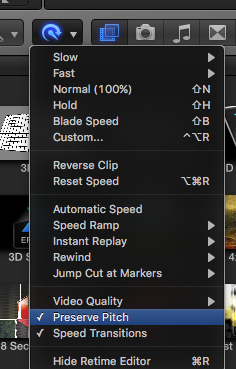
Going from 25 to 24 (or from 24 to 25) while preserving the pitch should not create any artifacts in the audio because the speed differences are only 4%.
Once you have exported your 24fps master file from FCP X, you just need to import it into any DCP creation software to create a 24fps DCP.
- If however you want to preserve the overall length of your program, you can create a 24fps QT master using FCP X or Compressor without altering the program length. To do this in FCP X you just need to drop the 25fps master into a new 42fps timeline. The downside to this method is that the conversion process will skip frames to accommodate for the altered frame rate, and your film might appear a little choppy especially when there is a lot of slow movement in your image (e.g. slow pans or glides). In such circumstances, Compressor might yield better results when you use the "Better" Quality settings. But, as I said, this is not the preferred method for converting 25fps programs to 24 fps.
- Ronny
As Robert says: work with 25fps all the way until you have a finished 25fps master with audio sweetening and subtitles, without having conversion headaches between applications. From this master you also can create a "clean" 25fps master without subtitles if you should need one.
If the festival requires a 24fps DCP, there are two ways you can go:
1. Create a 25fps DCP from your 25fps master first
Then simply re-import the 25fps DCP in your DCP creation software and export a 24fps DCP. When you use an application such as DCP-o-Matic, this process is very simple: import the 25fps DCP and in the timing tab enter "24" in the video frame rate box. The application will export a 24fps DCP using the "25@24" method, which makes your program longer. This is the preferred method for converting 25fps to 24fps.
Up-to-date DCP servers will play 25fps in SMPTE and in Interop packaging nowadays, so you probably will need a 25fps DCP for another festival anyway.
2. Create a new 24fps QT master file from the original 25fps master.
- When you use the "25@24" method, which will play all your 25 frames on the 24fps timeline and make your program longer, FCP X will be perfect for this. Just create a new 24fps project, drop the 25fps QT master onto the 24fps timeline and choose "Automatic Speed". The overall program will be 4% longer as your video and audio will be slowed down by 96%.
When you do this in FCP X, this will NOT alter the pitch of your audio as long as you have "Preserve Pitch" checked in the FCP X Retiming options pane:
Going from 25 to 24 (or from 24 to 25) while preserving the pitch should not create any artifacts in the audio because the speed differences are only 4%.
Once you have exported your 24fps master file from FCP X, you just need to import it into any DCP creation software to create a 24fps DCP.
- If however you want to preserve the overall length of your program, you can create a 24fps QT master using FCP X or Compressor without altering the program length. To do this in FCP X you just need to drop the 25fps master into a new 42fps timeline. The downside to this method is that the conversion process will skip frames to accommodate for the altered frame rate, and your film might appear a little choppy especially when there is a lot of slow movement in your image (e.g. slow pans or glides). In such circumstances, Compressor might yield better results when you use the "Better" Quality settings. But, as I said, this is not the preferred method for converting 25fps programs to 24 fps.
- Ronny
Last edit: 16 May 2016 11:01 by ronny courtens.
Please Log in to join the conversation.
16 May 2016 15:20 #76787
by odedh
Replied by odedh on topic Taking a Master 25fps File and Converting it to 24fps??
Ronny thanks so much for the detailed response. It was really helpful, and we'll do as you suggested, make a 25 fps DCP and if the movie will be accepted to a festival that requires 24fps we'll make it then by making the movie longer and correct the pitch if so needed
Thanks a lot
Oded
Thanks a lot
Oded
Please Log in to join the conversation.
- nils.dettmann
-
- Offline
- Elite Member
-
Less
More
- Posts: 161
- Thank you received: 13
16 May 2016 15:36 #76789
by nils.dettmann
Replied by nils.dettmann on topic Taking a Master 25fps File and Converting it to 24fps??
One question from my side.
Won´t festivals / cinemas in the ex-NTSC-world accept 25p DCPs today?
And if not is there any technical reason for this. The hardware is mostly the same around the world today.
Won´t festivals / cinemas in the ex-NTSC-world accept 25p DCPs today?
And if not is there any technical reason for this. The hardware is mostly the same around the world today.
Please Log in to join the conversation.
- ronny courtens
-
- Offline
- Moderator
-
Less
More
- Posts: 4455
- Thank you received: 962
16 May 2016 19:35 #76804
by ronny courtens
Replied by ronny courtens on topic Taking a Master 25fps File and Converting it to 24fps??
Hey Nils,
Most modern DCP servers will happily play 25fps. But not everyone has access to the latest gear, that's why there are still projection rooms that use older DCP servers which only can play 24fps and some other frame rates, but not 25fps. Of course all this will become irrelevant in a few years or so.
- Ronny
Most modern DCP servers will happily play 25fps. But not everyone has access to the latest gear, that's why there are still projection rooms that use older DCP servers which only can play 24fps and some other frame rates, but not 25fps. Of course all this will become irrelevant in a few years or so.
- Ronny
Please Log in to join the conversation.
