


- Posts: 2
- Thank you received: 0
3 Post Moderation Rule for New Boarders (25 Jan 2021)
New boarders will have their posts moderated - Don't worry if you cannot see your post immediately.
Newbie Problems
- Win Lockwood
-
 Topic Author
- Offline
- New Member
-

Less
More
08 May 2016 10:38 #76486
by Win Lockwood
Newbie Problems was created by Win Lockwood
Hello all,
I'm very new to the world of video editing, hoping someone can point me in the right direction. I have a simple edit I want to do;
Video from 2 GoPro angles, plus the audio from 1 of those GoPros. If anyone can explain in simple terms for my fragile mind what to do I'd be very grateful. I've looked at online tutorials but I haven't found one that translates to what I'm looking for. So even a link to a relevant tutorial would be great. I'm using Final Cut Pro X 10.1.3.
Cheers.
I'm very new to the world of video editing, hoping someone can point me in the right direction. I have a simple edit I want to do;
Video from 2 GoPro angles, plus the audio from 1 of those GoPros. If anyone can explain in simple terms for my fragile mind what to do I'd be very grateful. I've looked at online tutorials but I haven't found one that translates to what I'm looking for. So even a link to a relevant tutorial would be great. I'm using Final Cut Pro X 10.1.3.
Cheers.
Please Log in to join the conversation.
- Karsten Schlüter
-

- Offline
- Moderator
-

Less
More
- Posts: 3790
- Thank you received: 718
08 May 2016 12:08 #76490
by Karsten Schlüter
Replied by Karsten Schlüter on topic Newbie Problems
not the latest but still the best
www.fcp.co/final-cut-pro/news/744-part-1...cer-and-steve-martin
And Welcome to fcp.co!
www.fcp.co/final-cut-pro/news/744-part-1...cer-and-steve-martin
And Welcome to fcp.co!
Please Log in to join the conversation.
- Squamish ed
-
- Offline
- Elite Member
-

Less
More
- Posts: 238
- Thank you received: 20
08 May 2016 22:09 - 08 May 2016 22:11 #76497
by Squamish ed
Ed
Replied by Squamish ed on topic Newbie Problems
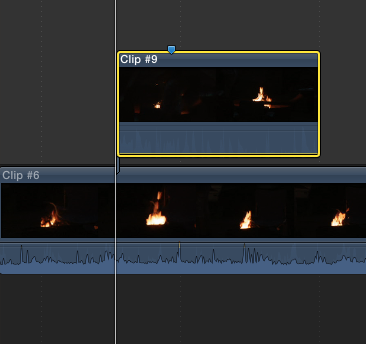
Maybe the simplest way while you learn more technique is to put your clip with audio in the timeline. Place your other clip (different GoPro angle) on top with the audio turned off. (Grab the little bar across the audio waveform and drag it down). That'll get you started.
The video will play and the audio from only the one clip will be heard. I'm assuming you know how to edit the clips to get the visuals you need.
The screen shot will show you what it looks like.
The video will play and the audio from only the one clip will be heard. I'm assuming you know how to edit the clips to get the visuals you need.
The screen shot will show you what it looks like.
Ed
Last edit: 08 May 2016 22:11 by Squamish ed.
Please Log in to join the conversation.

08 May 2016 22:17 #76498
by BenB
Replied by BenB on topic Newbie Problems
Multicam will sync them easily.
Multicam will allow you to fix one audio channel to be permanent as you do the edit.
Watch that series of videos Karsten posted.
Also, here's the user manual section on this, which is a great source of information.
help.apple.com/finalcutpro/mac/10.2/#/ver23c76439
Multicam will allow you to fix one audio channel to be permanent as you do the edit.
Watch that series of videos Karsten posted.
Also, here's the user manual section on this, which is a great source of information.
help.apple.com/finalcutpro/mac/10.2/#/ver23c76439
Please Log in to join the conversation.
- Win Lockwood
-
Topic Author
- Offline
- New Member
-
Less
More
- Posts: 2
- Thank you received: 0
09 May 2016 16:56 #76508
by Win Lockwood
Replied by Win Lockwood on topic Newbie Problems
Thanks all. I'm watching those tutorials at the moment and things are looking clearer. Should hopefully be easy enough from here. Cheers!
Please Log in to join the conversation.
